
User Profile Folder - Change User Account Folder Name

How to Change the User Folder Name of a User Profile in Windows 7


   Information
Normally, you could change your account name in User Accounts from the Control Panel (icons view), but that still would not change your accoun's user profile folder name in C:\Users.

This will show you how to change your account name and change the user profile folder name of any user account, including the built-in Administrator account (if enabled), in Windows 7 without losing anything in that user account. This will affect the user account's name for the C:\Users\(user-name) folder, Start Menu, Log on screen, Welcome screen, security permissions, etc......

You must be logged in as an administrator, and is a different account than the account you are changing the name of to be able to do this tutorial.

   Warning
Since editing a user profile and the registry can mess up Windows 7 if a mistake is made, it is highly advisable to create a restore point before doing this tutorial. This way if you make a mistake, you will be able to simply do a system restore to select and go back to this restore point to undo the mistake.


Here's How:

1. Log on to the user account (ex: Old Name) that you want to change the name of.

2. Save the current theme (ex: Old Name) for this user account. (see screenshot below)
NOTE: This is so that you will be able to change the theme back to this current theme in step 21 below later if you like.
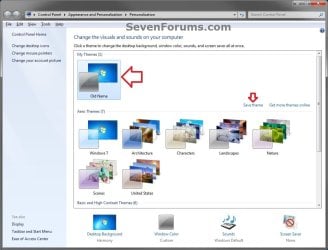
Save_Theme.jpg
3. If you have any files or folders in your C:\Users\(user-name) profile folder that are set to be shared, then you will need to temporarily set them to not be shared for now. After you finish renaming the user profile folder name, you could set them to be shared again in step 23 below.

4. Log off the user account that you want to change the name of. (see screenshot below)
NOTE: If you do not have another administrator account to use, then create a new administrator account first, then log off. When finished with the tutorial, you can delete this newly created account.
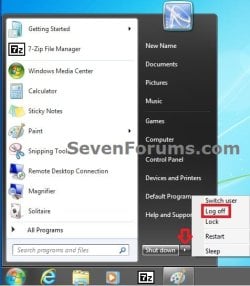
Log_Off.jpg
5. Log on to an administrator account that is not the user account that you want to change the name of.

6. Open Windows Explorer, navigate to C:\Users, open the Users folder, right click on the user profile folder (ex: Old Name) that you want to change the name of, and click on Rename. (see screenshot below)
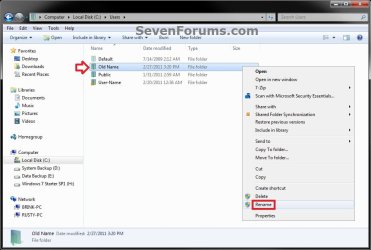
Step1.jpg
7. Type in the name (ex: New Name) that you want this user account's folder to have now and press Enter. Close the Windows Explorer window. (see screenshot below)
NOTE: If you are not able to rename the user folder for some reason (ex: in use), then boot into Safe Mode and try again.
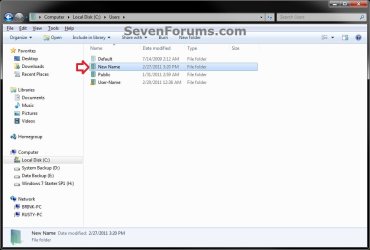
Step2.jpg
8. If prompted, click on Continue and Yes (UAC) to approve renaming the user folder.

9. Open the Start Menu, and type regedit in the search box and press Enter.

10. If prompted by UAC, then click on Yes.

11. In regedit, navigate to the location below. (see screenshot below)

Code:
HKEY_LOCAL_MACHINE\SOFTWARE\Microsoft\Windows NT\CurrentVersion\ProfileList
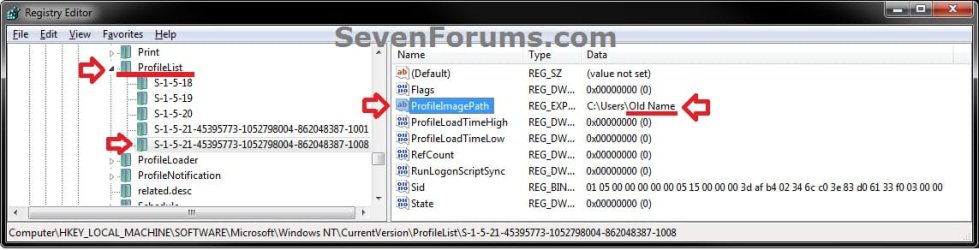
Step3.jpg
12. In the left pane of regedit, expand Profilelist, and select each long number S-1-5-.... key one by one until your see the user account name (ex: Old Name) that you want to change the name of included in the Data column of ProfileImagePath in the right pane. (see screenshot above)

13. In the right pane of the long number S-1-5-.... key for the user account (ex: Old Name) that you want to change the name of, right click on ProfileImagePath, and click on Modify. (see screenshot below.
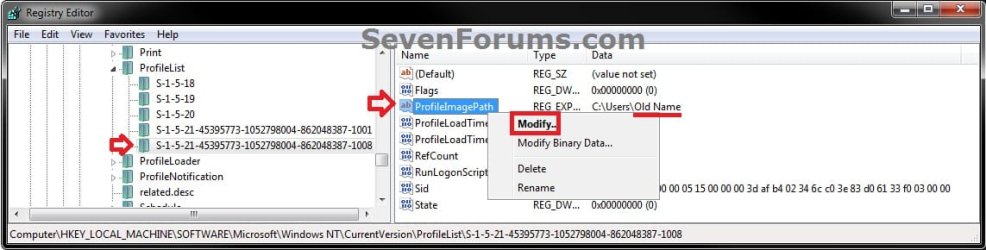
Step6.jpg
14. Change only the name (ex: Old Name) in the full path to the name (ex: New Name) that you want for the user account, and click on OK. (see screenshot below)
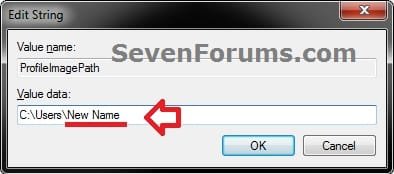
Step5.jpg
15. Close regedit.

16. Press the Windows + R keys to open the Run dialog, type netplwiz, and click on OK. (see screenshot below)
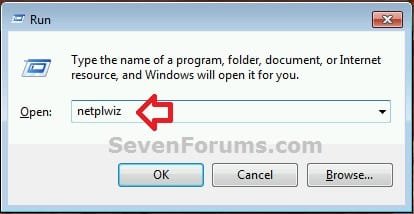
netplwiz-1.jpg
17. Check the Users must enter a user name and password to use this computer box, select the user account's old name (ex: Old Name), and click on the Properties button. (see screenshot below)
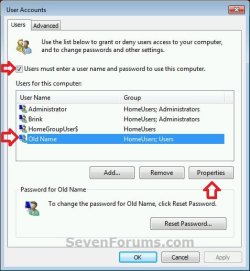
netplwiz-2.jpg
18. Change both the User name and Full name to the same new name (ex: New Name) from step 7 above, and click on OK. (see screenshot below)
netplwiz-3.jpg
19. Click on OK, and Restart the computer to apply. (see screenshot below step 17)

20. Log on to the now completely renamed user account (ex: New Name) from step 1 above.

21. When you log on to the renamed user account (ex: New Name) for the first time, you will notice that the desktop background wallpaper is now solid black. This is normal. Change the theme from the black Unsaved Theme to the theme (ex: Old Name) that you saved in step 2 above to restore the saved theme. (see screenshot below)
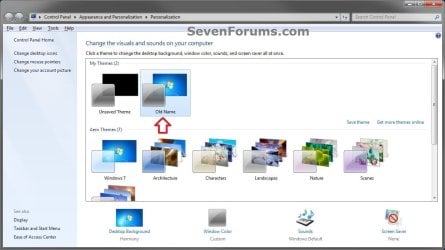
Theme-2.jpg
22. If you had to create a new administrator account at step 4 above to do this tutorial with, then you can now delete this newly created account if you like. This is not the New Name account.

23. If you had to set files to not be shared in step 3 above, then you can set them to be shared again if you like.

24. If you had Windows set to automatically log on to a user account at startup, then you can set that while logged on to an administrator account again if you like.


That's it,
Shawn


Last edited:
  • Like
Reactions: Arc
Great work Shawn ! It will help a lot of users . :D
 

My Computer

Computer type
PC/Desktop
Computer Manufacturer/Model Number
Self Assembled
OS
Microsoft Windows 10 Pro Insider Preview 64-bit
CPU
Intel(R) Core(TM) i3-4130 CPU @ 3.40GHz
Motherboard
Gigabyte Technology Co., Ltd. B85M-D3H
Memory
Corsair Vengence 4GB x2 (8.00GB Dual-Channel DDR3 @ 798MHz)
Graphics Card(s)
2047MB GeForce GTS 450 (ZOTAC International)
Sound Card
Onboard (Realtek High Definition Audio)
Monitor(s) Displays
LG Flatron E2040T
Screen Resolution
1600x900
Hard Drives
Western Digital 1 TB
Seagate 500 GB
PSU
Corsair VS550
Case
Cooler Master K380
Cooling
Cooler Master Seidon 120V Plus
Keyboard
Logitech MK260r
Mouse
Logitech MK260r
Internet Speed
PMPL Broadband
Antivirus
Windows Defender + MBAM
Browser
Firefox
Other Info
Dell Studio 15" Laptop
Thank you Archie. I hope that it does. :)
 

My Computer

Computer type
PC/Desktop
Computer Manufacturer/Model Number
Self built custom
OS
64-bit Windows 11 Pro for Workstations
CPU
Intel i7-8700K OC'd to 5 GHz
Motherboard
ASUS ROG Maximus XI Formula Z390
Memory
64 GB (4x16GB) G.SKILL TridentZ RGB DDR4 3600 MHz
Graphics Card(s)
ASUS ROG-STRIX-GTX1080TI-O11G-GAMING
Sound Card
Integrated
Monitor(s) Displays
2 x Samsung Odyssey G7 27"
Screen Resolution
2560x1440
Hard Drives
1TB Samsung 990 PRO M.2,
4TB Samsung 990 PRO PRO M.2,
TerraMaster F8 SSD Plus NAS
PSU
Seasonic Prime Titanium 850W
Case
Thermaltake Core P3
Cooling
Corsair Hydro H115i
Keyboard
Logitech wireless K800
Mouse
Logitech MX Master 4
Internet Speed
2 Gb/s Download and 100 Mb/s Upload
Antivirus
Malwarebyte Anti-Malware Premium
Browser
Google Chrome
Other Info
Logitech Z625 speaker system,
Logitech BRIO 4K Pro webcam,
HP Color LaserJet Pro MFP M477fdn,
APC SMART-UPS RT 1000 XL - SURT1000XLI,
Galaxy S23 Plus phone
Change user account fold name

I can't change the user account folder name. When I attempt to I receive a warning message that the folder name can't be changed because it has files shared with other users.
 

My Computer

Computer Manufacturer/Model Number
n/a
OS
windows 7 ultimate 32bit
CPU
Intel E6550 Core two duo 2.33
Motherboard
ASUS P5K-E
Memory
4 gigabyte
Graphics Card(s)
Nivdia GeForce 9800 GT
Sound Card
On board
Monitor(s) Displays
Soyo 26" Hannspree 25"
Hard Drives
3 Maxtor/Seagate SATA 3.0 500gig drives;3 Seagate Barracuda LP 1.5TB; 2 WD 1.0 TB drives; 2 WD 750g drives;
Case
CoolerMaster
Hello Roger, and welcome to Seven Forums.

Yeah, you will need to temporarily set any files/folders in the user profile folder that you have set to share to not be shared for now. After renaming the user profile folder name, you could set them to be shared again.
 

My Computer

Computer type
PC/Desktop
Computer Manufacturer/Model Number
Self built custom
OS
64-bit Windows 11 Pro for Workstations
CPU
Intel i7-8700K OC'd to 5 GHz
Motherboard
ASUS ROG Maximus XI Formula Z390
Memory
64 GB (4x16GB) G.SKILL TridentZ RGB DDR4 3600 MHz
Graphics Card(s)
ASUS ROG-STRIX-GTX1080TI-O11G-GAMING
Sound Card
Integrated
Monitor(s) Displays
2 x Samsung Odyssey G7 27"
Screen Resolution
2560x1440
Hard Drives
1TB Samsung 990 PRO M.2,
4TB Samsung 990 PRO PRO M.2,
TerraMaster F8 SSD Plus NAS
PSU
Seasonic Prime Titanium 850W
Case
Thermaltake Core P3
Cooling
Corsair Hydro H115i
Keyboard
Logitech wireless K800
Mouse
Logitech MX Master 4
Internet Speed
2 Gb/s Download and 100 Mb/s Upload
Antivirus
Malwarebyte Anti-Malware Premium
Browser
Google Chrome
Other Info
Logitech Z625 speaker system,
Logitech BRIO 4K Pro webcam,
HP Color LaserJet Pro MFP M477fdn,
APC SMART-UPS RT 1000 XL - SURT1000XLI,
Galaxy S23 Plus phone
OK, finally and successfully changed the old user name folder(Roger's) to new name(Rogers) per the instructions above. Now loads into correct desktop etc.
However,when I attempt to run Outlook or excel or word, I get the following error message:the path specified for the file(it is still showing the old users folder of Roger's\documents\outlook\files\[email protected] is not valid.

So Outlook and excel or still looking in the Roger's folder for app files. How do I change this?
 

My Computer

Computer Manufacturer/Model Number
n/a
OS
windows 7 ultimate 32bit
CPU
Intel E6550 Core two duo 2.33
Motherboard
ASUS P5K-E
Memory
4 gigabyte
Graphics Card(s)
Nivdia GeForce 9800 GT
Sound Card
On board
Monitor(s) Displays
Soyo 26" Hannspree 25"
Hard Drives
3 Maxtor/Seagate SATA 3.0 500gig drives;3 Seagate Barracuda LP 1.5TB; 2 WD 1.0 TB drives; 2 WD 750g drives;
Case
CoolerMaster
Roger,

Reinstalling Outlook and Excel should be able to sort it.
 

My Computer

Computer type
PC/Desktop
Computer Manufacturer/Model Number
Self built custom
OS
64-bit Windows 11 Pro for Workstations
CPU
Intel i7-8700K OC'd to 5 GHz
Motherboard
ASUS ROG Maximus XI Formula Z390
Memory
64 GB (4x16GB) G.SKILL TridentZ RGB DDR4 3600 MHz
Graphics Card(s)
ASUS ROG-STRIX-GTX1080TI-O11G-GAMING
Sound Card
Integrated
Monitor(s) Displays
2 x Samsung Odyssey G7 27"
Screen Resolution
2560x1440
Hard Drives
1TB Samsung 990 PRO M.2,
4TB Samsung 990 PRO PRO M.2,
TerraMaster F8 SSD Plus NAS
PSU
Seasonic Prime Titanium 850W
Case
Thermaltake Core P3
Cooling
Corsair Hydro H115i
Keyboard
Logitech wireless K800
Mouse
Logitech MX Master 4
Internet Speed
2 Gb/s Download and 100 Mb/s Upload
Antivirus
Malwarebyte Anti-Malware Premium
Browser
Google Chrome
Other Info
Logitech Z625 speaker system,
Logitech BRIO 4K Pro webcam,
HP Color LaserJet Pro MFP M477fdn,
APC SMART-UPS RT 1000 XL - SURT1000XLI,
Galaxy S23 Plus phone
Thanks for the tip. I tried to do a repair in Outlook and the Windows 7 installer. Did not work. However, did go into the registry and make the changes to the user profile folders per the instructions above. That solved the problem.
 

My Computer

Computer Manufacturer/Model Number
n/a
OS
windows 7 ultimate 32bit
CPU
Intel E6550 Core two duo 2.33
Motherboard
ASUS P5K-E
Memory
4 gigabyte
Graphics Card(s)
Nivdia GeForce 9800 GT
Sound Card
On board
Monitor(s) Displays
Soyo 26" Hannspree 25"
Hard Drives
3 Maxtor/Seagate SATA 3.0 500gig drives;3 Seagate Barracuda LP 1.5TB; 2 WD 1.0 TB drives; 2 WD 750g drives;
Case
CoolerMaster
That's great news Roger. Thank you for posting back with your results and solution. :)
 

My Computer

Computer type
PC/Desktop
Computer Manufacturer/Model Number
Self built custom
OS
64-bit Windows 11 Pro for Workstations
CPU
Intel i7-8700K OC'd to 5 GHz
Motherboard
ASUS ROG Maximus XI Formula Z390
Memory
64 GB (4x16GB) G.SKILL TridentZ RGB DDR4 3600 MHz
Graphics Card(s)
ASUS ROG-STRIX-GTX1080TI-O11G-GAMING
Sound Card
Integrated
Monitor(s) Displays
2 x Samsung Odyssey G7 27"
Screen Resolution
2560x1440
Hard Drives
1TB Samsung 990 PRO M.2,
4TB Samsung 990 PRO PRO M.2,
TerraMaster F8 SSD Plus NAS
PSU
Seasonic Prime Titanium 850W
Case
Thermaltake Core P3
Cooling
Corsair Hydro H115i
Keyboard
Logitech wireless K800
Mouse
Logitech MX Master 4
Internet Speed
2 Gb/s Download and 100 Mb/s Upload
Antivirus
Malwarebyte Anti-Malware Premium
Browser
Google Chrome
Other Info
Logitech Z625 speaker system,
Logitech BRIO 4K Pro webcam,
HP Color LaserJet Pro MFP M477fdn,
APC SMART-UPS RT 1000 XL - SURT1000XLI,
Galaxy S23 Plus phone
Hi,
I tried following this tutorial, but when I got to Step 7 (renaming the user account folder from a different user account with administrator settings) an error message comes up saying that the action can't be completed because the folder or a file in it is open in another program. I restarted the computer and logged on directly into the new account, but I still get the same message.
 

My Computer

OS
Windows 7 Home Premium 64-bit
Hi,
I tried following this tutorial, but when I got to Step 7 (renaming the user account folder from a different user account with administrator settings) an error message comes up saying that the action can't be completed because the folder or a file in it is open in another program. I restarted the computer and logged on directly into the new account, but I still get the same message.

Hello Adi009, and welcome to Seven Forums.

Double check to make sure that you do not have the folder opened in another window while you are trying to do step 7.
 
Last edited:

My Computer

Computer type
PC/Desktop
Computer Manufacturer/Model Number
Self built custom
OS
64-bit Windows 11 Pro for Workstations
CPU
Intel i7-8700K OC'd to 5 GHz
Motherboard
ASUS ROG Maximus XI Formula Z390
Memory
64 GB (4x16GB) G.SKILL TridentZ RGB DDR4 3600 MHz
Graphics Card(s)
ASUS ROG-STRIX-GTX1080TI-O11G-GAMING
Sound Card
Integrated
Monitor(s) Displays
2 x Samsung Odyssey G7 27"
Screen Resolution
2560x1440
Hard Drives
1TB Samsung 990 PRO M.2,
4TB Samsung 990 PRO PRO M.2,
TerraMaster F8 SSD Plus NAS
PSU
Seasonic Prime Titanium 850W
Case
Thermaltake Core P3
Cooling
Corsair Hydro H115i
Keyboard
Logitech wireless K800
Mouse
Logitech MX Master 4
Internet Speed
2 Gb/s Download and 100 Mb/s Upload
Antivirus
Malwarebyte Anti-Malware Premium
Browser
Google Chrome
Other Info
Logitech Z625 speaker system,
Logitech BRIO 4K Pro webcam,
HP Color LaserJet Pro MFP M477fdn,
APC SMART-UPS RT 1000 XL - SURT1000XLI,
Galaxy S23 Plus phone
Hi,
I tried following this tutorial, but when I got to Step 7 (renaming the user account folder from a different user account with administrator settings) an error message comes up saying that the action can't be completed because the folder or a file in it is open in another program. I restarted the computer and logged on directly into the new account, but I still get the same message.


I had the same problem and finally figured out it was network related. Disconnecting my LAN cable allowed me to complete the change. Maybe my router had something open...?

(Edit) Forgot to say thanks to Brink! <salute>
 

My Computer

Computer Manufacturer/Model Number
Homebuilt
OS
Windows 7 Home Premium 64bit
CPU
i5 660 (Clarkdale) @3.33GHz
Motherboard
Asus P7P55D-E
Memory
DDR3 8GB
Graphics Card(s)
GTX 560
Sound Card
on board
Monitor(s) Displays
LG Flatron
Screen Resolution
1680x1050
Thank you!!

This worked, now my user profile directory matches my login name.

I would suggest that if you've used Outlook under your old name, create a backup of your Outlook .pst folder by doing File:Export in Outlook before you change your user name.

:DWhen I opened Outlook, I just had to re-direct the path for the Outlook.pst folder to the backup I had created before changing the username.
 

My Computer

OS
home premium 64bit
Hello Galin, and welcome to Seven Forums.

Thank you for posting back with your results and tip. :)
 

My Computer

Computer type
PC/Desktop
Computer Manufacturer/Model Number
Self built custom
OS
64-bit Windows 11 Pro for Workstations
CPU
Intel i7-8700K OC'd to 5 GHz
Motherboard
ASUS ROG Maximus XI Formula Z390
Memory
64 GB (4x16GB) G.SKILL TridentZ RGB DDR4 3600 MHz
Graphics Card(s)
ASUS ROG-STRIX-GTX1080TI-O11G-GAMING
Sound Card
Integrated
Monitor(s) Displays
2 x Samsung Odyssey G7 27"
Screen Resolution
2560x1440
Hard Drives
1TB Samsung 990 PRO M.2,
4TB Samsung 990 PRO PRO M.2,
TerraMaster F8 SSD Plus NAS
PSU
Seasonic Prime Titanium 850W
Case
Thermaltake Core P3
Cooling
Corsair Hydro H115i
Keyboard
Logitech wireless K800
Mouse
Logitech MX Master 4
Internet Speed
2 Gb/s Download and 100 Mb/s Upload
Antivirus
Malwarebyte Anti-Malware Premium
Browser
Google Chrome
Other Info
Logitech Z625 speaker system,
Logitech BRIO 4K Pro webcam,
HP Color LaserJet Pro MFP M477fdn,
APC SMART-UPS RT 1000 XL - SURT1000XLI,
Galaxy S23 Plus phone
Brink,

1) Does this technique to rename the user profile folder work for the built-in administrator account? I want to rename the built-in administrator's user profile folder.

2) You say that the permissions page on the security tab will still show the old name as well as the new name. Is there any way to delete the old name from the permissions entries? I really would like that option. I only want to see the new name.

3) To confirm, after completing this procedure, will EVERY instance of the old name in Windows be updated to reflect the NEW name?

Thank you for your help! :)
 

My Computer

OS
WINDOWS 7 ULTIMATE X64

My Computer

Computer type
PC/Desktop
Computer Manufacturer/Model Number
Self built custom
OS
64-bit Windows 11 Pro for Workstations
CPU
Intel i7-8700K OC'd to 5 GHz
Motherboard
ASUS ROG Maximus XI Formula Z390
Memory
64 GB (4x16GB) G.SKILL TridentZ RGB DDR4 3600 MHz
Graphics Card(s)
ASUS ROG-STRIX-GTX1080TI-O11G-GAMING
Sound Card
Integrated
Monitor(s) Displays
2 x Samsung Odyssey G7 27"
Screen Resolution
2560x1440
Hard Drives
1TB Samsung 990 PRO M.2,
4TB Samsung 990 PRO PRO M.2,
TerraMaster F8 SSD Plus NAS
PSU
Seasonic Prime Titanium 850W
Case
Thermaltake Core P3
Cooling
Corsair Hydro H115i
Keyboard
Logitech wireless K800
Mouse
Logitech MX Master 4
Internet Speed
2 Gb/s Download and 100 Mb/s Upload
Antivirus
Malwarebyte Anti-Malware Premium
Browser
Google Chrome
Other Info
Logitech Z625 speaker system,
Logitech BRIO 4K Pro webcam,
HP Color LaserJet Pro MFP M477fdn,
APC SMART-UPS RT 1000 XL - SURT1000XLI,
Galaxy S23 Plus phone
Brink,

Unfortunately, I already had read that tutorial. It doesn't allow me to accomplish the goal I am seeking, which is renaming the built-in administrator account AND the built-in administrator profile folder WITHOUT a clean reinstall. I had enabled it shortly after installing Windows and did not rename it prior to enabling it.

Are there no other options that would allow me to accomplish my goal without reinstalling Windows?

Thanks for the help. I appreciate it.


-BRENT
 

My Computer

OS
WINDOWS 7 ULTIMATE X64
Brent,

I just tested it, and you will be able to use the tutorial on the first page to change the name and folder name of the built-in Administrator account after it has been enabled. :party:
 

My Computer

Computer type
PC/Desktop
Computer Manufacturer/Model Number
Self built custom
OS
64-bit Windows 11 Pro for Workstations
CPU
Intel i7-8700K OC'd to 5 GHz
Motherboard
ASUS ROG Maximus XI Formula Z390
Memory
64 GB (4x16GB) G.SKILL TridentZ RGB DDR4 3600 MHz
Graphics Card(s)
ASUS ROG-STRIX-GTX1080TI-O11G-GAMING
Sound Card
Integrated
Monitor(s) Displays
2 x Samsung Odyssey G7 27"
Screen Resolution
2560x1440
Hard Drives
1TB Samsung 990 PRO M.2,
4TB Samsung 990 PRO PRO M.2,
TerraMaster F8 SSD Plus NAS
PSU
Seasonic Prime Titanium 850W
Case
Thermaltake Core P3
Cooling
Corsair Hydro H115i
Keyboard
Logitech wireless K800
Mouse
Logitech MX Master 4
Internet Speed
2 Gb/s Download and 100 Mb/s Upload
Antivirus
Malwarebyte Anti-Malware Premium
Browser
Google Chrome
Other Info
Logitech Z625 speaker system,
Logitech BRIO 4K Pro webcam,
HP Color LaserJet Pro MFP M477fdn,
APC SMART-UPS RT 1000 XL - SURT1000XLI,
Galaxy S23 Plus phone
Brink,

Thank you for checking into it! You are great. Can you also address question #2 and #3 that I originally posted?

Also, just to be sure, you are saying to follow this tutorial for renaming the built-in administrator account AND its user profile folder?:

How to Change the User Folder Name of a User Profile in Windows 7
 

My Computer

OS
WINDOWS 7 ULTIMATE X64
You're welcome Brent.

Yep, that's the correct one here.


Q2) Unless the built-in Administrator's name was changed here before enabling it, then the old Administrator name may still show for the permissions in the Security tab.

Q3) It will change the name everywhere except for where permissions where set at with the original name. This will always reflect the original name.
 

My Computer

Computer type
PC/Desktop
Computer Manufacturer/Model Number
Self built custom
OS
64-bit Windows 11 Pro for Workstations
CPU
Intel i7-8700K OC'd to 5 GHz
Motherboard
ASUS ROG Maximus XI Formula Z390
Memory
64 GB (4x16GB) G.SKILL TridentZ RGB DDR4 3600 MHz
Graphics Card(s)
ASUS ROG-STRIX-GTX1080TI-O11G-GAMING
Sound Card
Integrated
Monitor(s) Displays
2 x Samsung Odyssey G7 27"
Screen Resolution
2560x1440
Hard Drives
1TB Samsung 990 PRO M.2,
4TB Samsung 990 PRO PRO M.2,
TerraMaster F8 SSD Plus NAS
PSU
Seasonic Prime Titanium 850W
Case
Thermaltake Core P3
Cooling
Corsair Hydro H115i
Keyboard
Logitech wireless K800
Mouse
Logitech MX Master 4
Internet Speed
2 Gb/s Download and 100 Mb/s Upload
Antivirus
Malwarebyte Anti-Malware Premium
Browser
Google Chrome
Other Info
Logitech Z625 speaker system,
Logitech BRIO 4K Pro webcam,
HP Color LaserJet Pro MFP M477fdn,
APC SMART-UPS RT 1000 XL - SURT1000XLI,
Galaxy S23 Plus phone
Back
Top