
User Profile Pic Frame Set Too High on Start Menu- How to amend?

Magnakai

New member
Member
VIP
Local time
8:45 AM
Messages
160
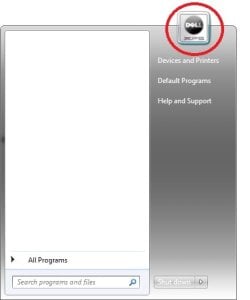
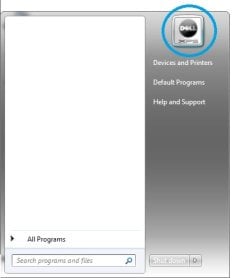
Hi, currently my User Picture frame sticks up over the top of the Start Menu edge (Figure 1). I have seen other people's start menus and noticed some are like that too. But I have also seen others which have their picture frame level with the top of the Start Menu frame (Figure 2), and that is the effect I am trying to achieve.

How it is right now :-
Figure 1
1.jpg


***


But here's how I want it :-
Figure 2
2.jpg


After I installed Win 7 x 64, the OEM Dell Theme was automatically installed for me. Actually, I'm not really sure if this affected the location of my Picture frame on the Start Up Menu. Would hope that someone shows me how to achieve the second effect (Figure 2), thanks in advance.
 

My Computer My Computer

At a glance

Windows 7 Ultimate x64
Computer type
PC/Desktop
OS
Windows 7 Ultimate x64
Weird. In my experience, "level" is normal. I checked some of the machines around my shop. On one the icon was "sticking up", on the other three it was "level". Ironically the machine where it was "sticking up" was a test install I just setup, and I know I haven't made any changes to themes, customized the Start menu, or otherwise.

The only thing I can think of is that the other three are installed to server boards with very low-end onboard graphics, 1024x768 max. I adjusted mine down to that resolution and the icon didn't become "level", but that doesn't necessarily prove anything.
 

My Computer My Computer

At a glance

Windows 7 Professional x64, Arch Linux
Computer type
PC/Desktop
OS
Windows 7 Professional x64, Arch Linux
for further info : I am using windows 7 ultimate edition x 64 on an old xps m1330 (year 2007-2008).
its native screen resolution is 1280 x 800.

Any ideas? Could anyone help me?

Despite how it shows up differently on different systems, is there not any manual editing I could do to achieve the effect I desire?
 

My Computer My Computer

At a glance

Windows 7 Ultimate x64
Computer type
PC/Desktop
OS
Windows 7 Ultimate x64
In order to change the picture to not stick out, you need to go into the control panel, then personalization, and set your theme to one of the Basic Windows Themes. If it is set to an Aero theme, it will stick out.
 

My Computer My Computer

At a glance

Windows 7 64 bit ProfessionalAMD A 816gbOn board
Computer type
PC/Desktop
Computer Manufacturer/Model Number
Hp
OS
Windows 7 64 bit Professional
CPU
AMD A 8
Motherboard
Amd
Memory
16gb
Graphics Card(s)
On board
Hard Drives
Se agate 1 tv
Antivirus
Security
That makes sense here, too. When I installed my display drivers (Intel), I left checked an option to automatically enable Aero.
 

My Computer My Computer

At a glance

Windows 7 Professional x64, Arch Linux
Computer type
PC/Desktop
OS
Windows 7 Professional x64, Arch Linux
hey thanks everyone for their advice.

i changed to a basic theme and now it doesn't stick out anymore. however, i lose out on beauty of aero themes. is there a way i can select an aero theme and then manually edit just the location of the profile pic frame somehow?
 

My Computer My Computer

At a glance

Windows 7 Ultimate x64
Computer type
PC/Desktop
OS
Windows 7 Ultimate x64
I don't think there is a way to do this when Aero is enabled.


hey thanks everyone for their advice.

i changed to a basic theme and now it doesn't stick out anymore. however, i lose out on beauty of aero themes. is there a way i can select an aero theme and then manually edit just the location of the profile pic frame somehow?
 

My Computer My Computer

At a glance

Windows 7 64 bit ProfessionalAMD A 816gbOn board
Computer type
PC/Desktop
Computer Manufacturer/Model Number
Hp
OS
Windows 7 64 bit Professional
CPU
AMD A 8
Motherboard
Amd
Memory
16gb
Graphics Card(s)
On board
Hard Drives
Se agate 1 tv
Antivirus
Security
hey yo i found a workaround for aero but uhm it's kind of odd. if u switch the taskbar to Up, Left, Right, as long as not at the default position of Bottom, ur User Profile Pic becomes "level" again. ie. if u can live with having the start orb/taskbar being in a non-standard location.

why just the bottom location? so inconsistent of win7...
 

My Computer My Computer

At a glance

Windows 7 Ultimate x64
Computer type
PC/Desktop
OS
Windows 7 Ultimate x64
Back
Top