Using 2 sound cards at once for different streams

Carnivore

New member
Member
Local time
8:38 PM
Messages
28
I'm running two sound cards - my system's onboard Realtek sound and an M-Audio Delta 66. Is there any way to use both at once, for instance to play a radio stream through the M-Audio card while everything else goes through the onboard card?

With Windows XP I would set my default playback device to the M-Audio card, then start playing an audio stream like an online radio station. Then I would go back to the control panel and set the default playback device to the onboard sound. The radio would continue playing through the M-Audio card (connected to my A/V receiver) as long as I didn't stop the stream, but then everything else would subsequently play through the onboard audio connected to desktop speakers.

This worked great but I was essentially taking advantage of a bug in WinXP that kept the first stream locked to the sound card in use until I stopped the stream, instead of immediately redirecting it to the newly selected playback device.

Now in Win7 any changes made to the playback device settings take place immediately, so if I'm streaming something through the M-Audio and then go to the control panel and change the audio output device to the onboard card, the stream immediately gets redirected to my new selection, it doesn't stay locked to the original cound card in use. So I'm hoping there may be some way to manually patch one stream to the first card and everything else to the second, so I can continue to listen to streaming audio through my A/V system and everything else through my desktop speakers.

Thanks for any suggestions.
 

My Computer My Computer

Computer type
PC/Desktop
Computer Manufacturer/Model Number
System Builder
OS
Windows 7 Professional x64 (Retail)
CPU
AMD Phenom II X3 720
Motherboard
Asus M3A78-EM
Memory
8GB Patriot 800MHz DDR2 4-4-4-12
Graphics Card(s)
ATI 3200 (onboard)
Sound Card
Realtek onboard & M-Audio Delta 66
Monitor(s) Displays
Dell 2209WA
Hard Drives
Sandisk 2240GB SSD
Several non-raid SATA drives for storage
PSU
Antec 400W
Case
Antec
Cooling
Arctic Cooling
Keyboard
Logitech Illuminated
Mouse
Microsoft Comgort Mouse 6000
Internet Speed
Verizon FiOS 50/25
A lot of software (especially audio related) should include a configuration setting where you can choose its output.

Doing so will cause the program to always play sound through that output, regardless of the systems chosen setting. Check to see if the software you're using includes such a feature.
 

My Computer My Computer

OS
Windows 7 Professional x64
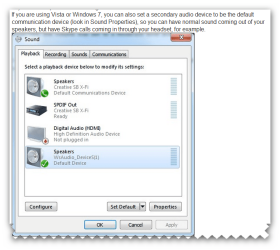
hi there i found this for you its in the pic does this help you?
 

Attachments

  • Snap_2010.12.15 18.28.27_004.png
    Snap_2010.12.15 18.28.27_004.png
    79.2 KB · Views: 328

My Computer My Computer

Computer Manufacturer/Model Number
packard bell IXTREME M5722
OS
Operating System : Windows 7 Home Premium Edition 6.01.7600 SP1 (x64)
CPU
Processor : Intel Core 2 Quad Q8300 @ 2500 MHz
Motherboard
Mainboard : Packard Bell (Acer EG43M )
Memory
Physical Memory :8GB Corsair4x 2GB 800MHz C5 DDR2
Graphics Card(s)
Video Card : XFX 6700 AMD
Monitor(s) Displays
Maestro 234DL - BenQ V2220 - BenQ VW2420H
Screen Resolution
Current Display :1920x1080p pixels at 60 Hz in HD LED
Hard Drives
Hard Disks : WDC (1000 GB)
Drive C: (Hard Disk) : 428 GB available on 491 GB
Drive D: (Hard Disk) : 426 GB available on 492 GB
SAMSUNG spinpoint HD103SJ 1000.2 GB
(X 2) KINGSTON SSD NOW V 30GB
PSU
XFX ProSeries 550W PSU
Case
PACKARD BELL IXTREME
Cooling
System Blower Current: 150mA Air Flow16CFM ;Akasa 90mm rear
Keyboard
Gigabyte Aivia K8100
Mouse
TRUST-Wireless Laser Mouse - Carbon edition MI-7770C
Internet Speed
TP-LINK > TL-WN951N / AV500 Gigabit Powerline Adapters
Browser
chrome dev
Other Info
EXTRA COOLING>(FAN CONTROLLER) PC Bay Cooler 3 x 40mm fans; Akasa AK-HD-BL Blue hard drive cooler 2 x 40 mm fan 4500 rpm 29.7 dBA
Bios> American Megatrends Inc.
Version : P01-A1
Date : 08/31/2009
Xale, you're right, I can go to the Options menu in most of my media players and select the audio output device. So I guess the real issue is how to set my browser to do the same, since some of the streaming radio stations I listen to are designed to only play in a browser window. Is there any way to set a browser window to playback to a specific audio device?

Brianzion, that's the Sound Playback control panel window. You can set up a default device for audio playback, and a separate default output for a communications device like a Skype headset. But I don't think that helps because I can't define a browser window to be a "communications device" to force its output to go to the alternate sound card, can I?
 

My Computer My Computer

Computer type
PC/Desktop
Computer Manufacturer/Model Number
System Builder
OS
Windows 7 Professional x64 (Retail)
CPU
AMD Phenom II X3 720
Motherboard
Asus M3A78-EM
Memory
8GB Patriot 800MHz DDR2 4-4-4-12
Graphics Card(s)
ATI 3200 (onboard)
Sound Card
Realtek onboard & M-Audio Delta 66
Monitor(s) Displays
Dell 2209WA
Hard Drives
Sandisk 2240GB SSD
Several non-raid SATA drives for storage
PSU
Antec 400W
Case
Antec
Cooling
Arctic Cooling
Keyboard
Logitech Illuminated
Mouse
Microsoft Comgort Mouse 6000
Internet Speed
Verizon FiOS 50/25
im not sure sorry im not much help im google-ing for you and i will let you no of any ideas
 

My Computer My Computer

Computer Manufacturer/Model Number
packard bell IXTREME M5722
OS
Operating System : Windows 7 Home Premium Edition 6.01.7600 SP1 (x64)
CPU
Processor : Intel Core 2 Quad Q8300 @ 2500 MHz
Motherboard
Mainboard : Packard Bell (Acer EG43M )
Memory
Physical Memory :8GB Corsair4x 2GB 800MHz C5 DDR2
Graphics Card(s)
Video Card : XFX 6700 AMD
Monitor(s) Displays
Maestro 234DL - BenQ V2220 - BenQ VW2420H
Screen Resolution
Current Display :1920x1080p pixels at 60 Hz in HD LED
Hard Drives
Hard Disks : WDC (1000 GB)
Drive C: (Hard Disk) : 428 GB available on 491 GB
Drive D: (Hard Disk) : 426 GB available on 492 GB
SAMSUNG spinpoint HD103SJ 1000.2 GB
(X 2) KINGSTON SSD NOW V 30GB
PSU
XFX ProSeries 550W PSU
Case
PACKARD BELL IXTREME
Cooling
System Blower Current: 150mA Air Flow16CFM ;Akasa 90mm rear
Keyboard
Gigabyte Aivia K8100
Mouse
TRUST-Wireless Laser Mouse - Carbon edition MI-7770C
Internet Speed
TP-LINK > TL-WN951N / AV500 Gigabit Powerline Adapters
Browser
chrome dev
Other Info
EXTRA COOLING>(FAN CONTROLLER) PC Bay Cooler 3 x 40mm fans; Akasa AK-HD-BL Blue hard drive cooler 2 x 40 mm fan 4500 rpm 29.7 dBA
Bios> American Megatrends Inc.
Version : P01-A1
Date : 08/31/2009
also having the same issue and how I solved it.

Hi, I apologize for reviving an old post, but I was having the same issue and I wanted to tell you how I solved it. Unfortunately there's no way that I know of to this natively in windows.... but... If you download VMWare Player (free program), you can install an OS on it (such as Windows XP). Then, once you've done that, there is an option in the virtual machine settings to direct it to a different sound card. That means that everything that happens in that virtual machine, whether it be the browser, or whatever, will play through that second sound card. Hope this helps! :geek:
 

My Computer My Computer

Computer Manufacturer/Model Number
pulse4J
OS
windows 7 x64
CPU
pulse4J
Motherboard
pulse4J
Memory
pulse4J
Graphics Card(s)
pulse4J
Sound Card
pulse4J
Monitor(s) Displays
pulse4J
Hard Drives
pulse4J
PSU
pulse4J
Case
pulse4J
Cooling
pulse4J
thanks for the update :)
 

My Computer My Computer

Computer Manufacturer/Model Number
packard bell IXTREME M5722
OS
Operating System : Windows 7 Home Premium Edition 6.01.7600 SP1 (x64)
CPU
Processor : Intel Core 2 Quad Q8300 @ 2500 MHz
Motherboard
Mainboard : Packard Bell (Acer EG43M )
Memory
Physical Memory :8GB Corsair4x 2GB 800MHz C5 DDR2
Graphics Card(s)
Video Card : XFX 6700 AMD
Monitor(s) Displays
Maestro 234DL - BenQ V2220 - BenQ VW2420H
Screen Resolution
Current Display :1920x1080p pixels at 60 Hz in HD LED
Hard Drives
Hard Disks : WDC (1000 GB)
Drive C: (Hard Disk) : 428 GB available on 491 GB
Drive D: (Hard Disk) : 426 GB available on 492 GB
SAMSUNG spinpoint HD103SJ 1000.2 GB
(X 2) KINGSTON SSD NOW V 30GB
PSU
XFX ProSeries 550W PSU
Case
PACKARD BELL IXTREME
Cooling
System Blower Current: 150mA Air Flow16CFM ;Akasa 90mm rear
Keyboard
Gigabyte Aivia K8100
Mouse
TRUST-Wireless Laser Mouse - Carbon edition MI-7770C
Internet Speed
TP-LINK > TL-WN951N / AV500 Gigabit Powerline Adapters
Browser
chrome dev
Other Info
EXTRA COOLING>(FAN CONTROLLER) PC Bay Cooler 3 x 40mm fans; Akasa AK-HD-BL Blue hard drive cooler 2 x 40 mm fan 4500 rpm 29.7 dBA
Bios> American Megatrends Inc.
Version : P01-A1
Date : 08/31/2009
Back
Top