Solved Using a 120 GB SSD and having 16 GB RAM

deskareas

New member
Member
Local time
11:52 PM
Messages
43
This is my first time i use a SSD. My system partition is usually around 200 GB in size.
I know that i should set the download folder to another drive, but what about the pagefile.sys?
I found while investigating, that some old programs need the swap file.
So i set it to min 10000 and max 20000.

It would be nice to get some tips.
 

My Computer My Computer

At a glance

7
OS
7
I moved the swap file to a different drive and let Windows manage it instead of specifying a size. With 16GB of ram it will not be used often, if at all.

I did leave a 200MB swap on C:.
 

My Computer My Computer

At a glance

Windows 10 Pro X64Intel Quad Core i7-4770 @ 3.4Ghz16.0GB PC3-12800 DDR3 SDRAM 1600 MHzIntel Integrated HD Graphics
Computer type
PC/Desktop
Computer Manufacturer/Model Number
Lenovo IdeaCenter 450
OS
Windows 10 Pro X64
CPU
Intel Quad Core i7-4770 @ 3.4Ghz
Memory
16.0GB PC3-12800 DDR3 SDRAM 1600 MHz
Graphics Card(s)
Intel Integrated HD Graphics
Sound Card
Realtek HD Audio
Monitor(s) Displays
HP 22" LCD
Screen Resolution
1680 x 1050
Hard Drives
250GB Samsung EVO SATA-3 SSD
2TB Seagate ST2000DM001 SATA-2
1.5TB Seagate ST3150041AS SATA
Keyboard
Dell USB
Mouse
Lenovo USB
Internet Speed
Cable via Road Runner 3MB Upload, 30MB Download
Antivirus
Windows Defender, MBAM Pro, MBAE
Browser
Seamonkey
Other Info
UEFI/GPT
PLDS DVD-RW DH16AERSH
I left my pagefile on C: and just set it to a Max of 2gb. It is not going to hurt anything or shorten the life of an SSD to any noticeable point. No harm, No foul.
 

My Computer My Computer

At a glance

Windows 7 Ultimate 64bitIntel Core i7-2600K Sandy Bridge 3.4GHz (@4.5...G.SKILL Ripjaws X Series 16GB 1600Mhz (4 x 4G...x2 EVGA GeForce GTX 760's w/ACXCoolers in SLI...
Computer type
PC/Desktop
Computer Manufacturer/Model Number
Jeepmann/Custom Built
OS
Windows 7 Ultimate 64bit
CPU
Intel Core i7-2600K Sandy Bridge 3.4GHz (@[email protected])
Motherboard
Asus Maximus IV Extreme LGA 1155 Intel P67
Memory
G.SKILL Ripjaws X Series 16GB 1600Mhz (4 x 4GB) (Stock)
Graphics Card(s)
x2 EVGA GeForce GTX 760's w/ACXCoolers in SLI Surround
Sound Card
On-Board
Monitor(s) Displays
3x Acer 24" HDMI Widescreen LCD Monitor
Screen Resolution
3@ 1920x1080 (5760x1080 In Surround)
Hard Drives
Samsung 830 128gb ssd
Western Digital Caviar Black 640GB 7200 RPM
Western Digital Caviar Black 500GB 7200 RPM
Seagate 2tb 7200 RPM
PSU
COOLER MASTER Silent Pro 1000W
Case
COOLER MASTER HAF X Black
Cooling
CORSAIR Hydro H70
Keyboard
Logitech G510
Mouse
Zalman M300
Internet Speed
100mbps-ish Down & 5mbps-ish Up
Other Info
I installed the stock 140mm case fan outside of case then installed the H70+ 1 of its 120mm fans inside case. Used the 2nd 120mm from the H70 to go in the Gpu tunnel.
230mm Front,200mm side,200mm top,120mm Gpu tunnel,120mm&140mm on H70.
SSDs have a limited number of writes to them, therefore you want to manage the drive as such.

I've heard there are ways to better prepare Windows for installation to an SSD, but I'm going to recommend against that because it would be more unnecessary writing to the drive.

Make sure you turn OFF the defragging of the drive. You defrag platter based drives because of physical limitations that do not exist in SSDs. SSDs will not slow down ANY noticeable amount as it frags.

One thing I did was set aside 4 Gigs [out of 16] at boot as a RamDrive, and I load an .IMG I made which puts specific folders on the drive, and then set my browser to use it for it's cache, I also made %Temp%, and %Tmp% point to Y:\Temp on the drive.

Because of keeping the drives from being needed to be "moved", I set my Blue-Ray to drive Z:, and my RamDrive to drive Y:. That way if I add drives, I don't have to worry about software complaining.

My networked drives that get letters start at Q: [Right now, there are 7 in my server]
 

My Computer My Computer

At a glance

Windows 7 Ultimate x64/Windows 8.1 Pro x64AMD FX 835016 Gigs [1 Gig for Shared Vid mem]Integrated ATI Radeon HD 4250 GPU
Computer type
PC/Desktop
Computer Manufacturer/Model Number
Custom Build
OS
Windows 7 Ultimate x64/Windows 8.1 Pro x64
CPU
AMD FX 8350
Motherboard
Asus M5A88-M
Memory
16 Gigs [1 Gig for Shared Vid mem]
Graphics Card(s)
Integrated ATI Radeon HD 4250 GPU
Sound Card
ALC892 8-Channel High Def Audio
Monitor(s) Displays
VGA main, HDMI to TV
Screen Resolution
VGA Screen: 1440 x 900 TV Screen: 1920 x 1080
Hard Drives
120 Gig SSD
150 Gig HDD
~2TB on server. [My Docs, Photos, My Music, dedicated drives, Desktop is a folder. All on the server. Used by both Win7/Win8.1, and other machines in the house]
PSU
850 Watt
Case
Smilodon Raidmax
Cooling
Cooler Master Hyper212EVO
Keyboard
[2,] Wireless
Mouse
[2,] Wireless
Internet Speed
Broadband
Antivirus
Microsoft Security Essentials
Browser
IE, Chrome, Opera
Other Info
Blue-Ray DL drive Z:\
Server: 2.4Ghz Dual core, with about 2TB on it. WinServ2003Enterprise x32 w 8Gigs usable RAM [YES]
MacBook: 2Ghz Core2Duo, 2Gigs, Snow 160Gigs
Acer AspireOne: 1.6Ghz, Dual-Core, 1 Gig, XP Home
6 Android Devices
iPod Touch
SSDs have a limited number of writes to them, therefore you want to manage the drive as such.

I've heard there are ways to better prepare Windows for installation to an SSD, but I'm going to recommend against that because it would be more unnecessary writing to the drive.

Make sure you turn OFF the defragging of the drive. You defrag platter based drives because of physical limitations that do not exist in SSDs. SSDs will not slow down ANY noticeable amount as it frags.

One thing I did was set aside 4 Gigs [out of 16] at boot as a RamDrive, and I load an .IMG I made which puts specific folders on the drive, and then set my browser to use it for it's cache, I also made %Temp%, and %Tmp% point to Y:\Temp on the drive.

Because of keeping the drives from being needed to be "moved", I set my Blue-Ray to drive Z:, and my RamDrive to drive Y:. That way if I add drives, I don't have to worry about software complaining.

My networked drives that get letters start at Q: [Right now, there are 7 in my server]
The question was about pagefile usage.
 

My Computer My Computer

At a glance

Windows 7 Ultimate X64 SP1Intel i5-2550K, Differing ~4.4-4.8GHz No buil...16GB G.Skill Sniper 1866MHz @ 2133MHz 2x8GBASUS GTX650TIB-DC2OC-2GD5, (650TI Boost)
Computer type
PC/Desktop
Computer Manufacturer/Model Number
Home Built Desktop By DataTech
OS
Windows 7 Ultimate X64 SP1
CPU
Intel i5-2550K, Differing ~4.4-4.8GHz No built in GPU
Motherboard
ASUS P8Z68-V PRO/GEN3
Memory
16GB G.Skill Sniper 1866MHz @ 2133MHz 2x8GB
Graphics Card(s)
ASUS GTX650TIB-DC2OC-2GD5, (650TI Boost)
Sound Card
Onboard Realtek 5-1
Monitor(s) Displays
Samsung P2570HD
Screen Resolution
1920x1080
Hard Drives
Samsung 840 Pro 256GB SSD for OS, 500GB Seagate Constellation (Enterprise drive) for Data
PSU
Corsair HX650W
Case
Inwin Dragon Rider
Cooling
Hyper 212 EVO w/two Noctua fans, push-pull, @1300 RPM
Keyboard
E-Z Eyes, bright yellow keys with large characters
Mouse
steelseries SENSEI Laser Pro Gaming
Internet Speed
48-51Mbs Mbs down, 11 Mbs up Xfinity Cable
Antivirus
Norton Internet Security 2013
Browser
IE 10, Opera, Pale Moon if needed
Other Info
4 case fans, LG BluRay-RE, ASUS DVD-RW, Mr. Fusion power supply, 1.21 gigawatts.
This is my first time i use a SSD. My system partition is usually around 200 GB in size.
I know that i should set the download folder to another drive, but what about the pagefile.sys?
I found while investigating, that some old programs need the swap file.
So i set it to min 10000 and max 20000.

It would be nice to get some tips.
I have left my pagefile on my SSD, otherwise it would somewhat diminish the SSD speed advantage. Some apps will use a pagefile regardless of installed RAM. I have it set at MIN 2GB and MAX 2GB.
Moving you User files to another drive will be helpful as disabling Hibernation, if you don't use it. In a command prompt type powercfg /h-off
 

My Computer My Computer

At a glance

Windows 7 Ultimate X64 SP1Intel i5-2550K, Differing ~4.4-4.8GHz No buil...16GB G.Skill Sniper 1866MHz @ 2133MHz 2x8GBASUS GTX650TIB-DC2OC-2GD5, (650TI Boost)
Computer type
PC/Desktop
Computer Manufacturer/Model Number
Home Built Desktop By DataTech
OS
Windows 7 Ultimate X64 SP1
CPU
Intel i5-2550K, Differing ~4.4-4.8GHz No built in GPU
Motherboard
ASUS P8Z68-V PRO/GEN3
Memory
16GB G.Skill Sniper 1866MHz @ 2133MHz 2x8GB
Graphics Card(s)
ASUS GTX650TIB-DC2OC-2GD5, (650TI Boost)
Sound Card
Onboard Realtek 5-1
Monitor(s) Displays
Samsung P2570HD
Screen Resolution
1920x1080
Hard Drives
Samsung 840 Pro 256GB SSD for OS, 500GB Seagate Constellation (Enterprise drive) for Data
PSU
Corsair HX650W
Case
Inwin Dragon Rider
Cooling
Hyper 212 EVO w/two Noctua fans, push-pull, @1300 RPM
Keyboard
E-Z Eyes, bright yellow keys with large characters
Mouse
steelseries SENSEI Laser Pro Gaming
Internet Speed
48-51Mbs Mbs down, 11 Mbs up Xfinity Cable
Antivirus
Norton Internet Security 2013
Browser
IE 10, Opera, Pale Moon if needed
Other Info
4 case fans, LG BluRay-RE, ASUS DVD-RW, Mr. Fusion power supply, 1.21 gigawatts.
  • Like
Reactions: Arc
Just let Windows 7 handle the memory and page filing. You don't need to move it any place or set any amounts. You don't have to create some magic program to fool with the memory. I don't worry about how many wrights to my SSD no more than I would worry about wrights to a hard drive. SSD warranties are done by time not how many wrights have been done. My warranty is 5 years no matter how many wrights it does or does not do. My SSD runs 7.6 to 7.9 on a sata 2.0 port AHCI. Done just wash your hands of all the little tricks and enjoy your SSD.
 

My Computer My Computer

At a glance

Windows 10 Pro. 64/ version 1709 Windows 7 Pr...Intel i7-6800K @ 4.3Corsair Platinum 16 gig @2400EVGA GTX 1070 OC
Computer type
PC/Desktop
Computer Manufacturer/Model Number
Home made Desktop
OS
Windows 10 Pro. 64/ version 1709 Windows 7 Pro/64
CPU
Intel i7-6800K @ 4.3
Motherboard
ASUS X-99 Deluxe II
Memory
Corsair Platinum 16 gig @2400
Graphics Card(s)
EVGA GTX 1070 OC
Monitor(s) Displays
Asus 27" LED LCD/VE278Q
Screen Resolution
1920-1080 or 1280-720 HDMI
Hard Drives
INTEL SSD 730-240 Gb Sata 3.0/
PSU
EVGA Platium 1200W
Case
Phanteks Luxe Tempered Glass 8 fans/ one radiator
Cooling
XSPC/ Water Cooled CPU
Keyboard
Das 4 Professional
Mouse
Logitech M705/MX Anywhere 2-S
Internet Speed
100 mbits
Antivirus
Microsoft Security Essentials/ Malwarebytes Premium 3.0/ SAS
Browser
I.E. 11 default/Firefox/ ISP Time Warner Cable/Spectrum
Other Info
LG BluRay Burner/
Sound system-KLipsch-THX/
Icy Dock ssd Hot Swap bays.
thanks for all your replies.
i decided not to use system restore and hibernate, that gives me more space.
i am not used to be limited to 120 GB on system drive, so until i have money to buy a 256 GB SSD i have to tangle a bit.
 

My Computer My Computer

At a glance

7
OS
7

My Computer My Computer

At a glance

Windows 7 Ultimate X64 SP1Intel i5-2550K, Differing ~4.4-4.8GHz No buil...16GB G.Skill Sniper 1866MHz @ 2133MHz 2x8GBASUS GTX650TIB-DC2OC-2GD5, (650TI Boost)
Computer type
PC/Desktop
Computer Manufacturer/Model Number
Home Built Desktop By DataTech
OS
Windows 7 Ultimate X64 SP1
CPU
Intel i5-2550K, Differing ~4.4-4.8GHz No built in GPU
Motherboard
ASUS P8Z68-V PRO/GEN3
Memory
16GB G.Skill Sniper 1866MHz @ 2133MHz 2x8GB
Graphics Card(s)
ASUS GTX650TIB-DC2OC-2GD5, (650TI Boost)
Sound Card
Onboard Realtek 5-1
Monitor(s) Displays
Samsung P2570HD
Screen Resolution
1920x1080
Hard Drives
Samsung 840 Pro 256GB SSD for OS, 500GB Seagate Constellation (Enterprise drive) for Data
PSU
Corsair HX650W
Case
Inwin Dragon Rider
Cooling
Hyper 212 EVO w/two Noctua fans, push-pull, @1300 RPM
Keyboard
E-Z Eyes, bright yellow keys with large characters
Mouse
steelseries SENSEI Laser Pro Gaming
Internet Speed
48-51Mbs Mbs down, 11 Mbs up Xfinity Cable
Antivirus
Norton Internet Security 2013
Browser
IE 10, Opera, Pale Moon if needed
Other Info
4 case fans, LG BluRay-RE, ASUS DVD-RW, Mr. Fusion power supply, 1.21 gigawatts.
Leave your pagefile on your SSD but set its size to 1-2GB just so there's enough space for a dumpfile, if you care to have a dumpfile if you get a bsod. Windows won't use the pagefile until your physical RAM is nearly full so you don't have to worry about extra wear on the SSD. If anyone knows of any programs that require a pagefile, please list them, because I don't think any programs like that exist. Also you should probably keep System Restore turned on, just in case you need it. You can limit its max size if you want.
 

My Computer My Computer

At a glance

Windows 7 Professional 64 bit
Computer Manufacturer/Model Number
Lenovo ThinkPad
OS
Windows 7 Professional 64 bit
The pagefile can be use regardless of what RAM is in use. My PF usage is low, about 350MB, but is in use, I have no idea what program use it, but they do exist.
 

My Computer My Computer

At a glance

Windows 7 Ultimate X64 SP1Intel i5-2550K, Differing ~4.4-4.8GHz No buil...16GB G.Skill Sniper 1866MHz @ 2133MHz 2x8GBASUS GTX650TIB-DC2OC-2GD5, (650TI Boost)
Computer type
PC/Desktop
Computer Manufacturer/Model Number
Home Built Desktop By DataTech
OS
Windows 7 Ultimate X64 SP1
CPU
Intel i5-2550K, Differing ~4.4-4.8GHz No built in GPU
Motherboard
ASUS P8Z68-V PRO/GEN3
Memory
16GB G.Skill Sniper 1866MHz @ 2133MHz 2x8GB
Graphics Card(s)
ASUS GTX650TIB-DC2OC-2GD5, (650TI Boost)
Sound Card
Onboard Realtek 5-1
Monitor(s) Displays
Samsung P2570HD
Screen Resolution
1920x1080
Hard Drives
Samsung 840 Pro 256GB SSD for OS, 500GB Seagate Constellation (Enterprise drive) for Data
PSU
Corsair HX650W
Case
Inwin Dragon Rider
Cooling
Hyper 212 EVO w/two Noctua fans, push-pull, @1300 RPM
Keyboard
E-Z Eyes, bright yellow keys with large characters
Mouse
steelseries SENSEI Laser Pro Gaming
Internet Speed
48-51Mbs Mbs down, 11 Mbs up Xfinity Cable
Antivirus
Norton Internet Security 2013
Browser
IE 10, Opera, Pale Moon if needed
Other Info
4 case fans, LG BluRay-RE, ASUS DVD-RW, Mr. Fusion power supply, 1.21 gigawatts.
I wasn't sure exactly how it would act so I did a test:

I set my pagefile minimum size to the minimum allowed 16 MB and max to 2 GB then started loading up my 16 GB of RAM using Testlimit, 1 GB at a time interspersed with just normal computer use (ie. add a GB, use computer for a bit, add another GB, use computer for a bit more). I monitored pagefile.sys with ProcMon and also checked to see if the files size of pagefile.sys changed. There was no activity for pagefile.sys and it didn't start growing until I'd used up over 14 GB of physical memory, then when I added the next 1 GB using Testlimit it jumped to about 500 MB. It's just one test and maybe there's a better way to test it, but it seems like my pagefile should never get used because I never usually use more than about 10 GB of RAM including cached files.

Usually I have my pagefile set to 1 GB.
 

My Computer My Computer

At a glance

Windows 7 Professional 64 bit
Computer Manufacturer/Model Number
Lenovo ThinkPad
OS
Windows 7 Professional 64 bit
I always reduce my pagefile to 2GB and get rid of the hiberfile. Never had a problem. My RAM is 4GB, 6GB and 8GB in the different systems.
 

My Computer My Computer

At a glance

Vista, Windows7, Mint Mate, Zorin, Windows 8from 1.6GHz Duo to i7
Computer Manufacturer/Model Number
HP, Dell, Gateway, Toshiba - 4 laptops and 2 desktops
OS
Vista, Windows7, Mint Mate, Zorin, Windows 8
CPU
from 1.6GHz Duo to i7
Monitor(s) Displays
2x HP w2207
Hard Drives
5x HDD, 7x SSD, 12x Externals
Keyboard
with trackball - no mices
Mouse
Trackball mice
Internet Speed
DSL 6000
The pagefile can be use regardless of what RAM is in use. My PF usage is low, about 350MB, but is in use, I have no idea what program use it, but they do exist.


+1 To this^^

I have 16gb Ram and "Max" pagefile of 2gb. As I said in my first post, set it to 1/2gb and leave it on the ssd. I did disable Hibernation.
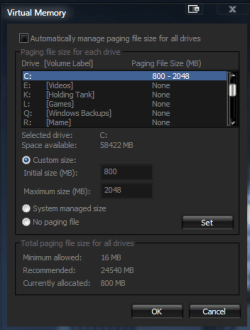
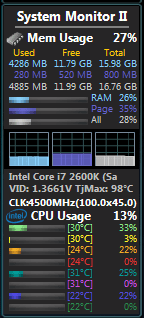
I have attached snips showing how mine is set and also even with 16gb ram, something will still use pagefile. Right now my pagefile is using 280mb out of my "min" 800mb.

I use a Samsung 830 128gb ssd, I have OS and ALL my programs on it..minus games..( I have a TON of programs) as of right now I'm sitting at 50/50 used/free space. All personal files,games..ect are on hdd.
 

Attachments

  • 11.PNG
    11.PNG
    13.1 KB · Views: 13
  • 22.PNG
    22.PNG
    8.3 KB · Views: 72

My Computer My Computer

At a glance

Windows 7 Ultimate 64bitIntel Core i7-2600K Sandy Bridge 3.4GHz (@4.5...G.SKILL Ripjaws X Series 16GB 1600Mhz (4 x 4G...x2 EVGA GeForce GTX 760's w/ACXCoolers in SLI...
Computer type
PC/Desktop
Computer Manufacturer/Model Number
Jeepmann/Custom Built
OS
Windows 7 Ultimate 64bit
CPU
Intel Core i7-2600K Sandy Bridge 3.4GHz (@[email protected])
Motherboard
Asus Maximus IV Extreme LGA 1155 Intel P67
Memory
G.SKILL Ripjaws X Series 16GB 1600Mhz (4 x 4GB) (Stock)
Graphics Card(s)
x2 EVGA GeForce GTX 760's w/ACXCoolers in SLI Surround
Sound Card
On-Board
Monitor(s) Displays
3x Acer 24" HDMI Widescreen LCD Monitor
Screen Resolution
3@ 1920x1080 (5760x1080 In Surround)
Hard Drives
Samsung 830 128gb ssd
Western Digital Caviar Black 640GB 7200 RPM
Western Digital Caviar Black 500GB 7200 RPM
Seagate 2tb 7200 RPM
PSU
COOLER MASTER Silent Pro 1000W
Case
COOLER MASTER HAF X Black
Cooling
CORSAIR Hydro H70
Keyboard
Logitech G510
Mouse
Zalman M300
Internet Speed
100mbps-ish Down & 5mbps-ish Up
Other Info
I installed the stock 140mm case fan outside of case then installed the H70+ 1 of its 120mm fans inside case. Used the 2nd 120mm from the H70 to go in the Gpu tunnel.
230mm Front,200mm side,200mm top,120mm Gpu tunnel,120mm&140mm on H70.
Maybe it can be used, but mine doesn't get used until I hit about 14 GB of physical memory usage. You can use Performance Monitor to closely monitor pagefile usage and my pagefile stays at 0 until I get to ~14 GB of in use physical memory.
 

My Computer My Computer

At a glance

Windows 7 Professional 64 bit
Computer Manufacturer/Model Number
Lenovo ThinkPad
OS
Windows 7 Professional 64 bit
I have 16gb Ram and "Max" pagefile of 2gb. As I said in my first post, set it to 1/2gb and leave it on the ssd. I did disable Hibernation.
I have attached snips showing how mine is set and also even with 16gb ram, something will still use pagefile. Right now my pagefile is using 280mb out of my "min" 800mb.

Where did you get that widget?
 

My Computer My Computer

At a glance

Windows 7 Ultimate x64/Windows 8.1 Pro x64AMD FX 835016 Gigs [1 Gig for Shared Vid mem]Integrated ATI Radeon HD 4250 GPU
Computer type
PC/Desktop
Computer Manufacturer/Model Number
Custom Build
OS
Windows 7 Ultimate x64/Windows 8.1 Pro x64
CPU
AMD FX 8350
Motherboard
Asus M5A88-M
Memory
16 Gigs [1 Gig for Shared Vid mem]
Graphics Card(s)
Integrated ATI Radeon HD 4250 GPU
Sound Card
ALC892 8-Channel High Def Audio
Monitor(s) Displays
VGA main, HDMI to TV
Screen Resolution
VGA Screen: 1440 x 900 TV Screen: 1920 x 1080
Hard Drives
120 Gig SSD
150 Gig HDD
~2TB on server. [My Docs, Photos, My Music, dedicated drives, Desktop is a folder. All on the server. Used by both Win7/Win8.1, and other machines in the house]
PSU
850 Watt
Case
Smilodon Raidmax
Cooling
Cooler Master Hyper212EVO
Keyboard
[2,] Wireless
Mouse
[2,] Wireless
Internet Speed
Broadband
Antivirus
Microsoft Security Essentials
Browser
IE, Chrome, Opera
Other Info
Blue-Ray DL drive Z:\
Server: 2.4Ghz Dual core, with about 2TB on it. WinServ2003Enterprise x32 w 8Gigs usable RAM [YES]
MacBook: 2Ghz Core2Duo, 2Gigs, Snow 160Gigs
Acer AspireOne: 1.6Ghz, Dual-Core, 1 Gig, XP Home
6 Android Devices
iPod Touch
I have 16gb Ram and "Max" pagefile of 2gb. As I said in my first post, set it to 1/2gb and leave it on the ssd. I did disable Hibernation.
I have attached snips showing how mine is set and also even with 16gb ram, something will still use pagefile. Right now my pagefile is using 280mb out of my "min" 800mb.

Where did you get that widget?

Sorry it took so long, I was off for the weekend. Here you go, lots of good ones on there.

Gadgets for Geeks. Most Wanted and Popular Windows 7, Windows 8 and Windows Vista Gadgets:
 

My Computer My Computer

At a glance

Windows 7 Ultimate 64bitIntel Core i7-2600K Sandy Bridge 3.4GHz (@4.5...G.SKILL Ripjaws X Series 16GB 1600Mhz (4 x 4G...x2 EVGA GeForce GTX 760's w/ACXCoolers in SLI...
Computer type
PC/Desktop
Computer Manufacturer/Model Number
Jeepmann/Custom Built
OS
Windows 7 Ultimate 64bit
CPU
Intel Core i7-2600K Sandy Bridge 3.4GHz (@[email protected])
Motherboard
Asus Maximus IV Extreme LGA 1155 Intel P67
Memory
G.SKILL Ripjaws X Series 16GB 1600Mhz (4 x 4GB) (Stock)
Graphics Card(s)
x2 EVGA GeForce GTX 760's w/ACXCoolers in SLI Surround
Sound Card
On-Board
Monitor(s) Displays
3x Acer 24" HDMI Widescreen LCD Monitor
Screen Resolution
3@ 1920x1080 (5760x1080 In Surround)
Hard Drives
Samsung 830 128gb ssd
Western Digital Caviar Black 640GB 7200 RPM
Western Digital Caviar Black 500GB 7200 RPM
Seagate 2tb 7200 RPM
PSU
COOLER MASTER Silent Pro 1000W
Case
COOLER MASTER HAF X Black
Cooling
CORSAIR Hydro H70
Keyboard
Logitech G510
Mouse
Zalman M300
Internet Speed
100mbps-ish Down & 5mbps-ish Up
Other Info
I installed the stock 140mm case fan outside of case then installed the H70+ 1 of its 120mm fans inside case. Used the 2nd 120mm from the H70 to go in the Gpu tunnel.
230mm Front,200mm side,200mm top,120mm Gpu tunnel,120mm&140mm on H70.
Back
Top