Using a .bat file to run another .bat file - 2nd .bat file (fails)

jfk92

New member
Local time
8:09 AM
Messages
14
Hi,

I am using two .bat files together. The first .bat file runs on a timed scheduled task (something like 3pm daily) and is simply a warning/informational message and then if the user hit's "any key" it will close the window/complete the execution and as a result will call a second .bat file. (if they close the first DOS .bat prompt window the second will not be called) The second .bat file runs a series of backup exercises. Namely mail as well as a single folder on the machine. Here is my issue:

If I manually execute the first .bat file, the 1st dos window opens, I hit any key - the window closes and the second backup .bat file executes beautifully. (I would have mail/files closed) When the first .bat file is called from the scheduled task, i(f the scheduled task opens the first file) and then before hitting 'any key' in the active DOS window, I click out of the prompt to close mail and any open files I have that are included in the backup, THEN activate the DOS window, press return - the second file opens and "runs" but doesn't backup - it acts as it would if I had the outlook mail open (skips the backup).

It seems that if I take focus off the first DOS prompt that pops up to close mail/files then activate it to execute the second .bat file it 'skips' the execution of the second...it'll run it - the second DOS screen pops up and scrolls through the commands but no backup is actually done.

I'm perplexed here! I very much appreciate anyone's thoughts/input on this one. Thank you very much.

John
 

My Computer My Computer

At a glance

Various - W7 32bit, 64bit
Computer type
PC/Desktop
OS
Various - W7 32bit, 64bit
If you post both the .bat files then perhaps we can see what is happening.
 

My Computer My Computer

At a glance

Windows 7 32 bitAMD 5200+ dual core2 GBNVidia GeForce 6150SE 128 MB
Computer Manufacturer/Model Number
HP Media Center
OS
Windows 7 32 bit
CPU
AMD 5200+ dual core
Memory
2 GB
Graphics Card(s)
NVidia GeForce 6150SE 128 MB
Monitor(s) Displays
CRT
Screen Resolution
1280x1024
Hard Drives
500 GB Sata internal :

SIIG USB 3.0 docking stations w/WD Caviar Black 6 Gb/s drives
Keyboard
PS/2
Mouse
PS/2 Wheel Mouse
Other Info
SIIG USB 3.0 PCIexpress card.
Absolutely - it works great if I open the 'prompt' manually OR if it fires and I don't have outlook or anything open and can just hit a key so it triggers the second file execution and backup. but if I have to 'unfocus' the first DOS prompt to close outlook or files before 'regaining focus' of it to hit a key to continue - the execution happens but nothing actually backs up...so confused.

Prompt file here:

@echo PLEASE CLOSE OUTLOOK EMAIL AND ANY OPEN FILES YOU STORE IN THE "VITUSA" FOLDER ON YOUR MACHINE FOR A BRIEF DATA BACKUP.
@echo *******
@echo *******
@echo PRESS ENTER ONLY AFTER OUTLOOK/FILES HAVE BEEN CLOSED.
@echo *******
@echo *******
@echo IF YOU DO NOT WISH TO BACKUP YOUR FILES AT THIS TIME THEN CLOSE THIS WINDOW BY CLICKING ON THE 'X' IN THE UPPER RIGHT CORNER OF THIS POPUP.
@echo *******
@echo *******
PAUSE

Call C:\Backup.bat


and backup file (called bat file) here:


::Create the Log file of bat file execution
::
::
Echo >U:\BackupLog.txt


:: Outlook file compression and backup
::
::
for %%A in (C:\Users\%USERNAME%\AppData\Local\Microsoft\Outlook) do "C:\Program Files (x86)\7-Zip\7z.exe" a -t7z -mx5 "U:\outlooknew" -xr!*.bat "C:\Users\%USERNAME%\AppData\Local\Microsoft\Outlook">>U:\BackupLog.txt
REN "U:\%USERNAME%outlook.7z" "outlookold.7z"
REN "U:\outlooknew.7z" "%USERNAME%outlook.7z"
DEL "U:\outlookold.7z"


::User file compression and backup
::
::
for %%A in (C:\Users\John\Documents\Vitusa) do "C:\Program Files (x86)\7-Zip\7z.exe" a -t7z -mx5 "U:\Vitusanew" -xr!*.bat "C:\Users\John\Documents\Vitusa">>U:\BackupLog.txt
REN "U:\%USERNAME%Vitusa.7z" "Vitusaold.7z"
REN "U:\Vitusanew.7z" "%USERNAME%Vitusa.7z"
DEL "U:\Vitusaold.7z"


::Backup the OneNote notebook to the U:
::
::
xcopy C:\Users\%USERNAME%\Documents\"OneNote Notebooks"\Vitusa U:\"JK OneNote Backup"/s/e/i/y>>U:\BackupLog.txt
 

My Computer My Computer

At a glance

Various - W7 32bit, 64bit
Computer type
PC/Desktop
OS
Various - W7 32bit, 64bit
From what you say it sounds like it sees the outlook files as in use by another process. I don't know why it doesn't give an error though.

edit: instead of .bat you could get a bit more sophisticated using a scripting language. AutoIt is easy to learn. AutoHotkey_L is more powerful. And there's always the MS ones such as powershell and VBScript.

The AutoIt and AutoHotkey_L packages are very small. Typically a compiled program is around 300 KB or less. Both have forums where you can ask for help if you get stuck.
 

My Computer My Computer

At a glance

Windows 7 32 bitAMD 5200+ dual core2 GBNVidia GeForce 6150SE 128 MB
Computer Manufacturer/Model Number
HP Media Center
OS
Windows 7 32 bit
CPU
AMD 5200+ dual core
Memory
2 GB
Graphics Card(s)
NVidia GeForce 6150SE 128 MB
Monitor(s) Displays
CRT
Screen Resolution
1280x1024
Hard Drives
500 GB Sata internal :

SIIG USB 3.0 docking stations w/WD Caviar Black 6 Gb/s drives
Keyboard
PS/2
Mouse
PS/2 Wheel Mouse
Other Info
SIIG USB 3.0 PCIexpress card.
Couple longshots that are easy to try:

1. Rename the 2nd file Backup.cmd (and Call it as such of course)

2. Wrap the 2nd command into a vbs file thusly so its window doesn't show at all:

-- Create a .VBS file e.g. Backup.VBS with these lines:

Set WshShell = CreateObject("WScript.Shell")
WshShell.Run chr(34) & "C:\Backup.cmd" & Chr(34), 0
Set WshShell = Nothing

-- Now from the 1st command Call C:\Backup.VBS

This solved a similarly odd problem for me, though honestly I am using AutoHotKey to call the .VBS commands. Again, the VBS magic is a generic method I found which simply runs (any) .bat file w/o causing a Command window to open.
 

My Computer My Computer

At a glance

Windows 7 Professional 64bitIntel Core i7 4600M @ 2.90GHz16.0GB Dual-Channel DDR3 @ 797MHz (11-11-11-28)Intel HD Graphics 4600 (Dell) 2048MB ATI AMD ...
Computer type
Laptop
Computer Manufacturer/Model Number
Dell Latitude E6540 Laptop
OS
Windows 7 Professional 64bit
CPU
Intel Core i7 4600M @ 2.90GHz
Motherboard
Dell Inc. 0CYT5F (SOCKET 0)
Memory
16.0GB Dual-Channel DDR3 @ 797MHz (11-11-11-28)
Graphics Card(s)
Intel HD Graphics 4600 (Dell) 2048MB ATI AMD Radeon HD 8790M
Sound Card
Realtek High Definition Audio
Monitor(s) Displays
HP ZR30w (2560x1600@60Hz)
Hard Drives
256GB LITEONIT LMT-256M6M-41 mm SATA (SSD)
1TB Samsung SSD 860 EVO mSATA SATA (SSD)
2TB USB 3.0 USB Device
115GB SanDisk Ultra Fit USB
Other Info
Multiple Dell E-Port Plus II Port Replicator/Docking Stations 0Y72NH USB 3.0 + 130W AC Adapters
thank you for the suggestions - I'll give them a try. curious though - I am using the 1st command prompt a the user interaction to decide if they want/are ready to backup at that time or not...if the vbs option hides it completely that would not be the effect I wanted.....
 

My Computer My Computer

At a glance

Various - W7 32bit, 64bit
Computer type
PC/Desktop
OS
Various - W7 32bit, 64bit
MilesAhead - I think you just gave me an avenue to pursue - I've been saying it as the possible issue/action but not realizing then that might be the problem to address! lol. if the O/S is viewing Outlook as still getting used perhaps I need to add a kill-cmd to the outlook just prior to calling the second .bat file....perhaps there is some writing that goes on immediately after closing outlook and I need some time before the second .bat fires if I can't kill it manually. thx. I'll have to bring up the process manager and see if outlook is still there when I close the application from the user side! thx!
 

My Computer My Computer

At a glance

Various - W7 32bit, 64bit
Computer type
PC/Desktop
OS
Various - W7 32bit, 64bit
Or you could try inserting a delay in the 2nd batch file with this line:
PING 127.0.0.1 -n 5 >nul

Depending what you read the number after the -n is approximately the delay in seconds, or seconds plus 1. IOW, using 5 as shown should get at least a 4 second delay. That may give the system time to "let go" of the files after the app is closed.
 
Last edited:

My Computer My Computer

At a glance

Windows 7 32 bitAMD 5200+ dual core2 GBNVidia GeForce 6150SE 128 MB
Computer Manufacturer/Model Number
HP Media Center
OS
Windows 7 32 bit
CPU
AMD 5200+ dual core
Memory
2 GB
Graphics Card(s)
NVidia GeForce 6150SE 128 MB
Monitor(s) Displays
CRT
Screen Resolution
1280x1024
Hard Drives
500 GB Sata internal :

SIIG USB 3.0 docking stations w/WD Caviar Black 6 Gb/s drives
Keyboard
PS/2
Mouse
PS/2 Wheel Mouse
Other Info
SIIG USB 3.0 PCIexpress card.
I am using the 1st command prompt a the user interactio...if the vbs option hides it completely that would not be the effect I wanted.....
If you read my suggestion it said "the 2nd command".
 

My Computer My Computer

At a glance

Windows 7 Professional 64bitIntel Core i7 4600M @ 2.90GHz16.0GB Dual-Channel DDR3 @ 797MHz (11-11-11-28)Intel HD Graphics 4600 (Dell) 2048MB ATI AMD ...
Computer type
Laptop
Computer Manufacturer/Model Number
Dell Latitude E6540 Laptop
OS
Windows 7 Professional 64bit
CPU
Intel Core i7 4600M @ 2.90GHz
Motherboard
Dell Inc. 0CYT5F (SOCKET 0)
Memory
16.0GB Dual-Channel DDR3 @ 797MHz (11-11-11-28)
Graphics Card(s)
Intel HD Graphics 4600 (Dell) 2048MB ATI AMD Radeon HD 8790M
Sound Card
Realtek High Definition Audio
Monitor(s) Displays
HP ZR30w (2560x1600@60Hz)
Hard Drives
256GB LITEONIT LMT-256M6M-41 mm SATA (SSD)
1TB Samsung SSD 860 EVO mSATA SATA (SSD)
2TB USB 3.0 USB Device
115GB SanDisk Ultra Fit USB
Other Info
Multiple Dell E-Port Plus II Port Replicator/Docking Stations 0Y72NH USB 3.0 + 130W AC Adapters
I am using the 1st command prompt a the user interactio...if the vbs option hides it completely that would not be the effect I wanted.....
If you read my suggestion it said "the 2nd command".

thx but unfortunately wrapping the second command into a vbs file doesn't solve the issue either. Same behavior exhibited - unfortunately the only way is to manually launch the prompt and fire the second command set - any 'loss of focus' of the first prompt seems to hose the success of the second.....thx anyway.
 

My Computer My Computer

At a glance

Various - W7 32bit, 64bit
Computer type
PC/Desktop
OS
Various - W7 32bit, 64bit
Hmmm, instead of using Call to call another batch, how about putting all the batch lines after a label making one big batch file? Then you test if you want to do the action or exit. If not the action jump to a line label at the end of the batch. If you want to do the action, jump to a line label at the start of the lines from the 2nd batch file. See batch docs for "goto" command instead of call.
 

My Computer My Computer

At a glance

Windows 7 32 bitAMD 5200+ dual core2 GBNVidia GeForce 6150SE 128 MB
Computer Manufacturer/Model Number
HP Media Center
OS
Windows 7 32 bit
CPU
AMD 5200+ dual core
Memory
2 GB
Graphics Card(s)
NVidia GeForce 6150SE 128 MB
Monitor(s) Displays
CRT
Screen Resolution
1280x1024
Hard Drives
500 GB Sata internal :

SIIG USB 3.0 docking stations w/WD Caviar Black 6 Gb/s drives
Keyboard
PS/2
Mouse
PS/2 Wheel Mouse
Other Info
SIIG USB 3.0 PCIexpress card.
this was a great idea. unfortunately I seem to get the same results regardless of how I am firing this - it seems that with the 'prompt' (first batch) even IF bundled into a single file the "PAUSE" action or something some how causes the second batch (even if embedded in the same bat file) to ignore the execution activities of backing up.....the concept is so simple - msft makes things so complicated!!!
 

My Computer My Computer

At a glance

Various - W7 32bit, 64bit
Computer type
PC/Desktop
OS
Various - W7 32bit, 64bit
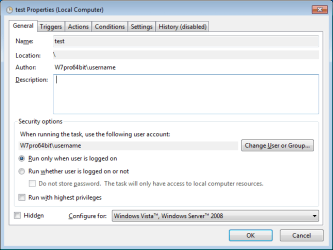
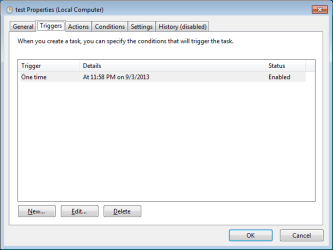
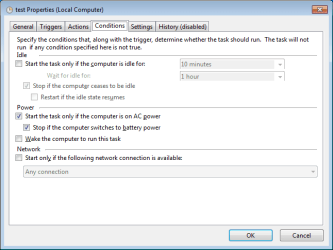
I've followed this thread since the first day that you posted it. I've tried/failed several times to replicate your issue. My 2nd batch file runs just fine no matter if the first file has lost focus or not.

Conditions gleaned from the original post:
1st batch file starts via a scheduled task
1st batch file is left at the pause line while other tasks are performed
(thus the 1st batch file is not in focus for a while)
1st batch file is brought back into focus and "any key" is pressed

I added a ping delay so that I could take the first batch file out of focus again before it called the 2nd batch file... but I got the same results without the ping delay. The 2nd batch file worked every time.


without the ping delay


Click on each image to enlarge:
ST1.png

ST2.png

ST3.png

ST4.png

ST5.png

Instead of us attempting to replicate your failure, please see if you can replicate my success using the simple/tiny batch files shown above (along with the simple scheduled task). Then little by little, add complexity to the 2nd batch file and let's see where it starts to fail.
 

My Computer My Computer

At a glance

W7 Pro SP1 64biti78GBIntel HD Graphics
Computer type
Laptop
Computer Manufacturer/Model Number
Employer provided Dell Latitude
OS
W7 Pro SP1 64bit
CPU
i7
Memory
8GB
Graphics Card(s)
Intel HD Graphics
Hard Drives
crappy SSD
Antivirus
Employer mandated Symantec Endpoint Protection
Browser
Pale Moon 64bit, IE11 64bit & Chrome 64bit
this was a great idea. unfortunately I seem to get the same results regardless of how I am firing this - it seems that with the 'prompt' (first batch) even IF bundled into a single file the "PAUSE" action or something some how causes the second batch (even if embedded in the same bat file) to ignore the execution activities of backing up.....the concept is so simple - msft makes things so complicated!!!

Hmm, it may be easier to learn a basic like scripting language, such as AutoIt, than to circumvent a weird quirk in the shell. If nothing else, coming up with another implementation may give more understanding. Often the first program I write to do something allows me to see how the design sucked. Then I rewrite it using the knowledge gained via trial and error. :)
 

My Computer My Computer

At a glance

Windows 7 32 bitAMD 5200+ dual core2 GBNVidia GeForce 6150SE 128 MB
Computer Manufacturer/Model Number
HP Media Center
OS
Windows 7 32 bit
CPU
AMD 5200+ dual core
Memory
2 GB
Graphics Card(s)
NVidia GeForce 6150SE 128 MB
Monitor(s) Displays
CRT
Screen Resolution
1280x1024
Hard Drives
500 GB Sata internal :

SIIG USB 3.0 docking stations w/WD Caviar Black 6 Gb/s drives
Keyboard
PS/2
Mouse
PS/2 Wheel Mouse
Other Info
SIIG USB 3.0 PCIexpress card.
thanks UsernameIssues and MilesAhead.

UsernameIssues - I took your advice and tried to replicate what you have. I changed my backup script to the exact same simple temp file directory, single file named "hi.txt" and a copy to a server directory. Bat file 1 opening, pausing, losing focus, getting focus with an 'any key' press and firing the simple copy command from bat file #2 - same results - if I 'lose focus' the second file runs and 'blinks' like it's run but no file is copied. IF I fire the 1st file again (either manually OR using the trigger timer) and in the first DOS screen as it's active, without 'losing focus' hit any key - the file is copied. I cannot replicate your success - my task schedule settings are identical to yours - except for I have it running with highest privileges, starting only if a specific network connection is available, and wake computer to run task. but these don't explain why losing focus will affect the execution of the second file.

thank you for the time and thought you have put in with the video and pictures - most helpful. I don't want you to waste any more of your own time worrying about this - I may have to "*gasp*" put it in the hands of the users where they actually intentionally click to back up periodically - and have to remember to. until I can put new sofware on our server that will extract the info nightly for them.... so much for being clever with bat files!

thank you all for your input - of course I'm interested in hearing more suggestions if anyone is interested/challenged - but I've clearly exhausted everything I can think of at this time with my limited abilities. thank you again.
 

My Computer My Computer

At a glance

Various - W7 32bit, 64bit
Computer type
PC/Desktop
OS
Various - W7 32bit, 64bit
How weird that it fails for you.

You might try copying the file to another spot on the local hard drive,
edit: to clarify - I'm suggesting to have the batch file copy a test file from one place on the local drive to another place on the local drive.

When I first saw this thread, I was ready to post a suggestion that you move towards using Cobian Backup. I use it to backup compress and backup Outlook PST files while they are still in use. That Cobian tool also removes old backups... I keep 90 days worth for most users.

But - I'm unsure what the for sale sign means on Cobian's tool. I hope that it will remain free for business use.
 
Last edited:

My Computer My Computer

At a glance

W7 Pro SP1 64biti78GBIntel HD Graphics
Computer type
Laptop
Computer Manufacturer/Model Number
Employer provided Dell Latitude
OS
W7 Pro SP1 64bit
CPU
i7
Memory
8GB
Graphics Card(s)
Intel HD Graphics
Hard Drives
crappy SSD
Antivirus
Employer mandated Symantec Endpoint Protection
Browser
Pale Moon 64bit, IE11 64bit & Chrome 64bit
I may have to "*gasp*" put it in the hands of the users where they actually intentionally click to back up periodically - and have to remember to.
Why don't you at least leave the Scheduled Task in place to pop-up and remind them to do a backup--make it fun by saying "Close all programs, click Backup on your desktop, and go for a coffee/soda!" or something.

That will at least get you part-way there (and give you an "out" when someone inevitably ignores the warnings and one day loses valuable data).

I think a reminder is valuable--whenever I ask someone about when they last made a backup they say "uh, I think it was just last week" and of course it turns-out it was last MONTH or even worse!

:o:geek:
 

My Computer My Computer

At a glance

Windows 7 Professional 64bitIntel Core i7 4600M @ 2.90GHz16.0GB Dual-Channel DDR3 @ 797MHz (11-11-11-28)Intel HD Graphics 4600 (Dell) 2048MB ATI AMD ...
Computer type
Laptop
Computer Manufacturer/Model Number
Dell Latitude E6540 Laptop
OS
Windows 7 Professional 64bit
CPU
Intel Core i7 4600M @ 2.90GHz
Motherboard
Dell Inc. 0CYT5F (SOCKET 0)
Memory
16.0GB Dual-Channel DDR3 @ 797MHz (11-11-11-28)
Graphics Card(s)
Intel HD Graphics 4600 (Dell) 2048MB ATI AMD Radeon HD 8790M
Sound Card
Realtek High Definition Audio
Monitor(s) Displays
HP ZR30w (2560x1600@60Hz)
Hard Drives
256GB LITEONIT LMT-256M6M-41 mm SATA (SSD)
1TB Samsung SSD 860 EVO mSATA SATA (SSD)
2TB USB 3.0 USB Device
115GB SanDisk Ultra Fit USB
Other Info
Multiple Dell E-Port Plus II Port Replicator/Docking Stations 0Y72NH USB 3.0 + 130W AC Adapters
Back
Top