Using a customized restore disk to do a custom install

dogsbodyorg

New member
Local time
4:09 PM
Messages
1
I have just bought an HP Pavilion laptop which comes with "Windows 7 Home Prem OA". I have created a set of restore disks (3 DVD's) which I have tested and successfully restore the entire laptop.

I want to boot this laptop into many different operating systems and so need to be able to do a customised install of Windows but the disc's won't let me.

Does anyone know how to make a standard MS install CD/DVD from these specialist disks?

Does anyone know how I can get a standard MS install CD/DVD from somewhere? Why doesn't MS allow you to download them from the site?

I have a valid licence key, I just want to use it!

Thank you very much in advance for any help.
 

My Computer

OS
Ubuntu
1) Restore disks like HP's are customized with OEM info, drivers and various propreitary software (bloatware). Thats why they span 2-3 dvds. Problem is, a tool like 7lite or 7customizer would ask for an install.wim, which in this case would be split across multiple dvds and would need to be aggregated into a single, working .wim file for anybody to do anything meaningful with it. Its a very iffy process and very tedious with no guarantee of success. Take a look at this thread if this topic interests you.

Accessing HP Recovery Disc Files: solved

2) You can borrow a win7 dvd from a friend or download one from the web (dont ask where!), then install the same version that your machine came preinstalled with and phone-activate using the COA sticker key at the bottom of your computer. Here are a couple of how to's.

http://www.sevenforums.com/tutorials/85813-windows-7-universal-installation-disc-create.html

http://www.sevenforums.com/tutorials/18715-activate-windows-7-phone.html

The reason MS doesnt allow easily available downloads is to thwart piracy, IMO. Also when you purchase genuine windows (other than the OEM computers), you invariably get a disk or .iso file with it.
 

My Computer

Computer Manufacturer/Model Number
Too many to describe...
OS
Windows 7 x64 pro/ Windows 7 x86 Pro/ XP SP3 x86
Why do you need a customizable install DVD? You can shrink the existing partition Windows 7 is installed on then create new partitions from the free space and install other OSes, like XP, or various versions of Linux (with care of course).

Even better, install Oracle (used to be Sun) VirtualBox then install anything you want, from DOS 6.3, XP, Vista or another copy of Windows 7, to the latest and greatest Linux release as virtual guests.

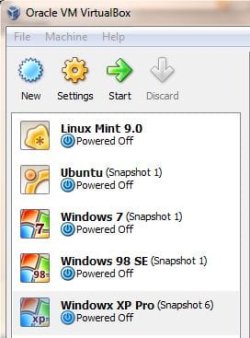
I have Win 98 Se, Windows XP Pro, Ubuntu Linux and Linux Mint all available as guests under Oracle VB.

OracleVB.jpg
 

My Computer

Computer type
PC/Desktop
Computer Manufacturer/Model Number
Lenovo IdeaCenter 450
OS
Windows 10 Pro X64
CPU
Intel Quad Core i7-4770 @ 3.4Ghz
Memory
16.0GB PC3-12800 DDR3 SDRAM 1600 MHz
Graphics Card(s)
Intel Integrated HD Graphics
Sound Card
Realtek HD Audio
Monitor(s) Displays
HP 22" LCD
Screen Resolution
1680 x 1050
Hard Drives
250GB Samsung EVO SATA-3 SSD
2TB Seagate ST2000DM001 SATA-2
1.5TB Seagate ST3150041AS SATA
Keyboard
Dell USB
Mouse
Lenovo USB
Internet Speed
Cable via Road Runner 3MB Upload, 30MB Download
Antivirus
Windows Defender, MBAM Pro, MBAE
Browser
Seamonkey
Other Info
UEFI/GPT
PLDS DVD-RW DH16AERSH
Borrow or find a Win7 install DVD, extract the ISO using ImgBurn then google ei.cfg removal tool to unlock all versions if necessary.

Extract favorite apps from HP Recov disks using this: http://www.sevenforums.com/installa...are-after-clean-win-7-install.html#post488270

Get any drivers the installer or optional Updates don't supply from HP Support Downloads webpage for your model.

There are many reasons to have a Win7 installer to Repair, clean reinstall for much better performance.
 
Back
Top