Solved Using a Graphic Equaliser With Realtek Audio?

Chris Nicola

New member
Power User
VIP
Local time
10:47 PM
Messages
170
I am playing an analog device through my sound card with 2 channel stereo and am wondering if Realtek have a built in graphic equalizer somewhere as I can't find one. If Realtek don't have an equalizer is there a third party software that can do the job? Your advice would be appreciated.

Kind Regards

Chris

PS The Realtek audio driver shows up as 6.0.1.7083.
 

My Computer

Computer type
PC/Desktop
Computer Manufacturer/Model Number
Desktop Custom built, Laptop Lenovo G575 Model 20081
OS
Desktop Win 10 Pro 64 bit, Laptop Win 7 Home 64 bit
CPU
Desktop Intel i7 4790 CPU 3.6 GHz, Laptop AMD C-50 1GHz
Motherboard
ASUS H81 Gamer
Memory
Desktop 16 Gbt, Laptop 4 Gbt
Graphics Card(s)
Desktop nvidea GeForce NTX960, Laptop AMD Raedon HD 6250M
Sound Card
Desktop onboard Realtec high definition audio nvidea HD aud
Monitor(s) Displays
BENQ G900 Digital 19 inch
Screen Resolution
1024 x 768
Hard Drives
Silicon Power SSD SATA 3.0 450b Gbt
Seagate 4 Tbt SSHD
PSU
Thermaltake 1000W
Case
Thermaltake
Cooling
Onboard case fans
Keyboard
Standard PS/2
Mouse
A4 Tech optical wireless PS/2
Internet Speed
10 Mbps
Antivirus
Microsoft Security Essentials
Other Info
DVD Samsung TSST corp CDDVDW - SATA
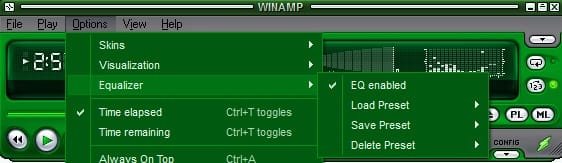
Hi Chris Nicola, I wouldn't bother setting Realtek, just set the app you use to play music. I use Winamp.

RR.jpg
 

My Computer

Computer Manufacturer/Model Number
Look in my Signature.
OS
Win7 H.Prem. 32bit+SP1
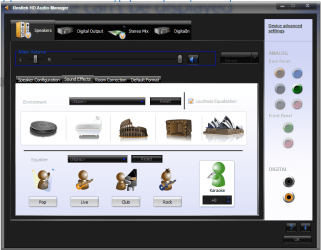
Realtek (all that I've seen) contains EQ for various settings.

Go to Control Panel/Hardware and Sound. Access the RealTek HD Audio Manager. Using the RealTek it will be applicable to any audio, not just within a media player.

See screen shot:
 

Attachments

  • Realtek EQ.JPG
    Realtek EQ.JPG
    62.3 KB · Views: 1

My Computer

Computer type
PC/Desktop
Computer Manufacturer/Model Number
My Own Build
OS
Windows 10 64 bit
CPU
Intel i7 6700K
Motherboard
ASUS ROG Maximus VIII Hero
Memory
16GB Corsair Dominator
Graphics Card(s)
Intel CPU Graphics
Sound Card
RealTek
Monitor(s) Displays
27" Dell S2719dgf
Screen Resolution
2560X1440
Hard Drives
1 TB Samsung 850 EVO SSD for Win 10 Pro
500GB Samsung 850 EVO SSD for Win 10 Insider
2 TB drive for backup
PSU
EVGA Supernova 750G2
Case
BeQuiet Silent Base 600
Cooling
Deepcool Captain 120EX
Keyboard
Microsoft Wireless 2000
Mouse
Microsoft wireless
Internet Speed
100 MB/sec (Cable)
Antivirus
Microsoft Defender and Malwarebytes
Browser
Edge/Firefox
Other Info
Cakewalk (Sonar) by BandLab and Studio One 4.1 Pro recording studio software. MOTU 896Mk3 Hybrid recording interface, Frontier Tranzport wireless control unit, Behringer X-Touch Control Surface.
Five USB connected optical drives for CD Audio production using Nero BurningROM
PS The Realtek audio driver shows up as 6.0.1.7083.
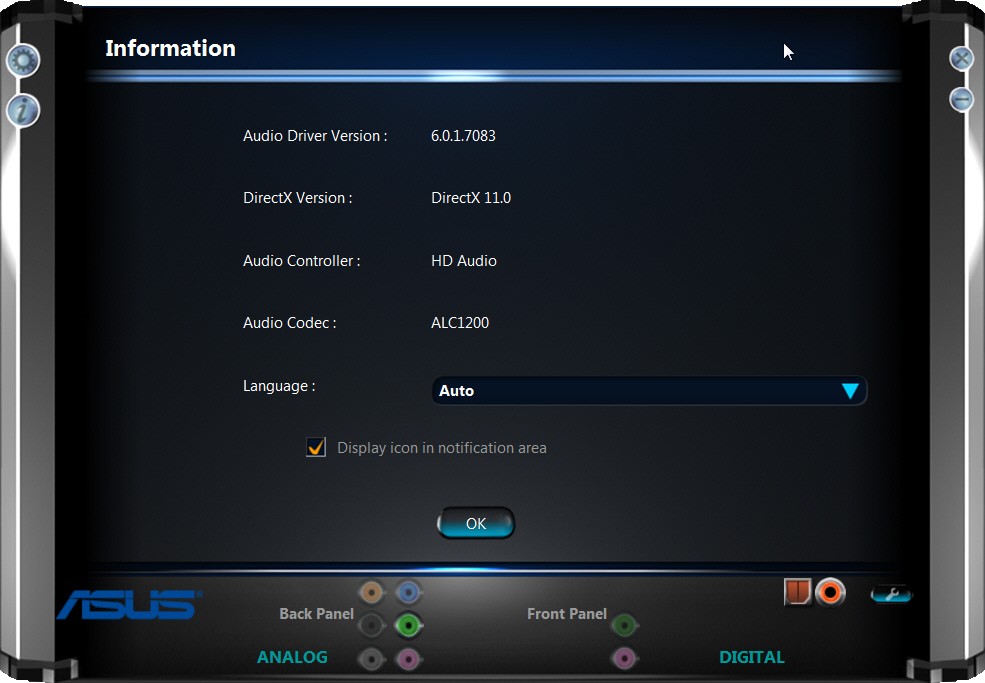
This is the latest Realtek driver, but out of curiosity what is the chip on your motherboard?

You should have the "Realtek HD Audio Manager" icon in your system tray. Right-click on it and select "sound manager" to open it. Then click on the "i" (info) button to display details of your Realtek chip.

xobo.jpg


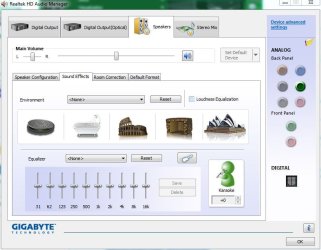
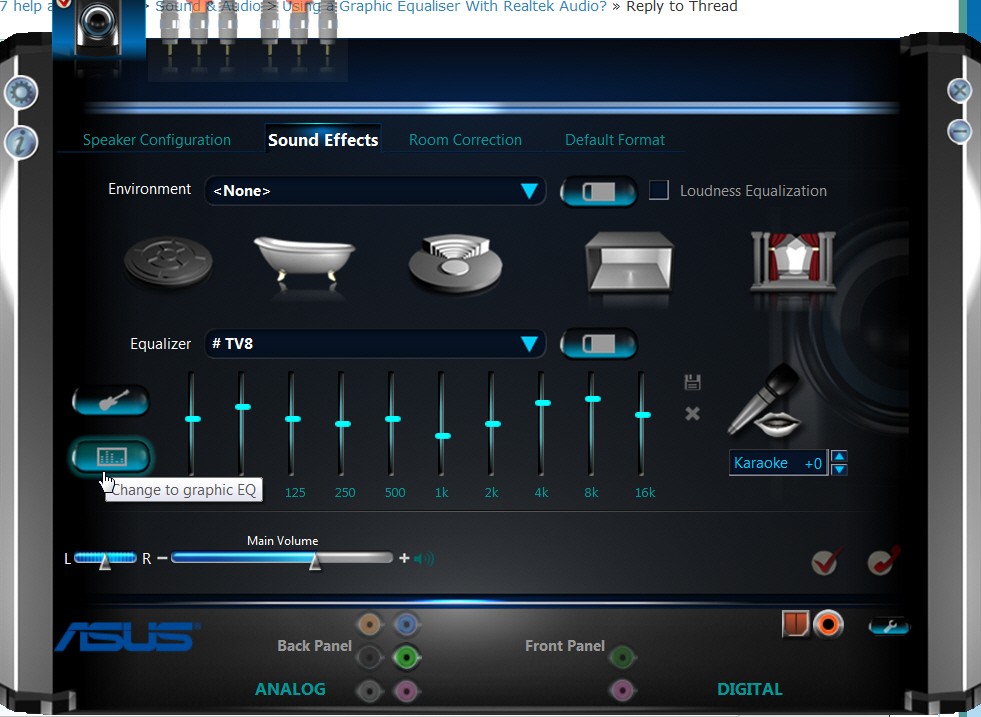
To get to the Realtek EQ (assuming your chip supports it), select the "Sound Effects" tab from the menu at the top of the opening presentation when you get into "Realtek HD Audio Manager". Then down about 2/3 of the way on the left side of the window there is a "change to graphic EQ" button. Click on it, and you'll now have a 10-band EQ that you can adjust. The adjustments will have a real-time effect on sound, so if you're playing something while adjusting that's a good way to come up with the slider settings you like... at least for that particular sound/music that you're playing.

When you're satisifed with that particular EQ setup, push the "save" (floppy disk icon) button to the upper-right of the EQ itself. Pick a name to save the EQ as, and it's now in effect indefinitely until you change it or select some other preset or one of your own other custom-saved EQ settings.

m1xm.jpg


Note that Realtek's GUI is now potentially different (i.e. a different skin) depending on manufacturer and motherboard. My screenshots above are from an ASUS board, but whether your "skin" is the same or not the HD Audio Manager and "sound effects" tab is still the place to set up your collection of custom-saved EQ's, both to save them and then to select them.
 

My Computer

Computer type
PC/Desktop
Computer Manufacturer/Model Number
Home-built, two systems (1) and (2)
OS
Windows 7 Pro x64 (1), Win7 Pro X64 (2)
CPU
i5-3350p 3.1Ghz/6MB-cache (1); E8400 3.0Ghz/6MB-cache (2)
Motherboard
ASUS P8Z77-V Pro (1); ASUS P5Q3 (2)
Memory
8GB PC3-12800 DDR3 (1); 4GB PC3-10600 DDR3 (2)
Graphics Card(s)
ATI HD7750 (1), (see TV cards); ATI R7 250 (2)
Sound Card
Realtek ALC892 HD Audio (1); Realtek ALC1200 HD Audio (2)
Monitor(s) Displays
Eizo HD2441W LCD, Eizo S2433W (1); Eizo 24" S2433W (2)
Screen Resolution
1920x1200, 1920x1200 (1); 1920x1200 (2)
Hard Drives
(1) 1TB SATA-II (7200RPM), 2x2TB SATA-III (7200RPM), 250GB SATA-III (10000RPM) for OS; 2x2TB external USB 3.0

(2) 320GB SATA-II (7200RPM), 750GB SATA-II (7200RPM), 150GB SATA-II (10000RPM) for OS; 2TB external USB 3.0
PSU
Nesteq ECS-6001 600W (1); Nesteq ECS-5001 500W (2)
Case
Acousti-Case 360 (1) and (2)
Cooling
Noctua NH-U12P SE2 for CPU, 2x120mm case fans (1) and (2)
Keyboard
IBM PS/2 (1) and (2)
Mouse
Logitech MX Revolution wireless (1); Microsoft wired (2)
Internet Speed
100mbps down / 10mbps up
Antivirus
Microsoft Security Essentials; Malwarebyte Anti-Malware Pro
Browser
Firefox
Other Info
Ceton InfiniTV 4-tuner cablecard-enabled TV card as well as Hauppauge HVR-2250 OTA/ATSC 2-tuner TV card in (1), running under Win7 WMC
Thank you all for your replies. I finally found it in the control panel under Hardware and sound / Realtek audio manager. I also found it in the system tray. It was so simple and I missed it for so long. The graphic equalizer and the presets are all there as seen in the screenshot from Fireberd. I was previously looking under the sound icon in control panel instead of Realtek HD audio manager. Thank you all for your help.


Kind Regards

Chris
 
Last edited:

My Computer

Computer type
PC/Desktop
Computer Manufacturer/Model Number
Desktop Custom built, Laptop Lenovo G575 Model 20081
OS
Desktop Win 10 Pro 64 bit, Laptop Win 7 Home 64 bit
CPU
Desktop Intel i7 4790 CPU 3.6 GHz, Laptop AMD C-50 1GHz
Motherboard
ASUS H81 Gamer
Memory
Desktop 16 Gbt, Laptop 4 Gbt
Graphics Card(s)
Desktop nvidea GeForce NTX960, Laptop AMD Raedon HD 6250M
Sound Card
Desktop onboard Realtec high definition audio nvidea HD aud
Monitor(s) Displays
BENQ G900 Digital 19 inch
Screen Resolution
1024 x 768
Hard Drives
Silicon Power SSD SATA 3.0 450b Gbt
Seagate 4 Tbt SSHD
PSU
Thermaltake 1000W
Case
Thermaltake
Cooling
Onboard case fans
Keyboard
Standard PS/2
Mouse
A4 Tech optical wireless PS/2
Internet Speed
10 Mbps
Antivirus
Microsoft Security Essentials
Other Info
DVD Samsung TSST corp CDDVDW - SATA
No Sound Effects Tab or Graphic EQ

I know exactly what I want because it looked a bit like in dsperber's post on my old Acer.

I have just reinstalled the most recent Realtek driver, codec and software package direct from their site, and I can't get a graphic EQ up using HD audio manager. I can only see Default Format and Speaker Configuration tabs.

win 7 64 bit. aspire 5750g.

I appreciate this thread has been inactive a long time but my problem is almost directly related.

P.S. I tried clicking most of the exe.s in the realtek install folder and nothing happened. rthdcpl.exe vncutil64 etc.
 

My Computer

Computer type
Laptop
Computer Manufacturer/Model Number
Acer Aspire 5750G
OS
Win 7 Home Premium 64 bit
CPU
core i7-2630QM
Memory
6GB DDR2
Graphics Card(s)
Intel HD Graphics discrete chipset
Hard Drives
750GB sata.
samsung hn-750mbb
Antivirus
avast free
Browser
chrome

My Computer

Computer type
PC/Desktop
Computer Manufacturer/Model Number
Desktop Custom built, Laptop Lenovo G575 Model 20081
OS
Desktop Win 10 Pro 64 bit, Laptop Win 7 Home 64 bit
CPU
Desktop Intel i7 4790 CPU 3.6 GHz, Laptop AMD C-50 1GHz
Motherboard
ASUS H81 Gamer
Memory
Desktop 16 Gbt, Laptop 4 Gbt
Graphics Card(s)
Desktop nvidea GeForce NTX960, Laptop AMD Raedon HD 6250M
Sound Card
Desktop onboard Realtec high definition audio nvidea HD aud
Monitor(s) Displays
BENQ G900 Digital 19 inch
Screen Resolution
1024 x 768
Hard Drives
Silicon Power SSD SATA 3.0 450b Gbt
Seagate 4 Tbt SSHD
PSU
Thermaltake 1000W
Case
Thermaltake
Cooling
Onboard case fans
Keyboard
Standard PS/2
Mouse
A4 Tech optical wireless PS/2
Internet Speed
10 Mbps
Antivirus
Microsoft Security Essentials
Other Info
DVD Samsung TSST corp CDDVDW - SATA
Aye I can see the audio manager, but in it I can't see a sound effects tab or a digital output tab.
The speakers tab has "speaker configuration" and "default format" tabs and the microphone tab has "microphone effects" and "default format" tabs, and that's all i can see. no EQ.
 

My Computer

Computer type
Laptop
Computer Manufacturer/Model Number
Acer Aspire 5750G
OS
Win 7 Home Premium 64 bit
CPU
core i7-2630QM
Memory
6GB DDR2
Graphics Card(s)
Intel HD Graphics discrete chipset
Hard Drives
750GB sata.
samsung hn-750mbb
Antivirus
avast free
Browser
chrome
Also, when I plug something into the headphone jack a new turquoise window pops up, but this too has no eq options, only Audio I/O and Power Management. The Audio I/O tab has microphone and speaker options and a demo sound window. that is all.
 

My Computer

Computer type
Laptop
Computer Manufacturer/Model Number
Acer Aspire 5750G
OS
Win 7 Home Premium 64 bit
CPU
core i7-2630QM
Memory
6GB DDR2
Graphics Card(s)
Intel HD Graphics discrete chipset
Hard Drives
750GB sata.
samsung hn-750mbb
Antivirus
avast free
Browser
chrome
Please can you send a screenshot of what you can actually see.

Kind Regards
Chris
 

My Computer

Computer type
PC/Desktop
Computer Manufacturer/Model Number
Desktop Custom built, Laptop Lenovo G575 Model 20081
OS
Desktop Win 10 Pro 64 bit, Laptop Win 7 Home 64 bit
CPU
Desktop Intel i7 4790 CPU 3.6 GHz, Laptop AMD C-50 1GHz
Motherboard
ASUS H81 Gamer
Memory
Desktop 16 Gbt, Laptop 4 Gbt
Graphics Card(s)
Desktop nvidea GeForce NTX960, Laptop AMD Raedon HD 6250M
Sound Card
Desktop onboard Realtec high definition audio nvidea HD aud
Monitor(s) Displays
BENQ G900 Digital 19 inch
Screen Resolution
1024 x 768
Hard Drives
Silicon Power SSD SATA 3.0 450b Gbt
Seagate 4 Tbt SSHD
PSU
Thermaltake 1000W
Case
Thermaltake
Cooling
Onboard case fans
Keyboard
Standard PS/2
Mouse
A4 Tech optical wireless PS/2
Internet Speed
10 Mbps
Antivirus
Microsoft Security Essentials
Other Info
DVD Samsung TSST corp CDDVDW - SATA
As requested.

The window on the right is what i get when i click on HD audio manager in control panel, the window on the left when I plug in headphones.

realtek.png


Sorry it took so long ive been busy all week.
 

My Computer

Computer type
Laptop
Computer Manufacturer/Model Number
Acer Aspire 5750G
OS
Win 7 Home Premium 64 bit
CPU
core i7-2630QM
Memory
6GB DDR2
Graphics Card(s)
Intel HD Graphics discrete chipset
Hard Drives
750GB sata.
samsung hn-750mbb
Antivirus
avast free
Browser
chrome
As requested.

The window on the right is what i get when i click on HD audio manager in control panel, the window on the left when I plug in headphones.

Sorry it took so long ive been busy all week.
Did you intend to post a screenshot? Nothing shows. Please edit and try again.
 

My Computer

Computer type
PC/Desktop
Computer Manufacturer/Model Number
Home-built, two systems (1) and (2)
OS
Windows 7 Pro x64 (1), Win7 Pro X64 (2)
CPU
i5-3350p 3.1Ghz/6MB-cache (1); E8400 3.0Ghz/6MB-cache (2)
Motherboard
ASUS P8Z77-V Pro (1); ASUS P5Q3 (2)
Memory
8GB PC3-12800 DDR3 (1); 4GB PC3-10600 DDR3 (2)
Graphics Card(s)
ATI HD7750 (1), (see TV cards); ATI R7 250 (2)
Sound Card
Realtek ALC892 HD Audio (1); Realtek ALC1200 HD Audio (2)
Monitor(s) Displays
Eizo HD2441W LCD, Eizo S2433W (1); Eizo 24" S2433W (2)
Screen Resolution
1920x1200, 1920x1200 (1); 1920x1200 (2)
Hard Drives
(1) 1TB SATA-II (7200RPM), 2x2TB SATA-III (7200RPM), 250GB SATA-III (10000RPM) for OS; 2x2TB external USB 3.0

(2) 320GB SATA-II (7200RPM), 750GB SATA-II (7200RPM), 150GB SATA-II (10000RPM) for OS; 2TB external USB 3.0
PSU
Nesteq ECS-6001 600W (1); Nesteq ECS-5001 500W (2)
Case
Acousti-Case 360 (1) and (2)
Cooling
Noctua NH-U12P SE2 for CPU, 2x120mm case fans (1) and (2)
Keyboard
IBM PS/2 (1) and (2)
Mouse
Logitech MX Revolution wireless (1); Microsoft wired (2)
Internet Speed
100mbps down / 10mbps up
Antivirus
Microsoft Security Essentials; Malwarebyte Anti-Malware Pro
Browser
Firefox
Other Info
Ceton InfiniTV 4-tuner cablecard-enabled TV card as well as Hauppauge HVR-2250 OTA/ATSC 2-tuner TV card in (1), running under Win7 WMC
It shows for me when I click on the little image button, I can't figure how to embed an image in the post? It should function as a link to my dropbox
 

My Computer

Computer type
Laptop
Computer Manufacturer/Model Number
Acer Aspire 5750G
OS
Win 7 Home Premium 64 bit
CPU
core i7-2630QM
Memory
6GB DDR2
Graphics Card(s)
Intel HD Graphics discrete chipset
Hard Drives
750GB sata.
samsung hn-750mbb
Antivirus
avast free
Browser
chrome
It shows for me when I click on the little image button, I can't figure how to embed an image in the post? It should function as a link to my dropbox
As you can see from Chris Nicola's post #7 above (he, too, posted a Dropbox picture), if you just paste the dropbox URL for the JPG itself into your post, that will provide a usable link in your post that we can click on to see the image. Don't use the "insert image" button.

Normally, inserting an image and having it display in the post itself (as I have done is my own post above) is done by manually sandwiching the URL for the image between a "start image" and "end image" delimiter, i.e. "[ i m g ]" and "[ / i m g ]" (with the spaces removed). But this works for me because I use ImageShack as my web repository for photos that I share this way... I don't use Dropbox.

URL's from ImageShack work fine as the pasted contents for the "insert image" button (and then push the OK button) and that picture is inserted properly and visibly into the post, but Dropbox must not work the same way. Just paste the Dropbox URL for the JPG in your post, as Chris Nicola's done, and then we can click on the link ourselves to see the picture from Dropbox.
 

My Computer

Computer type
PC/Desktop
Computer Manufacturer/Model Number
Home-built, two systems (1) and (2)
OS
Windows 7 Pro x64 (1), Win7 Pro X64 (2)
CPU
i5-3350p 3.1Ghz/6MB-cache (1); E8400 3.0Ghz/6MB-cache (2)
Motherboard
ASUS P8Z77-V Pro (1); ASUS P5Q3 (2)
Memory
8GB PC3-12800 DDR3 (1); 4GB PC3-10600 DDR3 (2)
Graphics Card(s)
ATI HD7750 (1), (see TV cards); ATI R7 250 (2)
Sound Card
Realtek ALC892 HD Audio (1); Realtek ALC1200 HD Audio (2)
Monitor(s) Displays
Eizo HD2441W LCD, Eizo S2433W (1); Eizo 24" S2433W (2)
Screen Resolution
1920x1200, 1920x1200 (1); 1920x1200 (2)
Hard Drives
(1) 1TB SATA-II (7200RPM), 2x2TB SATA-III (7200RPM), 250GB SATA-III (10000RPM) for OS; 2x2TB external USB 3.0

(2) 320GB SATA-II (7200RPM), 750GB SATA-II (7200RPM), 150GB SATA-II (10000RPM) for OS; 2TB external USB 3.0
PSU
Nesteq ECS-6001 600W (1); Nesteq ECS-5001 500W (2)
Case
Acousti-Case 360 (1) and (2)
Cooling
Noctua NH-U12P SE2 for CPU, 2x120mm case fans (1) and (2)
Keyboard
IBM PS/2 (1) and (2)
Mouse
Logitech MX Revolution wireless (1); Microsoft wired (2)
Internet Speed
100mbps down / 10mbps up
Antivirus
Microsoft Security Essentials; Malwarebyte Anti-Malware Pro
Browser
Firefox
Other Info
Ceton InfiniTV 4-tuner cablecard-enabled TV card as well as Hauppauge HVR-2250 OTA/ATSC 2-tuner TV card in (1), running under Win7 WMC
I too am not able to view the eq, only presets. See attached screenshot - How do I get it to display?

-thx
 

Attachments

  • RTMeq.PNG
    RTMeq.PNG
    54 KB · Views: 0

My Computer

Computer type
PC/Desktop
Computer Manufacturer/Model Number
HP (HP-P6212F)
OS
Microsoft Windows 7 Home Premium 64-bit 7601 Multiprocessor Free Service Pack 1
CPU
Pentium(R) Dual-Core CPU E5300 @ 2.60GHz
Motherboard
PEGATRON CORPORATION Benicia
Memory
6.00 GB
Graphics Card(s)
Intel(R) G33/G31 Express Chipset Family
Sound Card
Realtek High Definition Audio
Monitor(s) Displays
24'' HP WS LCD
Screen Resolution
1920 x 1080 x 32 bits (4294967296 colors) @ 60 Hz
Hard Drives
(1) ATA Hitachi HDT72106 SCSI Disk Device (2) Generic- Compact Flash USB Device (3) Generic- MS/MS-Pro USB Device (4) Generic- SD/MMC USB Device (5) Generic- SM/xD-Picture USB Device (6) Verbatim STORE N GO USB Device
Keyboard
Logitech G510s
Mouse
Logitech Trackball M570
Antivirus
Microsoft Security Essentials / Malwarebytes
Browser
IE / Firefox / Chrome
bump.gif
 

My Computer

Computer type
PC/Desktop
Computer Manufacturer/Model Number
HP (HP-P6212F)
OS
Microsoft Windows 7 Home Premium 64-bit 7601 Multiprocessor Free Service Pack 1
CPU
Pentium(R) Dual-Core CPU E5300 @ 2.60GHz
Motherboard
PEGATRON CORPORATION Benicia
Memory
6.00 GB
Graphics Card(s)
Intel(R) G33/G31 Express Chipset Family
Sound Card
Realtek High Definition Audio
Monitor(s) Displays
24'' HP WS LCD
Screen Resolution
1920 x 1080 x 32 bits (4294967296 colors) @ 60 Hz
Hard Drives
(1) ATA Hitachi HDT72106 SCSI Disk Device (2) Generic- Compact Flash USB Device (3) Generic- MS/MS-Pro USB Device (4) Generic- SD/MMC USB Device (5) Generic- SM/xD-Picture USB Device (6) Verbatim STORE N GO USB Device
Keyboard
Logitech G510s
Mouse
Logitech Trackball M570
Antivirus
Microsoft Security Essentials / Malwarebytes
Browser
IE / Firefox / Chrome
I'm in the exact same situation as jargraj, and I think we even have the same laptop... This problem has been bothering me ever since I bought this laptop, and I never found a solution for it. I really hope somebody can give jargraj and me a solution for it, because it really sucks.
I'm sorry I might have resurrected the thread, but this is the first time I found a relevant thread for my problem.

I hope to see a solution real soon.

Thanks in advance
 

My Computer

Computer type
PC/Desktop
OS
Windows 7 Home Premium 64bit

My Computer

Computer type
PC/Desktop
Computer Manufacturer/Model Number
Desktop Custom built, Laptop Lenovo G575 Model 20081
OS
Desktop Win 10 Pro 64 bit, Laptop Win 7 Home 64 bit
CPU
Desktop Intel i7 4790 CPU 3.6 GHz, Laptop AMD C-50 1GHz
Motherboard
ASUS H81 Gamer
Memory
Desktop 16 Gbt, Laptop 4 Gbt
Graphics Card(s)
Desktop nvidea GeForce NTX960, Laptop AMD Raedon HD 6250M
Sound Card
Desktop onboard Realtec high definition audio nvidea HD aud
Monitor(s) Displays
BENQ G900 Digital 19 inch
Screen Resolution
1024 x 768
Hard Drives
Silicon Power SSD SATA 3.0 450b Gbt
Seagate 4 Tbt SSHD
PSU
Thermaltake 1000W
Case
Thermaltake
Cooling
Onboard case fans
Keyboard
Standard PS/2
Mouse
A4 Tech optical wireless PS/2
Internet Speed
10 Mbps
Antivirus
Microsoft Security Essentials
Other Info
DVD Samsung TSST corp CDDVDW - SATA
No I don't even have 4 tabs for my speakers... I only have 2: speaker configuration and default format. ThaThat's the problem.. On my pc downstairs I do have the same window like in your screenshot, but my laptop does not
 

My Computer

Computer type
PC/Desktop
OS
Windows 7 Home Premium 64bit
Back
Top