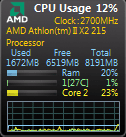
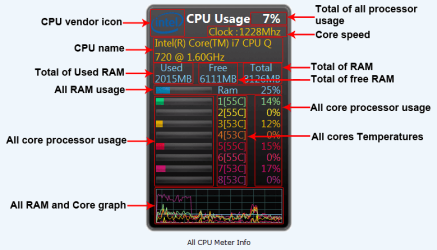
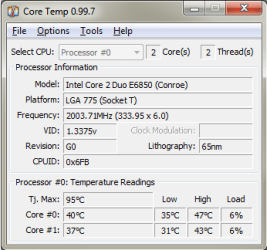
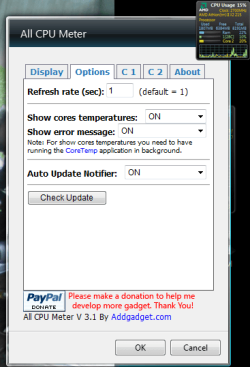
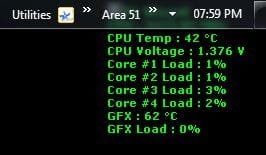
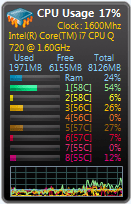
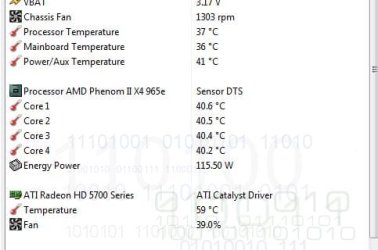
so i'm using the all cpu meter gadget to monitor my system. in the options tab theres a link to download the core temp application to also show your cpu core temperatures. the program says it should show temps for all cores, yet mine only shows 1 core temp out of 2.
does anyone know how to get either core temp or all cpu meter to show all core temperatures?
Attachments
all cpu meter.PNG
5.8 KB
· Views: 11,406
all cpu meter info.PNG
28 KB
· Views: 408
core temp pic.PNG
10.4 KB
· Views: 271
My Computer
Computer type
PC/Desktop
Computer Manufacturer/Model Number
Custom Build and MSI GE60 0ND laptop
OS
windows 7 64bit on both
CPU
AMD FX-8350 @4.6GHz/Intel Core i7-3610QM @2.3GHz
Motherboard
ASUS M5A99X EVO R2.0/MS-16GA
Memory
16GB G.Skill 1866MHz/8GB dual channel 1600MHz
Graphics Card(s)
two Sapphire HD7970 OC 3Gb in crossfire/GTX660M 2Gb
Sound Card
Realtek HD Audio/Realtek HD Audio with THX TruStudio Pro
Monitor(s) Displays
Hanns-G 27" 1080p /Generic PnP Monitor
Screen Resolution
both 1920x1080p 60Hz
Hard Drives
250GB Samsung 840 EVO SSD,
1TB WD Blue
3x2TB WD Greens
/Samsung 840 EVO mSATA
PSU
Corsair HX750/laptop psu
Case
NZXT Source 530
Cooling
CoolerMaster Hyper 212 Evo
Keyboard
Logitech G710+/laptop keyboard by steelseries
Mouse
Logitec G500s/Logitec G500
Internet Speed
50Mbps down/1-3 Mbps up
Other Info
Scythe Kaze Master Pro 5.25 fan controller; APC Back-UPS XS 1500
With any gadget simply look for the wrench/tools symbol when moving the cursor around it since that will be right under the X to close it up. That will typically bring up a display settings type screen.
If that gets you nowhere you may end up needing to remove and then reinstall it again from a fresh download along with going back to the settings.
W7 Ultimate x64/W10 Pro x64/W11 Pro Triple Boot - Main PC W7 Remote PC Micro ATX W7 Pro x64/W11 Pro
CPU
AMD Phenom II X4 975 Deneb 3.6ghz - 965 2nd remote pc
Motherboard
Gigabyte GA-790XTA-UD4-Gigabyte GA-880GM-D2H remote pc
Memory
Kingston Hyper X DDR3 1600 1.5v 16gb - Hyper X Fury 8gb 2nd
Graphics Card(s)
MSI HD Radeon 5750 1gb - MSI HD Radeon 6450 on mini tower
Sound Card
Creative Labs X-Fi Xtreme Audio P - Realtek onooard 2nd case
Monitor(s) Displays
ASUS VW199T-P 19" HP 2082a Main-HP 2082a 20" remote pc
Screen Resolution
Asus 1440x900 - HP 1600x900
Hard Drives
WD Black 1TB HD per OS W7, W10, and pending W11 presently on 500gb OS Drive - Pending Triple 1TB HDs for Spanned Storage/backup volume
Single 2TB external USB enclosure, single 1TB System 7 Host/Boot drive, Pending 8TB external HD for system image b
PSU
Corsair 750TX - primary / Corsair CX600 - second
Case
Antec 900-2 - SSD compatible / NZXT Vulcan mini tower
yea i've tried both of those which is why i'm confused. in the options, there is a drop down menu to "show core temperatures" and i've selected on. but still only one shows up.
Attachments
Capture.PNG
20.1 KB
· Views: 53
My Computer
Computer type
PC/Desktop
Computer Manufacturer/Model Number
Custom Build and MSI GE60 0ND laptop
OS
windows 7 64bit on both
CPU
AMD FX-8350 @4.6GHz/Intel Core i7-3610QM @2.3GHz
Motherboard
ASUS M5A99X EVO R2.0/MS-16GA
Memory
16GB G.Skill 1866MHz/8GB dual channel 1600MHz
Graphics Card(s)
two Sapphire HD7970 OC 3Gb in crossfire/GTX660M 2Gb
Sound Card
Realtek HD Audio/Realtek HD Audio with THX TruStudio Pro
Monitor(s) Displays
Hanns-G 27" 1080p /Generic PnP Monitor
Screen Resolution
both 1920x1080p 60Hz
Hard Drives
250GB Samsung 840 EVO SSD,
1TB WD Blue
3x2TB WD Greens
/Samsung 840 EVO mSATA
PSU
Corsair HX750/laptop psu
Case
NZXT Source 530
Cooling
CoolerMaster Hyper 212 Evo
Keyboard
Logitech G710+/laptop keyboard by steelseries
Mouse
Logitec G500s/Logitec G500
Internet Speed
50Mbps down/1-3 Mbps up
Other Info
Scythe Kaze Master Pro 5.25 fan controller; APC Back-UPS XS 1500
I have the same problem and I've had core temp even before it was supported by the all cpu meter. It's only showing one temp of my 6 cores. I've also tried messing with all the settings in core temp to no avail.
My Computer
OS
Windows 7 Professional 64 bit
CPU
AMD 1090T Thuban BE Phenom II X6 @ 4.1
Motherboard
Gigabyte 870A-UD3 SATA III USB 3.0
Memory
4GB DDR3 Corsair 1600
Graphics Card(s)
Palit GTX 470 1280MB dual fan
Sound Card
Creative SB X-Fi Titanium, Musiland Monitor 02 US 24/192
Monitor(s) Displays
Viewsonic VX2640w 26" 3ms g2g 5ms b2b
Screen Resolution
1920x1200 Native
Hard Drives
OCZ Vertex 2 50GB SSD, WD 1TB SATA III HDD, SG Freeagent 750GB ext, 2X Acomdata 250GB ext
Yep. You're right. I had an older version which showed both processors. I just downloaded and installed the new version and it only shows one processor.
Let's hope they fix it soon. Until it is fixed then I'll stop including CoreTemp in my list of utilities.
My Computer
Computer Manufacturer/Model Number
Toshiba Satellite S875D-S7239 laptop
OS
MS Windows 7 Ultimate SP1 64-bit
CPU
AMD A10-4600M
Motherboard
AMD Pumori (Socket FT1)
Memory
6.00 GB Dual-Channel DDR3 @ 798MHz (11-11-12-28)
Graphics Card(s)
AMD Radeon HD 7660G
Sound Card
High Definition Audio Device
Monitor(s) Displays
Generic PnP Monitor (1600x900@60Hz)
Screen Resolution
1600x900@60Hz
Hard Drives
SSD 119GB Corsair CSSD-V128GB2 ATA Device
Keyboard
Standard PS/2 Keyboard
Mouse
HP Wireless Optical Mobile Mouse Model FHA-3410
Internet Speed
What the local pub, local coffee shop offers.
Other Info
Optical Drive:MATSHITA BD-CMB UJ160B ATA Device
Also have an Asus ha1002xp netbook with Win 7 Ultimate installed.
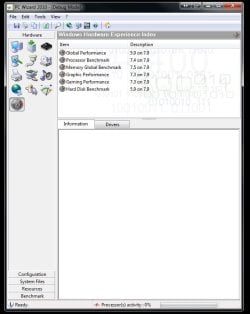
I ran the gadget shortly for the quad here as well and it seems everyone is running into that exact same problem. I simply tossed the gadget idea and went for the PC Wizard 2010 which will be displayed onscreen when minimized showing all cores as well as the main processor temp.
That one however once minimized means logging off to close it out however while it won't interfere with any full screen programs you decide to run.
W7 Ultimate x64/W10 Pro x64/W11 Pro Triple Boot - Main PC W7 Remote PC Micro ATX W7 Pro x64/W11 Pro
CPU
AMD Phenom II X4 975 Deneb 3.6ghz - 965 2nd remote pc
Motherboard
Gigabyte GA-790XTA-UD4-Gigabyte GA-880GM-D2H remote pc
Memory
Kingston Hyper X DDR3 1600 1.5v 16gb - Hyper X Fury 8gb 2nd
Graphics Card(s)
MSI HD Radeon 5750 1gb - MSI HD Radeon 6450 on mini tower
Sound Card
Creative Labs X-Fi Xtreme Audio P - Realtek onooard 2nd case
Monitor(s) Displays
ASUS VW199T-P 19" HP 2082a Main-HP 2082a 20" remote pc
Screen Resolution
Asus 1440x900 - HP 1600x900
Hard Drives
WD Black 1TB HD per OS W7, W10, and pending W11 presently on 500gb OS Drive - Pending Triple 1TB HDs for Spanned Storage/backup volume
Single 2TB external USB enclosure, single 1TB System 7 Host/Boot drive, Pending 8TB external HD for system image b
PSU
Corsair 750TX - primary / Corsair CX600 - second
Case
Antec 900-2 - SSD compatible / NZXT Vulcan mini tower
ok. looks like we'll just have to wait for an update for that to work.
in the meantime, is PC wizard 2010 different from cpuid? because i was reading somewhere in another thread where someone was looking for a program to monitor core temps. he ended up running like 4 different programs at once to compare each. he said that cpuid was always monitoring 10 degrees higher than the others.
pros and cons of pc wizard or cpuid? or are there better programs out there that i'm not seeing?
thanks for the help guys
My Computer
Computer type
PC/Desktop
Computer Manufacturer/Model Number
Custom Build and MSI GE60 0ND laptop
OS
windows 7 64bit on both
CPU
AMD FX-8350 @4.6GHz/Intel Core i7-3610QM @2.3GHz
Motherboard
ASUS M5A99X EVO R2.0/MS-16GA
Memory
16GB G.Skill 1866MHz/8GB dual channel 1600MHz
Graphics Card(s)
two Sapphire HD7970 OC 3Gb in crossfire/GTX660M 2Gb
Sound Card
Realtek HD Audio/Realtek HD Audio with THX TruStudio Pro
Monitor(s) Displays
Hanns-G 27" 1080p /Generic PnP Monitor
Screen Resolution
both 1920x1080p 60Hz
Hard Drives
250GB Samsung 840 EVO SSD,
1TB WD Blue
3x2TB WD Greens
/Samsung 840 EVO mSATA
PSU
Corsair HX750/laptop psu
Case
NZXT Source 530
Cooling
CoolerMaster Hyper 212 Evo
Keyboard
Logitech G710+/laptop keyboard by steelseries
Mouse
Logitec G500s/Logitec G500
Internet Speed
50Mbps down/1-3 Mbps up
Other Info
Scythe Kaze Master Pro 5.25 fan controller; APC Back-UPS XS 1500
I've gotten fond of using SpeedFan as a monitor of temps. I'll probably endup letting it run at startup since I'm running it frequently. During the summer and out in a beer garden I like to keep an eye on the temp.
My Computer
Computer Manufacturer/Model Number
Toshiba Satellite S875D-S7239 laptop
OS
MS Windows 7 Ultimate SP1 64-bit
CPU
AMD A10-4600M
Motherboard
AMD Pumori (Socket FT1)
Memory
6.00 GB Dual-Channel DDR3 @ 798MHz (11-11-12-28)
Graphics Card(s)
AMD Radeon HD 7660G
Sound Card
High Definition Audio Device
Monitor(s) Displays
Generic PnP Monitor (1600x900@60Hz)
Screen Resolution
1600x900@60Hz
Hard Drives
SSD 119GB Corsair CSSD-V128GB2 ATA Device
Keyboard
Standard PS/2 Keyboard
Mouse
HP Wireless Optical Mobile Mouse Model FHA-3410
Internet Speed
What the local pub, local coffee shop offers.
Other Info
Optical Drive:MATSHITA BD-CMB UJ160B ATA Device
Also have an Asus ha1002xp netbook with Win 7 Ultimate installed.
i've got one other issue related to temperature stuff, i'm not sure where to post it so please edit and move this post if necessary.
i recently installed the Ultra ChillTec Black. It has its own monitoring stuff with it so it doesn't plug into the motherboard like a regular cpu fan. this brings the problem of the computer shutting down within 5 seconds of boot up saying "cpu failure, shutting down to protect your computer" or some jazz like that.
i got the computer running by plugging in the old fan and just setting it down next to the chilltec inside the case, but i'd like to resolve the issue properly.
Ultra tech support said it is usually something to do with hardware monitoring in the motherboard bios, but they didnt know how to tell me to fix it. i can't find the manufacturer of my mobo and HP tech support is full of crap (45mins on hold just to tell me the manufacturer is "athleon" ...searched all night and i don't think thats correct).
any help would be appreciated.
My Computer
Computer type
PC/Desktop
Computer Manufacturer/Model Number
Custom Build and MSI GE60 0ND laptop
OS
windows 7 64bit on both
CPU
AMD FX-8350 @4.6GHz/Intel Core i7-3610QM @2.3GHz
Motherboard
ASUS M5A99X EVO R2.0/MS-16GA
Memory
16GB G.Skill 1866MHz/8GB dual channel 1600MHz
Graphics Card(s)
two Sapphire HD7970 OC 3Gb in crossfire/GTX660M 2Gb
Sound Card
Realtek HD Audio/Realtek HD Audio with THX TruStudio Pro
Monitor(s) Displays
Hanns-G 27" 1080p /Generic PnP Monitor
Screen Resolution
both 1920x1080p 60Hz
Hard Drives
250GB Samsung 840 EVO SSD,
1TB WD Blue
3x2TB WD Greens
/Samsung 840 EVO mSATA
PSU
Corsair HX750/laptop psu
Case
NZXT Source 530
Cooling
CoolerMaster Hyper 212 Evo
Keyboard
Logitech G710+/laptop keyboard by steelseries
Mouse
Logitec G500s/Logitec G500
Internet Speed
50Mbps down/1-3 Mbps up
Other Info
Scythe Kaze Master Pro 5.25 fan controller; APC Back-UPS XS 1500
FREE. Operating System, CPU and Temp, Ram, Motherboard, Graphics, Hard Drives, Optical Drives, Audio, Peripherals, Network info.
Simply put—this is the best and it’s free!
My Computer
Computer Manufacturer/Model Number
Toshiba Satellite S875D-S7239 laptop
OS
MS Windows 7 Ultimate SP1 64-bit
CPU
AMD A10-4600M
Motherboard
AMD Pumori (Socket FT1)
Memory
6.00 GB Dual-Channel DDR3 @ 798MHz (11-11-12-28)
Graphics Card(s)
AMD Radeon HD 7660G
Sound Card
High Definition Audio Device
Monitor(s) Displays
Generic PnP Monitor (1600x900@60Hz)
Screen Resolution
1600x900@60Hz
Hard Drives
SSD 119GB Corsair CSSD-V128GB2 ATA Device
Keyboard
Standard PS/2 Keyboard
Mouse
HP Wireless Optical Mobile Mouse Model FHA-3410
Internet Speed
What the local pub, local coffee shop offers.
Other Info
Optical Drive:MATSHITA BD-CMB UJ160B ATA Device
Also have an Asus ha1002xp netbook with Win 7 Ultimate installed.
awesome! looks like more late night research and a midnight phone call again LoL. thanks you guys! ill be checking into those programs when i get off work.
by the way, after that backup issue i got windows to back up my computer. so i finally installed my AMD Phenom II x4 965 3.4ghz and my Ultra ChillTec Black edition cooler. all's running well so far!
thanks again A Guy and karlsnooks.
thanks for your help too night hawk. ill be looking into all those programs guys.
My Computer
Computer type
PC/Desktop
Computer Manufacturer/Model Number
Custom Build and MSI GE60 0ND laptop
OS
windows 7 64bit on both
CPU
AMD FX-8350 @4.6GHz/Intel Core i7-3610QM @2.3GHz
Motherboard
ASUS M5A99X EVO R2.0/MS-16GA
Memory
16GB G.Skill 1866MHz/8GB dual channel 1600MHz
Graphics Card(s)
two Sapphire HD7970 OC 3Gb in crossfire/GTX660M 2Gb
Sound Card
Realtek HD Audio/Realtek HD Audio with THX TruStudio Pro
Monitor(s) Displays
Hanns-G 27" 1080p /Generic PnP Monitor
Screen Resolution
both 1920x1080p 60Hz
Hard Drives
250GB Samsung 840 EVO SSD,
1TB WD Blue
3x2TB WD Greens
/Samsung 840 EVO mSATA
PSU
Corsair HX750/laptop psu
Case
NZXT Source 530
Cooling
CoolerMaster Hyper 212 Evo
Keyboard
Logitech G710+/laptop keyboard by steelseries
Mouse
Logitec G500s/Logitec G500
Internet Speed
50Mbps down/1-3 Mbps up
Other Info
Scythe Kaze Master Pro 5.25 fan controller; APC Back-UPS XS 1500
ok. looks like we'll just have to wait for an update for that to work.
in the meantime, is PC wizard 2010 different from cpuid? because i was reading somewhere in another thread where someone was looking for a program to monitor core temps. he ended up running like 4 different programs at once to compare each. he said that cpuid was always monitoring 10 degrees higher than the others.
pros and cons of pc wizard or cpuid? or are there better programs out there that i'm not seeing?
When minimized and displayed onscreen you typically only the main cpu temp with PC Wizard. But the readings with it are generally quite accurate when compared to other programs like the old everest home edition that reported false high temps. The program comes from the same source as CPU-ID and GPU-Z by the way.
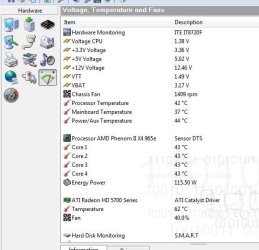
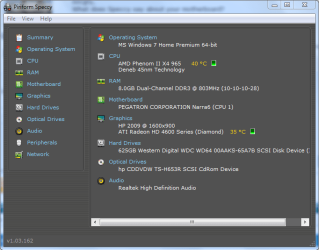
When the main window is open for PC Wizard 2010 it will display voltages as well as the video card temp along with both core and main processor temps. The options are similar to System Infor for Windows and the Speccy program you have now.
CoreTemp will simply show the main cpu temp when revealing the hidden icons in the notification area if set to hide. The PC Wizard program is far more useful in several areas however and is seen at CPUID - System & hardware benchmark, monitoring, reporting
W7 Ultimate x64/W10 Pro x64/W11 Pro Triple Boot - Main PC W7 Remote PC Micro ATX W7 Pro x64/W11 Pro
CPU
AMD Phenom II X4 975 Deneb 3.6ghz - 965 2nd remote pc
Motherboard
Gigabyte GA-790XTA-UD4-Gigabyte GA-880GM-D2H remote pc
Memory
Kingston Hyper X DDR3 1600 1.5v 16gb - Hyper X Fury 8gb 2nd
Graphics Card(s)
MSI HD Radeon 5750 1gb - MSI HD Radeon 6450 on mini tower
Sound Card
Creative Labs X-Fi Xtreme Audio P - Realtek onooard 2nd case
Monitor(s) Displays
ASUS VW199T-P 19" HP 2082a Main-HP 2082a 20" remote pc
Screen Resolution
Asus 1440x900 - HP 1600x900
Hard Drives
WD Black 1TB HD per OS W7, W10, and pending W11 presently on 500gb OS Drive - Pending Triple 1TB HDs for Spanned Storage/backup volume
Single 2TB external USB enclosure, single 1TB System 7 Host/Boot drive, Pending 8TB external HD for system image b
PSU
Corsair 750TX - primary / Corsair CX600 - second
Case
Antec 900-2 - SSD compatible / NZXT Vulcan mini tower
i got an email back from the creator of the core temp program. here's what he wrote me back:
"Hi Colin,
This is a design problem I haven't given much thought before, this will be fixed in the upcoming Core Temp version. But just so that everything's clear, the Phenoms and derivatives only have a single thermal sensor per processor, this means that with the next Core Temp version you will see 4 readings that show the same temperature in the gadget.
Thanks,
Arthur"
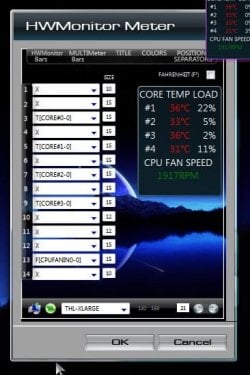
this makes sense for this reason; when you go into the all cpu meter options, and click on the link for core temp, it takes you to this website Windows Gadgets - All CPU Meter. the picture on this website of the gadget shows an Intel Core i7 CPU Q720 @1.6GHz (see snippet attach). i am running a quad core AMD Phenom II.
looks like problem solved, unless anyone found something else.
Attachments
Capture.PNG
9.7 KB
· Views: 1,696
Last edited:
My Computer
Computer type
PC/Desktop
Computer Manufacturer/Model Number
Custom Build and MSI GE60 0ND laptop
OS
windows 7 64bit on both
CPU
AMD FX-8350 @4.6GHz/Intel Core i7-3610QM @2.3GHz
Motherboard
ASUS M5A99X EVO R2.0/MS-16GA
Memory
16GB G.Skill 1866MHz/8GB dual channel 1600MHz
Graphics Card(s)
two Sapphire HD7970 OC 3Gb in crossfire/GTX660M 2Gb
Sound Card
Realtek HD Audio/Realtek HD Audio with THX TruStudio Pro
Monitor(s) Displays
Hanns-G 27" 1080p /Generic PnP Monitor
Screen Resolution
both 1920x1080p 60Hz
Hard Drives
250GB Samsung 840 EVO SSD,
1TB WD Blue
3x2TB WD Greens
/Samsung 840 EVO mSATA
PSU
Corsair HX750/laptop psu
Case
NZXT Source 530
Cooling
CoolerMaster Hyper 212 Evo
Keyboard
Logitech G710+/laptop keyboard by steelseries
Mouse
Logitec G500s/Logitec G500
Internet Speed
50Mbps down/1-3 Mbps up
Other Info
Scythe Kaze Master Pro 5.25 fan controller; APC Back-UPS XS 1500
"Per processor" meaning each core or the entire processor? Having readouts being all the same for every core is the same as just posting one temperature. Phenoms have 1-6 individual cores, so they should have all different readings. The i7 would have 4 duplicate readings due to the hyperthreading virtual cores. However, physical cores will all be unique. Is this what he meant?
My Computer
OS
Windows 7 Professional 64 bit
CPU
AMD 1090T Thuban BE Phenom II X6 @ 4.1
Motherboard
Gigabyte 870A-UD3 SATA III USB 3.0
Memory
4GB DDR3 Corsair 1600
Graphics Card(s)
Palit GTX 470 1280MB dual fan
Sound Card
Creative SB X-Fi Titanium, Musiland Monitor 02 US 24/192
Monitor(s) Displays
Viewsonic VX2640w 26" 3ms g2g 5ms b2b
Screen Resolution
1920x1200 Native
Hard Drives
OCZ Vertex 2 50GB SSD, WD 1TB SATA III HDD, SG Freeagent 750GB ext, 2X Acomdata 250GB ext
to me, he meant the entire processor. as advanced as quad and six core processor's are, i would almost expect them to have temp readings per core, not just 1 for the whole processor.
honestly i'm not sure what he meant. thats the only email i've gotten from him. ill send him another if ya like or ill give you his mailing address.
My Computer
Computer type
PC/Desktop
Computer Manufacturer/Model Number
Custom Build and MSI GE60 0ND laptop
OS
windows 7 64bit on both
CPU
AMD FX-8350 @4.6GHz/Intel Core i7-3610QM @2.3GHz
Motherboard
ASUS M5A99X EVO R2.0/MS-16GA
Memory
16GB G.Skill 1866MHz/8GB dual channel 1600MHz
Graphics Card(s)
two Sapphire HD7970 OC 3Gb in crossfire/GTX660M 2Gb
Sound Card
Realtek HD Audio/Realtek HD Audio with THX TruStudio Pro
Monitor(s) Displays
Hanns-G 27" 1080p /Generic PnP Monitor
Screen Resolution
both 1920x1080p 60Hz
Hard Drives
250GB Samsung 840 EVO SSD,
1TB WD Blue
3x2TB WD Greens
/Samsung 840 EVO mSATA
PSU
Corsair HX750/laptop psu
Case
NZXT Source 530
Cooling
CoolerMaster Hyper 212 Evo
Keyboard
Logitech G710+/laptop keyboard by steelseries
Mouse
Logitec G500s/Logitec G500
Internet Speed
50Mbps down/1-3 Mbps up
Other Info
Scythe Kaze Master Pro 5.25 fan controller; APC Back-UPS XS 1500
This is why I stuck with PC Wizard rather then Core Temp while that can also be looked at in the system tray reading there for the main temp. The image shows the variations seen with the cores when running the other program rather then what you would expect to see with a gadget.
Gadgets would be much harder to write in order to be made to provide a full breakdown since they have to be compact programs to start with while a regular full screen app can provide far more there. I think this is what was trying to be hinted on in the reply you saw without that person going into detail.
W7 Ultimate x64/W10 Pro x64/W11 Pro Triple Boot - Main PC W7 Remote PC Micro ATX W7 Pro x64/W11 Pro
CPU
AMD Phenom II X4 975 Deneb 3.6ghz - 965 2nd remote pc
Motherboard
Gigabyte GA-790XTA-UD4-Gigabyte GA-880GM-D2H remote pc
Memory
Kingston Hyper X DDR3 1600 1.5v 16gb - Hyper X Fury 8gb 2nd
Graphics Card(s)
MSI HD Radeon 5750 1gb - MSI HD Radeon 6450 on mini tower
Sound Card
Creative Labs X-Fi Xtreme Audio P - Realtek onooard 2nd case
Monitor(s) Displays
ASUS VW199T-P 19" HP 2082a Main-HP 2082a 20" remote pc
Screen Resolution
Asus 1440x900 - HP 1600x900
Hard Drives
WD Black 1TB HD per OS W7, W10, and pending W11 presently on 500gb OS Drive - Pending Triple 1TB HDs for Spanned Storage/backup volume
Single 2TB external USB enclosure, single 1TB System 7 Host/Boot drive, Pending 8TB external HD for system image b
PSU
Corsair 750TX - primary / Corsair CX600 - second
Case
Antec 900-2 - SSD compatible / NZXT Vulcan mini tower