
- Local time
- 12:45 AM
- Messages
- 49
I would like to use my Huawei G300 Ascend Android smartphone to get internet access for my laptop when I'm not within range of a WiFi hotspot. Preferably I would like to do this wirelessly (via Bluetooth or WiFi).
I have successfully (I thhink) paired my phone with my PC, but I don't understand how to set up a connection with my phone so it will act as a wide area broadband modem.
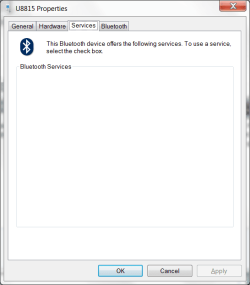
If I go to Control Panel, Hardware and Sound, Devices and Printers I can asee my phone under devices. It looks sort of greyed out. If I right click on it and select Properties, and then select the Services tab, no services are shown (see attachment).
A related question: is it bettwer to connect to the phone using Bluetooth, or using the phone's "personal hotspot" feature? Why?
Thanks - Rowan
I have successfully (I thhink) paired my phone with my PC, but I don't understand how to set up a connection with my phone so it will act as a wide area broadband modem.
If I go to Control Panel, Hardware and Sound, Devices and Printers I can asee my phone under devices. It looks sort of greyed out. If I right click on it and select Properties, and then select the Services tab, no services are shown (see attachment).
A related question: is it bettwer to connect to the phone using Bluetooth, or using the phone's "personal hotspot" feature? Why?
Thanks - Rowan
Attachments
My Computer
- OS
- Windows 7 Pro

