Using both front panel audio and back panel: solutions

pintree3

Mich
Member
VIP
Local time
10:32 AM
Messages
394
Location
Canada
This possibly should go in the hardware forum since it involves the motherboard as well but being a sound issue I assume here would be better.
I have an Asus Xonar DG sound card on an Asus P7P55D-E LX motherboard (and AMD Radeon HD 7800 Series video card) running on Windows 7 Home Premium 64bit.
I asked ASUS tech if I can use both the front panel & back panel at the same time for use of my headset (headphones and mic therefore headphone jack and mic jack.) They said NO that I had to choose one or the other, not both, and, that this has nothing to do with the sound card or MB but rather is a Windows thing. I assume this info is correct. Is it? If not please advise me as how to be able to use both.
On the assumption that it is correct, that I must make a choice an idea popped up.
My speakers are 'Cyber Acoustics CA-5402'. They have a control pod whereby on this control pod I could add my headphones whereby all speaker sounds are cut off automatically. Unfortunately this control pod which also controls the volume of the speakers no longer has control of the volume when the headphones are on and therefore volume must be controlled via Windows.
My idea. Can the Xonar, or rather Windows along with it, be set up so as to use only the front panel for the mic but NOT for the headphones?
OR
Since the control pod also has and 'aux in' (unfortunately not 'aux out') maybe this could be hacked somehow.
OR
Since I actually have 2 control pods, of which only one can be attached (to the woofer which has all the other cables attached to it) would it be possible to somehow make this 2nd control pod (attached for ex. with a splitter and then hacked somehow) to be used for the mic?
Or should I be going to an 'electronics website for such a questions?
Thanks ye all :-)
 
Last edited:

My Computer

Computer type
PC/Desktop
Computer Manufacturer/Model Number
OEM Designed by me :-)
OS
Windows 7 Home Premium 64
CPU
Intel Core i5 760 @ 2800MHz
Motherboard
Asus P7P55D-E LX
Memory
12288MB
Graphics Card(s)
AMD Radeon HD 7800 Series
Sound Card
ASUS Xonar DG
Monitor(s) Displays
ViewSonic VX2453 Series, HDMI 1080p Full HD
Screen Resolution
1920X1080
Hard Drives
Samsung SSD 840 EVO 250GB& two others
PSU
Tagan BZ Series, TG800-BZ 800W
Keyboard
Logitech MK250
Mouse
Logitech M310
Internet Speed
toppest, mostest :-) <-- bad, but fun English
Browser
Firefox, Crrome, IE
Whether you can use both, depends on the sound card software, not Windows. You should be able to use the front for mic and the GREEN speaker jack on the back for the headphones. However, why would you want to do that? If you plug the headphones into the rear speaker jack, you have to unplug the speakers from the PC to do this.

Normal operation is to use the front panel for the headphones (and mic) and when you plug in the headphones it mutes the output to the speakers. On some sound card control software (for example RealTek) there are options to either mute the speakers when the headset is connected or not mute the speakers and have both headset and speaker sound.

You have to use the designated Mic input, as a PC mic requires 5VDC for operation. Other than the mic input, others do not have 5VDC.

On the front panel connections. Your front panel audio connection must be to the ASUS Xonar and not to the motherboard sound connection. Since you have a separate sound card, your motherboard sound should be disabled in the BIOS so it does not conflict with the Xonar. In addition, you can only have one default audio playback device (e.g. Xonar OR motherboard sound but not both).
 

My Computer

Computer type
PC/Desktop
Computer Manufacturer/Model Number
My Own Build
OS
Windows 10 64 bit
CPU
Intel i7 6700K
Motherboard
ASUS ROG Maximus VIII Hero
Memory
16GB Corsair Dominator
Graphics Card(s)
Intel CPU Graphics
Sound Card
RealTek
Monitor(s) Displays
27" Dell S2719dgf
Screen Resolution
2560X1440
Hard Drives
1 TB Samsung 850 EVO SSD for Win 10 Pro
500GB Samsung 850 EVO SSD for Win 10 Insider
2 TB drive for backup
PSU
EVGA Supernova 750G2
Case
BeQuiet Silent Base 600
Cooling
Deepcool Captain 120EX
Keyboard
Microsoft Wireless 2000
Mouse
Microsoft wireless
Internet Speed
100 MB/sec (Cable)
Antivirus
Microsoft Defender and Malwarebytes
Browser
Edge/Firefox
Other Info
Cakewalk (Sonar) by BandLab and Studio One 4.1 Pro recording studio software. MOTU 896Mk3 Hybrid recording interface, Frontier Tranzport wireless control unit, Behringer X-Touch Control Surface.
Five USB connected optical drives for CD Audio production using Nero BurningROM
Hey fireberd it's you again :-) Always nice to read your opinions/suggestions/help.
Yes, I agree with you--logic would dictate that, would it not. I mean that is what I had back in the XP days. That is that both should be able to be used.
When I 1st bought this PC with the onboard sound card I was told by the techs who built my PC that I had a choice--one or the other and not both. So this was not the first time I heard this. Unless they actually meant I can not use both at the same time--which would make perfect sense but I doubt this is what they meant. Hence now with a new sound card added I am told the same thing. I am now, to make this story as short as possible, in the position where I have been told not twice but numerous times but various people about such a thing and always it being a Windows thing and not hardware thing. Is it possible that in all cases they had assumed I meant both at the same time? I guess anything is possible.
The thing is that now as before the front panel could never be used since it is set up for the back panel. I guess yes I should go to the BIOS and disable the motherboard sound card (if I am not mistaken my video card has some audio as well--HDMI: I guess having to do with that cable)
 

My Computer

Computer type
PC/Desktop
Computer Manufacturer/Model Number
OEM Designed by me :-)
OS
Windows 7 Home Premium 64
CPU
Intel Core i5 760 @ 2800MHz
Motherboard
Asus P7P55D-E LX
Memory
12288MB
Graphics Card(s)
AMD Radeon HD 7800 Series
Sound Card
ASUS Xonar DG
Monitor(s) Displays
ViewSonic VX2453 Series, HDMI 1080p Full HD
Screen Resolution
1920X1080
Hard Drives
Samsung SSD 840 EVO 250GB& two others
PSU
Tagan BZ Series, TG800-BZ 800W
Keyboard
Logitech MK250
Mouse
Logitech M310
Internet Speed
toppest, mostest :-) <-- bad, but fun English
Browser
Firefox, Crrome, IE

My Computer

Computer type
PC/Desktop
Computer Manufacturer/Model Number
Customs, Dell, Gateway, HP, Toshiba, Acer, ASUS
OS
Windows 7 Ultimate 64-bit, Windows 8.1 64-bit, Mac OS X 10.10, Linux Mint 17, Windows 10 Pro TP
Keyboard
Microsoft
Mouse
Microsoft
The Windows restriction is you can only have one default audio playback device. e.g. either the ASUS Xonar or you on board audio, but not both. But, since you have the Xonar, as I noted disable the on-board in the BIOS. That eliminates one potential conflict.

The front panel connections are most likely connected to the front panel audio jack on the motherboard. In order to use the front panel jacks that must be plugged into the Xonar card. Many cases have both "HD Audio" and "AC97" connectors for the front panel. The HD Audio is the one to use as it has jack sensing (and what the Xonar DG front panel header (connection) is set up for. Assuming there is no problem with the front panel jacks on your case this will allow you to use both the headset and mic jacks.

From the Xonar DG specs:

Front-Panel Header:
Supports headphone jack-detection, automatically switch audio output from back-panel to front

I don't know what Xonar has for a control panel, but it is most likely found in the Control Panel/Hardware and Sound section (that is where the RealTek HD Audio Manager is located).
 

My Computer

Computer type
PC/Desktop
Computer Manufacturer/Model Number
My Own Build
OS
Windows 10 64 bit
CPU
Intel i7 6700K
Motherboard
ASUS ROG Maximus VIII Hero
Memory
16GB Corsair Dominator
Graphics Card(s)
Intel CPU Graphics
Sound Card
RealTek
Monitor(s) Displays
27" Dell S2719dgf
Screen Resolution
2560X1440
Hard Drives
1 TB Samsung 850 EVO SSD for Win 10 Pro
500GB Samsung 850 EVO SSD for Win 10 Insider
2 TB drive for backup
PSU
EVGA Supernova 750G2
Case
BeQuiet Silent Base 600
Cooling
Deepcool Captain 120EX
Keyboard
Microsoft Wireless 2000
Mouse
Microsoft wireless
Internet Speed
100 MB/sec (Cable)
Antivirus
Microsoft Defender and Malwarebytes
Browser
Edge/Firefox
Other Info
Cakewalk (Sonar) by BandLab and Studio One 4.1 Pro recording studio software. MOTU 896Mk3 Hybrid recording interface, Frontier Tranzport wireless control unit, Behringer X-Touch Control Surface.
Five USB connected optical drives for CD Audio production using Nero BurningROM
I hate opening my PC case. Every time I go in, having so much hardware and corresponding cables and wires something goes wrong since there is so little space to move around. Usually some wire gets loosened, and the PC, due to the protective measures of the power supply, won't start. I replaced 1/2 my cables to avoid this looseness that keeps on happening. Anyhow, yup I guess I will open my case and I will go into my BIOS. Thanks for all of your help
 

My Computer

Computer type
PC/Desktop
Computer Manufacturer/Model Number
OEM Designed by me :-)
OS
Windows 7 Home Premium 64
CPU
Intel Core i5 760 @ 2800MHz
Motherboard
Asus P7P55D-E LX
Memory
12288MB
Graphics Card(s)
AMD Radeon HD 7800 Series
Sound Card
ASUS Xonar DG
Monitor(s) Displays
ViewSonic VX2453 Series, HDMI 1080p Full HD
Screen Resolution
1920X1080
Hard Drives
Samsung SSD 840 EVO 250GB& two others
PSU
Tagan BZ Series, TG800-BZ 800W
Keyboard
Logitech MK250
Mouse
Logitech M310
Internet Speed
toppest, mostest :-) <-- bad, but fun English
Browser
Firefox, Crrome, IE
nyhow, yup I guess I will open my case and I will go into my BIOS
Don't have to open the case to access the BIOS, just press a key when prompted at the bootup [while that prompt is still showing on the screen].
 

My Computer

Computer type
PC/Desktop
Computer Manufacturer/Model Number
Customs, Dell, Gateway, HP, Toshiba, Acer, ASUS
OS
Windows 7 Ultimate 64-bit, Windows 8.1 64-bit, Mac OS X 10.10, Linux Mint 17, Windows 10 Pro TP
Keyboard
Microsoft
Mouse
Microsoft
No, no, no :-) I did not mean to imply I needed to open my case to get into my BIOS.
I meant I will open my case to check my wiring/cabling for my Xonar and onboard sound cards and then (with case closed) boot in and get into my BIOS--2 separate actions
 

My Computer

Computer type
PC/Desktop
Computer Manufacturer/Model Number
OEM Designed by me :-)
OS
Windows 7 Home Premium 64
CPU
Intel Core i5 760 @ 2800MHz
Motherboard
Asus P7P55D-E LX
Memory
12288MB
Graphics Card(s)
AMD Radeon HD 7800 Series
Sound Card
ASUS Xonar DG
Monitor(s) Displays
ViewSonic VX2453 Series, HDMI 1080p Full HD
Screen Resolution
1920X1080
Hard Drives
Samsung SSD 840 EVO 250GB& two others
PSU
Tagan BZ Series, TG800-BZ 800W
Keyboard
Logitech MK250
Mouse
Logitech M310
Internet Speed
toppest, mostest :-) <-- bad, but fun English
Browser
Firefox, Crrome, IE
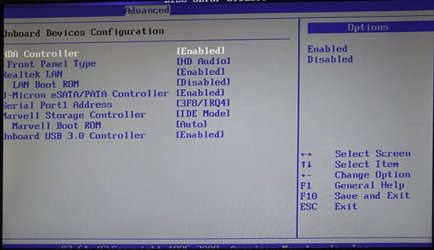
Hi again. OK attached is a photo of the only place on my BIOS where I see references to sound. I don't understand it or rather I don't get it: There is no mention of my Xonar or anything else really as you can see. What is there is, "Front Panel type -- HD Audio" and nothing else, nothing about the back panel, nothing about my on-board sound card or my Xonar. So in theory at least, there is nothing for me to do here in my BIOS concerning my sound--nothing to enable or disable.
Since this is the "Onboard device configuration" perhaps the BIOS is saying 'this is the MB itself anything else attached to it I don't know about.'' OK then what of the back panel'? and where would everything else be--heck I don't even see my video card either
 

Attachments

  • MyAsusBIOS_07AdvancedOnboard3.jpg
    MyAsusBIOS_07AdvancedOnboard3.jpg
    48 KB · Views: 22

My Computer

Computer type
PC/Desktop
Computer Manufacturer/Model Number
OEM Designed by me :-)
OS
Windows 7 Home Premium 64
CPU
Intel Core i5 760 @ 2800MHz
Motherboard
Asus P7P55D-E LX
Memory
12288MB
Graphics Card(s)
AMD Radeon HD 7800 Series
Sound Card
ASUS Xonar DG
Monitor(s) Displays
ViewSonic VX2453 Series, HDMI 1080p Full HD
Screen Resolution
1920X1080
Hard Drives
Samsung SSD 840 EVO 250GB& two others
PSU
Tagan BZ Series, TG800-BZ 800W
Keyboard
Logitech MK250
Mouse
Logitech M310
Internet Speed
toppest, mostest :-) <-- bad, but fun English
Browser
Firefox, Crrome, IE
Since this is the "Onboard device configuration" perhaps the BIOS is saying 'this is the MB itself anything else attached to it I don't know about.''
That's true. The only thing I've seen automatic on a number of different computers is disabling the built-in video adapter when an Add-in Video card is added.

As for your HDA Controller setting it looks to me like the only choice is for Enabled or set to Disabled when using an Add-in sound card. But that changes the front-panel choice so an Add-in card would need to support the front panel sockets.
 

My Computer

Computer type
PC/Desktop
Computer Manufacturer/Model Number
Customs, Dell, Gateway, HP, Toshiba, Acer, ASUS
OS
Windows 7 Ultimate 64-bit, Windows 8.1 64-bit, Mac OS X 10.10, Linux Mint 17, Windows 10 Pro TP
Keyboard
Microsoft
Mouse
Microsoft
I assumed that, HDA, meaning high_Definition Audio Controller, 'controlled' the HD sound, that is any hd sound and not necessarily the sound card (onboard or added). But it seems I am wrong here with this assumption. OK then if this is indeed what controls my onborad soundcard it would make sense for me to disable it, since my sound card does have something to attach to the front panel. (Wjat it says in the manual is: 'Front Panel audio header' defined as : " 9-pin Intel AC'97 / HDA front-panel which supports audio jack detection & audio headphone selection for Analog Out on the Audio Center."

BTW my audio card also has an ''S/PDIF Out Header'' which ''connects to the supported graphics card with HDMI" I was wondering if I should do so?--connect it to my sound card since it also has an 'S/PDIF Out Port'--not knowing the difference between the 2.

Thanks again to all of you
 

My Computer

Computer type
PC/Desktop
Computer Manufacturer/Model Number
OEM Designed by me :-)
OS
Windows 7 Home Premium 64
CPU
Intel Core i5 760 @ 2800MHz
Motherboard
Asus P7P55D-E LX
Memory
12288MB
Graphics Card(s)
AMD Radeon HD 7800 Series
Sound Card
ASUS Xonar DG
Monitor(s) Displays
ViewSonic VX2453 Series, HDMI 1080p Full HD
Screen Resolution
1920X1080
Hard Drives
Samsung SSD 840 EVO 250GB& two others
PSU
Tagan BZ Series, TG800-BZ 800W
Keyboard
Logitech MK250
Mouse
Logitech M310
Internet Speed
toppest, mostest :-) <-- bad, but fun English
Browser
Firefox, Crrome, IE
I would try disabling the HDA Controller then install the Add-in card and its software/drivers and use the header connection. Seems to me S/PDIF would not be needed for using audio in a computer.
S/PDIF - Wikipedia, the free encyclopedia
 

My Computer

Computer type
PC/Desktop
Computer Manufacturer/Model Number
Customs, Dell, Gateway, HP, Toshiba, Acer, ASUS
OS
Windows 7 Ultimate 64-bit, Windows 8.1 64-bit, Mac OS X 10.10, Linux Mint 17, Windows 10 Pro TP
Keyboard
Microsoft
Mouse
Microsoft
Back
Top