Solved using contacts from backup folder in Windows Live Mail

bogeyman

New member
Local time
5:45 AM
Messages
4
I just had my Windows 7 reinstalled and have installed Windows Live Mail. Prior to doing so I did a full backup to an external hard drive. I did not do any special export for Windows Live Mail. I have copied contacts from the Contacts file on the external hard drive file into the Contacts file on my computer. Windows Live Mail does not recognize those contacts. The only way I can make it work is by clicking on a single contact in my C Drive contacts folder to send an e-mail and then do an add to contact and presto, it now shows up in Windows Live Contacts. I am trying to avoid having to do this for each contact one at a time.

I would have thought I could simply copy all of my contacts from the backup drive into my C Drive Contacts folder and they would then be usable in Windows Live Mail. Obviously it is not that simple. Hope somebody can help me.

Thanks
 

My Computer My Computer

OS
Windows 7 64 bit
You may have to use the Import in WLM to bring the contacts from the Contacts Folder in C:\Users\YourUserName\Contacts. I've had to change Folder Options to Show hidden files, folders, etc., in order to show that Folder. WLM may be able to Import from the external drive.
 

My Computer My Computer

Computer type
PC/Desktop
Computer Manufacturer/Model Number
Customs, Dell, Gateway, HP, Toshiba, Acer, ASUS
OS
Windows 7 Ultimate 64-bit, Windows 8.1 64-bit, Mac OS X 10.10, Linux Mint 17, Windows 10 Pro TP
Keyboard
Microsoft
Mouse
Microsoft
Just to clarify, I am trying to import from an external hard drive into the Contacts folder in C drive. All of the contacts show in the C drive folder, but WLM doesn't link to them. As for changing folder options to show hidden files, where do I do that, in the C drive folder or the H drive folder. I am not familiar with hidden folders.

Thanks for your input
 

My Computer My Computer

OS
Windows 7 64 bit
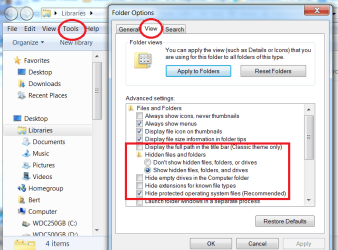
As for changing folder options to show hidden files, where do I do that, in the C drive folder or the H drive folder. I am not familiar with hidden folders.
This is an image that should help:
 

Attachments

  • Folder Options.png
    Folder Options.png
    41.2 KB · Views: 0

My Computer My Computer

Computer type
PC/Desktop
Computer Manufacturer/Model Number
Customs, Dell, Gateway, HP, Toshiba, Acer, ASUS
OS
Windows 7 Ultimate 64-bit, Windows 8.1 64-bit, Mac OS X 10.10, Linux Mint 17, Windows 10 Pro TP
Keyboard
Microsoft
Mouse
Microsoft
This problem was solved incredibly easily. When I backed up the computer, contact list was in folder called Contacts. When I copied it to C drive under my user name, Windows Live Mail would not link to this list. After trying different things I successfully linked this contact list to Windows Live Mail by doing the following:

1. Click on the Contents link in bottom left corner (column of links Mail, Calendar, Contacts, Feeds, Newsgroups)

2. Click on "Import" in the top tool bar

3. In the drop down menu, click on "Import address book for current windows user" and presto, all contacts now recognized by WLM.

I can't believe I didn't notice this right away. Hope this helps somebody else.
 

My Computer My Computer

OS
Windows 7 64 bit
Back
Top