Using Family Upgrade pack on different computers...

skiltrip

New member
Local time
1:44 AM
Messages
16
I plan on upgrading three computers to Win7 with the Family Home Premium 3-pack upgrade.

My question is regarding the XP versions they will be replacing.

2 of these licenses are a multi-license serial key from a former job that has since shut down. Myself, and 2 other IT guys have been using the serial ever since on our personal computers. It was a 100-license serial key or something like that. At this point, maybe 3-5 licenses are actually being used between us.

The 3rd of these computers is an Acer Desktop that had WinXP already installed on it.

Is there any reason I can't use the three copies of Win7 upgrade on these three machines? My main questions are about the multi-user serial, if that would cause any problems, and also that 2 are one serial number, and the other is a 3rd unrelated one.
 

My Computer

Computer Manufacturer/Model Number
Custom Built
OS
Windows 7 Home Premium x64
CPU
Q6600 @3GHz per core.
Motherboard
Asus P5K
Memory
4GB DDR2 800 G.Skill
Graphics Card(s)
Nvidia 7300LE
Sound Card
M-Audio Profire 610
Monitor(s) Displays
Acer H233H - 23"
Hard Drives
All 7200rpm SATA:
160GB system drive
640GB audio drive
PSU
Corsair 650TX
Cooling
Arctic Cooling Freezer 7

My Computer

Computer type
PC/Desktop
Computer Manufacturer/Model Number
Built them myself, Science Experiments !
OS
Win7 Enterprise, Win7 x86 (Ult 7600), Win7 x64 Ult 7600, TechNet RTM on AMD x64 (2.8Ghz)
CPU
AMD fx8350 4ghz, AMD-32 2400mhz, AMD-64 3200mhz, AMDx64 2.8G
Motherboard
SIS 755, ECS-K8M890M-M (Ult 7600), GigaByte & others
Memory
2gb, 4gb on the Ult 7600, 4gb on Technet RTM, 32gb on FX8350
Graphics Card(s)
Draw my own Graphics, several nVidia cards
Sound Card
on motherboard
Monitor(s) Displays
19" flat scr, 28" I-Inc widescr,22" Emprex Widescr, 23" Acer
Screen Resolution
1280 x 1024, 1440 x 900, 1920 x 1080
Hard Drives
6 pata Ide HD's & 2 Sata HD's
added 80gb external on Ult 7600 computer,
numerous extra 1tb, 2TB, 3Tb SATA HD's
A collection of ext HD Docks w/ HDs
PSU
430w, 550w, 600w, 700, 800, etc
Case
All Generic Full Towers
Cooling
Open Air & a few fans, some w/ colored LEDs
Keyboard
Compaq & Dell recycled from GoodWill
Mouse
Made in China Optical Wired Mouse
Internet Speed
Fast Cable InterNet
Antivirus
AVG Free on 24 different Desktops, NO Problems!
Browser
IE 8 is preferred, but use FireFox sometimes
Other Info
Linksys Routers, switches, & Hubs
Too Many USB Flash Drives to count, Biggest is 64GB !
Eight computers in my home network.
Sixteen computers at my business network.
Linked via TeamViewer !
Lots of old used spare computer parts everywhere!

My Computer

Computer Manufacturer/Model Number
Custom Built
OS
Windows 7 Home Premium x64
CPU
Q6600 @3GHz per core.
Motherboard
Asus P5K
Memory
4GB DDR2 800 G.Skill
Graphics Card(s)
Nvidia 7300LE
Sound Card
M-Audio Profire 610
Monitor(s) Displays
Acer H233H - 23"
Hard Drives
All 7200rpm SATA:
160GB system drive
640GB audio drive
PSU
Corsair 650TX
Cooling
Arctic Cooling Freezer 7
The upgrade versions do not check for XP serial key codes :)

Have a look at this tutorial

:ar:

http://www.sevenforums.com/tutorials/31402-clean-install-upgrade-windows-7-version.html

Very helpful information. So it's basically on the "honor system" correct?

This kind of puts my fears of complication to rest.

Yes, basically they want you to say you are a fomer user of a previous valid version & not just a first time user of Windows. ;)
 

My Computer

Computer type
PC/Desktop
Computer Manufacturer/Model Number
Built them myself, Science Experiments !
OS
Win7 Enterprise, Win7 x86 (Ult 7600), Win7 x64 Ult 7600, TechNet RTM on AMD x64 (2.8Ghz)
CPU
AMD fx8350 4ghz, AMD-32 2400mhz, AMD-64 3200mhz, AMDx64 2.8G
Motherboard
SIS 755, ECS-K8M890M-M (Ult 7600), GigaByte & others
Memory
2gb, 4gb on the Ult 7600, 4gb on Technet RTM, 32gb on FX8350
Graphics Card(s)
Draw my own Graphics, several nVidia cards
Sound Card
on motherboard
Monitor(s) Displays
19" flat scr, 28" I-Inc widescr,22" Emprex Widescr, 23" Acer
Screen Resolution
1280 x 1024, 1440 x 900, 1920 x 1080
Hard Drives
6 pata Ide HD's & 2 Sata HD's
added 80gb external on Ult 7600 computer,
numerous extra 1tb, 2TB, 3Tb SATA HD's
A collection of ext HD Docks w/ HDs
PSU
430w, 550w, 600w, 700, 800, etc
Case
All Generic Full Towers
Cooling
Open Air & a few fans, some w/ colored LEDs
Keyboard
Compaq & Dell recycled from GoodWill
Mouse
Made in China Optical Wired Mouse
Internet Speed
Fast Cable InterNet
Antivirus
AVG Free on 24 different Desktops, NO Problems!
Browser
IE 8 is preferred, but use FireFox sometimes
Other Info
Linksys Routers, switches, & Hubs
Too Many USB Flash Drives to count, Biggest is 64GB !
Eight computers in my home network.
Sixteen computers at my business network.
Linked via TeamViewer !
Lots of old used spare computer parts everywhere!
The upgrade versions do not check for XP serial key codes :)

Have a look at this tutorial

:ar:

http://www.sevenforums.com/tutorials/31402-clean-install-upgrade-windows-7-version.html

Very helpful information. So it's basically on the "honor system" correct?

This kind of puts my fears of complication to rest.

Yes, basically they want you to say you are a fomer user of a previous valid version & not just a first time user of Windows. ;)

Excellent. All I'm interested in is doing a clean 64bit installation. Looks like I can just boot from the 64bit install disk and do the deed. Thanks again for the quick response. This is my first thread (and my first posts) but might become a regular pretty quickly!
 

My Computer

Computer Manufacturer/Model Number
Custom Built
OS
Windows 7 Home Premium x64
CPU
Q6600 @3GHz per core.
Motherboard
Asus P5K
Memory
4GB DDR2 800 G.Skill
Graphics Card(s)
Nvidia 7300LE
Sound Card
M-Audio Profire 610
Monitor(s) Displays
Acer H233H - 23"
Hard Drives
All 7200rpm SATA:
160GB system drive
640GB audio drive
PSU
Corsair 650TX
Cooling
Arctic Cooling Freezer 7
On your first install do NOT enter the Serial Key Code & activate. Because you may have to do a second install overtop of the first one because of the upgrade check.
 

My Computer

Computer type
PC/Desktop
Computer Manufacturer/Model Number
Built them myself, Science Experiments !
OS
Win7 Enterprise, Win7 x86 (Ult 7600), Win7 x64 Ult 7600, TechNet RTM on AMD x64 (2.8Ghz)
CPU
AMD fx8350 4ghz, AMD-32 2400mhz, AMD-64 3200mhz, AMDx64 2.8G
Motherboard
SIS 755, ECS-K8M890M-M (Ult 7600), GigaByte & others
Memory
2gb, 4gb on the Ult 7600, 4gb on Technet RTM, 32gb on FX8350
Graphics Card(s)
Draw my own Graphics, several nVidia cards
Sound Card
on motherboard
Monitor(s) Displays
19" flat scr, 28" I-Inc widescr,22" Emprex Widescr, 23" Acer
Screen Resolution
1280 x 1024, 1440 x 900, 1920 x 1080
Hard Drives
6 pata Ide HD's & 2 Sata HD's
added 80gb external on Ult 7600 computer,
numerous extra 1tb, 2TB, 3Tb SATA HD's
A collection of ext HD Docks w/ HDs
PSU
430w, 550w, 600w, 700, 800, etc
Case
All Generic Full Towers
Cooling
Open Air & a few fans, some w/ colored LEDs
Keyboard
Compaq & Dell recycled from GoodWill
Mouse
Made in China Optical Wired Mouse
Internet Speed
Fast Cable InterNet
Antivirus
AVG Free on 24 different Desktops, NO Problems!
Browser
IE 8 is preferred, but use FireFox sometimes
Other Info
Linksys Routers, switches, & Hubs
Too Many USB Flash Drives to count, Biggest is 64GB !
Eight computers in my home network.
Sixteen computers at my business network.
Linked via TeamViewer !
Lots of old used spare computer parts everywhere!
On your first install do NOT enter the Serial Key Code & activate. Because you may have to do a second install overtop of the first one because of the upgrade check.

Is this referring to this part of the link you posted?..

"1. Do a clean install at boot without checking the Automatically activate Windows when I'm online box during the installation process.

2. When the installation is finished, then manually activate Windows 7 with your product key number."

If so, got it!
 

My Computer

Computer Manufacturer/Model Number
Custom Built
OS
Windows 7 Home Premium x64
CPU
Q6600 @3GHz per core.
Motherboard
Asus P5K
Memory
4GB DDR2 800 G.Skill
Graphics Card(s)
Nvidia 7300LE
Sound Card
M-Audio Profire 610
Monitor(s) Displays
Acer H233H - 23"
Hard Drives
All 7200rpm SATA:
160GB system drive
640GB audio drive
PSU
Corsair 650TX
Cooling
Arctic Cooling Freezer 7

My Computer

Computer type
PC/Desktop
Computer Manufacturer/Model Number
Built them myself, Science Experiments !
OS
Win7 Enterprise, Win7 x86 (Ult 7600), Win7 x64 Ult 7600, TechNet RTM on AMD x64 (2.8Ghz)
CPU
AMD fx8350 4ghz, AMD-32 2400mhz, AMD-64 3200mhz, AMDx64 2.8G
Motherboard
SIS 755, ECS-K8M890M-M (Ult 7600), GigaByte & others
Memory
2gb, 4gb on the Ult 7600, 4gb on Technet RTM, 32gb on FX8350
Graphics Card(s)
Draw my own Graphics, several nVidia cards
Sound Card
on motherboard
Monitor(s) Displays
19" flat scr, 28" I-Inc widescr,22" Emprex Widescr, 23" Acer
Screen Resolution
1280 x 1024, 1440 x 900, 1920 x 1080
Hard Drives
6 pata Ide HD's & 2 Sata HD's
added 80gb external on Ult 7600 computer,
numerous extra 1tb, 2TB, 3Tb SATA HD's
A collection of ext HD Docks w/ HDs
PSU
430w, 550w, 600w, 700, 800, etc
Case
All Generic Full Towers
Cooling
Open Air & a few fans, some w/ colored LEDs
Keyboard
Compaq & Dell recycled from GoodWill
Mouse
Made in China Optical Wired Mouse
Internet Speed
Fast Cable InterNet
Antivirus
AVG Free on 24 different Desktops, NO Problems!
Browser
IE 8 is preferred, but use FireFox sometimes
Other Info
Linksys Routers, switches, & Hubs
Too Many USB Flash Drives to count, Biggest is 64GB !
Eight computers in my home network.
Sixteen computers at my business network.
Linked via TeamViewer !
Lots of old used spare computer parts everywhere!

My Computer

Computer Manufacturer/Model Number
Custom Built
OS
Windows 7 Home Premium x64
CPU
Q6600 @3GHz per core.
Motherboard
Asus P5K
Memory
4GB DDR2 800 G.Skill
Graphics Card(s)
Nvidia 7300LE
Sound Card
M-Audio Profire 610
Monitor(s) Displays
Acer H233H - 23"
Hard Drives
All 7200rpm SATA:
160GB system drive
640GB audio drive
PSU
Corsair 650TX
Cooling
Arctic Cooling Freezer 7
Hello skiltrip, welcome to Seven Forums!


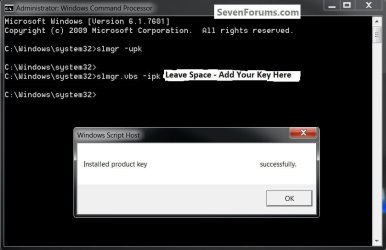
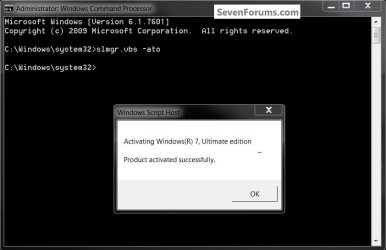
Here is something that has come up lately as a work-around, instead of a second install, after the first install has completed; in an elevated command window type ...

slmgr -upk

then slmgr.vbs -ipk leave a space and enter the product key and hit <enter>

then slmgr.vbs -ato <enter>
click to enlarge
AddKey.jpg
Activate.jpg
 

My Computer

Computer Manufacturer/Model Number
* BFK Customs *
OS
W 7 64-bit Ultimate
CPU
Intel Q9550 Yorkfield
Motherboard
ASUS P5Q Pro
Memory
8GB Dominator 8500C5D
Graphics Card(s)
ATI : XFX 5870
Sound Card
Realtek HD Audio 7-1
Monitor(s) Displays
1x 47" LCD HDMI & 3x 26" LCD HDMI
Screen Resolution
1920x1080P & 1920x1200
Hard Drives
1x 80GB Intel X25-M G2 SSD : 1x 500GB & 1x 640GB WD Caviar Black(s)
PSU
Corsair 620HX
Case
Cooler Master RC-690
Cooling
Tuniq Tower 120, 2x 140mm and 3x 120mm case fans
Keyboard
Microsoft 500
Mouse
Razer Diamondback 3G
Internet Speed
14 Mb/s
Other Info
1x Koutech 3Gb/s SATA HDD Hot Swap Rack
Thanks, BFK,


another great tip for the upgrade installations :thumbsup:
 

My Computer

Computer type
PC/Desktop
Computer Manufacturer/Model Number
Built them myself, Science Experiments !
OS
Win7 Enterprise, Win7 x86 (Ult 7600), Win7 x64 Ult 7600, TechNet RTM on AMD x64 (2.8Ghz)
CPU
AMD fx8350 4ghz, AMD-32 2400mhz, AMD-64 3200mhz, AMDx64 2.8G
Motherboard
SIS 755, ECS-K8M890M-M (Ult 7600), GigaByte & others
Memory
2gb, 4gb on the Ult 7600, 4gb on Technet RTM, 32gb on FX8350
Graphics Card(s)
Draw my own Graphics, several nVidia cards
Sound Card
on motherboard
Monitor(s) Displays
19" flat scr, 28" I-Inc widescr,22" Emprex Widescr, 23" Acer
Screen Resolution
1280 x 1024, 1440 x 900, 1920 x 1080
Hard Drives
6 pata Ide HD's & 2 Sata HD's
added 80gb external on Ult 7600 computer,
numerous extra 1tb, 2TB, 3Tb SATA HD's
A collection of ext HD Docks w/ HDs
PSU
430w, 550w, 600w, 700, 800, etc
Case
All Generic Full Towers
Cooling
Open Air & a few fans, some w/ colored LEDs
Keyboard
Compaq & Dell recycled from GoodWill
Mouse
Made in China Optical Wired Mouse
Internet Speed
Fast Cable InterNet
Antivirus
AVG Free on 24 different Desktops, NO Problems!
Browser
IE 8 is preferred, but use FireFox sometimes
Other Info
Linksys Routers, switches, & Hubs
Too Many USB Flash Drives to count, Biggest is 64GB !
Eight computers in my home network.
Sixteen computers at my business network.
Linked via TeamViewer !
Lots of old used spare computer parts everywhere!

My Computer

Computer Manufacturer/Model Number
* BFK Customs *
OS
W 7 64-bit Ultimate
CPU
Intel Q9550 Yorkfield
Motherboard
ASUS P5Q Pro
Memory
8GB Dominator 8500C5D
Graphics Card(s)
ATI : XFX 5870
Sound Card
Realtek HD Audio 7-1
Monitor(s) Displays
1x 47" LCD HDMI & 3x 26" LCD HDMI
Screen Resolution
1920x1080P & 1920x1200
Hard Drives
1x 80GB Intel X25-M G2 SSD : 1x 500GB & 1x 640GB WD Caviar Black(s)
PSU
Corsair 620HX
Case
Cooler Master RC-690
Cooling
Tuniq Tower 120, 2x 140mm and 3x 120mm case fans
Keyboard
Microsoft 500
Mouse
Razer Diamondback 3G
Internet Speed
14 Mb/s
Other Info
1x Koutech 3Gb/s SATA HDD Hot Swap Rack

My Computer

Computer Manufacturer/Model Number
Custom Built
OS
Windows 7 Home Premium x64
CPU
Q6600 @3GHz per core.
Motherboard
Asus P5K
Memory
4GB DDR2 800 G.Skill
Graphics Card(s)
Nvidia 7300LE
Sound Card
M-Audio Profire 610
Monitor(s) Displays
Acer H233H - 23"
Hard Drives
All 7200rpm SATA:
160GB system drive
640GB audio drive
PSU
Corsair 650TX
Cooling
Arctic Cooling Freezer 7
Anytime you install an upgrade version to a wiped or new HD, you need to do one of the workarounds to activate it.

This is because the installer searches the HD at bootup to see if there is any OS, to allow Upgrade version key upfront - even if you then go on to use Custom>Drive Options to delete, repartition and format.

If necessary because no OS is on the HD to be read by installer, you can wait until after install and use one of the standard workarounds, or try the new slmgr one introduced by Bill2.

Standard workarounds: http://www.sevenforums.com/tutorials/31402-clean-install-upgrade-windows-7-version.html
 
I assume either of these methods also require me to start with an already formatted hard-drive? (it currently has XP Pro 32bit on it). If so, what's the best tool to use to format it? Can I just use the XP CD to do the format but not install WinXP? Or is there a different
tool I should use?
 

My Computer

Computer Manufacturer/Model Number
Custom Built
OS
Windows 7 Home Premium x64
CPU
Q6600 @3GHz per core.
Motherboard
Asus P5K
Memory
4GB DDR2 800 G.Skill
Graphics Card(s)
Nvidia 7300LE
Sound Card
M-Audio Profire 610
Monitor(s) Displays
Acer H233H - 23"
Hard Drives
All 7200rpm SATA:
160GB system drive
640GB audio drive
PSU
Corsair 650TX
Cooling
Arctic Cooling Freezer 7
Hello again.


Doing a clean install of Windows 7 you can use the method out-lined in Step One of this tutorial at the link below to get the best possible space to install Windows to, Step Two doesn't have to be done if you want to format using the installer; just be sure to have backups of anything you don't want to lose.

SSD / HDD : Optimize for Windows Reinstallation


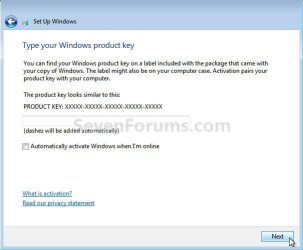
Just to be sure, do not enter a key here, leave it blank.

click to enlarge
No Key.jpg
 

My Computer

Computer Manufacturer/Model Number
* BFK Customs *
OS
W 7 64-bit Ultimate
CPU
Intel Q9550 Yorkfield
Motherboard
ASUS P5Q Pro
Memory
8GB Dominator 8500C5D
Graphics Card(s)
ATI : XFX 5870
Sound Card
Realtek HD Audio 7-1
Monitor(s) Displays
1x 47" LCD HDMI & 3x 26" LCD HDMI
Screen Resolution
1920x1080P & 1920x1200
Hard Drives
1x 80GB Intel X25-M G2 SSD : 1x 500GB & 1x 640GB WD Caviar Black(s)
PSU
Corsair 620HX
Case
Cooler Master RC-690
Cooling
Tuniq Tower 120, 2x 140mm and 3x 120mm case fans
Keyboard
Microsoft 500
Mouse
Razer Diamondback 3G
Internet Speed
14 Mb/s
Other Info
1x Koutech 3Gb/s SATA HDD Hot Swap Rack
I definitely will make sure I have any program installers copied from my C: drive. If I happen to have any files on there I'll copy those too. I have a 3 other internal drives I keep all my files on to make reformatting and re-installing quick and painless.


I'm a little unclear if I can follow these tutorials with XP 32bit already installed on my CD drive.

With my current situation, am I able to just insert the Win7 64bit disk, reboot and reboot from the disk, reformat my C: drive (there is only one single partition), install Win7, skipping the enter key part. Then do one of the workarounds (the manual activation or elevated command line method)?

Do I have this right? I just wanted sure If when I booted from the Win7 upgrade disk if it would cause a problem if it already saw WinXP on there.
 

My Computer

Computer Manufacturer/Model Number
Custom Built
OS
Windows 7 Home Premium x64
CPU
Q6600 @3GHz per core.
Motherboard
Asus P5K
Memory
4GB DDR2 800 G.Skill
Graphics Card(s)
Nvidia 7300LE
Sound Card
M-Audio Profire 610
Monitor(s) Displays
Acer H233H - 23"
Hard Drives
All 7200rpm SATA:
160GB system drive
640GB audio drive
PSU
Corsair 650TX
Cooling
Arctic Cooling Freezer 7
The point of my earlier post is that if you boot the Win7 DVD with XP on one of the HD's, it will scan the HD's to see it and allow use the Upgrade version Product Key up front, and you won't have to do one of the workarounds. You can even use Custom>Drive tools to delete, repartition and format since installer will already have passed a flag allowing Upgrade version key.

Since you have several HD's, the best arrangement if you'd want to keep XP is to put Win7 on a separate HD booted via BIOS. If you decide you'd like to have this dual-boot arrangement, unplug XP drive during install, set Win7 HD as first to boot in BIOS setup, boot the DVD to wipe the HD and install Win7. You'll need to do one of the workarounds after install as XP will not be seen when installer when it boots.

After install, plug back in XP HD and boot it using one-time BIOS Boot Menu key given on the first boot screen - every computer has one. This keeps both HD's independent to come and go as you please.
 
I'm trying to figure out how a volume license key that was used and belonged to a company that is no longer around is valid for you to use on the personal computers you and friends own.

Did your company release or transfer rights/ownership of those licenses to you and friends when it went out of business?

If not, using the upgrade is illegal.

If they are truly in your name, that's a different story.

Just because the company that owned them is no longer around doesn't mean you "get" them by default.
Microsoft doesn't operate like your local lost and found....
 

My Computer

Computer Manufacturer/Model Number
Sytemax
OS
7 Pro 64 Bit
CPU
8300 Quad 2.53Ghz
Motherboard
Asus
Memory
4GB DDR Crucial
Graphics Card(s)
Intel
Back
Top