using filezilla server

What did you put in for the IP filter?

Are you talking about connecting to the server console

091609_1456_installandc4.png

or
connection to the actually ftp via a different works station?
 

My Computer

OS
Windows 7 Ultimate x64
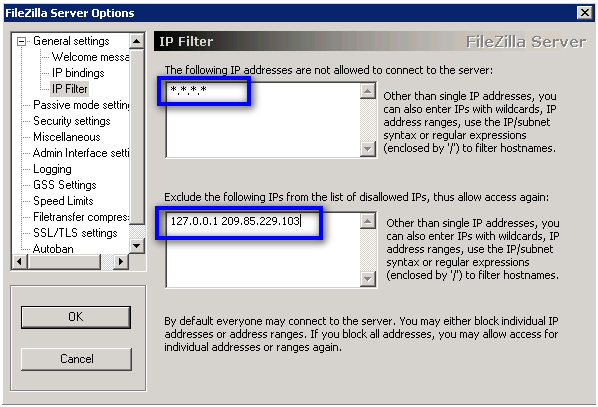
I got it to work... kind of. I tried to block all (*.*.*.) but it did not like that, so it was putting out that error. Why would have a problem with this?
 

My Computer

OS
64 bit
*.*.*.* would block everything that is not in the exclude list where you would want to put your local address at least. I'm glad you got it working. if you want to put the *.*.*.* back in there I will help you get it working.
 

My Computer

OS
Windows 7 Ultimate x64
I tried putting that in there, but it says invalid IP address.
 

My Computer

OS
64 bit
What address are you putting in?

How are you trying to connect?
Same machine, Different machine over LAN, Different machine over internet
 

My Computer

OS
Windows 7 Ultimate x64
I am putting in this address: *.*.*.*
I am doing it over a LAN, I think. I would like to be out of range of my home network, and still be able to traverse into my server.
 

My Computer

OS
64 bit
091609_1456_installandc9.png


This is the IP filter page.

If you're putting *.*.*.* on the top like the tutorial says then you need to put your LAN address on the bottom address.

You can find the local address from the link below.

http://www.sevenforums.com/tutorials/108982-ip-address-locate-find-your-computer.html

In addition you can also allow your whole subnet on the FTP server with one address. If your address is 192.168.0.x then you can use 192.168.0.0/24 to allow all addresses in the range.

The only bad thing about this is that when you're connecting remotely you will have to add the public address of the computer you're connecting from to the exclude list.
 

My Computer

OS
Windows 7 Ultimate x64
Back
Top