Using GPT or MBR for a pure backup drive.

Nozyspy

New member
Local time
4:02 PM
Messages
5
I'm not sure if this is the right place to put this, but this forum is the closest I could find to what my question is.

I have got a second internal harddrive to use as a pure backup drive for stuff like pictures, vids, music etc. (no system stuff) and when it asks me to initialize the drive it asks for either MBR or GPT.

To the best of what I have been able too find out so far, the main advantages of GPT are to do with partition size, and drives over 2TB. However since the drive is only 1TB that doesn't seem useful.

However it seems that MBR is more susceptible to boot corruption because the partition and boot data is only stored in one place, whereas GPT has redundant copies. The main issue with GPT seems to be compatibility.

I am really baffled, on the one hand I have seen lots of people say just to use MBT because it is tried and tested and GPT is only useful for drives over 2TB. But then on the other hand since this is a backup drive and I want that data to be safe, does GPT provide any advantage in terms of the redundant partition data, even though it will never be used as a boot drive?

Also I presume that the (non system) files and folders that will go in the backup would be able to be restored from a MBR drive to GPT drive (if upgrading to a new version of Windows in the future) and vice versa? I read that an MBR backup couldnt be restored to a GPT drive, but I am assuming that is an entire system image with the operating system and not just select files and folders?

Any advice would be much appreciated!
 

My Computer My Computer

At a glance

Windows 7 64bitIntel Core i7 4790KCrucial Ballistix Tracer 16GB (2x8GB)Asus GTX 780 Ti Matrix
Computer type
PC/Desktop
OS
Windows 7 64bit
CPU
Intel Core i7 4790K
Motherboard
ASUS Maximus VII Formula
Memory
Crucial Ballistix Tracer 16GB (2x8GB)
Graphics Card(s)
Asus GTX 780 Ti Matrix
Monitor(s) Displays
Iiyama ProLite XB2483HSU
PSU
Corsair AX860i
Case
Silverstone Raven RV01 (Modded)
Update: So I came across this post/thread here: http://www.sevenforums.com/hardware...-hard-drive-should-mbr-gpt-2.html#post3024291

Which seems to suggest that GPT doesnt provide full protection against corrupted partition information, so I am even more confused as to what the advantages are of these redundant partition data files. :S

So far the majority of places i have looked at seem to say to just go with MBR unless the drive is over 2TB (its only 1TB) so unless anyone can provide a really compelling reason to consider GPT I might just go with MBR. :S
 

My Computer My Computer

At a glance

Windows 7 64bitIntel Core i7 4790KCrucial Ballistix Tracer 16GB (2x8GB)Asus GTX 780 Ti Matrix
Computer type
PC/Desktop
OS
Windows 7 64bit
CPU
Intel Core i7 4790K
Motherboard
ASUS Maximus VII Formula
Memory
Crucial Ballistix Tracer 16GB (2x8GB)
Graphics Card(s)
Asus GTX 780 Ti Matrix
Monitor(s) Displays
Iiyama ProLite XB2483HSU
PSU
Corsair AX860i
Case
Silverstone Raven RV01 (Modded)
Use MBR and you are on the safe side.
 

My Computer My Computer

At a glance

Vista, Windows7, Mint Mate, Zorin, Windows 8from 1.6GHz Duo to i7
Computer Manufacturer/Model Number
HP, Dell, Gateway, Toshiba - 4 laptops and 2 desktops
OS
Vista, Windows7, Mint Mate, Zorin, Windows 8
CPU
from 1.6GHz Duo to i7
Monitor(s) Displays
2x HP w2207
Hard Drives
5x HDD, 7x SSD, 12x Externals
Keyboard
with trackball - no mices
Mouse
Trackball mice
Internet Speed
DSL 6000
- Ditto -

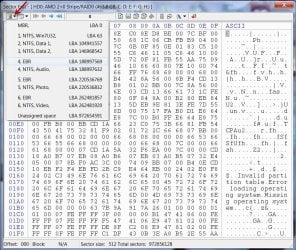
Save the important sectors in the Partition Table shown by Bootice. If you have any partition related problems making the drive inaccessible, you can simply restore the saved sectors to regain the drive.(Save the sectors on some other drive and not the same drive)

Saving with Bootice: http://www.sevenforums.com/hardware-devices/310295-lost-partitions.html#post2584426

14-02-2016 18-29-01.jpg

Note: If you have only four primary partitions you need to save only the LBA0 and four NTFS bootsectors ( Volume Boot Record/Partition Boot Record) shown in Bootice. In the sample screenshot above, I have three primary partitions and three logical partitions in the extended partition. I would save all the LBAs/Sectors shown in it with proper identifying names that includes the LBA/sector Number)

You need to take a fresh backup of the sectors only if you change the partition structure ( like adding a new partition, extending /merging the partition/s) any time. That answers the question you posed in the PM.

So if you change the partition structure anytime, run bootice again and save the sectors shown in bootice including LBA 0 since it contains the partition table and that partition table will change when you change the partition structure. After saving the sectors afresh, delete the old saved sectors.
 

My Computer My Computer

At a glance

Windows 7 Home Premium 32 bit
OS
Windows 7 Home Premium 32 bit
MBR
 

My Computer My Computer

At a glance

Windows 10 Pro x64Intel Core i7 6700KGSkill TridentZ RGB 16GB 3600 16-16-16-36EVGA GTX 980 Ti SC x2
Computer type
PC/Desktop
Computer Manufacturer/Model Number
Skylake Special #666
OS
Windows 10 Pro x64
CPU
Intel Core i7 6700K
Motherboard
Asus Sabertooth Z170 Mark 1
Memory
GSkill TridentZ RGB 16GB 3600 16-16-16-36
Graphics Card(s)
EVGA GTX 980 Ti SC x2
Sound Card
Realtek High Definition
Monitor(s) Displays
AOC G2460PG
Screen Resolution
1920 x 1080 144Hz
Hard Drives
Samsung 860 Pro 256GB, Seagate Barracuda 4TB x2
PSU
EVGA 1000 P2, EVGA White Custom Braided Cables
Case
Corsair Vengeance C70 Gunmetal Black
Cooling
Corsair H100i v2, Corsair ML120 x2, Thermal Grizzly Kryonaut
Keyboard
Logitech G910 Orion Spectrum
Mouse
Logitech G700s
Internet Speed
Verizon Fios Quantum Gateway 75/75
Antivirus
Windows Defender, Malwarebytes Free 3.8.3
Browser
Chrome
Other Info
Corsair SP120 x4, LG Blu-ray Drive, Durabrand HT-395 100 Watt Dolby Digital Amp, Corsair H2100 Wireless 7.1 Headset
@ OP. For your purposes-data storage only-it will not matter which format you use. You need MBR only if you're booting off it on a legacy BIOS MOBO. If you boot off a UEFI board, you would need GPT. You also need GPT when formatting a drive larger than 2TB. I'm using a 4TB GPT formatted HDD inside my computer that is using legacy boot and my 4TB backup HDDs are also GPT formatted; all six of them work just fine.

Also, there is no need to get complicated when formatting the drive. Choose MBR or GPT, format it, and just use it. Easy peasy.

Here is an article on the differences between MBR and GPT.
 

My Computer My Computer

At a glance

Win 7 Ultimate 64 bitIntel i7-3930KKingston HyperX Genesis 32GB Kit (8x4GB Modul...MSI R7850 Twin Frozr 2GD5/OC Radeon HD 7850 2...
Computer type
PC/Desktop
Computer Manufacturer/Model Number
Custom Build
OS
Win 7 Ultimate 64 bit
CPU
Intel i7-3930K
Motherboard
ASUS P9X79 WS
Memory
Kingston HyperX Genesis 32GB Kit (8x4GB Modules) 1600MHz DDR
Graphics Card(s)
MSI R7850 Twin Frozr 2GD5/OC Radeon HD 7850 2GB 256-bit GDDR
Sound Card
Asus Xonar Essence STX
Monitor(s) Displays
3x Asus VG248QE 24", Vizio 32" TV
Screen Resolution
1920 x 1080, ?
Hard Drives
Samsung 128GB 840 Pro SSD (1),
Samsung 4TB 850 EVO SSDs (4)
Samsung 4TB 850 EVO SSDs (16) external backup drives used in 2.5" hot swap bays in the computer.
PSU
Corsair HX750w
Case
Antec Two Hundred v2 (modified)
Cooling
Cooler Master GeminII S524 120mm (fan replaced with a 140mm)
Keyboard
Logitech G510s
Mouse
Logitech M525 (two in use)
Internet Speed
=< 32Mbps down, 8Mbps up
Antivirus
AVAST!, MBAM, SAS, Spybot S&D (all but MBAM free) Glary Util
Browser
IE11
Other Info
LSI 9211-8i HBA card (8 SATA III ports), 2.5" & 3.5" Hot Swap Bays, HooToo HT-CR001 PCI-E to USB 3.0 Internal Hub + 6 Slot Card Reader, and LG Model CH12LS28 BD-ROM Optical Drive. Also, ScanSnap S1500 ADF duplexing scanner, Canon 9000F flat bed scanner, Corsair SP2500 2.1 speakers, Samsung CLP 415nw laser color printer, Cyberpower PP2200SW UPS

My Computer My Computer

At a glance

Windows 10 Pro x64Intel Core i7 6700KGSkill TridentZ RGB 16GB 3600 16-16-16-36EVGA GTX 980 Ti SC x2
Computer type
PC/Desktop
Computer Manufacturer/Model Number
Skylake Special #666
OS
Windows 10 Pro x64
CPU
Intel Core i7 6700K
Motherboard
Asus Sabertooth Z170 Mark 1
Memory
GSkill TridentZ RGB 16GB 3600 16-16-16-36
Graphics Card(s)
EVGA GTX 980 Ti SC x2
Sound Card
Realtek High Definition
Monitor(s) Displays
AOC G2460PG
Screen Resolution
1920 x 1080 144Hz
Hard Drives
Samsung 860 Pro 256GB, Seagate Barracuda 4TB x2
PSU
EVGA 1000 P2, EVGA White Custom Braided Cables
Case
Corsair Vengeance C70 Gunmetal Black
Cooling
Corsair H100i v2, Corsair ML120 x2, Thermal Grizzly Kryonaut
Keyboard
Logitech G910 Orion Spectrum
Mouse
Logitech G700s
Internet Speed
Verizon Fios Quantum Gateway 75/75
Antivirus
Windows Defender, Malwarebytes Free 3.8.3
Browser
Chrome
Other Info
Corsair SP120 x4, LG Blu-ray Drive, Durabrand HT-395 100 Watt Dolby Digital Amp, Corsair H2100 Wireless 7.1 Headset
If you boot off a UEFI board, you would need GPT.
I have built 3 PCs with UEFI motherboards and I use MBR booting for all three. Of course I enjoy the benefits of the UEFI BIOS interface over the old legacy BIOS interface.

By choice all my internal and external drives are 2TB or less and they are all MBR formatted. If I go greater than 2TB I'll go GPT.

The MBR is stored in the first physical 512 bytes of your drive and contains some boot code and the very important partition table. Backing it up for the partition table is worthwhile since this will not be replaced by software that "rebuilds the MBR". A nice little program for this is:
MBR Backup

If you have a boot/OS drive not greater than 2TB it can be MBR and if one of your other drives is >2TB then it can be formatted GPT. Just make sure your backup software supports GPT.
 

My Computer My Computer

At a glance

Windows 7x64 Home Premium SP1Intel i7 2600kG.Skill Ripjaws (DDR3-1600) 2x4GBNvidia GeForce GTS 450; Intel HD Graphics 300...
Computer type
PC/Desktop
Computer Manufacturer/Model Number
Own build
OS
Windows 7x64 Home Premium SP1
CPU
Intel i7 2600k
Motherboard
ASUS P8Z68 Deluxe
Memory
G.Skill Ripjaws (DDR3-1600) 2x4GB
Graphics Card(s)
Nvidia GeForce GTS 450; Intel HD Graphics 3000(GT2+)
Monitor(s) Displays
Dell Ultrasharp IPS panel U2311H, Samsung SyncMaster P2350
Screen Resolution
1920x1080
Hard Drives
Samsung 850 Pro SSD 256GB, Samsung SSD 840 120GB, Seagates 1TB Barracuda ST31000528AS x2
PSU
Seasonic M12II 520W
Case
Lian Li Lancool PC-K60
Cooling
Case: 1x120mm, 3x140mm CPU: Hyper 212+
Keyboard
Logitech MK520 (wireless)
Mouse
Logitech MK520
Internet Speed
6-7 Mbps
Antivirus
Norton Security Premium, Malwarebytes on 2 (MSE on 3rd PC)
Browser
FireFox
Other Info
Audio: Logitech Z523 2.1
...The MBR is stored in the first physical 512 bytes of your drive and contains some boot code and the very important partition table. Backing it up for the partition table is worthwhile since this will not be replaced by software that "rebuilds the MBR". A nice little program for this is:
MBR Backup

I try to keep things as simple as possible (it's easier on my simple mind, not to mention I'm lazy). I just backup the entire C: drive using Macrium Reflect.
 

My Computer My Computer

At a glance

Win 7 Ultimate 64 bitIntel i7-3930KKingston HyperX Genesis 32GB Kit (8x4GB Modul...MSI R7850 Twin Frozr 2GD5/OC Radeon HD 7850 2...
Computer type
PC/Desktop
Computer Manufacturer/Model Number
Custom Build
OS
Win 7 Ultimate 64 bit
CPU
Intel i7-3930K
Motherboard
ASUS P9X79 WS
Memory
Kingston HyperX Genesis 32GB Kit (8x4GB Modules) 1600MHz DDR
Graphics Card(s)
MSI R7850 Twin Frozr 2GD5/OC Radeon HD 7850 2GB 256-bit GDDR
Sound Card
Asus Xonar Essence STX
Monitor(s) Displays
3x Asus VG248QE 24", Vizio 32" TV
Screen Resolution
1920 x 1080, ?
Hard Drives
Samsung 128GB 840 Pro SSD (1),
Samsung 4TB 850 EVO SSDs (4)
Samsung 4TB 850 EVO SSDs (16) external backup drives used in 2.5" hot swap bays in the computer.
PSU
Corsair HX750w
Case
Antec Two Hundred v2 (modified)
Cooling
Cooler Master GeminII S524 120mm (fan replaced with a 140mm)
Keyboard
Logitech G510s
Mouse
Logitech M525 (two in use)
Internet Speed
=< 32Mbps down, 8Mbps up
Antivirus
AVAST!, MBAM, SAS, Spybot S&D (all but MBAM free) Glary Util
Browser
IE11
Other Info
LSI 9211-8i HBA card (8 SATA III ports), 2.5" & 3.5" Hot Swap Bays, HooToo HT-CR001 PCI-E to USB 3.0 Internal Hub + 6 Slot Card Reader, and LG Model CH12LS28 BD-ROM Optical Drive. Also, ScanSnap S1500 ADF duplexing scanner, Canon 9000F flat bed scanner, Corsair SP2500 2.1 speakers, Samsung CLP 415nw laser color printer, Cyberpower PP2200SW UPS
Back
Top