
Games Goblin
New member
Hi all
I am creating a table at work, which lists the sales managers for different products and then further sub-sorted for different locations.
The old table had every name manually filled into it. Now, I have to update the table as new people have come in and existing ones have left etc. I was wondering whether instead of manually updating each and every name, if I could create a new table in a new worksheet which holds the names and e-mails of the personnel and the main table can refer the names from this table? So after doing this, in the future if any changes are to be made again, I only have to update the table in sheet 2 instead of updating the entire table in sheet 1.
Here is the outline of the tables in Question:
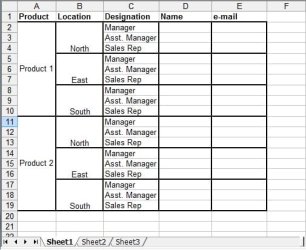
Here is Sheet 1 which contains the name & e-mails of personnel based upon location and designation. I want to lookup the data for name and e-mail from the table in Sheet 2
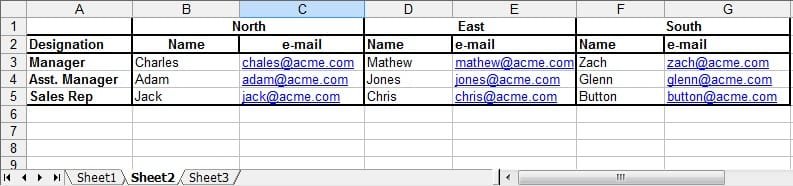
Here is Sheet 2 which contains the name and e-mails of the personnel.
So can this be done? Any help would be greatly appreciated!
I am creating a table at work, which lists the sales managers for different products and then further sub-sorted for different locations.
The old table had every name manually filled into it. Now, I have to update the table as new people have come in and existing ones have left etc. I was wondering whether instead of manually updating each and every name, if I could create a new table in a new worksheet which holds the names and e-mails of the personnel and the main table can refer the names from this table? So after doing this, in the future if any changes are to be made again, I only have to update the table in sheet 2 instead of updating the entire table in sheet 1.
Here is the outline of the tables in Question:
Here is Sheet 1 which contains the name & e-mails of personnel based upon location and designation. I want to lookup the data for name and e-mail from the table in Sheet 2
Here is Sheet 2 which contains the name and e-mails of the personnel.
So can this be done? Any help would be greatly appreciated!
My Computer
At a glance
Windows 7 Ultimate x64 Version 6.1 (Build 7600)Intel Core2 6300 @ 1.86 GHz2GBSapphire ATI Radeon HD4670 512MB GDDR3
- Computer Manufacturer/Model Number
- Custom
- OS
- Windows 7 Ultimate x64 Version 6.1 (Build 7600)
- CPU
- Intel Core2 6300 @ 1.86 GHz
- Motherboard
- Intel DP965LT
- Memory
- 2GB
- Graphics Card(s)
- Sapphire ATI Radeon HD4670 512MB GDDR3
- Sound Card
- IDT (onboard)
- Monitor(s) Displays
- Dell SP2208WFP
- Screen Resolution
- 1680x1050
- Hard Drives
- Samsung SP2004C SATA
- PSU
- Odyssey 450W
- Case
- Zebronics Antibiotic
- Cooling
- Stock
- Keyboard
- Logitech Easy Keyboard Deluxe
- Mouse
- Logitech Mx510
- Internet Speed
- 256K
