Using macrium reflect with windows 10

flogit

New member
Member
VIP
Local time
9:49 PM
Messages
359
Location
south wales uk
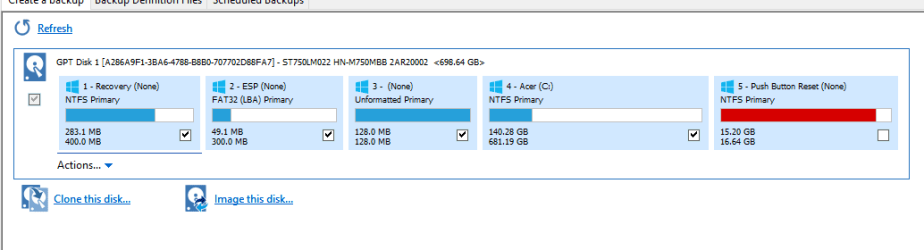
Went to backup my windows 10 C drive upon opening the Macrium,I aint sure which one to select to backup.
Can someone please help me decide which one do I have to backup.
Image included.

Many thanks.
 

Attachments

  • 2015-08-28 12_45_51-Calendar.png
    2015-08-28 12_45_51-Calendar.png
    15.7 KB · Views: 5

My Computer

Computer Manufacturer/Model Number
compaq presario CQ61
OS
windows 7 home premium 64bit
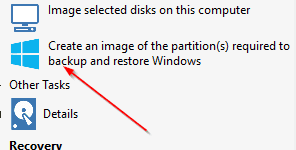
We may have different versions of Macrium, but I have a choice along the left side that says "create an image of the partitions required to backup and restore Windows".

Do you have such a choice in your version of Macrium?

If I take that choice, Macrium will decide on the necessary partitions.

I don't use that choice because I know what partitions to choose on my system. I don't have a GPT boot drive like you do, so it's much simpler.

I would advise you to go to the Macrium web site and search their help files and forum regarding info on GPT discs.
 

My Computer

Computer type
PC/Desktop
Computer Manufacturer/Model Number
Ignatz Special; 4 speed manual gearbox; factory air conditioning; one of one
OS
Windows 7 Home Premium SP1, 64-bit
CPU
Intel Skylake i5-6600K, not overclocked
Motherboard
AsRock Z170M Extreme 4, micro ATX
Memory
8 GB HyperX DDR4-2666 (2 x 4 GB)
Graphics Card(s)
none; graphics are integrated on CPU
Sound Card
onboard: Realtek ALC1150; external: USB Behringer UF0-202
Monitor(s) Displays
Dell S2340M 23 inch IPS
Screen Resolution
1600 x 900
Hard Drives
System: Crucial MX100 series SSD, 128 GB;
Data: Samsung Spinpoint 103SJ, 1 TB;
Backup: WD Caviar Green WD30EZRX-00D8PB0, 3 TB
PSU
Rosewill SilentNight 500 watt fanless, semi-modular
Case
Antec Solo II
Cooling
Noctua NH-U12S; Noctua F12 intake, Noctua S12A exhaust
Keyboard
Microsoft 200 6JH-00001 USB
Mouse
Dell or Microsoft optical wired; USB
Antivirus
Microsoft Security Essentials and Malwarebytes Premium
Browser
Pale Moon
Other Info
All fans PWM; speeds at idle: CPU circa 500 rpm; intake circa 600 rpm; exhaust circa 600 rpm; CPU temps 27 idle and 47 C load in a warm room (27 C/81 F) when running Intel Extreme Tuning Utility stress test.
Good morning.
I should have thought on that option,If that is the correct option when I select it the whole item comes up for backup as in the 1st screen shot.
I only want to make a copy of the operating system,As I have a regular backup of my documents etc using the Microsoft sync toy to an external hdd.
Would one of those in the 1st screen shot hold the O/S??

Thanks.

Is this the icon on the left side on the macrium page?.If so that's the one that selects all the drives.:confused:
 

Attachments

  • 2015-08-28 19_19_55-Microsoft Edge.png
    2015-08-28 19_19_55-Microsoft Edge.png
    5.5 KB · Views: 32

My Computer

Computer Manufacturer/Model Number
compaq presario CQ61
OS
windows 7 home premium 64bit
Yes, that is the icon.

Your operating system is on C, BUT, BUT, BUT it isn't enough for you to just make an image of C. Or, more correctly, it isn't enough if you want to restore your PC to a working state---which I assume is what you would want to do.

I'd just let Macrium choose by using that icon, until and unless you develop enough knowledge about GPT and UEFI to know which partitions are required. If you do, you could then select them manually, not using that icon.

Imaging is done on a partition-by-partition basis. If your data is on C, it will be included in any Macrium image of C. If your data is on one of the other partitions Macrium deems necessary to restore Windows, it will be included.

You say that when you choose the icon, Macrium automatically selects all partitions. That tells me you don't have a "data only" partition.

The way around that is to deliberately put your data on a "data only" partition, unrelated to Windows. If you do that, Macrium would NOT include it in the necessary partitions.

The only harm in including your personal data in a Macrium image is that the image file would be considerably larger. If you have plenty of storage space, no problem.

Actually, there is another issue: suppose you keep your data on C. Suppose you make an image file of C on Sept 1.

On Sept 3, you develop a bunch of new data--say family pictures. Then on Sept 5, your hard drive fails. So you restore the Sept 1 image of C to a new hard drive. In that situation, your Sept 3 pictures would be lost---unless you had another backup of them made on Sept 3 or later, unrelated to Macrium.
 

My Computer

Computer type
PC/Desktop
Computer Manufacturer/Model Number
Ignatz Special; 4 speed manual gearbox; factory air conditioning; one of one
OS
Windows 7 Home Premium SP1, 64-bit
CPU
Intel Skylake i5-6600K, not overclocked
Motherboard
AsRock Z170M Extreme 4, micro ATX
Memory
8 GB HyperX DDR4-2666 (2 x 4 GB)
Graphics Card(s)
none; graphics are integrated on CPU
Sound Card
onboard: Realtek ALC1150; external: USB Behringer UF0-202
Monitor(s) Displays
Dell S2340M 23 inch IPS
Screen Resolution
1600 x 900
Hard Drives
System: Crucial MX100 series SSD, 128 GB;
Data: Samsung Spinpoint 103SJ, 1 TB;
Backup: WD Caviar Green WD30EZRX-00D8PB0, 3 TB
PSU
Rosewill SilentNight 500 watt fanless, semi-modular
Case
Antec Solo II
Cooling
Noctua NH-U12S; Noctua F12 intake, Noctua S12A exhaust
Keyboard
Microsoft 200 6JH-00001 USB
Mouse
Dell or Microsoft optical wired; USB
Antivirus
Microsoft Security Essentials and Malwarebytes Premium
Browser
Pale Moon
Other Info
All fans PWM; speeds at idle: CPU circa 500 rpm; intake circa 600 rpm; exhaust circa 600 rpm; CPU temps 27 idle and 47 C load in a warm room (27 C/81 F) when running Intel Extreme Tuning Utility stress test.
Hey.Thanks for that information.
I must say that it looks very complicated a bit beyond me that was.Will have to have a good think about it.
Totally.......:confused:

Many Thanks.
 

My Computer

Computer Manufacturer/Model Number
compaq presario CQ61
OS
windows 7 home premium 64bit
It's actually pretty easy to use Macrium.

The main pitfalls are not making a known good "recovery disk" within Macrium that will in fact boot your PC. If it won't boot the PC, you have no way to start the machine with a bad hard drive and therefore could not restore.

And some folks make the bad decision to just make the image file, with no idea about how to actually restore it when disaster strikes.

So, if you decide to go with Macrium, I'd recommend you make a test image of a partition and then restore it, just so you know how the process works when you are not under the stress of a failed hard drive.
 

My Computer

Computer type
PC/Desktop
Computer Manufacturer/Model Number
Ignatz Special; 4 speed manual gearbox; factory air conditioning; one of one
OS
Windows 7 Home Premium SP1, 64-bit
CPU
Intel Skylake i5-6600K, not overclocked
Motherboard
AsRock Z170M Extreme 4, micro ATX
Memory
8 GB HyperX DDR4-2666 (2 x 4 GB)
Graphics Card(s)
none; graphics are integrated on CPU
Sound Card
onboard: Realtek ALC1150; external: USB Behringer UF0-202
Monitor(s) Displays
Dell S2340M 23 inch IPS
Screen Resolution
1600 x 900
Hard Drives
System: Crucial MX100 series SSD, 128 GB;
Data: Samsung Spinpoint 103SJ, 1 TB;
Backup: WD Caviar Green WD30EZRX-00D8PB0, 3 TB
PSU
Rosewill SilentNight 500 watt fanless, semi-modular
Case
Antec Solo II
Cooling
Noctua NH-U12S; Noctua F12 intake, Noctua S12A exhaust
Keyboard
Microsoft 200 6JH-00001 USB
Mouse
Dell or Microsoft optical wired; USB
Antivirus
Microsoft Security Essentials and Malwarebytes Premium
Browser
Pale Moon
Other Info
All fans PWM; speeds at idle: CPU circa 500 rpm; intake circa 600 rpm; exhaust circa 600 rpm; CPU temps 27 idle and 47 C load in a warm room (27 C/81 F) when running Intel Extreme Tuning Utility stress test.
Yea thanks.
I have used macrium before on a windows 7 desktop.
But that was easier as the OS was on a separate hdd and all doc's etc were on another internal hdd.

Looking at this laptop the 1st image confused me totally,Didn't know where to begin as there were so many places on the C drive.
Thanks.
 

My Computer

Computer Manufacturer/Model Number
compaq presario CQ61
OS
windows 7 home premium 64bit
https://msdn.microsoft.com/en-us/li...535(v=vs.85).aspx#gpt_faq_required_partitions

Above link might help you.

You apparently have a GPT system with UEFI.

From that link:

"For UEFI systems, the boot drive must contain an ESP, an MSR, and at least one basic data partition that contains the operating system."

So, that's 3 partitions required: C, ESP, and MSR (Microsoft Reserved).

"On drives greater than or equal to 16GB, the MSR is 128 MB."

That tells me that the third partition in your picture is the MSR. It's the only one that is 128 MB.

My guess would be that the "recovery" partition, the first one shown, is put there by Acer to help you recover to factory specs if needed. But I'm not sure why Macrium would necessarily think it's required to restore Windows.

The "push button reset" partition may also be part of the Acer recovery process and is apparently not needed to restore Windows, so Macrium omits it.
 

My Computer

Computer type
PC/Desktop
Computer Manufacturer/Model Number
Ignatz Special; 4 speed manual gearbox; factory air conditioning; one of one
OS
Windows 7 Home Premium SP1, 64-bit
CPU
Intel Skylake i5-6600K, not overclocked
Motherboard
AsRock Z170M Extreme 4, micro ATX
Memory
8 GB HyperX DDR4-2666 (2 x 4 GB)
Graphics Card(s)
none; graphics are integrated on CPU
Sound Card
onboard: Realtek ALC1150; external: USB Behringer UF0-202
Monitor(s) Displays
Dell S2340M 23 inch IPS
Screen Resolution
1600 x 900
Hard Drives
System: Crucial MX100 series SSD, 128 GB;
Data: Samsung Spinpoint 103SJ, 1 TB;
Backup: WD Caviar Green WD30EZRX-00D8PB0, 3 TB
PSU
Rosewill SilentNight 500 watt fanless, semi-modular
Case
Antec Solo II
Cooling
Noctua NH-U12S; Noctua F12 intake, Noctua S12A exhaust
Keyboard
Microsoft 200 6JH-00001 USB
Mouse
Dell or Microsoft optical wired; USB
Antivirus
Microsoft Security Essentials and Malwarebytes Premium
Browser
Pale Moon
Other Info
All fans PWM; speeds at idle: CPU circa 500 rpm; intake circa 600 rpm; exhaust circa 600 rpm; CPU temps 27 idle and 47 C load in a warm room (27 C/81 F) when running Intel Extreme Tuning Utility stress test.
Well here we are another day.
1st. I must thank You very much for giving up your valuable time to help me out here.
2nd.That does look very complicated,Not as simple as the windows 7 that I have been doing.But over the next few days will definitely have a good deep read of all your info and may have a go,As I'm not very up on computer technology but am learning slowly.

Well Thanks very much once again.:cool:
 

My Computer

Computer Manufacturer/Model Number
compaq presario CQ61
OS
windows 7 home premium 64bit
Hi,I thought that I would give you an update on the windows 10 backup
Well I went for it just selected the icon in question and let it run.
It took about 45min,But the only issue is it backed up everything windows OS and doc's etc.The only thing is when the time comes when the pc plays up don't know what will happen then.
I also tried the rescue disc that I made and all is okay.

Just cross fingers.
many Thanks
 

My Computer

Computer Manufacturer/Model Number
compaq presario CQ61
OS
windows 7 home premium 64bit
I have been using Acronis True Image for years, really like it. But sometimes it isn't too reliable. So I downloaded Macrium Reflect and made an image of my operating system. My computer has several hot swappable sata drives and I wanted to restore the image to one of them rather than my c: boot drive. I am always very careful to name my drives properly and things are going well. Selected the image, selected one of the hot swappables. Clicked next and it showed that I would be restoring the image of c:\bootdriveinternalw10 to c:\bootdriveinternalw10. I specifically ticked the box that said I:\hotswappable. But the next page didn't say anything about I: at all. So I cancelled. Am I doing something wrong? I was able to clone C: to I: without making an image and that went well. However, when trying to boot up and run the clone, it runs slow like molasses.
 

My Computer

OS
windows 7
I used to use Acronis, but now use Macrium (Paid version). When I back up (disc image) I back up all partitions. Then if the hard drive fails I can restore the entire drive. I do not use incremental backups, just the full backups. I have two USB connected hard drives that I back up to and alternate between the two, thus if one of those would fail (murphy's law) I still have the backup on the other drive. My backup, especially user data is critical as I use the PC for my recording studio.
 

My Computer

Computer type
PC/Desktop
Computer Manufacturer/Model Number
My Own Build
OS
Windows 10 64 bit
CPU
Intel i7 6700K
Motherboard
ASUS ROG Maximus VIII Hero
Memory
16GB Corsair Dominator
Graphics Card(s)
Intel CPU Graphics
Sound Card
RealTek
Monitor(s) Displays
27" Dell S2719dgf
Screen Resolution
2560X1440
Hard Drives
1 TB Samsung 850 EVO SSD for Win 10 Pro
500GB Samsung 850 EVO SSD for Win 10 Insider
2 TB drive for backup
PSU
EVGA Supernova 750G2
Case
BeQuiet Silent Base 600
Cooling
Deepcool Captain 120EX
Keyboard
Microsoft Wireless 2000
Mouse
Microsoft wireless
Internet Speed
100 MB/sec (Cable)
Antivirus
Microsoft Defender and Malwarebytes
Browser
Edge/Firefox
Other Info
Cakewalk (Sonar) by BandLab and Studio One 4.1 Pro recording studio software. MOTU 896Mk3 Hybrid recording interface, Frontier Tranzport wireless control unit, Behringer X-Touch Control Surface.
Five USB connected optical drives for CD Audio production using Nero BurningROM
A little different

As I have hot swappables, The Plan is to make an image to one of them and save for a rainy day. This way I can have W10 on one drive, W7 on another. If I want to run a different system all I have to do is to pick that drive at bootup. For all of my drives I have the OS system partition then the 2nd is for files.

But when restoring, shouldn't Macrium tell me which drive it is restoring to? I pick the I: drive and it shows I picked it. But on the next screen it shows that I picked the C: boot drive. (I have all hot swappable drives removed and have only my internal boot, my internal files drive and the hot swappable I want to put the image on to run).
 

My Computer

OS
windows 7
I suspect Macricum assumes its the "C" drive. But, when you have it set up operational it should become the "I" drive or whatever its supposed to be.

I have separate SSD drives for my system, one for Windows 7 and one for Windows 10. If I run Macrium from Windows 7, the Windows 7 drive is correctly identified as the "C" drive and the Win 10 drive as another letter. If I run Macrium from Windows 10 then the Win 10 drive is identified as the "C" drive. I used to have Acronis for backup it worked the same way.
 

My Computer

Computer type
PC/Desktop
Computer Manufacturer/Model Number
My Own Build
OS
Windows 10 64 bit
CPU
Intel i7 6700K
Motherboard
ASUS ROG Maximus VIII Hero
Memory
16GB Corsair Dominator
Graphics Card(s)
Intel CPU Graphics
Sound Card
RealTek
Monitor(s) Displays
27" Dell S2719dgf
Screen Resolution
2560X1440
Hard Drives
1 TB Samsung 850 EVO SSD for Win 10 Pro
500GB Samsung 850 EVO SSD for Win 10 Insider
2 TB drive for backup
PSU
EVGA Supernova 750G2
Case
BeQuiet Silent Base 600
Cooling
Deepcool Captain 120EX
Keyboard
Microsoft Wireless 2000
Mouse
Microsoft wireless
Internet Speed
100 MB/sec (Cable)
Antivirus
Microsoft Defender and Malwarebytes
Browser
Edge/Firefox
Other Info
Cakewalk (Sonar) by BandLab and Studio One 4.1 Pro recording studio software. MOTU 896Mk3 Hybrid recording interface, Frontier Tranzport wireless control unit, Behringer X-Touch Control Surface.
Five USB connected optical drives for CD Audio production using Nero BurningROM
I had the same drive switch when I was using dual boot. With the hot-swappable I just take the other drives out except for the one I want. Restoring an image to one doesn't give me that dual. Maybe that's the problem, Macrium could be getting confused as I am restoring my c: boot to my hot-swappable so there would be 2 the same.
 

My Computer

OS
windows 7
Back
Top