Using old sony vaio, tried upgrading to W7

abreezy

New member
Local time
9:30 PM
Messages
2
I am currently using a Sony Vaio All-in-one desktop. It probably around 6 years old, and has been running slowly lately so I wiped it using DBAN and then proceeded to install Windows 7 64 bit. After installing java, activex and some other drivers, I then downloaded a game called League of Legends. When I tried running the game however, I got a "could not load direct3d" error. So, after delving into some research (my model number is VGC-LT10E), it seems to me that this computer is so old, that Sony never released updated drivers for Windows 7 compatibility. The only drivers I could find (graphics card is GeForce 8400m GT) were compatible only with Vista. To add to the mess, this comp apparently only uses proprietary drivers, so I couldn't get drivers from nvidia's website.

TL;DR -
Does anyone know of a way to get working drivers for my Sony Vaio (VGC-LT10E) on Windows 7 64 bit?
I want to try and avoid having to downgrade back to Vista.

Thanks in advance to anyone who replies.
 

My Computer My Computer

At a glance

attempting to use w7 64bit
OS
attempting to use w7 64bit
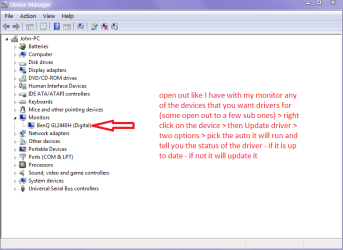
Hello and welcome breezy mate have a look in Control Panel > Device Manager > right click on the different devices and update the driver auto. See pic

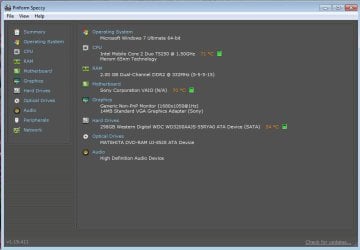
Some system specs would be good too I know we can look for the model but that isn't to say it has not been altered - Speccy will do that for you.

Speccy - Download < from piriform watch out for daft add ons

Hum just found this http://esupport.sony.com/US/p/model-home.pl?mdl=VGCLT10E&LOC=3#/downloadTab & http://esupport.sony.com/US/p/model...id=ca7bf53a3b41a6f4b510eb5048bed9a4#/howtoTab
 

Attachments

  • DM.PNG
    DM.PNG
    19.9 KB · Views: 7

My Computer My Computer

At a glance

Desk1 7 Home Prem / Desk2 10 Pro / Main lap A...Desk1 i5 3750K / Laptop i7 GTX 860M / Desk2 i...Desk1 8GB (1866) / Desk2 16GB (1333) / Laptop...Desk 1& 2NVidia GTX 650 & Laptops on board Intel
Computer type
PC/Desktop
Computer Manufacturer/Model Number
Own build (new) Desk1 / Asus ROG Win 7 / Desk2 1st build
OS
Desk1 7 Home Prem / Desk2 10 Pro / Main lap Asus ROG 10 Pro 2 laptop Toshiba 7 Pro Asus P2520 7 & 10
CPU
Desk1 i5 3750K / Laptop i7 GTX 860M / Desk2 i5 2500
Motherboard
Desk1 Asus P877-V / Desk2 Gigabyte H67 UD3H / Laptop ?
Memory
Desk1 8GB (1866) / Desk2 16GB (1333) / Laptop 8Gb DDR3
Graphics Card(s)
Desk 1& 2NVidia GTX 650 & Laptops on board Intel
Sound Card
Desk 1 & 2 -XONAR DG Realtek High Def audio Laptop
Monitor(s) Displays
Desk 1 Benq HD 2450 / Desk2 Philips 24" / Laptop 17.5"
Screen Resolution
1920x1080 D1 & D2 & Laptop 1
Hard Drives
Desk1 Samsung 120GB 830 SSD
Asus ROG 256GB 850 Pro SSD
Desk2 Samsung 840 256 SSD
Toshiba 120GB EVO
PSU
Desk 1 Corsair HX 1050/ Laptop ? / Desk 2 Corsair HX 650
Case
Desk 1 Cooler HAF XM ? Toshiba laptop / Desk2 Coolermaster
Cooling
Fans on all Desk1 -2 Desk2 - all Coolermasters 5 Laptop ?
Keyboard
Desk 1 MS Sidewinder X6 Desk 2 MS Sidewinder X 4
Mouse
Desk 1&2 - Gigabyte MS 900 gamer - laptop - Logitec wireless
Internet Speed
ADSL2+
Other Info
One other Desktop (tester) and spare Toshba laptop both with SSD's
Running Kaspersky 2016 ISS on all machines config'd identically
Logitec audio stereo systems on each machine (x3)
Canon MG5250MFC
Router/modem TP-Link running WPA2SK
Hello and welcome breezy mate have a look in Control Panel > Device Manager > right click on the different devices and update the driver auto. See pic

Some system specs would be good too I know we can look for the model but that isn't to say it has not been altered - Speccy will do that for you.

Speccy - Download < from piriform watch out for daft add ons

Hum just found this Sony eSupport - VGC-LT10E - Support & Sony eSupport - VGC-LT10E - Support

When I click auto update driver for both monitor and graphics card, it tells me I have the newest one.

The bottom two URL's have drivers that are for Vista only. They didn't work for me :(
 

Attachments

  • speccy summary.jpg
    speccy summary.jpg
    45.3 KB · Views: 8

My Computer My Computer

At a glance

attempting to use w7 64bit
OS
attempting to use w7 64bit
Sorry Breezy I thought they might. I do notice too you have 2GB RAM which I think would be better if you could get another 2GB on board as you are running a 64bit system and gaming too. Not expensive to do and having just fixed a Vista machine with similar specs and with a 32bit system the effect of the extra RAM was quite dramatic.

But the drivers we will need to do some more searching. Will return.

John
 

My Computer My Computer

At a glance

Desk1 7 Home Prem / Desk2 10 Pro / Main lap A...Desk1 i5 3750K / Laptop i7 GTX 860M / Desk2 i...Desk1 8GB (1866) / Desk2 16GB (1333) / Laptop...Desk 1& 2NVidia GTX 650 & Laptops on board Intel
Computer type
PC/Desktop
Computer Manufacturer/Model Number
Own build (new) Desk1 / Asus ROG Win 7 / Desk2 1st build
OS
Desk1 7 Home Prem / Desk2 10 Pro / Main lap Asus ROG 10 Pro 2 laptop Toshiba 7 Pro Asus P2520 7 & 10
CPU
Desk1 i5 3750K / Laptop i7 GTX 860M / Desk2 i5 2500
Motherboard
Desk1 Asus P877-V / Desk2 Gigabyte H67 UD3H / Laptop ?
Memory
Desk1 8GB (1866) / Desk2 16GB (1333) / Laptop 8Gb DDR3
Graphics Card(s)
Desk 1& 2NVidia GTX 650 & Laptops on board Intel
Sound Card
Desk 1 & 2 -XONAR DG Realtek High Def audio Laptop
Monitor(s) Displays
Desk 1 Benq HD 2450 / Desk2 Philips 24" / Laptop 17.5"
Screen Resolution
1920x1080 D1 & D2 & Laptop 1
Hard Drives
Desk1 Samsung 120GB 830 SSD
Asus ROG 256GB 850 Pro SSD
Desk2 Samsung 840 256 SSD
Toshiba 120GB EVO
PSU
Desk 1 Corsair HX 1050/ Laptop ? / Desk 2 Corsair HX 650
Case
Desk 1 Cooler HAF XM ? Toshiba laptop / Desk2 Coolermaster
Cooling
Fans on all Desk1 -2 Desk2 - all Coolermasters 5 Laptop ?
Keyboard
Desk 1 MS Sidewinder X6 Desk 2 MS Sidewinder X 4
Mouse
Desk 1&2 - Gigabyte MS 900 gamer - laptop - Logitec wireless
Internet Speed
ADSL2+
Other Info
One other Desktop (tester) and spare Toshba laptop both with SSD's
Running Kaspersky 2016 ISS on all machines config'd identically
Logitec audio stereo systems on each machine (x3)
Canon MG5250MFC
Router/modem TP-Link running WPA2SK
Hello abreezy and welcome to Seven Forums.

Sorry for jumping in. Don't mean to step on anyones toes. :)

Absolutely no guarantees but you may be able to use the Vista drivers by running them in Compatibility Mode.

http://www.sevenforums.com/tutorials/316-compatibility-mode.html

And just a bit off topic, but I noticed in the Speccy screenshot that your CPU and motherboard are 71C and 70C respectively. That's kinda on the warm side, especially if you're not doing anything CPU intensive. If you can get the Vista drivers to install and you start loading down the CPU playing LoL, those temps may get into the 90s or more. Definitely the danger zone.

Again, my apologies for jumping in.
 

My Computer My Computer

At a glance

Win 7 Pro 64-bitIntel i5 2.4 Ghz8GB DDR3Intel HD 3000
Computer type
Laptop
Computer Manufacturer/Model Number
Sony Vaio VPCEB47GM Laptop
OS
Win 7 Pro 64-bit
CPU
Intel i5 2.4 Ghz
Memory
8GB DDR3
Graphics Card(s)
Intel HD 3000
Sound Card
IDT High Definition
Monitor(s) Displays
15.6 WGXA Anti-Glare LED
Screen Resolution
1280x800
Hard Drives
640Gb 7200rpm
Antivirus
MSE
Browser
Opera (primary) with IE9 backup
I am currently using a Sony Vaio All-in-one desktop. It probably around 6 years old, and has been running slowly lately so I wiped it using DBAN and then proceeded to install Windows 7 64 bit. After installing java, activex and some other drivers, I then downloaded a game called League of Legends. When I tried running the game however, I got a "could not load direct3d" error. So, after delving into some research (my model number is VGC-LT10E), it seems to me that this computer is so old, that Sony never released updated drivers for Windows 7 compatibility. The only drivers I could find (graphics card is GeForce 8400m GT) were compatible only with Vista. To add to the mess, this comp apparently only uses proprietary drivers, so I couldn't get drivers from nvidia's website.

TL;DR -
Does anyone know of a way to get working drivers for my Sony Vaio (VGC-LT10E) on Windows 7 64 bit?
I want to try and avoid having to downgrade back to Vista.

Thanks in advance to anyone who replies.

I'm a bit confused. The Sony support site for the VGC-LT10E only lists Intel graphics.

Aside from that, there are 8400m drivers for Win7 X64. I vaguely recall installing the Vista X64 drivers for my 4 year old cheap Compaq laptop, and subsequently getting newer drivers via Windows Update.

I wish that notebook/all-in-one makers would stop using custom device IDs for their onboard graphics. No doubt it simplifies their support, but it makes life difficult for those who wish to update beyond what the manufacturer decided to officially support.
 

My Computer My Computer

At a glance

Windows 7 Pro X64 SP1Intel Core I7-3930k16 GB Gskill DDR3-2133eVGA GTX680
Computer Manufacturer/Model Number
homegrown
OS
Windows 7 Pro X64 SP1
CPU
Intel Core I7-3930k
Motherboard
Asus P9X79 Pro
Memory
16 GB Gskill DDR3-2133
Graphics Card(s)
eVGA GTX680
Sound Card
Creative X-Fi Titanium
Monitor(s) Displays
As PA246Q
Screen Resolution
1920 X 1200
Hard Drives
Corsair Force GT, 120 GB
WDC 1.5TB Caviar Black
PSU
PCP&C Silencer 750 Crossfire
Case
Silverstone FT02
Cooling
Noctua NH-D14
Keyboard
cheap Logitech USB
Mouse
Microsoft Intellimouse Explorer (old optical) USB
Internet Speed
6Mb cable
Other Info
Pioneer BDR-205
Samsung SH-203B
Monsoon 5.1 speakers
Hello abreezy and welcome to Seven Forums.

Sorry for jumping in. Don't mean to step on anyones toes. :)

Absolutely no guarantees but you may be able to use the Vista drivers by running them in Compatibility Mode.

http://www.sevenforums.com/tutorials/316-compatibility-mode.html

And just a bit off topic, but I noticed in the Speccy screenshot that your CPU and motherboard are 71C and 70C respectively. That's kinda on the warm side, especially if you're not doing anything CPU intensive. If you can get the Vista drivers to install and you start loading down the CPU playing LoL, those temps may get into the 90s or more. Definitely the danger zone.

Again, my apologies for jumping in.
Yep M I did notice those temps but was thinking it probably just needs a clean out plus some ore RAM to be honest 2GB is a drop in the bucket these days eh?

Breezy I don't know how you are with the innards but can you take a look inside and see how dusty it is? maybe get a photoshot of the inside mate we can go from there.
 

My Computer My Computer

At a glance

Desk1 7 Home Prem / Desk2 10 Pro / Main lap A...Desk1 i5 3750K / Laptop i7 GTX 860M / Desk2 i...Desk1 8GB (1866) / Desk2 16GB (1333) / Laptop...Desk 1& 2NVidia GTX 650 & Laptops on board Intel
Computer type
PC/Desktop
Computer Manufacturer/Model Number
Own build (new) Desk1 / Asus ROG Win 7 / Desk2 1st build
OS
Desk1 7 Home Prem / Desk2 10 Pro / Main lap Asus ROG 10 Pro 2 laptop Toshiba 7 Pro Asus P2520 7 & 10
CPU
Desk1 i5 3750K / Laptop i7 GTX 860M / Desk2 i5 2500
Motherboard
Desk1 Asus P877-V / Desk2 Gigabyte H67 UD3H / Laptop ?
Memory
Desk1 8GB (1866) / Desk2 16GB (1333) / Laptop 8Gb DDR3
Graphics Card(s)
Desk 1& 2NVidia GTX 650 & Laptops on board Intel
Sound Card
Desk 1 & 2 -XONAR DG Realtek High Def audio Laptop
Monitor(s) Displays
Desk 1 Benq HD 2450 / Desk2 Philips 24" / Laptop 17.5"
Screen Resolution
1920x1080 D1 & D2 & Laptop 1
Hard Drives
Desk1 Samsung 120GB 830 SSD
Asus ROG 256GB 850 Pro SSD
Desk2 Samsung 840 256 SSD
Toshiba 120GB EVO
PSU
Desk 1 Corsair HX 1050/ Laptop ? / Desk 2 Corsair HX 650
Case
Desk 1 Cooler HAF XM ? Toshiba laptop / Desk2 Coolermaster
Cooling
Fans on all Desk1 -2 Desk2 - all Coolermasters 5 Laptop ?
Keyboard
Desk 1 MS Sidewinder X6 Desk 2 MS Sidewinder X 4
Mouse
Desk 1&2 - Gigabyte MS 900 gamer - laptop - Logitec wireless
Internet Speed
ADSL2+
Other Info
One other Desktop (tester) and spare Toshba laptop both with SSD's
Running Kaspersky 2016 ISS on all machines config'd identically
Logitec audio stereo systems on each machine (x3)
Canon MG5250MFC
Router/modem TP-Link running WPA2SK
Back
Top