I have many original pictures in my photo gallery. An example of this is 1111_original. I have dragged some of these originals to my windows dvd maker and the picture does appear in the slide shows I am working on. However, the picture is blurry. Can someone give me some advice on how to work with these original pictures, enlarging, making the blur disappear, any information at all.
As usual any assistance is greatly appreciated. Thanks...
What size are the images? Are they JPEG's? When you say they are original, where did they come from? If they are under 2mb in file size would you be prepared to attach one to your post?
My Computer
Computer type
PC/Desktop
OS
Microsoft Windows 7 Home Premium 64-bit 7601 Multiprocessor Free Service Pack 1
CPU
Intel(R) Core(TM) i7-3770 CPU @ 3.40GHz
Motherboard
ASUSTeK COMPUTER INC. P8H77-M
Memory
8.00 GB
Graphics Card(s)
Intel(R) HD Graphics 4000
Sound Card
On Board
Monitor(s) Displays
Dell 24"
Screen Resolution
1920 x 1080
Hard Drives
(1) INTEL SSDSC2CT180A3 ATA Device (2) ST500DM002-1BD142 ATA Device (3) WDC WD3200AAKS-75L9A0 ATA Device (4) Generic- Compact Flash USB Device (5) Generic- MS/MS-Pro USB Device (6) Generic- SD/MMC USB Device (7) Generic- SM/xD-Picture USB
What size are the images? Are they JPEG's? When you say they are original, where did they come from? If they are under 2mb in file size would you be prepared to attach one to your post?
This is a window 7 that I am using and I hope the info I am giving helps...
Name 1557_original (using this example since I opened it in the library
under pictures)
Type is File
Size is 410 KB
Folder path is C:Users/Carole/My Pictures/PhotoDirector/3
Attributes A
I really don't want to download a program...seems I always have a problem when I
do this.
Any help is appreciated.
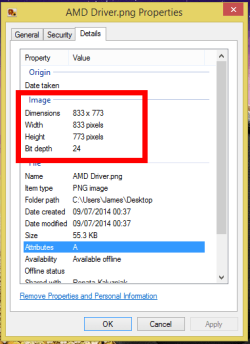
Hi. All the information I gave you is what I have under details except I gave you the wrong size it should be 13.0 KB...I noticed that you used AMD Driver.
png.Properties for your details...thanks again...
Don' know for sure if you got the reply. Anyhow size should be 13.0. I also noticed that you use AMD Driver.png. Properties for your details...all information I gave you is what I have under details
That is an exceptionally small file size. It would seem as if your picture is very pixelated causing the blurring. Only a larger pictiure will cure this. I asked where the pictures come from but you didn't reply!!
My Computer
Computer type
PC/Desktop
OS
Microsoft Windows 7 Home Premium 64-bit 7601 Multiprocessor Free Service Pack 1
CPU
Intel(R) Core(TM) i7-3770 CPU @ 3.40GHz
Motherboard
ASUSTeK COMPUTER INC. P8H77-M
Memory
8.00 GB
Graphics Card(s)
Intel(R) HD Graphics 4000
Sound Card
On Board
Monitor(s) Displays
Dell 24"
Screen Resolution
1920 x 1080
Hard Drives
(1) INTEL SSDSC2CT180A3 ATA Device (2) ST500DM002-1BD142 ATA Device (3) WDC WD3200AAKS-75L9A0 ATA Device (4) Generic- Compact Flash USB Device (5) Generic- MS/MS-Pro USB Device (6) Generic- SD/MMC USB Device (7) Generic- SM/xD-Picture USB
Sometimes I have trouble explaining things so here goes. I go to my library and open my pictures. Whatever is in this picture library shows up. I have found listings ie 1000_original...which I click on to open. A listing of how I want to open the item gave me a choice to have it open in paint, or even my photo gallery besides many other places. I usually click on paint and a small picture does come up in the paint box.
I am able to drag the listing number ie 1000_original to windows dvd maker and the picture does show up there but it is very blurry and from what you have told me a picture of this size would be blurry.
You have answered my question and I really thank you for this. I will stay away from those ie 1000_originals. I can't use them the way I wanted to. Thank you for taking the time to help me. I really appreciate it. Bye