
Solved Using Task Scheduler fails to run RoboCopy.

Trapper

New member
Power User
Local time
3:15 AM
Messages
207
Location
Hertfordshire UK.
I have set up some RoboCopy tasks that run fine when run from the desktop link, but being forgetful I thought I would try to run them automatically using Task Scheduler. I followed the instructions in the tutorial and all appeared to be fine. However the tasks did not run so I checked them in Task Scheduler and last run stated 'Never'. I then chose to 'Run' them Task Scheduler and got the following dos report:

(The smiley is ColonD :Dat)


REPORT:
Simple Usage :: ROBOCOPY source destination /MIR
source :: Source Directory (drive:\path or \\server\share\path).
destination :: Destination Dir (drive:\path or \\server\share\path).
/MIR :: Mirror a complete directory tree.
For more usage information run ROBOCOPY /?
**** /MIR can DELETE files as well as copy them !
C:\Windows\system32>robocopy "C:\Program Files (x86)\Microsoft Money 2005" "K:\M
oney File Backups" /e /np /tee /mt:4 /log+:my_backup_log.txt
2014/01/03 10:25:38 ERROR 5 (0x00000005) Opening Log File C:\Windows\system32\my
_backup_log.txt
Access is denied.

-------------------------------------------------------------------------------
ROBOCOPY :: Robust File Copy for Windows
-------------------------------------------------------------------------------
Started : Fri Jan 03 10:25:38 2014
Source - C:\Program Files (x86)\Microsoft Money 2005\
Dest - K:\Money File Backups\
Files :
Options : /TEE /S /E /COPY:DAT /NP /MT:4 /R:1000000 /W:30

------------------------------------------------------------------------------
ERROR : Invalid Parameter #7 : "/log+:my_backup_log.txt"
Simple Usage :: ROBOCOPY source destination /MIR
source :: Source Directory (drive:\path or \\server\share\path).
destination :: Destination Dir (drive:\path or \\server\share\path).
/MIR :: Mirror a complete directory tree.
For more usage information run ROBOCOPY /?

**** /MIR can DELETE files as well as copy them !
C:\Windows\system32>robocopy "C:\Users\Alan\Documents\Outlook Files" "K:\Outlook
Files - NEW 21 03 2012" /e /np /tee /mt:4 /log+:my_backup_log.txt
2014/01/03 10:25:38 ERROR 5 (0x00000005) Opening Log File C:\Windows\system32\my
_backup_log.txt
Access is denied.

-------------------------------------------------------------------------------
ROBOCOPY :: Robust File Copy for Windows
-------------------------------------------------------------------------------
Started : Fri Jan 03 10:25:38 2014
Source - C:\Users\Alan\Documents\Outlook Files\
Dest - K:\Outlook Files - NEW 21 03 2012\
Files :
Options : /TEE /S /E /COPY:DAT /NP /MT:4 /R:1000000 /W:30
------------------------------------------------------------------------------
ERROR : Invalid Parameter #7 : "/log+:my_backup_log.txt"
Simple Usage :: ROBOCOPY source destination /MIR
source :: Source Directory (drive:\path or \\server\share\path).
destination :: Destination Dir (drive:\path or \\server\share\path).
/MIR :: Mirror a complete directory tree.
For more usage information run ROBOCOPY /?


END.


I entered ROBOCOPY/? in the Win7 search box but got no help screen.


The above only shows a proportion of the commands set up in RoboCopy so I reckon it gave up trying to run and reported only the above errors, only a guess though!


Any suggestions as to what may be wrong based on the above report?

These are some of my RoboCopy lines:
robocopy "I:\DATA" "K:\DATA" /e /np /tee /mt:4 /log:my_backup_log.txt
robocopy "C:\Program Files (x86)\Microsoft Money 2005" "K:\Money File Backups" /e /np /tee /mt:4 /log+:my_backup_log.txt
robocopy "C:\Users\Alan\Documents\Outlook Files" "K:\Outlook Files - NEW 21 03 2012" /e /np /tee /mt:4 /log+:my_backup_log.txt
robocopy "C:\Users\Alan\AppData\Roaming\Mozilla\Firefox\Profiles\00nrkh7f.default" "K:\Mozilla File Backups" /e /np /tee /mt:4 /log+:my_backup_log.txt
robocopy "C:\Program Files\Microsoft Office\Office14\Queries" "K:\Queries Alans Address Book 02.xls" /e /np /tee /mt:4 /log+:my_backup_log.txt

Many thanks
Alan.
 

My Computer

Computer type
PC/Desktop
Computer Manufacturer/Model Number
Home Build
OS
Windows 7 Professional 64bit
CPU
i5-2500K 3.30Hz 6MB Cache
Motherboard
ASUS P8P67 Pro B3 Revision
Memory
16GB DDR3
Graphics Card(s)
ASUSGeforce GTX1050Ti 4GB
Sound Card
On-Board
Monitor(s) Displays
LG23MP65HQ-P
Hard Drives
WD Caviar Green 500gb
Maxtor 300gb
WD External USB 120gb
WD My Passport USB 2TB
LUX3 External USB 1TB
PSU
Corsair 800W
Case
Antec
Cooling
Arctic 13 Cooler
Antivirus
Bitdefender Total Security 2017
Browser
FireFox
Code:
2014/01/03 10:25:38 ERROR 5 (0x00000005) Opening Log File [COLOR="red"]C:\Windows\system32\[/COLOR]my
_backup_log.txt
[COLOR="Red"]Access is denied[/COLOR].

I think the basic problem is you are trying to save the logfile to a Windows protected folder.

My suggestions is to use your robocopy bat file from your desktop....not C:\Windows\system32\

Try that and let us know what happens.

BTW : you run robocopy /? from an elevated command prompt as explained in the tutorial - not from Windows search.
 

My Computer

Computer type
PC/Desktop
Computer Manufacturer/Model Number
Golden Mk. I.4
OS
Windows 10 Pro x64 ; Xubuntu x64
CPU
Intel i7 860 @ 2.80 GHz O/C'ed to 4.0GHz
Motherboard
Gigabyte P55A-UD3R Rev.1. Award BIOS F13
Memory
16GB Corsair Vengance DDR3 @ 661 MHz Dual Channel (9-9-9-24)
Graphics Card(s)
EVGA NVidia GTX 560 1024MB
Sound Card
Realtek Integrated
Monitor(s) Displays
Dual Samsung SyncMaster 2494HS
Screen Resolution
1920*1080 and 1920*1080
Hard Drives
1*Samsung 840 EVO 120GB SSD;
1*OCZ Vertex 2 60GB SSD;
2*Samsung F3 SpinPoint 1TB in RAID0;
1*Samsung F1 SpinPoint 1TB;
2*Western Digital 1TB External USB 3.0
1*Western Digital 500GB External USB 3.0
1*Seagate 500GB External USB 2.0
PSU
Thermaltake ToughPower QFan 750W
Case
Thermaltake Element S VK60001W2Z
Cooling
Corsair H60 Water Cooling, 2*230mm and 2*80mm case fans
Keyboard
Logitech G110
Mouse
Logitech MX518
Thank you for the fast reply Golden, I can run the file manually without any problems from my desktop but I would like to use Task Scheduler to run it on a regular basis, I would really like it to run as shutdown if that is possible but it seems I can only chose a time and run asap if a run is missed.
I am printing off the tutorials about backups and images as I do not seem to have an actual windows backup set up yet!
I have just bought a 2TB WD My Passport drive for system and file backups, now I just need to find out what will be best.

Regards
Alan.
 

My Computer

Computer type
PC/Desktop
Computer Manufacturer/Model Number
Home Build
OS
Windows 7 Professional 64bit
CPU
i5-2500K 3.30Hz 6MB Cache
Motherboard
ASUS P8P67 Pro B3 Revision
Memory
16GB DDR3
Graphics Card(s)
ASUSGeforce GTX1050Ti 4GB
Sound Card
On-Board
Monitor(s) Displays
LG23MP65HQ-P
Hard Drives
WD Caviar Green 500gb
Maxtor 300gb
WD External USB 120gb
WD My Passport USB 2TB
LUX3 External USB 1TB
PSU
Corsair 800W
Case
Antec
Cooling
Arctic 13 Cooler
Antivirus
Bitdefender Total Security 2017
Browser
FireFox

My Computer

Computer type
PC/Desktop
Computer Manufacturer/Model Number
Golden Mk. I.4
OS
Windows 10 Pro x64 ; Xubuntu x64
CPU
Intel i7 860 @ 2.80 GHz O/C'ed to 4.0GHz
Motherboard
Gigabyte P55A-UD3R Rev.1. Award BIOS F13
Memory
16GB Corsair Vengance DDR3 @ 661 MHz Dual Channel (9-9-9-24)
Graphics Card(s)
EVGA NVidia GTX 560 1024MB
Sound Card
Realtek Integrated
Monitor(s) Displays
Dual Samsung SyncMaster 2494HS
Screen Resolution
1920*1080 and 1920*1080
Hard Drives
1*Samsung 840 EVO 120GB SSD;
1*OCZ Vertex 2 60GB SSD;
2*Samsung F3 SpinPoint 1TB in RAID0;
1*Samsung F1 SpinPoint 1TB;
2*Western Digital 1TB External USB 3.0
1*Western Digital 500GB External USB 3.0
1*Seagate 500GB External USB 2.0
PSU
Thermaltake ToughPower QFan 750W
Case
Thermaltake Element S VK60001W2Z
Cooling
Corsair H60 Water Cooling, 2*230mm and 2*80mm case fans
Keyboard
Logitech G110
Mouse
Logitech MX518
Thank you for the link to Synctoy, I have printed off the tutorial and will read it as soon as I can, I may be back with a few ???'s so be ready!

Thanks again.

Alan.
 

My Computer

Computer type
PC/Desktop
Computer Manufacturer/Model Number
Home Build
OS
Windows 7 Professional 64bit
CPU
i5-2500K 3.30Hz 6MB Cache
Motherboard
ASUS P8P67 Pro B3 Revision
Memory
16GB DDR3
Graphics Card(s)
ASUSGeforce GTX1050Ti 4GB
Sound Card
On-Board
Monitor(s) Displays
LG23MP65HQ-P
Hard Drives
WD Caviar Green 500gb
Maxtor 300gb
WD External USB 120gb
WD My Passport USB 2TB
LUX3 External USB 1TB
PSU
Corsair 800W
Case
Antec
Cooling
Arctic 13 Cooler
Antivirus
Bitdefender Total Security 2017
Browser
FireFox
:confused:
I have installed SyncToy and printed off the tutorial. I note in step 1 of 'Using SyncToy' it shows to choose your folders, I selected a left folder named I:\DATA. I: is my main external drive which has a folder named DATA and made a new folder in my external 2TB M: drive called Synctoy DATA. I selected this new folder as my right folder. (M:\Synctoy DATA).

My I:\DATA folder contains about 15 sub folders each with its individual files, around 700 across these sub folders in total and as suggested used the ECHO option. I named the pairing of folders as 'I DATA Backups'.

I previewed the I DATA Backups in Synctoy and instead of 15 folders I found 700 files, if I did this with my music folder containing around 60 sub folders with about 30~50 songs in each that would mean a listing of 2,000+ plus songs. I have many other folders with sub folders I wish to back up as they are.

Is it possible for Synctoy to maintain my existing folder structure in the backup and not extract every sub folder file? Or, would I need to 'pair' every folders 'sub folder' on a one to one basis? A very long and laborious task! If so I think I may be better off with with Robocopy and hope I can find a way to use Task Scheduler to run it automatically. Or put up a post-it note to remind me. ;)

I prefer to have exact and direct copies not compressed or in a format that needs another program to open them.

Thanks for your help.
Alan.
 

My Computer

Computer type
PC/Desktop
Computer Manufacturer/Model Number
Home Build
OS
Windows 7 Professional 64bit
CPU
i5-2500K 3.30Hz 6MB Cache
Motherboard
ASUS P8P67 Pro B3 Revision
Memory
16GB DDR3
Graphics Card(s)
ASUSGeforce GTX1050Ti 4GB
Sound Card
On-Board
Monitor(s) Displays
LG23MP65HQ-P
Hard Drives
WD Caviar Green 500gb
Maxtor 300gb
WD External USB 120gb
WD My Passport USB 2TB
LUX3 External USB 1TB
PSU
Corsair 800W
Case
Antec
Cooling
Arctic 13 Cooler
Antivirus
Bitdefender Total Security 2017
Browser
FireFox
Alan,

1. Please copy the text in the code box below to a new instance of Notepad.
2. Save the file as test.bat on your desktop
3. Right-click on test.bat and run as administrator

It should backup everything in I:\Data to your M: drive in a folder called \Backup_DATA. Please report back if it does that.

Code:
robocopy I:\DATA M:\Backup_DATA /e /mir /np /log:backup_log.txt
pause
 

My Computer

Computer type
PC/Desktop
Computer Manufacturer/Model Number
Golden Mk. I.4
OS
Windows 10 Pro x64 ; Xubuntu x64
CPU
Intel i7 860 @ 2.80 GHz O/C'ed to 4.0GHz
Motherboard
Gigabyte P55A-UD3R Rev.1. Award BIOS F13
Memory
16GB Corsair Vengance DDR3 @ 661 MHz Dual Channel (9-9-9-24)
Graphics Card(s)
EVGA NVidia GTX 560 1024MB
Sound Card
Realtek Integrated
Monitor(s) Displays
Dual Samsung SyncMaster 2494HS
Screen Resolution
1920*1080 and 1920*1080
Hard Drives
1*Samsung 840 EVO 120GB SSD;
1*OCZ Vertex 2 60GB SSD;
2*Samsung F3 SpinPoint 1TB in RAID0;
1*Samsung F1 SpinPoint 1TB;
2*Western Digital 1TB External USB 3.0
1*Western Digital 500GB External USB 3.0
1*Seagate 500GB External USB 2.0
PSU
Thermaltake ToughPower QFan 750W
Case
Thermaltake Element S VK60001W2Z
Cooling
Corsair H60 Water Cooling, 2*230mm and 2*80mm case fans
Keyboard
Logitech G110
Mouse
Logitech MX518
Hi Golden.
Thanks for your reply.

I did as you suggested and the I DATA file was copied to my M drive correctly. Thank you.

I would like to be able to set Task Scheduler to run the scripts as in my post 1 automatically but something is not working, if I (you? ;)) can sort out what the problem in Task Scheduler is then I will be a very happy bunny.

Thanks
Alan.
 

My Computer

Computer type
PC/Desktop
Computer Manufacturer/Model Number
Home Build
OS
Windows 7 Professional 64bit
CPU
i5-2500K 3.30Hz 6MB Cache
Motherboard
ASUS P8P67 Pro B3 Revision
Memory
16GB DDR3
Graphics Card(s)
ASUSGeforce GTX1050Ti 4GB
Sound Card
On-Board
Monitor(s) Displays
LG23MP65HQ-P
Hard Drives
WD Caviar Green 500gb
Maxtor 300gb
WD External USB 120gb
WD My Passport USB 2TB
LUX3 External USB 1TB
PSU
Corsair 800W
Case
Antec
Cooling
Arctic 13 Cooler
Antivirus
Bitdefender Total Security 2017
Browser
FireFox
Alan leave it with me for a day or so, and I'll work it out :D
 

My Computer

Computer type
PC/Desktop
Computer Manufacturer/Model Number
Golden Mk. I.4
OS
Windows 10 Pro x64 ; Xubuntu x64
CPU
Intel i7 860 @ 2.80 GHz O/C'ed to 4.0GHz
Motherboard
Gigabyte P55A-UD3R Rev.1. Award BIOS F13
Memory
16GB Corsair Vengance DDR3 @ 661 MHz Dual Channel (9-9-9-24)
Graphics Card(s)
EVGA NVidia GTX 560 1024MB
Sound Card
Realtek Integrated
Monitor(s) Displays
Dual Samsung SyncMaster 2494HS
Screen Resolution
1920*1080 and 1920*1080
Hard Drives
1*Samsung 840 EVO 120GB SSD;
1*OCZ Vertex 2 60GB SSD;
2*Samsung F3 SpinPoint 1TB in RAID0;
1*Samsung F1 SpinPoint 1TB;
2*Western Digital 1TB External USB 3.0
1*Western Digital 500GB External USB 3.0
1*Seagate 500GB External USB 2.0
PSU
Thermaltake ToughPower QFan 750W
Case
Thermaltake Element S VK60001W2Z
Cooling
Corsair H60 Water Cooling, 2*230mm and 2*80mm case fans
Keyboard
Logitech G110
Mouse
Logitech MX518
:D:D

Thank you, your help is very appreciated!

Regards

Alan.
 

My Computer

Computer type
PC/Desktop
Computer Manufacturer/Model Number
Home Build
OS
Windows 7 Professional 64bit
CPU
i5-2500K 3.30Hz 6MB Cache
Motherboard
ASUS P8P67 Pro B3 Revision
Memory
16GB DDR3
Graphics Card(s)
ASUSGeforce GTX1050Ti 4GB
Sound Card
On-Board
Monitor(s) Displays
LG23MP65HQ-P
Hard Drives
WD Caviar Green 500gb
Maxtor 300gb
WD External USB 120gb
WD My Passport USB 2TB
LUX3 External USB 1TB
PSU
Corsair 800W
Case
Antec
Cooling
Arctic 13 Cooler
Antivirus
Bitdefender Total Security 2017
Browser
FireFox
No problem Alan. If you need to put more items into the bat file too, just let me know.
 

My Computer

Computer type
PC/Desktop
Computer Manufacturer/Model Number
Golden Mk. I.4
OS
Windows 10 Pro x64 ; Xubuntu x64
CPU
Intel i7 860 @ 2.80 GHz O/C'ed to 4.0GHz
Motherboard
Gigabyte P55A-UD3R Rev.1. Award BIOS F13
Memory
16GB Corsair Vengance DDR3 @ 661 MHz Dual Channel (9-9-9-24)
Graphics Card(s)
EVGA NVidia GTX 560 1024MB
Sound Card
Realtek Integrated
Monitor(s) Displays
Dual Samsung SyncMaster 2494HS
Screen Resolution
1920*1080 and 1920*1080
Hard Drives
1*Samsung 840 EVO 120GB SSD;
1*OCZ Vertex 2 60GB SSD;
2*Samsung F3 SpinPoint 1TB in RAID0;
1*Samsung F1 SpinPoint 1TB;
2*Western Digital 1TB External USB 3.0
1*Western Digital 500GB External USB 3.0
1*Seagate 500GB External USB 2.0
PSU
Thermaltake ToughPower QFan 750W
Case
Thermaltake Element S VK60001W2Z
Cooling
Corsair H60 Water Cooling, 2*230mm and 2*80mm case fans
Keyboard
Logitech G110
Mouse
Logitech MX518
Firstly.

:o:o

Apologies. After posting that Synctoy did not list as folders and sub-folder I realised I was looking at the preview in Synctoy and had not run the program, hence the long list of individual files. I then tried again on my music folder and it worked fine with all sub-folders copied along with their 6000 files! I felt a right idiot but I guess we all get it wrong sometimes...

If there is a way to use Robocopy with Task Scheduler then that would be great, as I can then use both to backup to seperate drives.

Golden. The files I am copying at present are these;

robocopy "I:\DATA" "M:\DATA" /e /np /tee /mt:4 /log:my_backup_log.txt
robocopy "C:\Program Files (x86)\Microsoft Money 2005" "M:\Money File Backups" /e /np /tee /mt:4 /log+:my_backup_log.txt
robocopy "C:\Users\Alan\Documents\Outlook Files" "M:\Outlook Files - NEW 21 03 2012" /e /np /tee /mt:4 /log+:my_backup_log.txt
robocopy "C:\Users\Alan\AppData\Roaming\Mozilla\Firefox\Profiles\00nrkh7f.default" "M:\Mozilla File Backups" /e /np /tee /mt:4 /log+:my_backup_log.txt
robocopy "C:\Program Files\Microsoft Office\Office14\Queries" "M:\Queries Alans Address Book 02.xls" /e /np /tee /mt:4 /log+:my_backup_log.txt
robocopy "C:\Program Files (x86)\Steam\SteamApps\common\Half-Life 2" "M:\Half-Life 2" /e /np /tee /mt:4 /log+:my_backup_log.txt
robocopy "C:\Users\Alan\Documents\My Phone Calls" "M:Users\Alan\Documents\My Phone Calls" /e /np /tee /mt:4 /log+:my_backup_log.txt
robocopy "C:\Program Files (x86)\Steam\userdata\12161089" "M:Program Files (x86)\Steam\userdata\12161089" /e /np /tee /mt:4 /log+:my_backup_log.txt
pause

Regards
Alan.
 

My Computer

Computer type
PC/Desktop
Computer Manufacturer/Model Number
Home Build
OS
Windows 7 Professional 64bit
CPU
i5-2500K 3.30Hz 6MB Cache
Motherboard
ASUS P8P67 Pro B3 Revision
Memory
16GB DDR3
Graphics Card(s)
ASUSGeforce GTX1050Ti 4GB
Sound Card
On-Board
Monitor(s) Displays
LG23MP65HQ-P
Hard Drives
WD Caviar Green 500gb
Maxtor 300gb
WD External USB 120gb
WD My Passport USB 2TB
LUX3 External USB 1TB
PSU
Corsair 800W
Case
Antec
Cooling
Arctic 13 Cooler
Antivirus
Bitdefender Total Security 2017
Browser
FireFox
Alan - I have a much simplier alternative. Since you use Windows 7 Professional, you have access to Group Policy - its far easier to run a script at ShutDown using this.

Do a test using that small .bat file we put together earlier.

Steps:
1. Click the Windows logo and the R key on the keyboard to open the Run Dialogue box
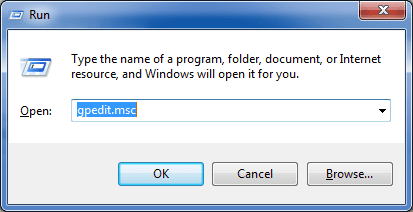
2. In the box, type gpedit.msc as shown below, and click OK

2.png

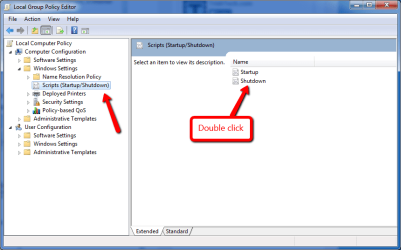
3. The Group Policy panel will open. Browse to the Scripts section, and then double-click the ShutDown option as shown below

3.png

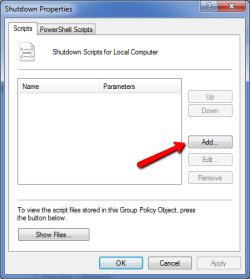
4. In the ShutDown Properties panel that opens, click the Add button

4.png

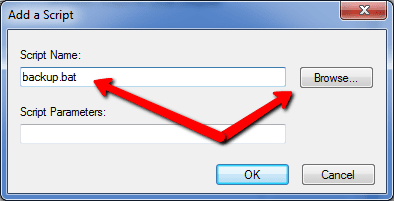
5. Click Browse to browse to and select the .BAT file you created, and click OK.

5.png

6. Now Close the Group Policy panel - click File then Exit to close it.

Now to test - shut down the computer as normal. It should run the robocopy .bat file, and then shut down. Let us know how it goes.
 

My Computer

Computer type
PC/Desktop
Computer Manufacturer/Model Number
Golden Mk. I.4
OS
Windows 10 Pro x64 ; Xubuntu x64
CPU
Intel i7 860 @ 2.80 GHz O/C'ed to 4.0GHz
Motherboard
Gigabyte P55A-UD3R Rev.1. Award BIOS F13
Memory
16GB Corsair Vengance DDR3 @ 661 MHz Dual Channel (9-9-9-24)
Graphics Card(s)
EVGA NVidia GTX 560 1024MB
Sound Card
Realtek Integrated
Monitor(s) Displays
Dual Samsung SyncMaster 2494HS
Screen Resolution
1920*1080 and 1920*1080
Hard Drives
1*Samsung 840 EVO 120GB SSD;
1*OCZ Vertex 2 60GB SSD;
2*Samsung F3 SpinPoint 1TB in RAID0;
1*Samsung F1 SpinPoint 1TB;
2*Western Digital 1TB External USB 3.0
1*Western Digital 500GB External USB 3.0
1*Seagate 500GB External USB 2.0
PSU
Thermaltake ToughPower QFan 750W
Case
Thermaltake Element S VK60001W2Z
Cooling
Corsair H60 Water Cooling, 2*230mm and 2*80mm case fans
Keyboard
Logitech G110
Mouse
Logitech MX518
Thank you for you help, things did not go to plan, I have tried this 3 times and each time the 'Shutting Down screen appears with the cursor for about 4 minutes each shutdown, at that point I hit the reset button to reboot the PC.
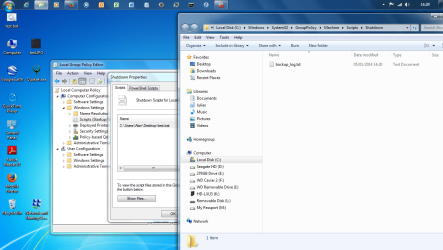
As you can see from the screenshot below I have the test.bat file on the desktop and it's set to run as administrator, the shutdown properties box shows C:\Users\Alan\Desktop\test.bat which seems fine. When I click on 'Show Files' the screen you see below appears; 'backup_log.txt' So something does not seem to be right somewhere

I do not want to cause you any more problems and think it may be less problematical to put a post-it reminder on my monitor!

Regards
Alan.
 

Attachments

  • screenshot 050114.png
    screenshot 050114.png
    472.9 KB · Views: 4

My Computer

Computer type
PC/Desktop
Computer Manufacturer/Model Number
Home Build
OS
Windows 7 Professional 64bit
CPU
i5-2500K 3.30Hz 6MB Cache
Motherboard
ASUS P8P67 Pro B3 Revision
Memory
16GB DDR3
Graphics Card(s)
ASUSGeforce GTX1050Ti 4GB
Sound Card
On-Board
Monitor(s) Displays
LG23MP65HQ-P
Hard Drives
WD Caviar Green 500gb
Maxtor 300gb
WD External USB 120gb
WD My Passport USB 2TB
LUX3 External USB 1TB
PSU
Corsair 800W
Case
Antec
Cooling
Arctic 13 Cooler
Antivirus
Bitdefender Total Security 2017
Browser
FireFox
It's no problem Alan :) I'll have more of a look for you tonight.
 

My Computer

Computer type
PC/Desktop
Computer Manufacturer/Model Number
Golden Mk. I.4
OS
Windows 10 Pro x64 ; Xubuntu x64
CPU
Intel i7 860 @ 2.80 GHz O/C'ed to 4.0GHz
Motherboard
Gigabyte P55A-UD3R Rev.1. Award BIOS F13
Memory
16GB Corsair Vengance DDR3 @ 661 MHz Dual Channel (9-9-9-24)
Graphics Card(s)
EVGA NVidia GTX 560 1024MB
Sound Card
Realtek Integrated
Monitor(s) Displays
Dual Samsung SyncMaster 2494HS
Screen Resolution
1920*1080 and 1920*1080
Hard Drives
1*Samsung 840 EVO 120GB SSD;
1*OCZ Vertex 2 60GB SSD;
2*Samsung F3 SpinPoint 1TB in RAID0;
1*Samsung F1 SpinPoint 1TB;
2*Western Digital 1TB External USB 3.0
1*Western Digital 500GB External USB 3.0
1*Seagate 500GB External USB 2.0
PSU
Thermaltake ToughPower QFan 750W
Case
Thermaltake Element S VK60001W2Z
Cooling
Corsair H60 Water Cooling, 2*230mm and 2*80mm case fans
Keyboard
Logitech G110
Mouse
Logitech MX518
Need to go out but just thought of something, in the test.bat script it ends at 'pause' maybe the shutdown will not shutdown as the script is 'paused' and not finished?

I will try it tomorrow and see if it works without the pause.
 

My Computer

Computer type
PC/Desktop
Computer Manufacturer/Model Number
Home Build
OS
Windows 7 Professional 64bit
CPU
i5-2500K 3.30Hz 6MB Cache
Motherboard
ASUS P8P67 Pro B3 Revision
Memory
16GB DDR3
Graphics Card(s)
ASUSGeforce GTX1050Ti 4GB
Sound Card
On-Board
Monitor(s) Displays
LG23MP65HQ-P
Hard Drives
WD Caviar Green 500gb
Maxtor 300gb
WD External USB 120gb
WD My Passport USB 2TB
LUX3 External USB 1TB
PSU
Corsair 800W
Case
Antec
Cooling
Arctic 13 Cooler
Antivirus
Bitdefender Total Security 2017
Browser
FireFox
Yep. Remove the pause.
 

My Computer

Computer type
PC/Desktop
Computer Manufacturer/Model Number
Golden Mk. I.4
OS
Windows 10 Pro x64 ; Xubuntu x64
CPU
Intel i7 860 @ 2.80 GHz O/C'ed to 4.0GHz
Motherboard
Gigabyte P55A-UD3R Rev.1. Award BIOS F13
Memory
16GB Corsair Vengance DDR3 @ 661 MHz Dual Channel (9-9-9-24)
Graphics Card(s)
EVGA NVidia GTX 560 1024MB
Sound Card
Realtek Integrated
Monitor(s) Displays
Dual Samsung SyncMaster 2494HS
Screen Resolution
1920*1080 and 1920*1080
Hard Drives
1*Samsung 840 EVO 120GB SSD;
1*OCZ Vertex 2 60GB SSD;
2*Samsung F3 SpinPoint 1TB in RAID0;
1*Samsung F1 SpinPoint 1TB;
2*Western Digital 1TB External USB 3.0
1*Western Digital 500GB External USB 3.0
1*Seagate 500GB External USB 2.0
PSU
Thermaltake ToughPower QFan 750W
Case
Thermaltake Element S VK60001W2Z
Cooling
Corsair H60 Water Cooling, 2*230mm and 2*80mm case fans
Keyboard
Logitech G110
Mouse
Logitech MX518
Hi Golden.
Removing the 'pause' cured the problem :D

Where can I find the 'Log' as it does not appear on the desktop on rebooting? It does appear if I run the file without shutting down.

Once again thank you for your help.

Regards
Alan.
 

My Computer

Computer type
PC/Desktop
Computer Manufacturer/Model Number
Home Build
OS
Windows 7 Professional 64bit
CPU
i5-2500K 3.30Hz 6MB Cache
Motherboard
ASUS P8P67 Pro B3 Revision
Memory
16GB DDR3
Graphics Card(s)
ASUSGeforce GTX1050Ti 4GB
Sound Card
On-Board
Monitor(s) Displays
LG23MP65HQ-P
Hard Drives
WD Caviar Green 500gb
Maxtor 300gb
WD External USB 120gb
WD My Passport USB 2TB
LUX3 External USB 1TB
PSU
Corsair 800W
Case
Antec
Cooling
Arctic 13 Cooler
Antivirus
Bitdefender Total Security 2017
Browser
FireFox
The log should reside in the same location as the .bat file.....presumably your desktop? Do a search for it in Windows Explorer.
 

My Computer

Computer type
PC/Desktop
Computer Manufacturer/Model Number
Golden Mk. I.4
OS
Windows 10 Pro x64 ; Xubuntu x64
CPU
Intel i7 860 @ 2.80 GHz O/C'ed to 4.0GHz
Motherboard
Gigabyte P55A-UD3R Rev.1. Award BIOS F13
Memory
16GB Corsair Vengance DDR3 @ 661 MHz Dual Channel (9-9-9-24)
Graphics Card(s)
EVGA NVidia GTX 560 1024MB
Sound Card
Realtek Integrated
Monitor(s) Displays
Dual Samsung SyncMaster 2494HS
Screen Resolution
1920*1080 and 1920*1080
Hard Drives
1*Samsung 840 EVO 120GB SSD;
1*OCZ Vertex 2 60GB SSD;
2*Samsung F3 SpinPoint 1TB in RAID0;
1*Samsung F1 SpinPoint 1TB;
2*Western Digital 1TB External USB 3.0
1*Western Digital 500GB External USB 3.0
1*Seagate 500GB External USB 2.0
PSU
Thermaltake ToughPower QFan 750W
Case
Thermaltake Element S VK60001W2Z
Cooling
Corsair H60 Water Cooling, 2*230mm and 2*80mm case fans
Keyboard
Logitech G110
Mouse
Logitech MX518
Thank you.
The backup_log, when run from the shutdown script resides at C:\Windows\System 32\Group Policy\Machine\Scripts\Shutdown
When run from the desktop the Backup_log is on the desktop, if I need to see copy I can now find it either way.

I have found a Robocopy switch list, well I think that's what you'd call it. I lists all the /e /s /sec commands,

I have removed the /mir from your script above and now have:
robocopy I:\DATA M:\Backup_DATA /e /np /log:backup_log.txt

as I want any files deleted on my I: drive not to be deleted on my M: drive in case I find I need it later.
In my previous robocopy scripts I have /mt:4, this, in my list shows as Multithreaded copying. What does this mean? The number of lines of scripts? Or something else?

Can I add files to the script I now have;
robocopy I:\DATA M:\Backup_DATA /e /np /log:backup_log.txt

and add my own files to theM:Backup_DATA folder? and would I need to add the /mt [:n] for the number of lines added below - /mt:3?
robocopy C:\system32 M:\Backup_DATA /e /np /log:backup_log.txt
robocopy D:\Gardening M:\Backup_DATA /e /np /log:backup_log.txt

Sorry if these are silly questions, Guessing is fine if it works but a disaster if it goes wrong!

Regards
Alan.
 

My Computer

Computer type
PC/Desktop
Computer Manufacturer/Model Number
Home Build
OS
Windows 7 Professional 64bit
CPU
i5-2500K 3.30Hz 6MB Cache
Motherboard
ASUS P8P67 Pro B3 Revision
Memory
16GB DDR3
Graphics Card(s)
ASUSGeforce GTX1050Ti 4GB
Sound Card
On-Board
Monitor(s) Displays
LG23MP65HQ-P
Hard Drives
WD Caviar Green 500gb
Maxtor 300gb
WD External USB 120gb
WD My Passport USB 2TB
LUX3 External USB 1TB
PSU
Corsair 800W
Case
Antec
Cooling
Arctic 13 Cooler
Antivirus
Bitdefender Total Security 2017
Browser
FireFox
Back
Top