Using 'Theme Backgrounds' Question

Sparky1

New member
Local time
7:56 PM
Messages
18
I have downloaded other official themes from other countries and the wallpapers are fantastic! (Much better than the U.K theme I got with my copy).

Can I set them up so they show up with the United Kingdom ones that do show up under desktop backgrounds?

How can I select the wallpapers I like from each theme and set them as 'slide show' desktop background? The wallpapers do not show up unless I individually select a theme - but then I don't have access to them all at once like the other ones.

Many thanks.
 

My Computer

OS
Windows 7
Hello Sparky,

Welcome to 7 Forums.

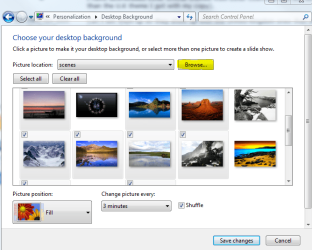
You can make any folder into the background changer. Make up a folder with all the pics you want in it. Then go to personalize and click on background. Click on browse to select the folder. You can then check the pics you want to use from the folder and click save changes. This will create a new unsaved theme. You can then save the theme if you wish.

backgrd.PNG

Hope this helps.

Gary
 

My Computer

Computer Manufacturer/Model Number
Dell XPS420
OS
Vista Ult 64 bit Seven Ult RTM x64
CPU
Intel Core2 Quad Q6600 2.40 gigahertz
Memory
Crucial Ballistix 4x2GB PC2 6400
Graphics Card(s)
NVIDIA GeForce 8600 GTS 256 MB
Sound Card
Creative SB X-Fi audio
Monitor(s) Displays
HP w2207 + HPvs15
Screen Resolution
1680x1050 + 1024x768
Hard Drives
2-WD5000AAKS-500 GB
WD5000AAV-500 GB external
Keyboard
Microsoft Comfort Curve
Mouse
MX Revolution
Other Info
Wacom Intuos 2 Graphics Tablet
Experience Index=5.5
Hi Gary, thanks for the reply. I wanted was to do what you suggested - however the wallpapers are stuck in 'Theme Packs' and I couldn't find the actual wallpaper anywhere on my PC. I've tried searching manually but they aren't showing up.

Now, I have another strange problem relating to adding themes/wallpapers. After downloading additional themes from Microsoft and using the select wallpaper option - I then decided to delete the themes and cut my losses.

Now I have a list of 'desktop backgrounds' that appear in the list that aren't there. If I tried to select one I get an error message explaining that 'the requested item cannot be found' - which is of course because I deleted the themes from my PC. This seems to be a registry bug maybe? I've tried running several scans but none have found any errors so far.

It's no big deal I guess - just a bit weird.
 

My Computer

OS
Windows 7
Back
Top