Using VBox

andrew124c41

New member
Local time
9:02 AM
Messages
30
I want to install either win 7 or ubantu/wine on a virtual PC
I have setup my drives this way:

SSD: c:OS d:VBox and HDD e: data

Now I am not sure what to do. I assume I install Vbox and my OS images on d:

I am doing this really for my wife so she can run a browser and surf without causing any problems from malware.

However, while I have moved my users folder to the e: drive....a second physical drive, my virtual image will run on the SSD and favorites, etc will now write to the SSD which I would like to avoid.

Any help would be appreciated.

Thank you
 

My Computer

Computer type
PC/Desktop
OS
7
Motherboard
Asus m597A
It's normal that if you run the virtual machine, the data is written to the SSD (actually the virtual image on your SSD).

Compare it with a zip file you're gonna update. That requires your SSD/HDD is gonna write. The virtual image is almost the same. It's not more than a compressed file where your virtual machine is running on.

If this isn't the answer on your question, can you be more specific please, like this part?

andrew124c41 said:
However, while I have moved my users folder to the e: drive....a second physical drive, my virtual image will run on the SSD and favorites, etc will now write to the SSD which I would like to avoid.
 

My Computer

Computer type
Laptop
Computer Manufacturer/Model Number
Dell Inspiron (15) 3520
OS
Windows 7 Professional x64, Windows 8.1 Pro x64, Windows 10 Home x64
CPU
Intel(R) Pentium(R) CPU B960 @ 2.20GHz, 2200 MHz,
Motherboard
Dell Inc. (or else Unknown)
Memory
4GB Installed (3.87 available)
Graphics Card(s)
Intel(R) HD Graphics ver. 9.17.10.4229
Sound Card
Cirrus LogicHigh Definition Audio
Monitor(s) Displays
General PnP Display
Screen Resolution
1366x768
Hard Drives
WDC WD5000LPVT-75G33T0 (Internal 500GB)
WD My Passport 0741 USB Device (External 1TB)
PSU
Dell LA64NS2-01
Cooling
Dell Inspiron 3520 CPU Cooling Fan Heatsink 60.4TZ01.011 0T0
Keyboard
Standard PS/2 Keyboard
Mouse
Dell Touchpad + Ewent EW3218
Internet Speed
60 MB/s
Antivirus
Windows Defender + Eset System Rescue CD (Linux A-V)
Browser
Google Chrome (Mozilla FireFox on Windows 10)
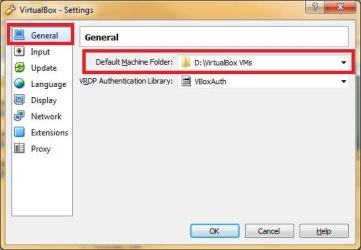
Install the VBox to the SSD but configure it to use D for virtual machines.

VBox settings default location.jpg
 

My Computer

Computer type
PC/Desktop
Computer Manufacturer/Model Number
Custom Build
OS
Windows 7 Ultimate x64 SP1
CPU
AMD Phenom 2 1090T
Motherboard
Gigabyte GA-890FXA-UD5
Memory
2x8GB Kingston HyperX Fury Black 1600Mhz Unganged
Graphics Card(s)
MSI GTX 970 Gaming 4G
Sound Card
Realtek On-Board HD 7.1 Audio / Logitech G35
Monitor(s) Displays
3xAcer GD245HQ
Screen Resolution
1920x1080
Hard Drives
Samsung 850 Pro 512GB SSD - OS /
WD Caviar Black SATA 3 - 1 TBx2 - Dynamic RAID 0 /
WD Caviar Green SATA 2 - 640GBx2 - Dynamic RAID 0 /
WD Caviar Green SATA 2 - 640GB - Internal Backup /
Seagate Barracude SATA 3 - 3TB - External Backup/ Sync
PSU
HighPower 1000W
Case
Cooler Master HAF 932
Cooling
Noctua NH-D14
Keyboard
Logitech G19
Mouse
Logitech G500
Internet Speed
100/4 Mbit Cable (100GB quota)
Antivirus
ZoneAlarm Extreme Security / MBAM Pro / MBAE Free / SAS Free
Browser
IE 11 - Firefox - Chrome
Other Info
Logitech F710/ G27/ G940/ Z5500 // TrackIR 5 // Nvidia 3D Surround Vision
Any data saved will go to the ssd. Can it be made to go to the second drive, data?
 

My Computer

Computer type
PC/Desktop
OS
7
Motherboard
Asus m597A
Can you elaborate on what you mean by saved data? If you mean the saved data inside the virtual OS, it will be saved to the virtual hard disk file (virtual disk image - vdi).

If you mean shared folders, I don't use them and just access the virtual machine through the network.
 

My Computer

Computer type
PC/Desktop
Computer Manufacturer/Model Number
Custom Build
OS
Windows 7 Ultimate x64 SP1
CPU
AMD Phenom 2 1090T
Motherboard
Gigabyte GA-890FXA-UD5
Memory
2x8GB Kingston HyperX Fury Black 1600Mhz Unganged
Graphics Card(s)
MSI GTX 970 Gaming 4G
Sound Card
Realtek On-Board HD 7.1 Audio / Logitech G35
Monitor(s) Displays
3xAcer GD245HQ
Screen Resolution
1920x1080
Hard Drives
Samsung 850 Pro 512GB SSD - OS /
WD Caviar Black SATA 3 - 1 TBx2 - Dynamic RAID 0 /
WD Caviar Green SATA 2 - 640GBx2 - Dynamic RAID 0 /
WD Caviar Green SATA 2 - 640GB - Internal Backup /
Seagate Barracude SATA 3 - 3TB - External Backup/ Sync
PSU
HighPower 1000W
Case
Cooler Master HAF 932
Cooling
Noctua NH-D14
Keyboard
Logitech G19
Mouse
Logitech G500
Internet Speed
100/4 Mbit Cable (100GB quota)
Antivirus
ZoneAlarm Extreme Security / MBAM Pro / MBAE Free / SAS Free
Browser
IE 11 - Firefox - Chrome
Other Info
Logitech F710/ G27/ G940/ Z5500 // TrackIR 5 // Nvidia 3D Surround Vision
Can shared folders be placed on a separate drive if necessary
 

My Computer

Computer type
PC/Desktop
OS
7
Motherboard
Asus m597A

My Computer

Computer type
PC/Desktop
Computer Manufacturer/Model Number
Custom Build
OS
Windows 7 Ultimate x64 SP1
CPU
AMD Phenom 2 1090T
Motherboard
Gigabyte GA-890FXA-UD5
Memory
2x8GB Kingston HyperX Fury Black 1600Mhz Unganged
Graphics Card(s)
MSI GTX 970 Gaming 4G
Sound Card
Realtek On-Board HD 7.1 Audio / Logitech G35
Monitor(s) Displays
3xAcer GD245HQ
Screen Resolution
1920x1080
Hard Drives
Samsung 850 Pro 512GB SSD - OS /
WD Caviar Black SATA 3 - 1 TBx2 - Dynamic RAID 0 /
WD Caviar Green SATA 2 - 640GBx2 - Dynamic RAID 0 /
WD Caviar Green SATA 2 - 640GB - Internal Backup /
Seagate Barracude SATA 3 - 3TB - External Backup/ Sync
PSU
HighPower 1000W
Case
Cooler Master HAF 932
Cooling
Noctua NH-D14
Keyboard
Logitech G19
Mouse
Logitech G500
Internet Speed
100/4 Mbit Cable (100GB quota)
Antivirus
ZoneAlarm Extreme Security / MBAM Pro / MBAE Free / SAS Free
Browser
IE 11 - Firefox - Chrome
Other Info
Logitech F710/ G27/ G940/ Z5500 // TrackIR 5 // Nvidia 3D Surround Vision
Back
Top