Solved Using windirstat it shows 30gb for c drive, but 20 is missing

xboxhaxorz

New member
Member
Local time
1:26 AM
Messages
68
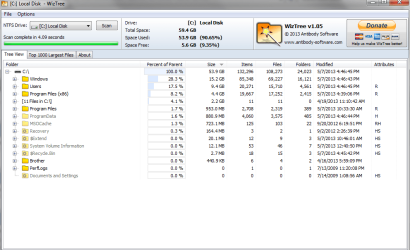
When i used that program it showed about 30 gb of usage
I have 9gb free left but have a 60gb ssd with 59 of usable space so thats 20 missing

I dont have any other partitions or anything, i have used ccleaner, wise disk cleaner, disk cleanup etc;
 

My Computer My Computer

At a glance

7
OS
7
I have a 2gb page file, i deleted all the restore points and performed the clean ups, this installation of windows included the service pack and i have not performed any repair or re installs on this system
 

My Computer My Computer

At a glance

7
OS
7

My Computer My Computer

At a glance

Windows 10 Pro x64 ; Xubuntu x64Intel i7 860 @ 2.80 GHz O/C'ed to 4.0GHz16GB Corsair Vengance DDR3 @ 661 MHz Dual Cha...EVGA NVidia GTX 560 1024MB
Computer type
PC/Desktop
Computer Manufacturer/Model Number
Golden Mk. I.4
OS
Windows 10 Pro x64 ; Xubuntu x64
CPU
Intel i7 860 @ 2.80 GHz O/C'ed to 4.0GHz
Motherboard
Gigabyte P55A-UD3R Rev.1. Award BIOS F13
Memory
16GB Corsair Vengance DDR3 @ 661 MHz Dual Channel (9-9-9-24)
Graphics Card(s)
EVGA NVidia GTX 560 1024MB
Sound Card
Realtek Integrated
Monitor(s) Displays
Dual Samsung SyncMaster 2494HS
Screen Resolution
1920*1080 and 1920*1080
Hard Drives
1*Samsung 840 EVO 120GB SSD;
1*OCZ Vertex 2 60GB SSD;
2*Samsung F3 SpinPoint 1TB in RAID0;
1*Samsung F1 SpinPoint 1TB;
2*Western Digital 1TB External USB 3.0
1*Western Digital 500GB External USB 3.0
1*Seagate 500GB External USB 2.0
PSU
Thermaltake ToughPower QFan 750W
Case
Thermaltake Element S VK60001W2Z
Cooling
Corsair H60 Water Cooling, 2*230mm and 2*80mm case fans
Keyboard
Logitech G110
Mouse
Logitech MX518
i have disabled hibernation since i installed windows
 

My Computer My Computer

At a glance

7
OS
7

My Computer My Computer

At a glance

Windows 10 Pro x64 ; Xubuntu x64Intel i7 860 @ 2.80 GHz O/C'ed to 4.0GHz16GB Corsair Vengance DDR3 @ 661 MHz Dual Cha...EVGA NVidia GTX 560 1024MB
Computer type
PC/Desktop
Computer Manufacturer/Model Number
Golden Mk. I.4
OS
Windows 10 Pro x64 ; Xubuntu x64
CPU
Intel i7 860 @ 2.80 GHz O/C'ed to 4.0GHz
Motherboard
Gigabyte P55A-UD3R Rev.1. Award BIOS F13
Memory
16GB Corsair Vengance DDR3 @ 661 MHz Dual Channel (9-9-9-24)
Graphics Card(s)
EVGA NVidia GTX 560 1024MB
Sound Card
Realtek Integrated
Monitor(s) Displays
Dual Samsung SyncMaster 2494HS
Screen Resolution
1920*1080 and 1920*1080
Hard Drives
1*Samsung 840 EVO 120GB SSD;
1*OCZ Vertex 2 60GB SSD;
2*Samsung F3 SpinPoint 1TB in RAID0;
1*Samsung F1 SpinPoint 1TB;
2*Western Digital 1TB External USB 3.0
1*Western Digital 500GB External USB 3.0
1*Seagate 500GB External USB 2.0
PSU
Thermaltake ToughPower QFan 750W
Case
Thermaltake Element S VK60001W2Z
Cooling
Corsair H60 Water Cooling, 2*230mm and 2*80mm case fans
Keyboard
Logitech G110
Mouse
Logitech MX518
From C drive, on Organize tab select Folder Options>View and Show Hidden and Protected OS files so you can see everything that's there, rightclick to Properties if necessary to view size.

Then go through all of the User folders to see if you've missed something.
 
I attached a photo and i check hidden files cant find anything there
 

Attachments

  • Untitled.png
    Untitled.png
    33.2 KB · Views: 3

My Computer My Computer

At a glance

7
OS
7
What's different when you look at C drive in Explorer after unhiding both Hidden and System files? Compare it to WinDirStat and TreeWiz.

Sometimes this is an anomaly only resolved by reinstalling. I've been stumped by it twice before.
 
its not different, for me reinstalling is the easy way out and obviously solves all problems
but i was hoping to fix this issue
 

My Computer My Computer

At a glance

7
OS
7
another note when leaving wiztree at that screen, sometimes it changes
for example right now its showing 18.8gb free and 40.6gb used and if i rescan it, then it goes back to the image i had just posted above
 

My Computer My Computer

At a glance

7
OS
7
i suspected something was up because when i would delete files large gigs it would not free the space
i uninstalled rollback rx and boom 30gb was now freely available

programs suck
 

My Computer My Computer

At a glance

7
OS
7
Good work for persevering!

Stick with System Restore and Backup Images, which save many troubled Win7's we see here.
 
Back
Top