Using XP Mode with HP Photosmart 8750

Lizzi

New member
Local time
10:54 PM
Messages
12
I recently bought a HP computer that uses Windows 7 Home Premium, 64-bit. My HP Photosmart 8750 worked great when I used my old computer that had my XP operating system. We all know that HP, for whatever reason, has decided not to support their 8750 printer when used with Win7. They offer no driver, only the one included with Win7. This is a $399 printer. The printer works great when I have the printer attached to my old computer with XP, but will not print graphics (which is why I bought it) when used with my new HP computer.

My question, finally: If I upgraded my copy of Win7 to Professional or Ultimate, and used XP mode, would my printer then work as if I was truly using my old computer with XP?

Thanks for any info anyone can offer.

lizzzi
 

My Computer My Computer

At a glance

Windows 7 Premium 64 bitIntel Core i7-9208G1GB ATI Radeib 4850
Computer Manufacturer/Model Number
Hewlett Packard HPE-180t
OS
Windows 7 Premium 64 bit
CPU
Intel Core i7-920
Motherboard
HP Pavillion
Memory
8G
Graphics Card(s)
1GB ATI Radeib 4850
Sound Card
Integrated 7.1
Monitor(s) Displays
2007 Dell Flat Screen 20"
Hard Drives
750GB SATA
If you have a little bit time, you could try if following these steps would allow you to print graphics directly from Seven:
  • Create a System Restore point, in case something goes wrong
  • Disconnect the printer from your computer
  • Uninstall everything related to that printer
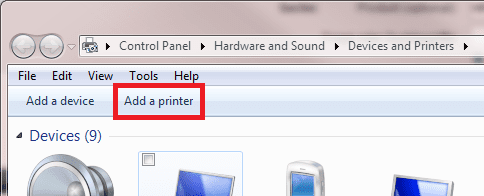
  • Open Devices and Printers (Start Menu > Devices and Printers or Control Panel > Hardware and Sound > Devices and Printers)
  • Click Add a printer
    .
    Add_HP_1.png
    .
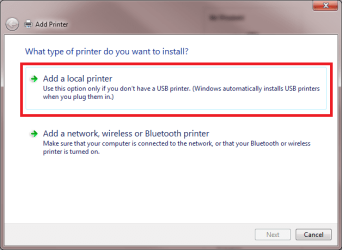
  • Click Add a local printer, click Next
    .
    Add_HP_2.png
    .
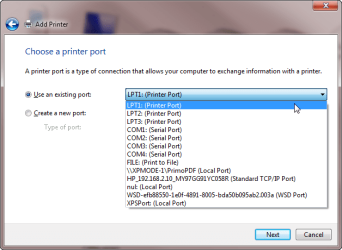
  • Choose Use an existing port > LPT1:, click Next
    .
    Add_HP_3.png
    .
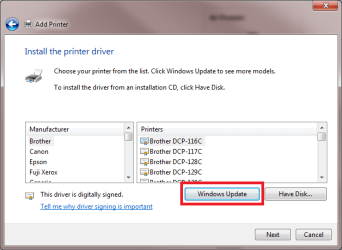
  • Click Windows Update button, to let Seven to download latest drivers. Wait a moment, it can take some time
    .
    Add_HP_4.png
    .
  • When Seven has finished to update the printers list, choose HP from the left pane, and Photosmart 8700 Series (HP) from the right pane. Notice: for this series, two sets of drivers are offered. Use HP, not Microsoft
    .
    Add_HP_5.png
    .
  • Follow the instructions given on screen. Do not connect your printer before installation asks it
This should work for you. However, if it's still not working as you'd like, you can always connect printer to XP Mode. Having some experience in both XP Mode and HP products, I can assure you are not going to have any problems doing this. When you have installed the XP Mode, simply install HP software, then connect the printer to XP Mode when HP software installation asks it.

You can then easily open your documents / images located on Seven directly from XP Mode's My Computer window, which shows the drives of your host machine. You can also print directly from Seven by adding the HP on XP Mode as a network printer.

In any case, when it's time to install the printer, come back if you have any questions.

Kari
 
Last edited by a moderator:

My Computer My Computer

At a glance

Windows 10 Pro x64 EN-GB1.6 GHz Intel Core i7-720QM Processor6 GBATI Mobility Radeon HD 5850 Graphics
Computer type
Laptop
Computer Manufacturer/Model Number
HP ENVY 17-1150eg
OS
Windows 10 Pro x64 EN-GB
CPU
1.6 GHz Intel Core i7-720QM Processor
Memory
6 GB
Graphics Card(s)
ATI Mobility Radeon HD 5850 Graphics
Sound Card
Beats sound system with integrated subwoofer
Monitor(s) Displays
17" laptop display, 22" LED and 32" Full HD TV through HDMI
Screen Resolution
1600*900 (1), 1920*1080 (2&3)
Hard Drives
Internal: 2 x 500 GB SATA Hard Disk Drive 7200 rpm
External: 2TB for backups, 3TB USB3 network drive for media
Cooling
As Envy runs a bit warm, I have it on a Cooler Master pad
Keyboard
Logitech diNovo Media Desktop Laser (bluetooth)
Mouse
Logitech Performance Mouse MX
Internet Speed
50/10 Mbps VDSL
Antivirus
Windows Defender 4.3.9431.0
Browser
Maxthon 3.5.2., IE11
decided not to support their 8750 printer when used with Win7.

Actually HP has this to say about that printer and Windows 7,

A full feature software and driver package for Windows 7 is not available for your product. However, the drivers for your HP product are already included in the new Windows 7 operating system! You do not need to download drivers to use the product.
With the basic driver, some of the buttons on the product do not function and some of the advanced product features are not available. However, using the workaround procedures in this document, you can still print from a software program. You can also import and view images on a memory card, if your product has a memory card slot.

Installing the Product with the USB Cable and Using the Driver Located in the Windows 7 Operating System HP Photosmart 8750 Professional Photo Printer - HP Customer Care (Canada - English)

and if that doesn't work you can always try the Vista driver for it,

HP Photosmart Full Feature Software and Drivers HP Photosmart 8750 Professional Photo Printer - HP Customer Care (Canada - English)

that should work.
 

My Computer My Computer

At a glance

Win 7 Ultimate x64FX-8350 @ 4.6 GHz so farADATA XPG V1 Series Black 8GB DDR3 1600Sapphire R9 270x Dual-X
Computer type
PC/Desktop
Computer Manufacturer/Model Number
Me
OS
Win 7 Ultimate x64
CPU
FX-8350 @ 4.6 GHz so far
Motherboard
Asus M5A97 EVO
Memory
ADATA XPG V1 Series Black 8GB DDR3 1600
Graphics Card(s)
Sapphire R9 270x Dual-X
Sound Card
Xonar DGX w/ Corsair Vengence 1300
Monitor(s) Displays
Acer S232HL Abid
Screen Resolution
1920x1080
Hard Drives
120 GB OCZ Vertex 3
500 GB Seagate 7200.12
PSU
Antec Earthwatts 650W Green
Case
Antec Three Hundred
Cooling
Cooler Master 212 EVO
Keyboard
Logitech G510
Mouse
Logitech G500s
Internet Speed
35000/3000
Well, I took a little bit of all the advice I had and made the printer work somewhat better. I downloaded the Vista 64-bit driver and installed it. I did set restore point first (and very glad I did). At first the downloaded driver would not install (it is the full Vista 64-bit set-up for the printer). Then it claimed it had installed the printer, but the system did not recognize my printer. So, I did a system restore. Part of what I installed could not be picked up again by the system, but the rest of it restored quite nicely. I still cannot print a graphic in "best" mode, but it will print in "fast draft" and...maintenance services are back so I can view ink levels.

In all fairness, I have to say, Kari, I forgot to uninstall the printer from Win7. Probably why I don't have everything. If I had done it completely following your instructions, no doubt I would be fine, but I didn't, so I must suffer for that. I do have a question, though. Why did the instructions say to connect to LP1, when the printer is USB?

This did take a great deal of time, but I'm glad to have an HP Toolbox again. Now I will look into using an XP Virtual mode. Will try Kari's instructions first. Thanks everyone for their help. I will continue to work on the problem to get a more complete solution.

lizzzi
 

My Computer My Computer

At a glance

Windows 7 Premium 64 bitIntel Core i7-9208G1GB ATI Radeib 4850
Computer Manufacturer/Model Number
Hewlett Packard HPE-180t
OS
Windows 7 Premium 64 bit
CPU
Intel Core i7-920
Motherboard
HP Pavillion
Memory
8G
Graphics Card(s)
1GB ATI Radeib 4850
Sound Card
Integrated 7.1
Monitor(s) Displays
2007 Dell Flat Screen 20"
Hard Drives
750GB SATA
Lizzi, I would try the method I described earlier once more. Try to follow the steps I described exactly as written. The drivers you get using this installation method are as far as I know the best for PS 8700 series printer. I don't have an 8700 printer but I have succesfully installed these drivers to a Windows 7 system on my neighbors computer, being able to to print high quality photos.

Why LPT1? The term LPT dates back to time even before Windows. It's short of Line Printer, originally meaning the so called parallel interface used to connect printers before USB was even invented. If you look at the available ports, you'll notice there's basically only LPT or COM ports available. Using a USB printer, it needs to be assigned an LPT port to communicate with computer.

Printer_ports.png

Kari
 
Last edited:

My Computer My Computer

At a glance

Windows 10 Pro x64 EN-GB1.6 GHz Intel Core i7-720QM Processor6 GBATI Mobility Radeon HD 5850 Graphics
Computer type
Laptop
Computer Manufacturer/Model Number
HP ENVY 17-1150eg
OS
Windows 10 Pro x64 EN-GB
CPU
1.6 GHz Intel Core i7-720QM Processor
Memory
6 GB
Graphics Card(s)
ATI Mobility Radeon HD 5850 Graphics
Sound Card
Beats sound system with integrated subwoofer
Monitor(s) Displays
17" laptop display, 22" LED and 32" Full HD TV through HDMI
Screen Resolution
1600*900 (1), 1920*1080 (2&3)
Hard Drives
Internal: 2 x 500 GB SATA Hard Disk Drive 7200 rpm
External: 2TB for backups, 3TB USB3 network drive for media
Cooling
As Envy runs a bit warm, I have it on a Cooler Master pad
Keyboard
Logitech diNovo Media Desktop Laser (bluetooth)
Mouse
Logitech Performance Mouse MX
Internet Speed
50/10 Mbps VDSL
Antivirus
Windows Defender 4.3.9431.0
Browser
Maxthon 3.5.2., IE11
8750 Printer Problems with Win7

Thanks, Kari.

I'm going to install the printer with your instructions exactly as you stated. I will print the instructions so I'll have them. As soon as some of the Christmas rush gets over with (next couple of days), I'm working on my printer. Can't stand having this huge Dell XPS with XP sitting here much longer. The Vista drivers didn't change a thing...so onward and upward. Will let you know the outcome.

Your assistance is truly appeciated.

Happy Holidays,
lizzzi
 

My Computer My Computer

At a glance

Windows 7 Premium 64 bitIntel Core i7-9208G1GB ATI Radeib 4850
Computer Manufacturer/Model Number
Hewlett Packard HPE-180t
OS
Windows 7 Premium 64 bit
CPU
Intel Core i7-920
Motherboard
HP Pavillion
Memory
8G
Graphics Card(s)
1GB ATI Radeib 4850
Sound Card
Integrated 7.1
Monitor(s) Displays
2007 Dell Flat Screen 20"
Hard Drives
750GB SATA
Back
Top