Solved Usually slow after startup, but not always. Reinstalled, swapped HDD.

deltaproximus

New member
Local time
12:56 AM
Messages
11
Sometimes when I start up, everything is completely slow to respond and stays slow. Running an i5 with 6GB of RAM. Had an SSD originally in the machine, but I assumed with the problem I had that my SSD was dying, so I switched to a brand new WD black 750GB HDD and did a fresh install of Windows 7, and I'm still having the problem. Ran checkdisk on both the SSD and the new HDD, did a memtest on my RAM and no errors. The kicker is it's only slow most of the time. Sometimes it responds like a new fresh install of windows and is super snappy, like I'd expect. When this happens, I can hibernate and everything stays snappy when I resume the session. If I ever shutdown or restart, 80% of the time when it starts up it goes back to being incredibly slow. Makes me afraid to shut down now! It doesn't seem to be software, since the reinstall didn't fix it. It's not the hard drive, as I've switched it out. If it was RAM, wouldn't the memtest have found something? I ordered new RAM anyway, and it's arriving later this week, but what else could it be?

The slowness starts with the windows logo on start up, or if I go to a boot screen (regular, safemode, etc). If I go into the safemode selection screen, it takes several seconds to register the arrow keys, and after choosing a mode the screen disappears in chunks from top to bottom over about 7 seconds before it moves on. When everything is operating normally, this screen acts typically. The BIOS menus never seem to be slow.

I also tested to see if it was the graphics card drivers by rolling back to an older driver version before I had the issue. This also did not resolve it.
 

My Computer My Computer

At a glance

Windows 7 Home Premium 64bitIntel i5-460M6GBNvidia GeForce GT 420M
Computer type
Laptop
Computer Manufacturer/Model Number
Acer Aspire 5742G
OS
Windows 7 Home Premium 64bit
CPU
Intel i5-460M
Motherboard
Acer laptop standard
Memory
6GB
Graphics Card(s)
Nvidia GeForce GT 420M
Hard Drives
750 GB HDD
Antivirus
none currently
Browser
chrome

My Computer My Computer

At a glance

Win-7-Pro64bit 7-H-Prem-64biti7-5930K 2nd i9-9940x both water blocked VRM'...Trident-z 3200C14 2nd Trident-z 3600C16EVGA 1080ti ftw3 2nd Titan Xp both water blocked
Computer type
PC/Desktop
Computer Manufacturer/Model Number
Custom assembled by me :}
OS
Win-7-Pro64bit 7-H-Prem-64bit
CPU
i7-5930K 2nd i9-9940x both water blocked VRM's too
Motherboard
ASUS SABERTOOTH X99 2nd ASUS x299 Apex
Memory
Trident-z 3200C14 2nd Trident-z 3600C16
Graphics Card(s)
EVGA 1080ti ftw3 2nd Titan Xp both water blocked
Sound Card
Built-in Realtek
Monitor(s) Displays
1-AOC G2460PG 24"G-Sync 144Hz/ 2nd 1-ASUS VG248QE 24" 144Hz
Screen Resolution
1920 x 1080 144Hz
Hard Drives
2-Samsung M.2 Evo & Evo Plus
2-Samsung 850 EVO 500GB SSD's/ 3-2.5 W.D. Black 1tb-&3-1tb/3-3.5 WD Black 1tb hdd's
PSU
EVGA SuperNOVA 1000-P2 2nd 1200-P2
Case
2-Corsair Obsidian Series 450D Black ATX Mid Tower
Cooling
Custom water loops
Keyboard
Logitech G710+/ 2nd Logitech G910
Mouse
2-RedDragon M901 Perdition 16400 dpi Gaming mouse = wired
Internet Speed
Comcast Ping 19ms 89.31mbps download speed 6.12mbps upload
Antivirus
Malwarebytes Pro/ Superantispyware Pro
Browser
FireFox & Pale moon
Other Info
2nd ASUS X299 Apex/Intel i9-9940x with Custom water loop/7H-Prem-x64/Corsair 450D case/Ram Trident-z 3600C16 4x8gb / Samsung970Evo plus 500gb SSD/Dual ssd EZ swap evo/PSU EVGA SuperNova 1200w-P2 80+Platinum/GPU Titan Xp /8-ML-140 on push-pull on 2-280GTX rads
Thanks for the reply. I decided to uninstall the KBs in the linked post as you suggested, but there was no improvement. The slowdowns happened on the reinstall prior to me installing any of the windows updates, so I wasn't hopeful to begin with.

I've re-checked my windows logs, and it appears my bluetooth card is registering an error each time it starts up slow, but no such error on the fast start ups. Since the bluetooth and wifi are on the same card, I might try replacing it as soon as I can find a replacement, but I don't see how this would cause the whole system to be slow (perhaps it's another symptom of the same problem instead?).

Nope, not the bluetooth adapter. Had a few startups where it was slow without bluetooth errors appearing in the logs.
 
Last edited:

My Computer My Computer

At a glance

Windows 7 Home Premium 64bitIntel i5-460M6GBNvidia GeForce GT 420M
Computer type
Laptop
Computer Manufacturer/Model Number
Acer Aspire 5742G
OS
Windows 7 Home Premium 64bit
CPU
Intel i5-460M
Motherboard
Acer laptop standard
Memory
6GB
Graphics Card(s)
Nvidia GeForce GT 420M
Hard Drives
750 GB HDD
Antivirus
none currently
Browser
chrome
Additionally not having any problems running linux off a flash drive (debian wheezy). Going to take a hard look at device drivers now.
 

My Computer My Computer

At a glance

Windows 7 Home Premium 64bitIntel i5-460M6GBNvidia GeForce GT 420M
Computer type
Laptop
Computer Manufacturer/Model Number
Acer Aspire 5742G
OS
Windows 7 Home Premium 64bit
CPU
Intel i5-460M
Motherboard
Acer laptop standard
Memory
6GB
Graphics Card(s)
Nvidia GeForce GT 420M
Hard Drives
750 GB HDD
Antivirus
none currently
Browser
chrome
Try loading defaults in BIOS (either first screen or exit menu).
 

My Computer My Computer

At a glance

Windows 7 Ultimate x64 SP1AMD Phenom 2 1090T2x8GB Kingston HyperX Fury Black 1600Mhz Unga...MSI GTX 970 Gaming 4G
Computer type
PC/Desktop
Computer Manufacturer/Model Number
Custom Build
OS
Windows 7 Ultimate x64 SP1
CPU
AMD Phenom 2 1090T
Motherboard
Gigabyte GA-890FXA-UD5
Memory
2x8GB Kingston HyperX Fury Black 1600Mhz Unganged
Graphics Card(s)
MSI GTX 970 Gaming 4G
Sound Card
Realtek On-Board HD 7.1 Audio / Logitech G35
Monitor(s) Displays
3xAcer GD245HQ
Screen Resolution
1920x1080
Hard Drives
Samsung 850 Pro 512GB SSD - OS /
WD Caviar Black SATA 3 - 1 TBx2 - Dynamic RAID 0 /
WD Caviar Green SATA 2 - 640GBx2 - Dynamic RAID 0 /
WD Caviar Green SATA 2 - 640GB - Internal Backup /
Seagate Barracude SATA 3 - 3TB - External Backup/ Sync
PSU
HighPower 1000W
Case
Cooler Master HAF 932
Cooling
Noctua NH-D14
Keyboard
Logitech G19
Mouse
Logitech G500
Internet Speed
100/4 Mbit Cable (100GB quota)
Antivirus
ZoneAlarm Extreme Security / MBAM Pro / MBAE Free / SAS Free
Browser
IE 11 - Firefox - Chrome
Other Info
Logitech F710/ G27/ G940/ Z5500 // TrackIR 5 // Nvidia 3D Surround Vision
After loading defaults in the bios, I had an immediate shut down after the logo screen. Next attempt at booting up was slow again =/
 

My Computer My Computer

At a glance

Windows 7 Home Premium 64bitIntel i5-460M6GBNvidia GeForce GT 420M
Computer type
Laptop
Computer Manufacturer/Model Number
Acer Aspire 5742G
OS
Windows 7 Home Premium 64bit
CPU
Intel i5-460M
Motherboard
Acer laptop standard
Memory
6GB
Graphics Card(s)
Nvidia GeForce GT 420M
Hard Drives
750 GB HDD
Antivirus
none currently
Browser
chrome

My Computer My Computer

At a glance

Win-7-Pro64bit 7-H-Prem-64biti7-5930K 2nd i9-9940x both water blocked VRM'...Trident-z 3200C14 2nd Trident-z 3600C16EVGA 1080ti ftw3 2nd Titan Xp both water blocked
Computer type
PC/Desktop
Computer Manufacturer/Model Number
Custom assembled by me :}
OS
Win-7-Pro64bit 7-H-Prem-64bit
CPU
i7-5930K 2nd i9-9940x both water blocked VRM's too
Motherboard
ASUS SABERTOOTH X99 2nd ASUS x299 Apex
Memory
Trident-z 3200C14 2nd Trident-z 3600C16
Graphics Card(s)
EVGA 1080ti ftw3 2nd Titan Xp both water blocked
Sound Card
Built-in Realtek
Monitor(s) Displays
1-AOC G2460PG 24"G-Sync 144Hz/ 2nd 1-ASUS VG248QE 24" 144Hz
Screen Resolution
1920 x 1080 144Hz
Hard Drives
2-Samsung M.2 Evo & Evo Plus
2-Samsung 850 EVO 500GB SSD's/ 3-2.5 W.D. Black 1tb-&3-1tb/3-3.5 WD Black 1tb hdd's
PSU
EVGA SuperNOVA 1000-P2 2nd 1200-P2
Case
2-Corsair Obsidian Series 450D Black ATX Mid Tower
Cooling
Custom water loops
Keyboard
Logitech G710+/ 2nd Logitech G910
Mouse
2-RedDragon M901 Perdition 16400 dpi Gaming mouse = wired
Internet Speed
Comcast Ping 19ms 89.31mbps download speed 6.12mbps upload
Antivirus
Malwarebytes Pro/ Superantispyware Pro
Browser
FireFox & Pale moon
Other Info
2nd ASUS X299 Apex/Intel i9-9940x with Custom water loop/7H-Prem-x64/Corsair 450D case/Ram Trident-z 3600C16 4x8gb / Samsung970Evo plus 500gb SSD/Dual ssd EZ swap evo/PSU EVGA SuperNova 1200w-P2 80+Platinum/GPU Titan Xp /8-ML-140 on push-pull on 2-280GTX rads
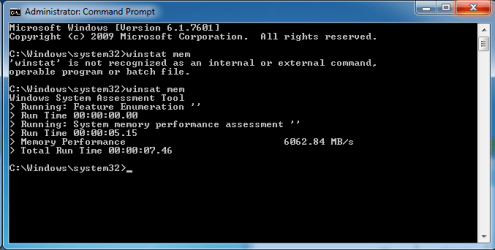
This is the memory assessment speed on one of the rare good boots. Next post will have start up time and memory assessment on a slow boot (waiting on it right now to reboot).
 

Attachments

  • Screenshot 2015-07-06 15.37.43.png
    Screenshot 2015-07-06 15.37.43.png
    11.6 KB · Views: 10

My Computer My Computer

At a glance

Windows 7 Home Premium 64bitIntel i5-460M6GBNvidia GeForce GT 420M
Computer type
Laptop
Computer Manufacturer/Model Number
Acer Aspire 5742G
OS
Windows 7 Home Premium 64bit
CPU
Intel i5-460M
Motherboard
Acer laptop standard
Memory
6GB
Graphics Card(s)
Nvidia GeForce GT 420M
Hard Drives
750 GB HDD
Antivirus
none currently
Browser
chrome
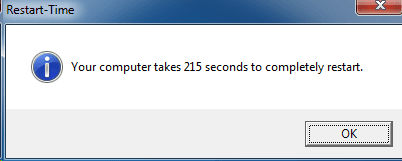
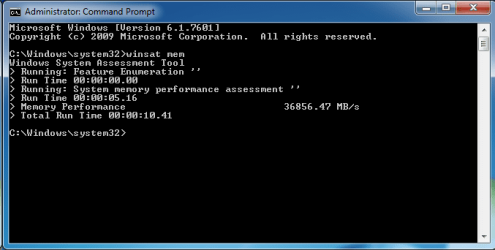
Apparently my RAM is six times faster on a bad boot...
 

Attachments

  • Screenshot 2015-07-06 15.44.59.png
    Screenshot 2015-07-06 15.44.59.png
    4.9 KB · Views: 10
  • Screenshot 2015-07-06 15.45.03.png
    Screenshot 2015-07-06 15.45.03.png
    11.2 KB · Views: 10

My Computer My Computer

At a glance

Windows 7 Home Premium 64bitIntel i5-460M6GBNvidia GeForce GT 420M
Computer type
Laptop
Computer Manufacturer/Model Number
Acer Aspire 5742G
OS
Windows 7 Home Premium 64bit
CPU
Intel i5-460M
Motherboard
Acer laptop standard
Memory
6GB
Graphics Card(s)
Nvidia GeForce GT 420M
Hard Drives
750 GB HDD
Antivirus
none currently
Browser
chrome
Is this issue identical to the one which caused you to replace the SSD? Are you still running the SSD to compare? Is it plugged in?

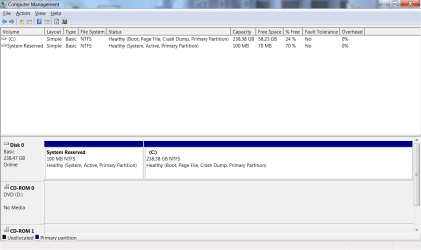
Please post back a screenshot of Disk Management - Post a Screen Capture Image

Are you thoroughly patched, meaning all Important and Optional Updates are installed except for Windows 10 adware? Did you use the drivers supplied by Win7 via installer and Updates first before forcing any others?

Have you tried swapping the RAM sticks around, checking for debris in the slots to blow out?

Start working through the Troubleshooting Steps for Windows 7
which goes over the install thoroughly and almost always uncovers problems.
 
Last edited:
Yes, it's the identical issue I was having on the SSD. I haven't formatted the SSD yet, so I'll pop it back in and run the same tests. It wasn't plugged in. I'll run through the troubleshooting steps too and report back. Here's the disk management screen shot:
 

Attachments

  • Screenshot 2015-07-06 16.00.23.png
    Screenshot 2015-07-06 16.00.23.png
    19.5 KB · Views: 1

My Computer My Computer

At a glance

Windows 7 Home Premium 64bitIntel i5-460M6GBNvidia GeForce GT 420M
Computer type
Laptop
Computer Manufacturer/Model Number
Acer Aspire 5742G
OS
Windows 7 Home Premium 64bit
CPU
Intel i5-460M
Motherboard
Acer laptop standard
Memory
6GB
Graphics Card(s)
Nvidia GeForce GT 420M
Hard Drives
750 GB HDD
Antivirus
none currently
Browser
chrome
Most likely with the RAM or install then.

Did you run the bootable Linux stick without the hard drive plugged in? This can absolve or implicate the install since issue replicates with both hard drives.

Can you remove the Bluetooth altogether to test for awhile?
 
Last edited:
The hard drive was plugged in when I was using the linux stick, yes. I do have new ram coming in tomorrow, which will hopefully fix the problem. Can't find a manufacturer diagnostic tool for my SSD, it's an old sandisk one and is listed as EOL. Running the manufacturer diagnostics on the HDD now using another PC.

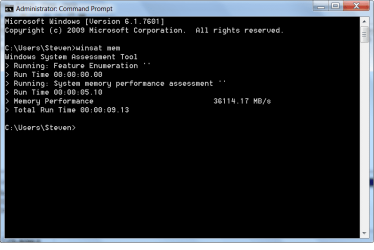
Strangely with the SSD back in, instead of being fast on approximately 1 out 5 reboots, it's only being slow on 1 out of 5 reboots, but the winsat mem test had similar results on the slow boot up.

I'll test without the bluetooth card if it's not working with the new RAM tomorrow.
 

Attachments

  • winsatmem.png
    winsatmem.png
    17.4 KB · Views: 0
  • diskman.png
    diskman.png
    26.3 KB · Views: 0

My Computer My Computer

At a glance

Windows 7 Home Premium 64bitIntel i5-460M6GBNvidia GeForce GT 420M
Computer type
Laptop
Computer Manufacturer/Model Number
Acer Aspire 5742G
OS
Windows 7 Home Premium 64bit
CPU
Intel i5-460M
Motherboard
Acer laptop standard
Memory
6GB
Graphics Card(s)
Nvidia GeForce GT 420M
Hard Drives
750 GB HDD
Antivirus
none currently
Browser
chrome
Looks like it was the bluetooth+wifi combo card. I may be just getting lucky with several good restarts in a row, but since I swapped it for a wifi only card (the one original to the laptop) I haven't had a slow boot up. The replacement ram I bought is a 2 GB upgrade, so I'm not upset I got it, but just replacing the ram didn't fix anything. Too bad the BT+wifi card didn't crap out during the 30 day return period =/ Thank you to everyone that responded and tried to help! I've got a few new things in my tool belt for future problems now, which I'm sure will come in handy the next time I have computer trouble!
 

My Computer My Computer

At a glance

Windows 7 Home Premium 64bitIntel i5-460M6GBNvidia GeForce GT 420M
Computer type
Laptop
Computer Manufacturer/Model Number
Acer Aspire 5742G
OS
Windows 7 Home Premium 64bit
CPU
Intel i5-460M
Motherboard
Acer laptop standard
Memory
6GB
Graphics Card(s)
Nvidia GeForce GT 420M
Hard Drives
750 GB HDD
Antivirus
none currently
Browser
chrome
Back
Top