RS = RapidShare.com, MU = MegaUpload.com -- they are free (& subscription) file-hosting services. Their only problem is that they are not indexed -- you need to know the url of the file(s) you wish to download and you may have to re-assemble the file segments using hjsplit, WinRAR, 7-zip or a similar utility. There are, however, blogs that aggrigate indexes of of these services independently. Try a google search for "rapidshare windows 7077 x64" (without the quotes) or the same search string except with 'megaupload' instead of 'rapidshare' and you will probably find a source.
My Computer
Computer Manufacturer/Model Number
home brew
OS
Win.7.Ult.x64
CPU
Intel Core i7 970
Motherboard
Gigabyte GA-X58-UD5
Memory
12GB (6x2GB) OCZ Platinum DDR3 1600
Graphics Card(s)
Gigabyte GV-R485MC-1GH, ATI 4850, 1GB GDDR3, passive cooler
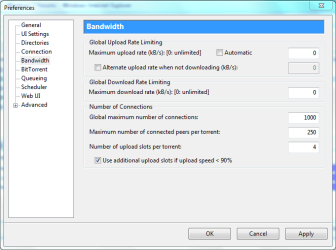
Might try these settings to see if it makes a difference.
uTorrent 1.82
Options/Preferences Bandwidth - Number Of Connections Global maximum number of connections: 300 Maximum number of connected peers per torrent: 100 Number of upload slots per torrent: 3
Mine gets upwards of 150 kb/s at times on a 1472/256 DSL.
Make sure you don't try to download too many files at a time - I like to limit it to 3 but for the best speed try 1 at a time.
If your behind a router, port forward. Also make sure your settings are in relation to your net speed. For example my crappy aussie net speed is xx/128k. There for my max upload speed for utorrent is capped to 9KB (in preferences) and i usually only allow for 1 download to be running at one time (unless i really need to get things done.