
You are using an out of date browser. It may not display this or other websites correctly.
You should upgrade or use an alternative browser.
You should upgrade or use an alternative browser.
Vaio Analysis manager / Windows Installer window keeps popping up
- Thread starter zolboo
- Start date

Hello zolboo and a warm welcome to the Forum
I found this on the Sony website. If you follow the instructions it should solve your problem
I found this on the Sony website. If you follow the instructions it should solve your problem
This is the Vaio Personalisation Manager which keeps track of your favorite music, programs etc. As far as I can work out it is designed to make personalised recommendations of music or other things you may be interested in when using Vaio Media Gallery. Rather like Amazon's Personal Recommendations.
If you don't want this service then just disable it. Go to VAIO Analysis Manager and you will find an option something like ' Preference Learning' - just uncheck it and reboot.
Last edited:
My Computer
At a glance
Microsoft Windows 7 Home Premium 64-bit 7601 ...Intel(R) Core(TM) i7-3770 CPU @ 3.40GHz8.00 GBIntel(R) HD Graphics 4000
- Computer type
- PC/Desktop
- OS
- Microsoft Windows 7 Home Premium 64-bit 7601 Multiprocessor Free Service Pack 1
- CPU
- Intel(R) Core(TM) i7-3770 CPU @ 3.40GHz
- Motherboard
- ASUSTeK COMPUTER INC. P8H77-M
- Memory
- 8.00 GB
- Graphics Card(s)
- Intel(R) HD Graphics 4000
- Sound Card
- On Board
- Monitor(s) Displays
- Dell 24"
- Screen Resolution
- 1920 x 1080
- Hard Drives
- (1) INTEL SSDSC2CT180A3 ATA Device (2) ST500DM002-1BD142 ATA Device (3) WDC WD3200AAKS-75L9A0 ATA Device (4) Generic- Compact Flash USB Device (5) Generic- MS/MS-Pro USB Device (6) Generic- SD/MMC USB Device (7) Generic- SM/xD-Picture USB
- PSU
- 500w Corsair
- Case
- Cooler Master
- Cooling
- 3 Fans
- Keyboard
- Logitech MK300
- Mouse
- Logitech WOM
- Internet Speed
- 75Mb
- Antivirus
- Norton 360
- Browser
- Firefox, Opera, IE

- Local time
- 6:12 PM
- Messages
- 50,634
I would disable all of the Sony crapware and then clean up after it: Clean Up Factory Bloatware
Eventually most tech enthusiasts will Clean Reinstall - Factory OEM Windows 7
Eventually most tech enthusiasts will Clean Reinstall - Factory OEM Windows 7
Hello Mitchell
How are you.
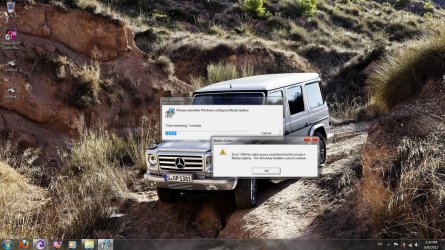
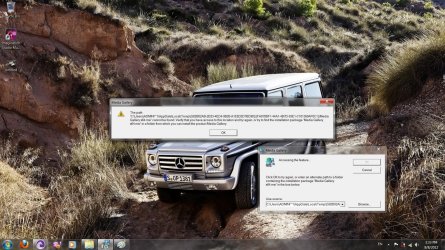
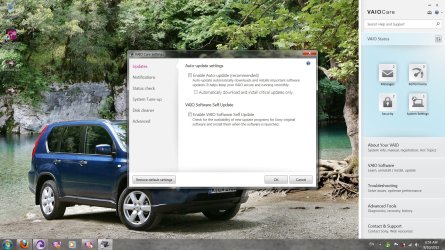
i received your e-mail. I am attaching snapshots of my screen so that you can see what is wrong or what i have to do.i disabled the service but it has not been applied or no difference was shown after unckecked or checked. I would like to have the service enabled and updated yet do not wnat it to pop up anytime. Could it anaylizes manually?
thank you
Sincerely;
Zolboo
Hello zolboo and a warm welcome to the Forum
I found this on the Sony website. If you follow the instructions it should solve your problemThis is the Vaio Personalisation Manager which keeps track of your favorite music, programs etc. As far as I can work out it is designed to make personalised recommendations of music or other things you may be interested in when using Vaio Media Gallery. Rather like Amazon's Personal Recommendations.
If you don't want this service then just disable it. Go to VAIO Analysis Manager and you will find an option something like ' Preference Learning' - just uncheck it and reboot.
How are you.
i received your e-mail. I am attaching snapshots of my screen so that you can see what is wrong or what i have to do.i disabled the service but it has not been applied or no difference was shown after unckecked or checked. I would like to have the service enabled and updated yet do not wnat it to pop up anytime. Could it anaylizes manually?
thank you
Sincerely;
Zolboo
Attachments

My Computer
At a glance
64
- OS
- 64
- Local time
- 6:12 PM
- Messages
- 50,634
Did you follow the steps I gave you to Clean Up Factory Bloatware, establishing a Clean Boot? This will disable all of the Sony crapware until you can get the superior Clean Reinstall.
Did you follow the steps I gave you to Clean Up Factory Bloatware, establishing a Clean Boot? This will disable all of the Sony crapware until you can get the superior Clean Reinstall.
hi. tnx.
But what is Clean Up Factory Bloatware? Does it mean to format the system and install a new system?
My Computer
At a glance
64
- OS
- 64
- Local time
- 6:12 PM
- Messages
- 50,634
Did you see this post earlier? Click the blue links:
I would disable all of the Sony crapware and then clean up after it: Clean Up Factory Bloatware
Eventually most tech enthusiasts will Clean Reinstall - Factory OEM Windows 7

- Local time
- 9:12 PM
- Messages
- 329
I use Sony Vaio.. the problem is that a Vaio Analysis manager / Windows Installer window keeps popping up and it suddenly exit without me even knowing what it is doing or installing.
You have to let it finish installing before uninstall it ..
Start-Mediagallery ... double click it ...run the program all the way ..restart ..
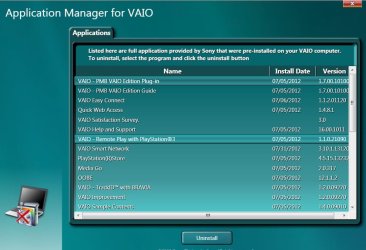
Go to : c:/Program Files (x86)/Sony folder you will find a Vaio Uninstaller folder. In this folder there is an application and you can uninstall the Vaio applications, which you cannot find on windows programs list.
My Computer
At a glance
WDS 7 Home Pre.x64Intel Core i5 2450M @ 2.50GHz8GB Kingston[2x4] Dual-Channel DDR3 @ 1333MHzAMD Radeon(TM) HD 6470M + Intel(R) HD Graph 3000
- Computer type
- Laptop
- Computer Manufacturer/Model Number
- Sony Vaio VPC-SE23FXS
- OS
- WDS 7 Home Pre.x64
- CPU
- Intel Core i5 2450M @ 2.50GHz
- Memory
- 8GB Kingston[2x4] Dual-Channel DDR3 @ 1333MHz
- Graphics Card(s)
- AMD Radeon(TM) HD 6470M + Intel(R) HD Graph 3000
- Hard Drives
- TOSHIBA MK6459GSXP 600GB x 5400RPM (SATA)
- Local time
- 6:12 PM
- Messages
- 50,634
wds7 - Are there any Sony applications which can affect performance or functions when uninstalled? The reason i ask is because of the Special Note for Sony Owners in Clean Reinstall - Factory OEM Windows 7:
 Information
Special Note to Sony Vaio Owners:
Software which enables Fkey functions and illumination must be reinstalled from the Sony Support Downloads webpage in the order as shown here: Function keys don't work after clean install - Windows 7 Forums
Should the Fkey functions and lighting be preserved by NOT uninstalling one of the apps on the menu you show? If so I'd like to add it to the Clean Up Bloatware tutorial. Thanks.
Special Note to Sony Vaio Owners:
Software which enables Fkey functions and illumination must be reinstalled from the Sony Support Downloads webpage in the order as shown here: Function keys don't work after clean install - Windows 7 Forums
Should the Fkey functions and lighting be preserved by NOT uninstalling one of the apps on the menu you show? If so I'd like to add it to the Clean Up Bloatware tutorial. Thanks.
- Local time
- 9:12 PM
- Messages
- 329
wds7 - Are there any Sony applications which can affect performance or functions when uninstalled? The reason i ask is because of the Special Note for Sony Owners in Clean Reinstall - Factory OEM Windows 7:
Information
Special Note to Sony Vaio Owners:
Software which enables Fkey functions and illumination must be reinstalled from the Sony Support Downloads webpage in the order as shown here: Function keys don't work after clean install - Windows 7 Forums
Should the Fkey functions and lighting be preserved by NOT uninstalling one of the apps on the menu you show? If so I'd like to add it to the Clean Up Bloatware tutorial. Thanks.
i have not done the Wds Clean-install yet ..but I heard people have very hard time to get the back lit keyboard back ..
These are the ones I keep :
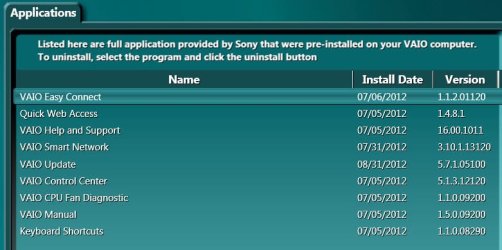
My Computer
At a glance
WDS 7 Home Pre.x64Intel Core i5 2450M @ 2.50GHz8GB Kingston[2x4] Dual-Channel DDR3 @ 1333MHzAMD Radeon(TM) HD 6470M + Intel(R) HD Graph 3000
- Computer type
- Laptop
- Computer Manufacturer/Model Number
- Sony Vaio VPC-SE23FXS
- OS
- WDS 7 Home Pre.x64
- CPU
- Intel Core i5 2450M @ 2.50GHz
- Memory
- 8GB Kingston[2x4] Dual-Channel DDR3 @ 1333MHz
- Graphics Card(s)
- AMD Radeon(TM) HD 6470M + Intel(R) HD Graph 3000
- Hard Drives
- TOSHIBA MK6459GSXP 600GB x 5400RPM (SATA)
- Local time
- 6:12 PM
- Messages
- 50,634
Thanks. The installed list may be different than what is offered on the Sony Vaio Downloads webpage since I don't see the ones required for illumination in the list.
Please keep us posted in the Clean Reinstall tutorial when you do yours how it goes and if there are any other issues besides the Special Note. Remember you can save a Win7 backup image to re-image back to the same config you have now if you prefer it.
Please keep us posted in the Clean Reinstall tutorial when you do yours how it goes and if there are any other issues besides the Special Note. Remember you can save a Win7 backup image to re-image back to the same config you have now if you prefer it.
Similar threads
- Replies
- 6
- Views
- 2K

- Replies
- 10
- Views
- 14K
