
Vaio VGN-NW120D Webcam

cradke

New member
Local time
4:46 PM
Messages
7
Hi, I'm new here.

My webcam hasn't been getting recognized by my applications, and when I looked under Devices and Printers it showed up as "Unknown Device". I ran a troubleshoot on it and it tells me that it's been stopped because it has reported problems (Code 43 - see attachment).

The thing is, it was working fine on Skype yesterday so I'm doubtful that there's actually anything wrong with the webcam. Is there any way I can override this, or get to the root of the problem?

Any help would be greatly appreciated.

Craig
 

Attachments
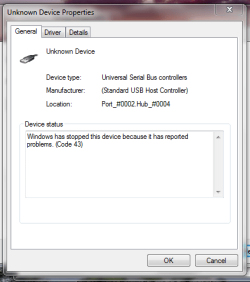
  • Device Status.png
    Device Status.png
    58.6 KB · Views: 2

My Computer

Computer Manufacturer/Model Number
Sony Vaio VGN-NW120D
OS
Windows 7
CPU
Intel Core 2 Duo T6500
Memory
4.00 GB
1. Go to this page and download that program, run it. If that doesn't work..
2. Check for updated chip set drivers
3. Check for a BIOS update
 

My Computer

Computer Manufacturer/Model Number
Custom Built
OS
Windows 7 Ultimate
CPU
AMD Athlon II X2 245 2.90Ghz
Motherboard
Some Gigabyte one, dont remember model
Memory
3.00 GB
Graphics Card(s)
8800GTS 512MB
Sound Card
Sound Blaster X-Fi Titanium Fatal1ty
Monitor(s) Displays
Dual 22" widescreen
Hard Drives
250GB internal, 500GB internal
PSU
CORSAIR CMPSU-850TX 850W Power Supply
Case
Thermalkake Tsunami Dream
Cooling
Thermaltake Golden Orb II
Keyboard
Saitek Eclipse 2
Mouse
Logitech MX518
Thanks for the quick reply, Kirsch.

I tried downloading the MediaPlus Extension and that didn't work. How do I check for updated chip set drivers?
 

My Computer

Computer Manufacturer/Model Number
Sony Vaio VGN-NW120D
OS
Windows 7
CPU
Intel Core 2 Duo T6500
Memory
4.00 GB

My Computer

Computer Manufacturer/Model Number
Custom Built
OS
Windows 7 Ultimate
CPU
AMD Athlon II X2 245 2.90Ghz
Motherboard
Some Gigabyte one, dont remember model
Memory
3.00 GB
Graphics Card(s)
8800GTS 512MB
Sound Card
Sound Blaster X-Fi Titanium Fatal1ty
Monitor(s) Displays
Dual 22" widescreen
Hard Drives
250GB internal, 500GB internal
PSU
CORSAIR CMPSU-850TX 850W Power Supply
Case
Thermalkake Tsunami Dream
Cooling
Thermaltake Golden Orb II
Keyboard
Saitek Eclipse 2
Mouse
Logitech MX518
That didn't work either. Thanks, though.
 

My Computer

Computer Manufacturer/Model Number
Sony Vaio VGN-NW120D
OS
Windows 7
CPU
Intel Core 2 Duo T6500
Memory
4.00 GB
Did you restart? Also, just for me, please try a different USB port, and then restart. :)
 

My Computer

Computer Manufacturer/Model Number
Custom Built
OS
Windows 7 Ultimate
CPU
AMD Athlon II X2 245 2.90Ghz
Motherboard
Some Gigabyte one, dont remember model
Memory
3.00 GB
Graphics Card(s)
8800GTS 512MB
Sound Card
Sound Blaster X-Fi Titanium Fatal1ty
Monitor(s) Displays
Dual 22" widescreen
Hard Drives
250GB internal, 500GB internal
PSU
CORSAIR CMPSU-850TX 850W Power Supply
Case
Thermalkake Tsunami Dream
Cooling
Thermaltake Golden Orb II
Keyboard
Saitek Eclipse 2
Mouse
Logitech MX518
Sorry, I didn't mention that it's a built-in webcam. I've restarted with both installs, but no luck so far.
 

My Computer

Computer Manufacturer/Model Number
Sony Vaio VGN-NW120D
OS
Windows 7
CPU
Intel Core 2 Duo T6500
Memory
4.00 GB
Derr... vaio.. my bad..

On this page you will see "BIOS" and "Motherboard". Expand them to see downloads for each one (the Motherboard one is the chipset). Give those a shot.
 

My Computer

Computer Manufacturer/Model Number
Custom Built
OS
Windows 7 Ultimate
CPU
AMD Athlon II X2 245 2.90Ghz
Motherboard
Some Gigabyte one, dont remember model
Memory
3.00 GB
Graphics Card(s)
8800GTS 512MB
Sound Card
Sound Blaster X-Fi Titanium Fatal1ty
Monitor(s) Displays
Dual 22" widescreen
Hard Drives
250GB internal, 500GB internal
PSU
CORSAIR CMPSU-850TX 850W Power Supply
Case
Thermalkake Tsunami Dream
Cooling
Thermaltake Golden Orb II
Keyboard
Saitek Eclipse 2
Mouse
Logitech MX518
Thanks to you, I can now share my morning bed head with the world. :)

The BIOS upgrade worked. What exactly does BIOS do? I'd never heard about it until here.
 

My Computer

Computer Manufacturer/Model Number
Sony Vaio VGN-NW120D
OS
Windows 7
CPU
Intel Core 2 Duo T6500
Memory
4.00 GB
BIOS Upgrade did the trick? AWESOME!! Glad I could help! Sometimes (from my original post) 3rd time's a charm!! :thumbsup:

BIOS

The BIOS of a PC software is built into the PC, and is the first code run by a PC when powered on ('boot firmware'). The primary function of the BIOS is to load and start an operating system
 

My Computer

Computer Manufacturer/Model Number
Custom Built
OS
Windows 7 Ultimate
CPU
AMD Athlon II X2 245 2.90Ghz
Motherboard
Some Gigabyte one, dont remember model
Memory
3.00 GB
Graphics Card(s)
8800GTS 512MB
Sound Card
Sound Blaster X-Fi Titanium Fatal1ty
Monitor(s) Displays
Dual 22" widescreen
Hard Drives
250GB internal, 500GB internal
PSU
CORSAIR CMPSU-850TX 850W Power Supply
Case
Thermalkake Tsunami Dream
Cooling
Thermaltake Golden Orb II
Keyboard
Saitek Eclipse 2
Mouse
Logitech MX518
Bad news - the BIOS update only fixed it for a few days, and the webcam stopped turning on again. :(

Can you think of anything else that might be causing this problem? I haven't had time to try fixing it until now, but I'm starting to think it's a hardware issue... I just hope it's something else because I don't know if the webcam is covered by my warrantee and I don't feel like going to all the trouble to get it serviced.

Any help would be greatly appreciated.
 

My Computer

Computer Manufacturer/Model Number
Sony Vaio VGN-NW120D
OS
Windows 7
CPU
Intel Core 2 Duo T6500
Memory
4.00 GB
Back
Top