Validate win 7

SIW2

YTS GEEK
Guru
Gold Member
VIP
SF Team
Local time
12:12 AM
Messages
16,784
On booting up today, I got this message:
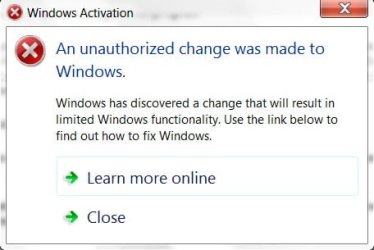
AUTH-1-2009-04-22_124833.jpg

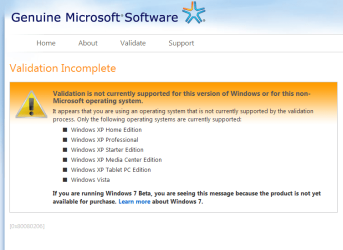
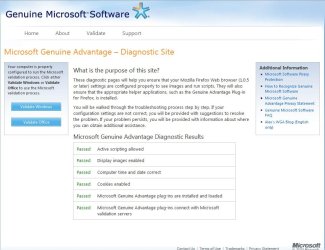
Follow the instructions to install WGA plugin , click the validate button and you should get this:
AUTH-8-2009-04-22_130512.jpg

NOTE: If you are using FF go to Tools>Options and ensure Java script is enabled. If you have NoScript, allow scripts globally.

Make sure you have your product key to hand - you need to restart and enter the key when requested - you will not get the option in The System window.

You should get a message telling you it is Genuine.

If the Desktop is still Black - rt click and personalise to return to normal.

If you have any difficulty, here are the plugins ( extract from zip folder and double click to install)

Windows:

View attachment WGAPluginInstall.zip

View attachment legitcheck.zip

Office:

View attachment OGAPluginInstall.zip


Relevant links:

Genuine Microsoft Software

Genuine Microsoft Software

Genuine Microsoft Software

Genuine Microsoft Software
 

My Computers

System One System Two

  • Computer type
    PC/Desktop
    OS
    7 X64
    CPU
    i5 8400
    Motherboard
    gigabyte b365m ds3h
    Memory
    2x8gb 3200mhz
    Hard Drives
    various
    PSU
    pure power 11 400w cm
    Case
    Coolermaster
    Cooling
    cryorig m9i
  • Computer type
    PC/Desktop
    OS
    7x64
    CPU
    g5400
    Motherboard
    ga b365m ds3h
    Memory
    8gb ddr4 2400
    PSU
    xfx pro 450w
Win 7 or IE

On first glance that looks like the page to validate IE, not Windows 7.

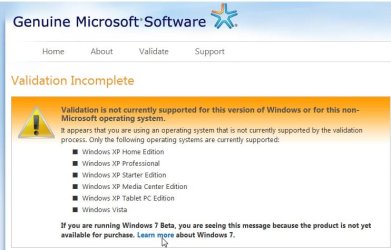
When you try to validate Windows 7 you should get the following page:
 

Attachments

  • validation.PNG
    validation.PNG
    28.6 KB · Views: 502

My Computer

Computer Manufacturer/Model Number
Dell B-110
OS
Dual boot WindowsXP/Windows 7
CPU
Intel Pentium 4 3.2GHz HT
Memory
1 GB
Graphics Card(s)
nVidia GeForce FX 5500
Sound Card
Creative Soundblaster Audigy 2 ZS
Screen Resolution
1024 X 768 32bit
Hard Drives
2 WD - 80/160 GB
Other Info
Highly upgraded from Dell stock unit
Hi rkseagle,

Yes, I went through that page as well to get to the validation page above.;)
 

My Computers

System One System Two

  • Computer type
    PC/Desktop
    OS
    7 X64
    CPU
    i5 8400
    Motherboard
    gigabyte b365m ds3h
    Memory
    2x8gb 3200mhz
    Hard Drives
    various
    PSU
    pure power 11 400w cm
    Case
    Coolermaster
    Cooling
    cryorig m9i
  • Computer type
    PC/Desktop
    OS
    7x64
    CPU
    g5400
    Motherboard
    ga b365m ds3h
    Memory
    8gb ddr4 2400
    PSU
    xfx pro 450w
I too get to the page attached by rkseagle. Does that mean I have to use one of the tools listed by SIW2?
 

My Computer

OS
Windows 7 Ultimate x64
I don't understand why you are getting this message when starting up.

Did you change your hardware?
 

My Computer

OS
Win7 64 bits FR
CPU
2500K @ 4.5 GHz
Motherboard
Asrock Z68 Gen3 Extreme3
Memory
4x4GB 1600MHz GSkill CL9.
Graphics Card(s)
HD6850 Powercolor stock
Sound Card
Integrated
Monitor(s) Displays
Samsung 2343 + Dell 20in 4/3
Screen Resolution
2048x1152, 1600x1200
Hard Drives
OCZ Vertex LE SSD, 50GB
OCZ Solid 3 120GB
OCZ Vertex 2 240GB
Western Digital Scorpio 320GB 5400 rpm
PSU
KingWin Lazer Platinum (90+) 550Watts
Case
HAF912
Cooling
CPU: OCZ Vendetta 2
Keyboard
MX5500 revolution bluetooth
Mouse
MX5500 revolution bluetooth
Internet Speed
Cable 7 Mbps
I never once had that happen to me yet. Maybe its cause I selected to get updates for install when I installed 7100 (and every other build).
 
I did not select to get updates while installing.
 

My Computer

OS
Windows 7 Ultimate x64
Also would like to know if the administration link in Startup Programs is removed or is it me not seeing it as I get the Windows is not genuine message?
 

My Computer

OS
Windows 7 Ultimate x64

My Computers

System One System Two

  • Computer type
    PC/Desktop
    OS
    7 X64
    CPU
    i5 8400
    Motherboard
    gigabyte b365m ds3h
    Memory
    2x8gb 3200mhz
    Hard Drives
    various
    PSU
    pure power 11 400w cm
    Case
    Coolermaster
    Cooling
    cryorig m9i
  • Computer type
    PC/Desktop
    OS
    7x64
    CPU
    g5400
    Motherboard
    ga b365m ds3h
    Memory
    8gb ddr4 2400
    PSU
    xfx pro 450w
I did what SIW2 mentioned and I do get to the validation page. the page clearly says that we see the page cause win 7 is not yet available for purchase. If so, the WGA check should be disabled. I am not sure why its enabled.
 

My Computer

OS
Windows 7 Ultimate x64
Update:
I reinstalled Win 7 with the option of getting the updates for installation and this time, my copy of Win RC beta got activated without problems.
 

My Computer

OS
Windows 7 Ultimate x64
I clicked on validate windows but only this page shows:

What is the problem? I am doing it for a week and with several browsers
 

My Computer

OS
Windows 7
well I found the answer by my self.:
My email:
--- Original Message ---
From : [email protected]
Sent : Thursday, January 07, 2010 12:27:49 PM UTC
To : CNTUS.0000.**.***.AR.000.****.CS.CMR.CUS.00.WB@css .one.microsoft.com
Subject : Windows validate doesnt work. what should I do?

CONTACT INFORMATION
Phone: 0098********

QUESTIONS OR COMMENTS
Message: After I clicked on Validate windows on this page:
http://www.microsoft.com/genuine/def...playlang=en-gb
nothing happend just this page showd:
http://img4.tinypic.info/files/lyfvn0dem5vj1t4jxf0v.png
I have tested with two browsers nothing happens.
What is the problem?

And answer:
Dear Customer,

Thank you for contacting Microsoft Customer Support.

Basically the reason that there is nothing happening is this site designed to show errors with the validation. If the Windows is Genuine it gives that screen shot you have sent. If you still have more inquiries, please do not hesitate to get back to us.


Best Regards,

Renda Mohamed
Xceed On Behalf Of Microsoft
For Phone & online Customer Service & Support please visit,
Arabic: http://support.microsoft.com/gp/telephonems?ln=ar
English: http://support.microsoft.com/gp/telephonems?ln=en-me
For security updates please visit,
http://www.microsoft.com/protect
If you have any feedback about mywork, please let either myself or my manager Samir Ahmed know at [email protected]
------------------------------------------------------------------
According to these emails nothing should happen after you clicked "Validate Windows" ( If your windows is genuine).
I will be glad If some one with genuine windows7 test and reply)
 

My Computer

OS
Windows 7
I hope you are correct!

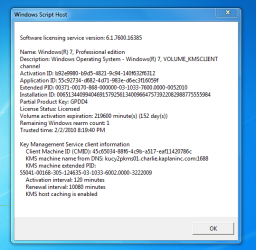
I just got a screen shot that looks like my windows 7 is set to expire in June, 2010, but when I go to the valadte page, nothing happens when I try to validate. According to the previous post form Microsoft, that means my copy is genuine, right? Which is correct?
Attached is the info form search on my laptop.
 

Attachments

  • Capture.PNG
    Capture.PNG
    27.9 KB · Views: 22

My Computer

Computer type
Laptop
Computer Manufacturer/Model Number
Dell Vostro 3750
OS
Windows 7 Professional
CPU
Core I5
Memory
8GB
Hard Drives
Seagate 600 240GB SSD
Antivirus
MSE
Browser
Chrome, IE, Firfox
Back
Top