Validation of OEM Win7/64 installed on new hard drive--have OLD one

Rickenbacker108

New member
Local time
10:11 AM
Messages
4
I have a custom AMD-powered system that is about 18 months old (since OEM Win7 was installed on a new drive). The core WDC 2500KS HD slowed down and showed other errors which made the system unusable about 60 days ago. Best I can remember I never entered a product key when Win7 was originally installed and but the copy/system was validated according to MSFT (I could be wrong). I've kept up with updates and have SR-1 installed. Due to the problems with the system (30+ days ago), I purchased a larger WDC drive and reinstalled my OEM copy of Win7 onto it. Although I was again able to do this w/out a product key (don't have one with the OEM copy?), MSFT is now complaining that the system is NOT GENUINE and step one requires a product key (never provided to me?).

Today I used the Magic Jellybean program to obtain the Product & CD keys--validity currently unknown.

I also have the original hard drive running and accessible via USB? (also backed up separately).

What should I do in what order?

1. Can I /should I officially uninstall my copy of Win7 on the "remote/original drive" ?
SLMGR.vbs refers to remote "systems" not drives--AFAIK.
2. Is #1 possible?? and is it necessary or advised?
3. Should I simply proceed with validation and deal with the potential conflict(s) later?
4. Is MSFT still willing to speak with people on the phone about these things on their nickel?

I am aware of the excellent documentation available (referenced from this site) on SLMGR.vbs. I am also overwhelmed with the options it offers and their sheer complexity. I am an old computer programmer who is quite handy, but I rarely deal with MSFT licensing issues and much of the terminology in the help for SLMGR.vbs is foriegn to me.

I would be very grateful for feedback on my problem. I would like to get this system officially validated without spending money on purchasing another copy of Win 7 (which I view as unnessary).

Thanks in Advance :(
 

My Computer My Computer

At a glance

Windows 7 64-bitAMD Athlong 64 X2 4600+4 GB DDR2 Dual ChannelATI Radeon 3100
Computer Manufacturer/Model Number
Custom System
OS
Windows 7 64-bit
CPU
AMD Athlong 64 X2 4600+
Motherboard
ASUSTek M3A78-CM
Memory
4 GB DDR2 Dual Channel
Graphics Card(s)
ATI Radeon 3100
Sound Card
built-in on Motherboard
Monitor(s) Displays
Samsung 24"
Hard Drives
Seagate ST3200822AS
WDC WD7500AARX-00N0YB0 (750 GB)
WDC WD2500KS
PSU
500 Watts
Case
Corsair (large, quiet, adjustable fan speed)
Cooling
CPU fan installed; brand ??
I don't see any reason to uninstall from the old drive unless you think you can extract your Product Key from it with Jelly Bean. Does it have a different Windows installation than the new drive?

You may as well call Microsoft on their toll free number and find out if your Product Key is valid.
 

My Computer My Computer

At a glance

Windows 7 Home Premium SP1, 64-bitIntel Skylake i5-6600K, not overclocked8 GB HyperX DDR4-2666 (2 x 4 GB)none; graphics are integrated on CPU
Computer type
PC/Desktop
Computer Manufacturer/Model Number
Ignatz Special; 4 speed manual gearbox; factory air conditioning; one of one
OS
Windows 7 Home Premium SP1, 64-bit
CPU
Intel Skylake i5-6600K, not overclocked
Motherboard
AsRock Z170M Extreme 4, micro ATX
Memory
8 GB HyperX DDR4-2666 (2 x 4 GB)
Graphics Card(s)
none; graphics are integrated on CPU
Sound Card
onboard: Realtek ALC1150; external: USB Behringer UF0-202
Monitor(s) Displays
Dell S2340M 23 inch IPS
Screen Resolution
1600 x 900
Hard Drives
System: Crucial MX100 series SSD, 128 GB;
Data: Samsung Spinpoint 103SJ, 1 TB;
Backup: WD Caviar Green WD30EZRX-00D8PB0, 3 TB
PSU
Rosewill SilentNight 500 watt fanless, semi-modular
Case
Antec Solo II
Cooling
Noctua NH-U12S; Noctua F12 intake, Noctua S12A exhaust
Keyboard
Microsoft 200 6JH-00001 USB
Mouse
Dell or Microsoft optical wired; USB
Antivirus
Microsoft Security Essentials and Malwarebytes Premium
Browser
Pale Moon
Other Info
All fans PWM; speeds at idle: CPU circa 500 rpm; intake circa 600 rpm; exhaust circa 600 rpm; CPU temps 27 idle and 47 C load in a warm room (27 C/81 F) when running Intel Extreme Tuning Utility stress test.
Thanks ignatzatsonic,

The new install is from the same CD as the old install. I understand MSFT would only want this to be installed on one machine, but what defines a "machine". Logically this would center on the hard drive (the only thing that has changed in my system).
 

My Computer My Computer

At a glance

Windows 7 64-bitAMD Athlong 64 X2 4600+4 GB DDR2 Dual ChannelATI Radeon 3100
Computer Manufacturer/Model Number
Custom System
OS
Windows 7 64-bit
CPU
AMD Athlong 64 X2 4600+
Motherboard
ASUSTek M3A78-CM
Memory
4 GB DDR2 Dual Channel
Graphics Card(s)
ATI Radeon 3100
Sound Card
built-in on Motherboard
Monitor(s) Displays
Samsung 24"
Hard Drives
Seagate ST3200822AS
WDC WD7500AARX-00N0YB0 (750 GB)
WDC WD2500KS
PSU
500 Watts
Case
Corsair (large, quiet, adjustable fan speed)
Cooling
CPU fan installed; brand ??
"OEM" typically means "motherboard".

The hard drive doesn't matter in the least.

Whatever Product Key that may have been used on the old install is valid on the new install.

What matters is:

1: Do you have it?

2: Why won't it activate properly?

You can answer #1; Microsoft may be able to shed light on #2.

Technically, MS restricts OEM licenses to PCs intended for resale, but they apparently are not rigorous about enforcing that.
 

My Computer My Computer

At a glance

Windows 7 Home Premium SP1, 64-bitIntel Skylake i5-6600K, not overclocked8 GB HyperX DDR4-2666 (2 x 4 GB)none; graphics are integrated on CPU
Computer type
PC/Desktop
Computer Manufacturer/Model Number
Ignatz Special; 4 speed manual gearbox; factory air conditioning; one of one
OS
Windows 7 Home Premium SP1, 64-bit
CPU
Intel Skylake i5-6600K, not overclocked
Motherboard
AsRock Z170M Extreme 4, micro ATX
Memory
8 GB HyperX DDR4-2666 (2 x 4 GB)
Graphics Card(s)
none; graphics are integrated on CPU
Sound Card
onboard: Realtek ALC1150; external: USB Behringer UF0-202
Monitor(s) Displays
Dell S2340M 23 inch IPS
Screen Resolution
1600 x 900
Hard Drives
System: Crucial MX100 series SSD, 128 GB;
Data: Samsung Spinpoint 103SJ, 1 TB;
Backup: WD Caviar Green WD30EZRX-00D8PB0, 3 TB
PSU
Rosewill SilentNight 500 watt fanless, semi-modular
Case
Antec Solo II
Cooling
Noctua NH-U12S; Noctua F12 intake, Noctua S12A exhaust
Keyboard
Microsoft 200 6JH-00001 USB
Mouse
Dell or Microsoft optical wired; USB
Antivirus
Microsoft Security Essentials and Malwarebytes Premium
Browser
Pale Moon
Other Info
All fans PWM; speeds at idle: CPU circa 500 rpm; intake circa 600 rpm; exhaust circa 600 rpm; CPU temps 27 idle and 47 C load in a warm room (27 C/81 F) when running Intel Extreme Tuning Utility stress test.
Thanks for the encouragement.

At this point I can only hope that the key data obtained from the Magic Jellybean program is valid--but I never entered this data on THIS INSTALLATION??

I guess I lack guts. I'll charge ahead.

Thanks!
 

My Computer My Computer

At a glance

Windows 7 64-bitAMD Athlong 64 X2 4600+4 GB DDR2 Dual ChannelATI Radeon 3100
Computer Manufacturer/Model Number
Custom System
OS
Windows 7 64-bit
CPU
AMD Athlong 64 X2 4600+
Motherboard
ASUSTek M3A78-CM
Memory
4 GB DDR2 Dual Channel
Graphics Card(s)
ATI Radeon 3100
Sound Card
built-in on Motherboard
Monitor(s) Displays
Samsung 24"
Hard Drives
Seagate ST3200822AS
WDC WD7500AARX-00N0YB0 (750 GB)
WDC WD2500KS
PSU
500 Watts
Case
Corsair (large, quiet, adjustable fan speed)
Cooling
CPU fan installed; brand ??
Thanks for the encouragement.

At this point I can only hope that the key data obtained from the Magic Jellybean program is valid--but I never entered this data on THIS INSTALLATION??

I guess I lack guts. I'll charge ahead.

Thanks!

Why haven't you at least attempted to use the Product Key you fished out with Jelly Bean on this installation?

Is this a home built PC? If not, the OEM builders (HP, Dell, etc) are required to include the Product Key on the PC. It's normally on a sticker on the bottom of the PC or perhaps in a battery compartment.

It's 25 characters, in this format:

xxxxx-xxxxx-xxxxx-xxxxx-xxxxx
 

My Computer My Computer

At a glance

Windows 7 Home Premium SP1, 64-bitIntel Skylake i5-6600K, not overclocked8 GB HyperX DDR4-2666 (2 x 4 GB)none; graphics are integrated on CPU
Computer type
PC/Desktop
Computer Manufacturer/Model Number
Ignatz Special; 4 speed manual gearbox; factory air conditioning; one of one
OS
Windows 7 Home Premium SP1, 64-bit
CPU
Intel Skylake i5-6600K, not overclocked
Motherboard
AsRock Z170M Extreme 4, micro ATX
Memory
8 GB HyperX DDR4-2666 (2 x 4 GB)
Graphics Card(s)
none; graphics are integrated on CPU
Sound Card
onboard: Realtek ALC1150; external: USB Behringer UF0-202
Monitor(s) Displays
Dell S2340M 23 inch IPS
Screen Resolution
1600 x 900
Hard Drives
System: Crucial MX100 series SSD, 128 GB;
Data: Samsung Spinpoint 103SJ, 1 TB;
Backup: WD Caviar Green WD30EZRX-00D8PB0, 3 TB
PSU
Rosewill SilentNight 500 watt fanless, semi-modular
Case
Antec Solo II
Cooling
Noctua NH-U12S; Noctua F12 intake, Noctua S12A exhaust
Keyboard
Microsoft 200 6JH-00001 USB
Mouse
Dell or Microsoft optical wired; USB
Antivirus
Microsoft Security Essentials and Malwarebytes Premium
Browser
Pale Moon
Other Info
All fans PWM; speeds at idle: CPU circa 500 rpm; intake circa 600 rpm; exhaust circa 600 rpm; CPU temps 27 idle and 47 C load in a warm room (27 C/81 F) when running Intel Extreme Tuning Utility stress test.
Never used Magic Jellybean. By the statement you made here:

Today I used the Magic Jellybean program to obtain the Product & CD keys--validity currently unknown.

are you saying you used it get the keys off of the old hard drive, or is MJ not capable of doing it?

I know of a couple of programs that can be used to get keys off of "non-system" drives (they are system drives, just not for the currently running system).

If that's what you're looking for I'll see if I can find some links.
 

My Computer My Computer

At a glance

Windows 7 Ultimate x64
OS
Windows 7 Ultimate x64
Try Belarc Advisor: Belarc Advisor - Free Personal PC Audit

It takes a snapshot of your inventory including product keys.

Have you checked the outside of the computer to see if there is a COA sticker with a product key attached to it?
 

My Computer My Computer

At a glance

Windows 7 Ultimate SP1 64-BitIntel Core i7 870 @ 2.93GHz8Gb Dual-Channel DDR3 @ 664MHznVidia GeForce GTX 460 1024MB dedicated RAM
Computer Manufacturer/Model Number
HP Pavilion Elite 495UK
OS
Windows 7 Ultimate SP1 64-Bit
CPU
Intel Core i7 870 @ 2.93GHz
Motherboard
MSI 2A9C (CPU1)
Memory
8Gb Dual-Channel DDR3 @ 664MHz
Graphics Card(s)
nVidia GeForce GTX 460 1024MB dedicated RAM
Sound Card
Realtek HD Audio
Monitor(s) Displays
HP2310i
Screen Resolution
1920 x 1080
Hard Drives
1x1954GB Hitachi HDS22020ALA 330 (RAID), 1x1954GB Hitachi External for backup and storage
PSU
460W
Case
HP Elite
Cooling
Air cooled
Keyboard
Logitech K750 solar-powered keyboard
Mouse
Logitech Wireless M180 mouse
Internet Speed
2Mb
Other Info
Pure Avanti Flow Internet Radio with iPod Dock, 64Gb iPod, HP USB Speakers, Sony MDR-V500 Headphones, Sony Vaio F-Series Laptop
Try Belarc Advisor: Belarc Advisor - Free Personal PC Audit

It takes a snapshot of your inventory including product keys.

Have you checked the outside of the computer to see if there is a COA sticker with a product key attached to it?

It's worth a try. But I'm not sure you can get Belarc to get the keys off a system drive that's not the current system.

I've got an old install on a currently connected bare external HD, and I had just run Belarc early this morning. It doesn't show anything about the OS or software, just the standard hardware stuff. Do you know of a way to get Belarc to show it?

By the way, have you noticed that Belarc still hasn't been updated to reflect the latest Patch Tuesday updates?
 

My Computer My Computer

At a glance

Windows 7 Ultimate x64
OS
Windows 7 Ultimate x64
Where did you get Win7?

Is this Builder's OEM you installed? If so and you carelessly lost the $100+ Product Key then it should be findable on the old HD using Belarc or similar. Just swap it in place of the current HD.

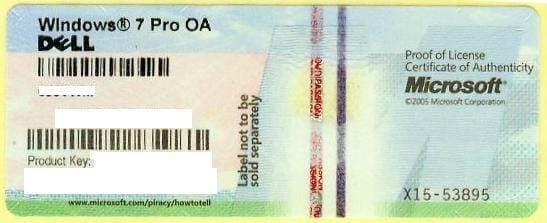
Or is this factory OEM which came preinstalled? If so it must have a COA sticker which has the Product Key on machine as shown below. Just make sure you put the correct key in.
 

Attachments

  • 1270558000_86224332_1-Pictures-of--Buying-Windows-7-Prof-COA-Sticker-Only-100pcs-up-Needed.jpg
    1270558000_86224332_1-Pictures-of--Buying-Windows-7-Prof-COA-Sticker-Only-100pcs-up-Needed.jpg
    21.2 KB · Views: 7
** Resolved **

Thanks for the suggestions. Let me tell you what I learned & what worked.

3 types of Windows, mine was an OEM / Upgrade.
Windows installations are tied to the Motherboard/BIOS--not to the hard drive.
Magic Jellybean program retrieved a "default product code" that could not be used.

On the phone with MSFT and even though I could not produce the original product key, they eventually bought my story. Although we had access to the original HD via USB, Magic Jellybean could NOT retrieve the product key from it--since it was not the boot CD. Due to disk read or controller errors, the old HD took 15 minutes to boot. They offered to stay on the phone with me while I reconfigured my system (HD from external to internal) to boot and bring it up, but I suggested that it would take 15-20 minutes and would be a waste of their time--offering to call them back when the old HD was driving the system. After another two minutes of consultation while I was on hold they GAVE ME A NEW AND WORKABLE product key, which they installed using remote desktop.

It is interesting to me that the original CD (provided to me w/out any product key--AFAIK) worked the first time (18 months ago), but not the second. The answer may have been the this OEM copy was actually an Upgrade copy (perhaps not really an true full OEM version) that I had installed into an XP partition. The second installation was attempted on an HD that had not had a prior O/S installed on it.

Interestingly, MSFT used the Magic Jellybean program in their initial attempt to retrieve my key. First they got the same data I had failed with ("default product key cannot be used to activate Windows"--paraphrase, and second it failed to access the registry of my USB-connected originial hard drive.

;)
 

My Computer My Computer

At a glance

Windows 7 64-bitAMD Athlong 64 X2 4600+4 GB DDR2 Dual ChannelATI Radeon 3100
Computer Manufacturer/Model Number
Custom System
OS
Windows 7 64-bit
CPU
AMD Athlong 64 X2 4600+
Motherboard
ASUSTek M3A78-CM
Memory
4 GB DDR2 Dual Channel
Graphics Card(s)
ATI Radeon 3100
Sound Card
built-in on Motherboard
Monitor(s) Displays
Samsung 24"
Hard Drives
Seagate ST3200822AS
WDC WD7500AARX-00N0YB0 (750 GB)
WDC WD2500KS
PSU
500 Watts
Case
Corsair (large, quiet, adjustable fan speed)
Cooling
CPU fan installed; brand ??
This is why I said you'd need to swap the old HD in place of the new to read the Product Key - obviously Windows needs to be booted to do so.

If this is a Win7 Upgrade kit from Vista, then it included a Product Key with the disk which can be clean reinstalled. It's key should be work when audited from the HD.

Any Upgrade from XP you bought would have to be retail or possibly from the manufacturer in which case it could be OEM and/or Upgrade. You should know this since it is within recent history. The Product Key would be readable from the HD and should work.

If this is the original OS preinstalled at factory then the key would be on the COA sticker. The Product Key audited from HD would not work since it is a factory mass activation SLP key.
 
Back
Top