Varied SSD Problems/Issues

JDY

New member
Local time
7:46 PM
Messages
15
I recently bought a new SSD and eventually managed to install it after some issues (motherboard doesn't support ACHI which I think caused an issue with upgrading the firmware so I didn't bother with that) I thought the installation had gone fine but I am now experiencing a lot of issues.

When I start up the computer I often get an "Disk Read Error Occurred" error. This is normally "fixed" by turning the computer off for a while (a minute) and trying again.

Another problem is that the computer often states that it didn't shut down correctly and gives me the safe mode options at boot.

Another problem is that the computer has also totally turned off without no notice and when rebooted gives the option to use the built in HP recovery software or boot windows normally.

And an issue that has just occurred is that I got a message saying that windows needs to be reactivated. A reboot seems to have temporarily fixed this.

One of the causes of these issues might be that on my other 1TB HDD is still a version of Windows 7 (the version I cloned to the SSD) the reason I haven't removed this is because of this types of issuing occurring I can simple remove the SSD and revert back to the HDD.

I was tempted to do a fresh install of Windows onto the SSD but I have a variety of paid for software that I do not want to pay for more licenses again (Office, Serif etc.)

Any help or recommendations appreciated.

Cheers
 

My Computer

OS
Windows 7 Home Premium 64Bit
Hmm, some of the problems you describe are definitely not caused by the SSD. But something is wrong with that installation.

One possible problem is that the bootmgr is still sitting on the 1TB HDD. Another (mostly performance) problem could be that the SSD is not properly aligned.

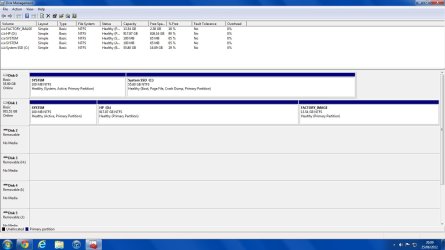
Suggest that you post a full expanded picture of your Disk Management so that we can have a look. And also tell us how you installed Win7 on the SSD.

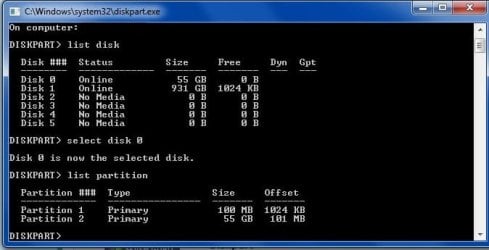
To check the alignment, run these commands in Command Prompt:

Diskpart
List disk
Select disk n
List partition

Now you should see a result like this.

Partition ### Type Size Offset
------------- ---------------- ------- -------
Partition 1 Primary 59 GB 1024 KB - but 64KB or any number divisible by 4 is also good

The offset (in KBs) has to be divisible by 4.

There is nothing wrong running the SSD in IDE mode. But then this registry key should be set to 3 and not 0: HKEY_LOCAL_MACHINE\SYSTEM\CurrentControlSet\services - proceed to MSAHCI > Start
 

My Computer

Computer Manufacturer/Model Number
HP, Dell, Gateway, Toshiba - 4 laptops and 2 desktops
OS
Vista, Windows7, Mint Mate, Zorin, Windows 8
CPU
from 1.6GHz Duo to i7
Monitor(s) Displays
2x HP w2207
Hard Drives
5x HDD, 7x SSD, 12x Externals
Keyboard
with trackball - no mices
Mouse
Trackball mice
Internet Speed
DSL 6000
I installed Windows 7 onto the SSD by using Macrium Reflect and cloned my HDD to the SSD.


The reason for the 100MB partition at the beginning is because originally I just cloned the 2nd partition (the biggest one) and the computer wouldn't boot.

I have also gone back into the registry and changed MSAHCI back to 3 because I originally changed it to 0 thinking my motherboard would have support for it.
 

Attachments

  • diskpart.jpg
    diskpart.jpg
    31.6 KB · Views: 15
  • diskmgmt.jpg
    diskmgmt.jpg
    98.9 KB · Views: 16

My Computer

OS
Windows 7 Home Premium 64Bit
The pics are not visible. Use the paper clip to attach them. From what you say I already have the suspicion that there is a problem.
 

My Computer

Computer Manufacturer/Model Number
HP, Dell, Gateway, Toshiba - 4 laptops and 2 desktops
OS
Vista, Windows7, Mint Mate, Zorin, Windows 8
CPU
from 1.6GHz Duo to i7
Monitor(s) Displays
2x HP w2207
Hard Drives
5x HDD, 7x SSD, 12x Externals
Keyboard
with trackball - no mices
Mouse
Trackball mice
Internet Speed
DSL 6000
Done.
 

My Computer

OS
Windows 7 Home Premium 64Bit

My Computer

Computer Manufacturer/Model Number
HP, Dell, Gateway, Toshiba - 4 laptops and 2 desktops
OS
Vista, Windows7, Mint Mate, Zorin, Windows 8
CPU
from 1.6GHz Duo to i7
Monitor(s) Displays
2x HP w2207
Hard Drives
5x HDD, 7x SSD, 12x Externals
Keyboard
with trackball - no mices
Mouse
Trackball mice
Internet Speed
DSL 6000
Hit me, knock me down I might be wrong. You have two active drives. Disk 0 and disk 1. I don't think that is correct.
 

My Computer

Computer type
PC/Desktop
Computer Manufacturer/Model Number
Home made Desktop
OS
Windows 10 Pro. 64/ version 1709 Windows 7 Pro/64
CPU
Intel i7-6800K @ 4.3
Motherboard
ASUS X-99 Deluxe II
Memory
Corsair Platinum 16 gig @2400
Graphics Card(s)
EVGA GTX 1070 OC
Monitor(s) Displays
Asus 27" LED LCD/VE278Q
Screen Resolution
1920-1080 or 1280-720 HDMI
Hard Drives
INTEL SSD 730-240 Gb Sata 3.0/
PSU
EVGA Platium 1200W
Case
Phanteks Luxe Tempered Glass 8 fans/ one radiator
Cooling
XSPC/ Water Cooled CPU
Keyboard
Das 4 Professional
Mouse
Logitech M705/MX Anywhere 2-S
Internet Speed
100 mbits
Antivirus
Microsoft Security Essentials/ Malwarebytes Premium 3.0/ SAS
Browser
I.E. 11 default/Firefox/ ISP Time Warner Cable/Spectrum
Other Info
LG BluRay Burner/
Sound system-KLipsch-THX/
Icy Dock ssd Hot Swap bays.
Hit me, knock me down I might be wrong. You have two active drives. Disk 0 and disk 1. I don't think that is correct.
There is nothing wrong with that. You can have 1 active partition on each and every disk drive.
 

My Computer

Computer Manufacturer/Model Number
HP, Dell, Gateway, Toshiba - 4 laptops and 2 desktops
OS
Vista, Windows7, Mint Mate, Zorin, Windows 8
CPU
from 1.6GHz Duo to i7
Monitor(s) Displays
2x HP w2207
Hard Drives
5x HDD, 7x SSD, 12x Externals
Keyboard
with trackball - no mices
Mouse
Trackball mice
Internet Speed
DSL 6000
Thanks for the info.
 

My Computer

Computer type
PC/Desktop
Computer Manufacturer/Model Number
Home made Desktop
OS
Windows 10 Pro. 64/ version 1709 Windows 7 Pro/64
CPU
Intel i7-6800K @ 4.3
Motherboard
ASUS X-99 Deluxe II
Memory
Corsair Platinum 16 gig @2400
Graphics Card(s)
EVGA GTX 1070 OC
Monitor(s) Displays
Asus 27" LED LCD/VE278Q
Screen Resolution
1920-1080 or 1280-720 HDMI
Hard Drives
INTEL SSD 730-240 Gb Sata 3.0/
PSU
EVGA Platium 1200W
Case
Phanteks Luxe Tempered Glass 8 fans/ one radiator
Cooling
XSPC/ Water Cooled CPU
Keyboard
Das 4 Professional
Mouse
Logitech M705/MX Anywhere 2-S
Internet Speed
100 mbits
Antivirus
Microsoft Security Essentials/ Malwarebytes Premium 3.0/ SAS
Browser
I.E. 11 default/Firefox/ ISP Time Warner Cable/Spectrum
Other Info
LG BluRay Burner/
Sound system-KLipsch-THX/
Icy Dock ssd Hot Swap bays.
I followed the first two steps but went no further. I haven't had any issue since moving the MBR and changing the MSAHCI mode back to 3 so that may have fixed the problem, if my previous issues do re-occur then I will continue to follow the last 3 steps you suggested.

Cheers
 

My Computer

OS
Windows 7 Home Premium 64Bit
Back
Top