various BSOD problems (winjdows 7 32-bit)

michellewjy

New member
Member
Local time
9:46 AM
Messages
79
I've been experiencing the BSOD problem since July after i sent my computer to be reformated due to BSOD problems as well. I don't know how do I describe this but the BSOD problem (0x000004e)occurs every 2 weeks and i realized it happens when i'm watching videos. Then I thought maybe the programme would be the cause, so i uninstall media player classic and installed media playyer classic homecinema. Last Saturday, I was downloading some videos and watching them as well, then BSOD strikes twice, within one hour. Since then, BSOD has been occurring everyday with different codes now. Previously the previous BSOD code was 0x0000004e. I've always send my laptop to ask the guy to check what's the cause of BSOD, but everytime they say they can't detect any problem at all. But when i switched on my laptop at home, BSOD never fails to happen. Can you please help me? I'm currently doing the memtest86, but previously I've done that as well and BSOD stopped for around 1 month and comes back. I was thinking of the cause of BSOD because recently the display driver kept on stopped working and recovered.
Please help me, in desperately help.
 

My Computer

OS
windows 7

My Computer

Computer type
PC/Desktop
Computer Manufacturer/Model Number
Custom Build
OS
Windows 10 Pro x64, Arch Linux
CPU
Intel Core 2 Quad Q8200 OC'd 3.08GHz
Motherboard
Asus Rampage formula LGA775
Memory
8GB DDR2 900Mhz
Graphics Card(s)
MSI GT730 2GB GDDR5 (Kepler)
Sound Card
Supreme FX2
Monitor(s) Displays
Samsung LS22F350 LED
Screen Resolution
1080P
Hard Drives
Kingston SSDNow UV400 120GB, 500GB Hitachi, 2TB Samsung, 500GB Seagate FreeAgent, 640GB Samsung, 160GB Toshiba (Arch)
PSU
AeroCool 500W Bronze
Cooling
Cooler Master V6 + 3X fans
Keyboard
Prolink keyboard
Mouse
Logitech M705
Internet Speed
1MiB/s
Browser
Chrome Beta
Install these JMicron Card Reader drivers: ftp://driver.jmicron.com.tw/jmc2xx/CardReader/Cardreader/JMB38X_WinDrv_R1.00.48_WHQL.zip

Install these Lenovo energy management drivers: Lenovo Support - Drivers & Downloads

msinfo32 reports a problem with your Bluetooth drivers; please install these ones from Lenovo: http://consumersupport.lenovo.com/ot/en/driversdownloads/Drivers_Show_1961.html

Install these Conextant modem drivers from Lenovo: Lenovo Support - Drivers & Downloads

Install these graphics drivers: NVIDIA DRIVERS 258.96 WHQL

Finally, install these Broadcom network adapter drivers: Broadcom.com - Ethernet NIC NetLink Driver Downloads

Hopefully, those driver updates will cure whatever it is that was causing the problem.

...Summary of the Dumps:
Code:
[font=lucida console]
Built by: 7600.16385.x86fre.win7_rtm.090713-1255
Debug session time: Wed Sep 22 01:59:31.105 2010 (UTC - 4:00)
System Uptime: 0 days 0:11:30.025
BUGCHECK_STR:  0x4E_99
PROCESS_NAME:  firefox.exe
¨¨¨¨¨¨¨¨¨¨¨¨¨¨¨¨¨¨¨¨¨¨¨¨¨¨¨¨¨¨¨¨¨¨¨¨¨¨¨¨¨¨¨¨¨¨¨¨¨¨¨¨¨¨¨¨¨¨¨¨¨¨¨¨¨¨¨¨¨¨¨¨¨¨¨¨¨¨¨¨¨¨¨¨¨¨
Built by: 7600.16385.x86fre.win7_rtm.090713-1255
Debug session time: Mon Sep 13 05:21:01.490 2010 (UTC - 4:00)
System Uptime: 0 days 4:00:05.535
BUGCHECK_STR:  0x4E_99
PROCESS_NAME:  explorer.exe
¨¨¨¨¨¨¨¨¨¨¨¨¨¨¨¨¨¨¨¨¨¨¨¨¨¨¨¨¨¨¨¨¨¨¨¨¨¨¨¨¨¨¨¨¨¨¨¨¨¨¨¨¨¨¨¨¨¨¨¨¨¨¨¨¨¨¨¨¨¨¨¨¨¨¨¨¨¨¨¨¨¨¨¨¨¨
Built by: 7600.16385.x86fre.win7_rtm.090713-1255
Debug session time: Sat Sep 11 10:06:08.144 2010 (UTC - 4:00)
System Uptime: 0 days 0:12:25.188
BUGCHECK_STR:  0x4E_99
PROCESS_NAME:  Thunder.exe
¨¨¨¨¨¨¨¨¨¨¨¨¨¨¨¨¨¨¨¨¨¨¨¨¨¨¨¨¨¨¨¨¨¨¨¨¨¨¨¨¨¨¨¨¨¨¨¨¨¨¨¨¨¨¨¨¨¨¨¨¨¨¨¨¨¨¨¨¨¨¨¨¨¨¨¨¨¨¨¨¨¨¨¨¨¨
Built by: 7600.16385.x86fre.win7_rtm.090713-1255
Debug session time: Sat Sep  4 09:34:27.708 2010 (UTC - 4:00)
System Uptime: 0 days 0:53:04.752
BUGCHECK_STR:  0x4E_99
PROCESS_NAME:  PPStream.exe
¨¨¨¨¨¨¨¨¨¨¨¨¨¨¨¨¨¨¨¨¨¨¨¨¨¨¨¨¨¨¨¨¨¨¨¨¨¨¨¨¨¨¨¨¨¨¨¨¨¨¨¨¨¨¨¨¨¨¨¨¨¨¨¨¨¨¨¨¨¨¨¨¨¨¨¨¨¨¨¨¨¨¨¨¨¨
Built by: 7600.16385.x86fre.win7_rtm.090713-1255
Debug session time: Mon Aug 16 02:29:07.862 2010 (UTC - 4:00)
System Uptime: 0 days 0:19:17.907
BUGCHECK_STR:  0x4E_99
PROCESS_NAME:  plugin-contain
¨¨¨¨¨¨¨¨¨¨¨¨¨¨¨¨¨¨¨¨¨¨¨¨¨¨¨¨¨¨¨¨¨¨¨¨¨¨¨¨¨¨¨¨¨¨¨¨¨¨¨¨¨¨¨¨¨¨¨¨¨¨¨¨¨¨¨¨¨¨¨¨¨¨¨¨¨¨¨¨¨¨¨¨¨¨
Built by: 7600.16385.x86fre.win7_rtm.090713-1255
Debug session time: Mon Oct  4 21:19:19.967 2010 (UTC - 4:00)
System Uptime: 0 days 1:33:15.012
PROCESS_NAME:  System
BUGCHECK_STR:  0x24
¨¨¨¨¨¨¨¨¨¨¨¨¨¨¨¨¨¨¨¨¨¨¨¨¨¨¨¨¨¨¨¨¨¨¨¨¨¨¨¨¨¨¨¨¨¨¨¨¨¨¨¨¨¨¨¨¨¨¨¨¨¨¨¨¨¨¨¨¨¨¨¨¨¨¨¨¨¨¨¨¨¨¨¨¨¨
Built by: 7600.16385.x86fre.win7_rtm.090713-1255
Debug session time: Mon Oct  4 03:02:08.256 2010 (UTC - 4:00)
System Uptime: 0 days 0:44:45.300
BUGCHECK_STR:  0x4E_99
PROCESS_NAME:  firefox.exe
¨¨¨¨¨¨¨¨¨¨¨¨¨¨¨¨¨¨¨¨¨¨¨¨¨¨¨¨¨¨¨¨¨¨¨¨¨¨¨¨¨¨¨¨¨¨¨¨¨¨¨¨¨¨¨¨¨¨¨¨¨¨¨¨¨¨¨¨¨¨¨¨¨¨¨¨¨¨¨¨¨¨¨¨¨¨
Built by: 7600.16385.x86fre.win7_rtm.090713-1255
Debug session time: Sun Oct  3 00:20:08.296 2010 (UTC - 4:00)
System Uptime: 0 days 0:14:11.341
BUGCHECK_STR:  0x4E_99
PROCESS_NAME:  firefox.exe
¨¨¨¨¨¨¨¨¨¨¨¨¨¨¨¨¨¨¨¨¨¨¨¨¨¨¨¨¨¨¨¨¨¨¨¨¨¨¨¨¨¨¨¨¨¨¨¨¨¨¨¨¨¨¨¨¨¨¨¨¨¨¨¨¨¨¨¨¨¨¨¨¨¨¨¨¨¨¨¨¨¨¨¨¨¨
Built by: 7600.16385.x86fre.win7_rtm.090713-1255
Debug session time: Sat Oct  2 07:40:23.873 2010 (UTC - 4:00)
System Uptime: 0 days 0:29:55.918
*** WARNING: Unable to verify timestamp for ATMFD.DLL
*** ERROR: Module load completed but symbols could not be loaded for ATMFD.DLL
*** WARNING: Unable to verify timestamp for mcupdate.dll
*** ERROR: Module load completed but symbols could not be loaded for mcupdate.dll
*** WARNING: Unable to verify timestamp for spsys.sys
*** ERROR: Module load completed but symbols could not be loaded for spsys.sys
*** WARNING: Unable to verify timestamp for amdxata.sys
*** ERROR: Module load completed but symbols could not be loaded for amdxata.sys
*** WARNING: Unable to verify timestamp for spldr.sys
*** ERROR: Module load completed but symbols could not be loaded for spldr.sys
*** WARNING: Unable to verify timestamp for jmcr.sys
*** ERROR: Module load completed but symbols could not be loaded for jmcr.sys
*** WARNING: Unable to verify timestamp for MpFilter.sys
*** ERROR: Module load completed but symbols could not be loaded for MpFilter.sys
*** WARNING: Unable to verify timestamp for bcmwl6.sys
*** ERROR: Module load completed but symbols could not be loaded for bcmwl6.sys
*** WARNING: Unable to verify timestamp for b57nd60x.sys
*** ERROR: Module load completed but symbols could not be loaded for b57nd60x.sys
*** WARNING: Unable to verify timestamp for AcpiVpc.sys
*** ERROR: Module load completed but symbols could not be loaded for AcpiVpc.sys
*** WARNING: Unable to verify timestamp for GEARAspiWDM.sys
*** ERROR: Module load completed but symbols could not be loaded for GEARAspiWDM.sys
*** WARNING: Unable to verify timestamp for nvlddmkm.sys
*** ERROR: Module load completed but symbols could not be loaded for nvlddmkm.sys
*** WARNING: Unable to verify timestamp for nvBridge.kmd
*** ERROR: Module load completed but symbols could not be loaded for nvBridge.kmd
*** WARNING: Unable to verify timestamp for CHDRT32.sys
*** ERROR: Module load completed but symbols could not be loaded for CHDRT32.sys
*** WARNING: Unable to verify timestamp for drmk.sys
*** ERROR: Module load completed but symbols could not be loaded for drmk.sys
*** WARNING: Unable to verify timestamp for VSTAZL3.SYS
*** ERROR: Module load completed but symbols could not be loaded for VSTAZL3.SYS
*** WARNING: Unable to verify timestamp for VSTDPV3.SYS
*** ERROR: Module load completed but symbols could not be loaded for VSTDPV3.SYS
*** WARNING: Unable to verify timestamp for VSTCNXT3.SYS
*** ERROR: Module load completed but symbols could not be loaded for VSTCNXT3.SYS
*** WARNING: Unable to verify timestamp for BisonC07.sys
*** ERROR: Module load completed but symbols could not be loaded for BisonC07.sys
*** WARNING: Unable to verify timestamp for dump_pciidex.sys
*** ERROR: Module load completed but symbols could not be loaded for dump_pciidex.sys
*** WARNING: Unable to verify timestamp for peauth.sys
*** ERROR: Module load completed but symbols could not be loaded for peauth.sys
*** WARNING: Unable to verify timestamp for secdrv.SYS
*** ERROR: Module load completed but symbols could not be loaded for secdrv.SYS
*** ERROR: Module load completed but symbols could not be loaded for ipnat.sys
*** WARNING: Unable to verify timestamp for MpNWMon.sys
*** ERROR: Module load completed but symbols could not be loaded for MpNWMon.sys
BUGCHECK_STR:  0xc2_7
PROCESS_NAME:  explorer.exe
¨¨¨¨¨¨¨¨¨¨¨¨¨¨¨¨¨¨¨¨¨¨¨¨¨¨¨¨¨¨¨¨¨¨¨¨¨¨¨¨¨¨¨¨¨¨¨¨¨¨¨¨¨¨¨¨¨¨¨¨¨¨¨¨¨¨¨¨¨¨¨¨¨¨¨¨¨¨¨¨¨¨¨¨¨¨
Built by: 7600.16385.x86fre.win7_rtm.090713-1255
Debug session time: Sat Oct  2 07:09:52.272 2010 (UTC - 4:00)
System Uptime: 0 days 9:57:05.317
PROCESS_NAME:  Photoshop.exe
BUGCHECK_STR:  0x24
¨¨¨¨¨¨¨¨¨¨¨¨¨¨¨¨¨¨¨¨¨¨¨¨¨¨¨¨¨¨¨¨¨¨¨¨¨¨¨¨¨¨¨¨¨¨¨¨¨¨¨¨¨¨¨¨¨¨¨¨¨¨¨¨¨¨¨¨¨¨¨¨¨¨¨¨¨¨¨¨¨¨¨¨¨¨
[/font]
 

My Computer

Computer Manufacturer/Model Number
Custom
OS
Windows 7 Professional x64
CPU
Intel i7 2600K OC'd @ 4620 MHz
Motherboard
Asus P8Z68-V Pro
Memory
16GB GSkill Sniper 2133 Mhz (4x4GB)
Graphics Card(s)
EVGA GeForce GTX 480 SuperClocked+
Sound Card
Realtek High Definition Audio
Monitor(s) Displays
2x Acer S273HLbmii 27"
Screen Resolution
2 x 1920x1080
Hard Drives
64GB Crucial M4 SSD

Storage: Hitachi 1TB 5400RPM, Samsung 1.5TB 5400RPM
PSU
Corsair HW Series 750w (modular)
Case
Cooler Master HAF 932 Advanced Blue Edition
Cooling
CM Hyper 212+ CPU cooler, 3x 230mm + 1x 140mm case fans
Keyboard
Logitech MK320 (wireless)
Mouse
Logitech MK320 (wireless)
Internet Speed
30 Mb/s : 2 Mb/s
before i download all the above, my laptop experienced BSOD again and this time the code is different. It's something like 0x0000001a.

*edit : I realized that my computer is experiencing BSOD ever since Saturday, once a day with different codes sometimes. Tomorrow I'll give you an update whether my laptop is experiencing BSOD again. Thanks for all the help!
 
Last edited:

My Computer

OS
windows 7
Sounds good. Let us know!
 

My Computer

Computer Manufacturer/Model Number
Custom
OS
Windows 7 Professional x64
CPU
Intel i7 2600K OC'd @ 4620 MHz
Motherboard
Asus P8Z68-V Pro
Memory
16GB GSkill Sniper 2133 Mhz (4x4GB)
Graphics Card(s)
EVGA GeForce GTX 480 SuperClocked+
Sound Card
Realtek High Definition Audio
Monitor(s) Displays
2x Acer S273HLbmii 27"
Screen Resolution
2 x 1920x1080
Hard Drives
64GB Crucial M4 SSD

Storage: Hitachi 1TB 5400RPM, Samsung 1.5TB 5400RPM
PSU
Corsair HW Series 750w (modular)
Case
Cooler Master HAF 932 Advanced Blue Edition
Cooling
CM Hyper 212+ CPU cooler, 3x 230mm + 1x 140mm case fans
Keyboard
Logitech MK320 (wireless)
Mouse
Logitech MK320 (wireless)
Internet Speed
30 Mb/s : 2 Mb/s
Seriously thanks for the advise you gave me. Until now, there's no BSOD problem thank god, but i realized something. Something's kinna weird with my windows. Sometimes the error "Windows Explorer has stopped working" and sometimes the toolbar of some programmes will suddenly start blinking all the sudden.
 

My Computer

OS
windows 7

My Computer

Computer Manufacturer/Model Number
Custom
OS
Windows 7 Professional x64
CPU
Intel i7 2600K OC'd @ 4620 MHz
Motherboard
Asus P8Z68-V Pro
Memory
16GB GSkill Sniper 2133 Mhz (4x4GB)
Graphics Card(s)
EVGA GeForce GTX 480 SuperClocked+
Sound Card
Realtek High Definition Audio
Monitor(s) Displays
2x Acer S273HLbmii 27"
Screen Resolution
2 x 1920x1080
Hard Drives
64GB Crucial M4 SSD

Storage: Hitachi 1TB 5400RPM, Samsung 1.5TB 5400RPM
PSU
Corsair HW Series 750w (modular)
Case
Cooler Master HAF 932 Advanced Blue Edition
Cooling
CM Hyper 212+ CPU cooler, 3x 230mm + 1x 140mm case fans
Keyboard
Logitech MK320 (wireless)
Mouse
Logitech MK320 (wireless)
Internet Speed
30 Mb/s : 2 Mb/s
Does it delete all my files and folder in windows?
 

My Computer

OS
windows 7
No, programs, files, and folders are untouched.
 

My Computer

Computer Manufacturer/Model Number
Custom
OS
Windows 7 Professional x64
CPU
Intel i7 2600K OC'd @ 4620 MHz
Motherboard
Asus P8Z68-V Pro
Memory
16GB GSkill Sniper 2133 Mhz (4x4GB)
Graphics Card(s)
EVGA GeForce GTX 480 SuperClocked+
Sound Card
Realtek High Definition Audio
Monitor(s) Displays
2x Acer S273HLbmii 27"
Screen Resolution
2 x 1920x1080
Hard Drives
64GB Crucial M4 SSD

Storage: Hitachi 1TB 5400RPM, Samsung 1.5TB 5400RPM
PSU
Corsair HW Series 750w (modular)
Case
Cooler Master HAF 932 Advanced Blue Edition
Cooling
CM Hyper 212+ CPU cooler, 3x 230mm + 1x 140mm case fans
Keyboard
Logitech MK320 (wireless)
Mouse
Logitech MK320 (wireless)
Internet Speed
30 Mb/s : 2 Mb/s
I did that repair install two days ago but today when i was watching some video, suddenly it hangs and when i tried to reduce volume, it hangs as well. Is it like another symptom of BSOD? Help?
 

My Computer

OS
windows 7
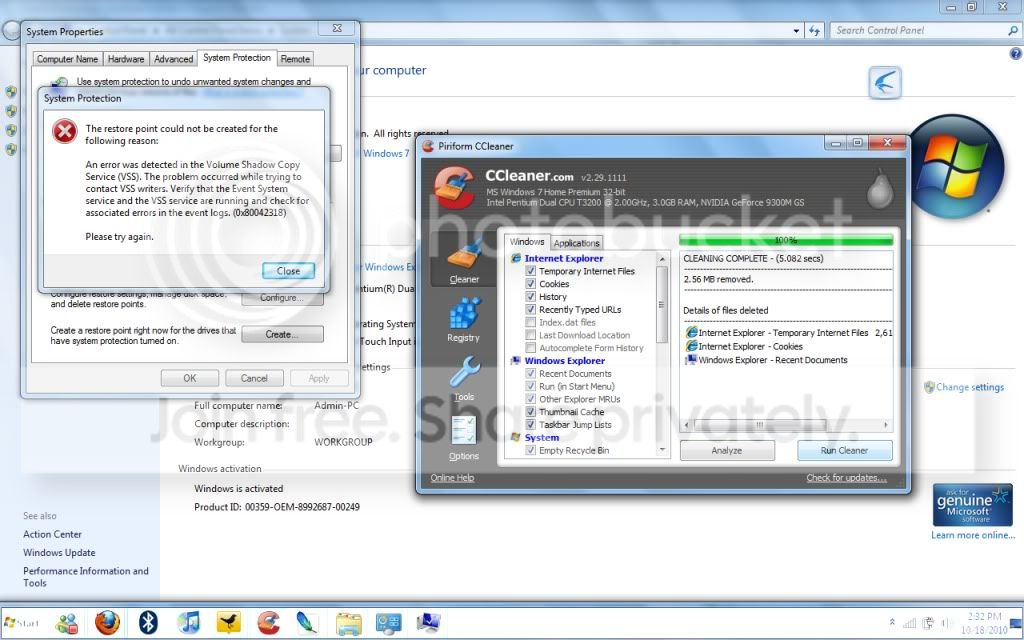
Today I've been experiencing weird problems. I will put some print screen pictures to show you. Please please please help me.

problem2.jpg

problem1.jpg
 

My Computer

OS
windows 7

My Computer

Computer Manufacturer/Model Number
Custom
OS
Windows 7 Professional x64
CPU
Intel i7 2600K OC'd @ 4620 MHz
Motherboard
Asus P8Z68-V Pro
Memory
16GB GSkill Sniper 2133 Mhz (4x4GB)
Graphics Card(s)
EVGA GeForce GTX 480 SuperClocked+
Sound Card
Realtek High Definition Audio
Monitor(s) Displays
2x Acer S273HLbmii 27"
Screen Resolution
2 x 1920x1080
Hard Drives
64GB Crucial M4 SSD

Storage: Hitachi 1TB 5400RPM, Samsung 1.5TB 5400RPM
PSU
Corsair HW Series 750w (modular)
Case
Cooler Master HAF 932 Advanced Blue Edition
Cooling
CM Hyper 212+ CPU cooler, 3x 230mm + 1x 140mm case fans
Keyboard
Logitech MK320 (wireless)
Mouse
Logitech MK320 (wireless)
Internet Speed
30 Mb/s : 2 Mb/s
I sent my computer to a computer shop and ask them to reformat it, so i guess i got windows 7 from the shop. Did the System File Checker and they did not find any violations. Everything's fine. It's the first time i've seen that problem and after that, my space in C Drive in decreasing rapidly. Please help. Thanks
 

My Computer

OS
windows 7
Hmm... Do you have a Windows 7 install disk?? It is very unlikely that a repair shop would take it upon themselves to install Windows 7 after doing a simple format?? Please fill out your system specs...
 

My Computer

Computer type
PC/Desktop
Computer Manufacturer/Model Number
LENOVO K450 @3.0GHZ
OS
64-bit Windows 8.1 Pro
CPU
Core(TM) i5 CPU 4330 Haswell @ 3.20GHz
Motherboard
LENOVO
Memory
12.00 GB
Graphics Card(s)
Intel(R) HD Graphics
Sound Card
Intel HD integtrated
Monitor(s) Displays
HP 25' ISP Monitor
Screen Resolution
1900/1020
Hard Drives
(1) ST1000DM003-1CH162 (2) Generic STORAGE DEVICE USB Device (3) Generic STORAGE DEVICE USB Device
Internet Speed
100mb down/10mb up

My Computer

Computer Manufacturer/Model Number
Custom
OS
Windows 7 Professional x64
CPU
Intel i7 2600K OC'd @ 4620 MHz
Motherboard
Asus P8Z68-V Pro
Memory
16GB GSkill Sniper 2133 Mhz (4x4GB)
Graphics Card(s)
EVGA GeForce GTX 480 SuperClocked+
Sound Card
Realtek High Definition Audio
Monitor(s) Displays
2x Acer S273HLbmii 27"
Screen Resolution
2 x 1920x1080
Hard Drives
64GB Crucial M4 SSD

Storage: Hitachi 1TB 5400RPM, Samsung 1.5TB 5400RPM
PSU
Corsair HW Series 750w (modular)
Case
Cooler Master HAF 932 Advanced Blue Edition
Cooling
CM Hyper 212+ CPU cooler, 3x 230mm + 1x 140mm case fans
Keyboard
Logitech MK320 (wireless)
Mouse
Logitech MK320 (wireless)
Internet Speed
30 Mb/s : 2 Mb/s
OK, i've validated my OS but somehow my C drive space is still decreasing. Is it a virus or trojan? Please Help and Thanks.
 

My Computer

OS
windows 7
OK, i've validated my OS but somehow my C drive space is still decreasing. Is it a virus or trojan? Please Help and Thanks.

system specs..... Please
 

My Computer

Computer Manufacturer/Model Number
HP Pavillion dv-7 1005 Tx
OS
Win 8 Release candidate 8400
CPU
[email protected]
Memory
4 gigs
Graphics Card(s)
Nvidia 9600M
Sound Card
HD built-in
Monitor(s) Displays
17" Wxga
Screen Resolution
1440x900
Cooling
none
Internet Speed
45Mb down 5Mb up
Ken- System Specs are included in the msinfo32 file in this post: http://www.sevenforums.com/crashes-...od-problems-winjdows-7-32-bit.html#post995024

Anything in particular you want to see?

A lot of things can cause that. I honestly haven't seen a virus eat up hard drive space, but I acknowledge it is not out of the realm of malware to cause that.


Hard drive space is often "eaten" by Volume Shadow Servicing; known in practical terms as System Restore. To check that, open an elevated command prompt and enter Vssadmin List ShadowStorage

http://www.sevenforums.com/tutorials/783-elevated-command-prompt.html

Also, go to Control Panel>System>System Protection, select your C drive, and hit Configure. Give System Restore the amount of space you want, but don't disable it completely. When that random error comes along, you'll kick yourself when you want to do a system restore!
 

My Computer

Computer Manufacturer/Model Number
Custom
OS
Windows 7 Professional x64
CPU
Intel i7 2600K OC'd @ 4620 MHz
Motherboard
Asus P8Z68-V Pro
Memory
16GB GSkill Sniper 2133 Mhz (4x4GB)
Graphics Card(s)
EVGA GeForce GTX 480 SuperClocked+
Sound Card
Realtek High Definition Audio
Monitor(s) Displays
2x Acer S273HLbmii 27"
Screen Resolution
2 x 1920x1080
Hard Drives
64GB Crucial M4 SSD

Storage: Hitachi 1TB 5400RPM, Samsung 1.5TB 5400RPM
PSU
Corsair HW Series 750w (modular)
Case
Cooler Master HAF 932 Advanced Blue Edition
Cooling
CM Hyper 212+ CPU cooler, 3x 230mm + 1x 140mm case fans
Keyboard
Logitech MK320 (wireless)
Mouse
Logitech MK320 (wireless)
Internet Speed
30 Mb/s : 2 Mb/s
Okay thanks for the advice.

Just asking is there anyway to check the virus/trojan causing it IF there's a virus? Currently using Windows Essentials.
 

My Computer

OS
windows 7
Back
Top