Hi silentmat.
Apparently it is a display driver related issue.
Code:
BugCheck D1, {590, 5, 0, fffff880111c5933}

*** WARNING: Unable to verify timestamp for nvlddmkm.sys
*** ERROR: Module load completed but symbols could not be loaded for nvlddmkm.sys
[COLOR=Red]Probably caused by : nvlddmkm.sys[/COLOR] ( nvlddmkm+19b933 )

Followup: MachineOwner
---------
And unfortunately I dont know any driver version that works good with GTX 770. You may try the drivers on a trial and error basis:
- 320.49 WHQL
- 327.23 WHQL
- 331.58 WHWL
- 331.65 WHQL
- 331.82 WHQL
- 332.21 WHQL
- Any other later version .....
Get them from
Drivers - Download NVIDIA Drivers
Do a clean install on all of them. Uninstall the previously installed driver first.
Uninstall All nvidia items in Control Panel > Programs and features
- 3D Vision Control Driver
- 3D Vision Driver
- Graphics Driver
- HD Audio Driver
- PhysX
- nvidia Update
- GeForce Experience
(Are you using nvidia chipset drivers? If so, dont uninstall anything other than those are listed).- Now follow Drivers - Clean Left over Files after Uninstalling
- Download the target WHQL. While installing, Select Custom (Advanced) install. In the next page, follow this settings:
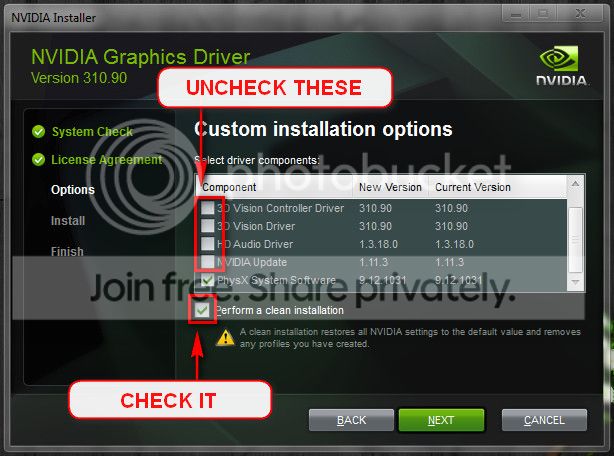
Lengthy process, but the only stable version of nvidia is 314.22 lately, which does not support 700 series GPU.
This will be a time consuming process, but you should hope that one of the drivers will work good there.
Also update Killer e2200 PCI-E Gigabit Ethernet Controller (NDIS 6.20).
Code:
BugCheck D1, {fffff8000348d410, 2, 0, fffff8800165a682}

*** WARNING: Unable to verify timestamp for bflwfx64.sys
*** ERROR: Module load completed but symbols could not be loaded for bflwfx64.sys
[COLOR=Red]Probably caused by : bflwfx64.sys[/COLOR] ( bflwfx64+123f )

Followup: MachineOwner
---------
Get it from
Driver Downloads | Qualcomm Atheros, Inc..
Some hardware issues are reported, too.
Code:
BugCheck D1, {2540be400, 2, 1, fffff880016714aa}
[COLOR=Red]
Probably caused by : hardware[/COLOR] ( tcpip!TcpAdjustDefaultTcbRcvWnd+7a )

Followup: MachineOwner
---------
Are you overclocking? As you are getting BSODs, you should stop overclocking and run all the hardware components like CPU, GPU and RAM to their default settings.
Is the computer hot? Report us the heat of the computer after a couple of hours of your normal usage. Upload a screenshot of the summery tab of
Speccy. Alternatively, you can publish a Speccy snapshot too:
http://www.sevenforums.com/tutorials/311593-speccy-publish-snapshot-your-system-specs.html .
Test your RAM modules for possible errors.
How to Test and Diagnose RAM Issues with Memtest86+
Run memtest for at least 8 passes, preferably overnight.
If it start showing errors/red lines, stop testing. A single error is enough to determine that something is going bad there.
Stress test the Graphics Card using Furmark.
Video Card - Stress Test with Furmark
Stress test the CPU.
Hardware - Stress Test With Prime95
Let us know the results.
http://pcsupport.about.com/od/fixtheproblem/tp/clearcmos.htm


