Various BSODs mostly while playing games

khooler

New member
Local time
9:36 AM
Messages
8
Hi, i built my pc a while ago (about 6-7 months ago). Since then i've experienced many BSODs and tried to solve them, but failed. These BSODs mostly happened while i was playing games (I.E. = Borderlands 2, Battlefield 4, Battlefield Hardline). Some of them were probably caused by overheating, which was caused by me being stupid: i didn't mount the cpu cooler fan correctly -- now it's fixed. I still don't know what to do and what the problem is, and only now i realized there's this big community here which can help me. I really hope you'll be able to help me.

Thanks,
Francesco
 

My Computer

Computer type
PC/Desktop
OS
Windows 7 Ultimate x64
CPU
AMD FX-8320 8-Core Vishera 3.5GHz
Motherboard
Gigabyte GA-990XA-UD3
Memory
Kingston HyperX Red 8GB (2x4GB)
Graphics Card(s)
Sapphire ATI Radeon R9 270X 2GB
Hard Drives
Seagate 1TB 3.5" 7200rpm
Antivirus
Microsoft Security Essentials
Browser
Google Chrome
Khooler You had quite a few dump files. I checked the last 3-4 month's of them. 4 referenced your graphics driver and were all the same.

Code:
lmvm atikmdag
start             end                 module name
fffff880`11019000 fffff880`11f29000   atikmdag T (no symbols)           
    Loaded symbol image file: atikmdag.sys
    Image path: \SystemRoot\system32\DRIVERS\atikmdag.sys
    Image name:[COLOR=red] atikmdag.sys[/COLOR]
    Timestamp:        Tue Apr 15 21:13:17 2014 (534DE73D)
    CheckSum:         00EADC32
    ImageSize:        00F10000
    Translations:     0000.04b0 0000.04e4 0409.04b0 0409.04e4
I would recommend you install the latest WHQL driver or if yours is current, reinstall it from http://www.sevenforums.com/graphic-cards/329659-latest-amd-catalyst-video-driver-windows-7-a.html installing only the graphics driver if possible. Uninstall your old drivers after downloading your new drivers then follow this tutorial selecting ATI display Drivers only http://www.sevenforums.com/tutorials/83814-drivers-clean-left-over-files-after-uninstalling.html Then install the new drivers.

others
Code:
*******************************************************************************
*                                                                             *
*                        Bugcheck Analysis                                    *
*                                                                             *
*******************************************************************************
Use !analyze -v to get detailed debugging information.
BugCheck 50, {fffff680008d0080, 0, fffff8000366c55b, 2}
 
Could not read faulting driver name
Probably caused by : [COLOR=red]memory_corruption[/COLOR] ( nt!MiAgeWorkingSet+1d1 )
Followup: MachineOwner

Code:
*******************************************************************************
*                                                                             *
*                        Bugcheck Analysis                                    *
*                                                                             *
*******************************************************************************
PAGE_FAULT_IN_NONPAGED_AREA (50)
[COLOR=red]Invalid system memory was referenced[/COLOR].  This cannot be protected by try-except,
it must be protected by a Probe.  Typically the address is just plain bad or it
is pointing at freed memory.
Arguments:
Arg1: 00000000009d0a18,[COLOR=red] memory referenced[/COLOR].
Arg2: 0000000000000000, value 0 = read operation, 1 = write operation.
Arg3: 00000000682357c4, If non-zero, the instruction address which referenced the bad memory
 address.
Arg4: 0000000000000008, (reserved)

Code:
*******************************************************************************
*                                                                             *
*                        Bugcheck Analysis                                    *
*                                                                             *
*******************************************************************************
SYSTEM_SERVICE_EXCEPTION (3b)
An exception happened while executing a system service routine.
Arguments:
Arg1: 00000000c0000005, Exception code that caused the bugcheck
Arg2: fffff80003603147, Address of the instruction which caused the bugcheck
Arg3: fffff8800abb8620, Address of the context record for the exception that caused the bugcheck
Arg4: 0000000000000000, zero.
Debugging Details:
------------------
 
EXCEPTION_CODE: (NTSTATUS) 0xc0000005 - The instruction at 0x%08lx [COLOR=red]referenced memory[/COLOR] at 0x%08lx. The memory could not be %s.

Code:
PAGE_FAULT_IN_NONPAGED_AREA (50)
[COLOR=red]Invalid system memory was referenced[/COLOR].  This cannot be protected by try-except,
it must be protected by a Probe.  Typically the address is just plain bad or it
is pointing at freed memory.
Arguments:
Arg1: 00000000009d0a18, memory referenced.
Arg2: 0000000000000000, value 0 = read operation, 1 = write operation.
Arg3: 00000000682357c4, If non-zero, the instruction address which referenced the bad memory
 address.
Arg4: 0000000000000008, (reserved)

Please Run Memtest86+
picture.php

   Information
Please download from this site only http://www.memtest.org/ in the middle of the page are the Download links, you can download the ISO.zip or the Auto USB Flash Drive installer.zip

Extract the Zip file. If you chose the ISO image, burn it to a CD using Windows Disk Image Burner or any Image burner you mat have. If you downloaded the Auto USB installer, extract it, insert your USB 2.0 Flash Drive and take note of the drive letter. Run the installer, select the Flash Drive Letter, check the format box and press next. It will install memtest86+ to a flash drive. You can use either V4.20 or V5.01. Boot from your selected media. If you use V5.01 it will tell you to press certain buttons at the start, please press no buttons. The test will begin on it's own and continue to run until you stop it. It needs to run for 8 complete passes or until you receive an error. If you receive an error, stop the test. Even 1 error is a fail. Each pass tests a different part of the ram and each of the 10 tests in each pass tests something different. It takes a minimum of 8 passes to completely test the ram, more passes are better. It is quite a long test and will take several hours depending on how much ram you have. Due to the time length it is best to run overnight. If you have any questions, please do not hesitate to ask.​


Also Open a elevated command prompt ( click start, type cmd in the search box, right click on the cmd entry and select run as administrator) in the black box that opens, copy/paste sfc /scannow. If you decide to type it, notice the space between the sfc and the /. It is a system file checker which will scan your system files and attempt to correct any missing or corrupt files. What we want are the results to say windows found no integrity violations. If it says files were found but could not be repaired, close the box, reboot and run it again, after opening the administrative command prompt. You may have to reboot and run it three times for it to repair all system files. If it can't repair them after 3 reboots, let us know.​

Please let us know the outcome of these and please keep close watch on your GPU and CPU temps. It seems that is a must in your case.​
 

My Computers

System One System Two

  • Computer type
    PC/Desktop
    Computer Manufacturer/Model Number
    ALWAYS UNDER CONSTRUCTION
    OS
    Windows 11 Pro
    CPU
    Ryzen 9 5900X
    Motherboard
    Asus X570 Crosshair Viii Hero
    Memory
    32GB G Skill DDR4-3600
    Graphics Card(s)
    EVGA RTX 3080 FTW 3 Ultra
    Sound Card
    On Board/Sennheiser PC37X Headset
    Monitor(s) Displays
    3 X Asus 27"
    Screen Resolution
    2560x1440
    Hard Drives
    2 X 1 TB NVME drives
    PSU
    EVGA 850
    Case
    Phanteks Eclipse P400A
    Cooling
    EVGA 280 AIO
    Keyboard
    Logitech G510s/ Logitech G13
    Mouse
    Logitech G502
    Internet Speed
    24/1
    Antivirus
    ESET/MBAM Pro/SAS Pro
    Browser
    Chrome/ Firefox/ Edge
  • Computer type
    Laptop
    System Manufacturer/Model Number
    Dell 16 Plus
    OS
    Windows 11 Pro
    CPU
    Intel Ultra 9 288V
    Memory
    32 GB LPDDR5X 8533
    Monitor(s) Displays
    16" Mini-LED HDR600 Touch 90 Hz
    Screen Resolution
    2560X1600
    Hard Drives
    1 TB NVME
Ok, i've installed the new drivers following your procedure; since then i've been running Memtest86 v5.01 -- 11 hours 40 minutes since it started: 6 passes and no errors. I'll EDIT this post when it's done (unfortunately i have to wait a lot).
Then, i'll try to run that cmd command.
Thanks for your help.
 

My Computer

Computer type
PC/Desktop
OS
Windows 7 Ultimate x64
CPU
AMD FX-8320 8-Core Vishera 3.5GHz
Motherboard
Gigabyte GA-990XA-UD3
Memory
Kingston HyperX Red 8GB (2x4GB)
Graphics Card(s)
Sapphire ATI Radeon R9 270X 2GB
Hard Drives
Seagate 1TB 3.5" 7200rpm
Antivirus
Microsoft Security Essentials
Browser
Google Chrome
Khooler You had quite a few dump files. I checked the last 3-4 month's of them. 4 referenced your graphics driver and were all the same.
<stuff that i cut>

EDIT / NEWS:
I installed the drivers (all of the package except the game thinghy which i already had)
I tested the ram with memtest86 [8 passes took 20 hours] --> NO ERRORS were found, as i saw
I only need to try that command.

How can i be sure i fixed something?
 

My Computer

Computer type
PC/Desktop
OS
Windows 7 Ultimate x64
CPU
AMD FX-8320 8-Core Vishera 3.5GHz
Motherboard
Gigabyte GA-990XA-UD3
Memory
Kingston HyperX Red 8GB (2x4GB)
Graphics Card(s)
Sapphire ATI Radeon R9 270X 2GB
Hard Drives
Seagate 1TB 3.5" 7200rpm
Antivirus
Microsoft Security Essentials
Browser
Google Chrome
Time will tell is the only way to tell for sure. Didn't you follow the installing drivers link I gave you. All you need to install is the Display Driver and the PhysX Driver unless you use the other drivers, which few people do.

Run the sfc test which only takes a few minutes, see if you have problems with the protected system files. Then just use the computer as you always do.
 

My Computers

System One System Two

  • Computer type
    PC/Desktop
    Computer Manufacturer/Model Number
    ALWAYS UNDER CONSTRUCTION
    OS
    Windows 11 Pro
    CPU
    Ryzen 9 5900X
    Motherboard
    Asus X570 Crosshair Viii Hero
    Memory
    32GB G Skill DDR4-3600
    Graphics Card(s)
    EVGA RTX 3080 FTW 3 Ultra
    Sound Card
    On Board/Sennheiser PC37X Headset
    Monitor(s) Displays
    3 X Asus 27"
    Screen Resolution
    2560x1440
    Hard Drives
    2 X 1 TB NVME drives
    PSU
    EVGA 850
    Case
    Phanteks Eclipse P400A
    Cooling
    EVGA 280 AIO
    Keyboard
    Logitech G510s/ Logitech G13
    Mouse
    Logitech G502
    Internet Speed
    24/1
    Antivirus
    ESET/MBAM Pro/SAS Pro
    Browser
    Chrome/ Firefox/ Edge
  • Computer type
    Laptop
    System Manufacturer/Model Number
    Dell 16 Plus
    OS
    Windows 11 Pro
    CPU
    Intel Ultra 9 288V
    Memory
    32 GB LPDDR5X 8533
    Monitor(s) Displays
    16" Mini-LED HDR600 Touch 90 Hz
    Screen Resolution
    2560X1600
    Hard Drives
    1 TB NVME
cc4d4e29bb.PNG

This is what i have been installing for the second time. I think PhysX is an NVIDIA thing.

I will try the command in 5 minutes.
 

My Computer

Computer type
PC/Desktop
OS
Windows 7 Ultimate x64
CPU
AMD FX-8320 8-Core Vishera 3.5GHz
Motherboard
Gigabyte GA-990XA-UD3
Memory
Kingston HyperX Red 8GB (2x4GB)
Graphics Card(s)
Sapphire ATI Radeon R9 270X 2GB
Hard Drives
Seagate 1TB 3.5" 7200rpm
Antivirus
Microsoft Security Essentials
Browser
Google Chrome
Yea, I'm sorry, Too many threads I'm working on. You're right about PhysX. I would try just cleaning out the old drivers and installing the Display driver and nothing else. I don't believe in installing anything you don't use. CCC is a known hazard for some reason, you already have an HDMI driver in your board's drivers, so you don't need it and it will keep from conflicting with the HDMI driver you already have.
 

My Computers

System One System Two

  • Computer type
    PC/Desktop
    Computer Manufacturer/Model Number
    ALWAYS UNDER CONSTRUCTION
    OS
    Windows 11 Pro
    CPU
    Ryzen 9 5900X
    Motherboard
    Asus X570 Crosshair Viii Hero
    Memory
    32GB G Skill DDR4-3600
    Graphics Card(s)
    EVGA RTX 3080 FTW 3 Ultra
    Sound Card
    On Board/Sennheiser PC37X Headset
    Monitor(s) Displays
    3 X Asus 27"
    Screen Resolution
    2560x1440
    Hard Drives
    2 X 1 TB NVME drives
    PSU
    EVGA 850
    Case
    Phanteks Eclipse P400A
    Cooling
    EVGA 280 AIO
    Keyboard
    Logitech G510s/ Logitech G13
    Mouse
    Logitech G502
    Internet Speed
    24/1
    Antivirus
    ESET/MBAM Pro/SAS Pro
    Browser
    Chrome/ Firefox/ Edge
  • Computer type
    Laptop
    System Manufacturer/Model Number
    Dell 16 Plus
    OS
    Windows 11 Pro
    CPU
    Intel Ultra 9 288V
    Memory
    32 GB LPDDR5X 8533
    Monitor(s) Displays
    16" Mini-LED HDR600 Touch 90 Hz
    Screen Resolution
    2560X1600
    Hard Drives
    1 TB NVME
OK,i run the command: windows found no integrity violations.
I am now reinstalling the drivers.
 

My Computer

Computer type
PC/Desktop
OS
Windows 7 Ultimate x64
CPU
AMD FX-8320 8-Core Vishera 3.5GHz
Motherboard
Gigabyte GA-990XA-UD3
Memory
Kingston HyperX Red 8GB (2x4GB)
Graphics Card(s)
Sapphire ATI Radeon R9 270X 2GB
Hard Drives
Seagate 1TB 3.5" 7200rpm
Antivirus
Microsoft Security Essentials
Browser
Google Chrome
Did you do the clean leftover drivers first? That is usually the biggest problem with Graphics drivers, no matter which brand you have.
 

My Computers

System One System Two

  • Computer type
    PC/Desktop
    Computer Manufacturer/Model Number
    ALWAYS UNDER CONSTRUCTION
    OS
    Windows 11 Pro
    CPU
    Ryzen 9 5900X
    Motherboard
    Asus X570 Crosshair Viii Hero
    Memory
    32GB G Skill DDR4-3600
    Graphics Card(s)
    EVGA RTX 3080 FTW 3 Ultra
    Sound Card
    On Board/Sennheiser PC37X Headset
    Monitor(s) Displays
    3 X Asus 27"
    Screen Resolution
    2560x1440
    Hard Drives
    2 X 1 TB NVME drives
    PSU
    EVGA 850
    Case
    Phanteks Eclipse P400A
    Cooling
    EVGA 280 AIO
    Keyboard
    Logitech G510s/ Logitech G13
    Mouse
    Logitech G502
    Internet Speed
    24/1
    Antivirus
    ESET/MBAM Pro/SAS Pro
    Browser
    Chrome/ Firefox/ Edge
  • Computer type
    Laptop
    System Manufacturer/Model Number
    Dell 16 Plus
    OS
    Windows 11 Pro
    CPU
    Intel Ultra 9 288V
    Memory
    32 GB LPDDR5X 8533
    Monitor(s) Displays
    16" Mini-LED HDR600 Touch 90 Hz
    Screen Resolution
    2560X1600
    Hard Drives
    1 TB NVME
Did you do the clean leftover drivers first? That is usually the biggest problem with Graphics drivers, no matter which brand you have.

yea if you mean display driver uninstaller i did.
 

My Computer

Computer type
PC/Desktop
OS
Windows 7 Ultimate x64
CPU
AMD FX-8320 8-Core Vishera 3.5GHz
Motherboard
Gigabyte GA-990XA-UD3
Memory
Kingston HyperX Red 8GB (2x4GB)
Graphics Card(s)
Sapphire ATI Radeon R9 270X 2GB
Hard Drives
Seagate 1TB 3.5" 7200rpm
Antivirus
Microsoft Security Essentials
Browser
Google Chrome
erwY1IZ.png

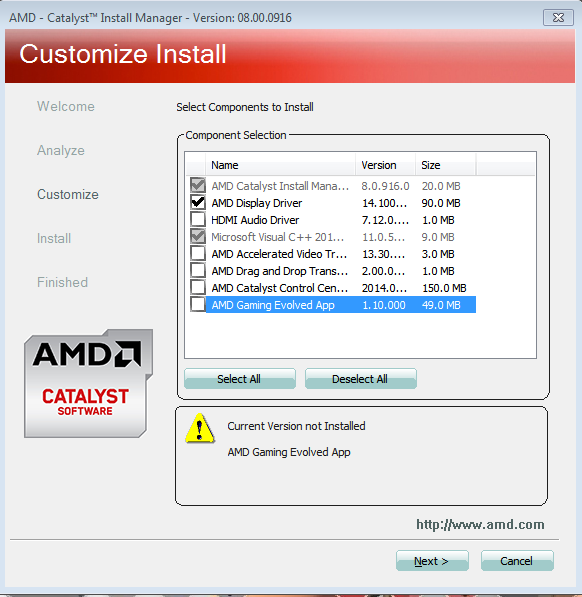
this is what i am installing now... -- i can't deselect those two
 

My Computer

Computer type
PC/Desktop
OS
Windows 7 Ultimate x64
CPU
AMD FX-8320 8-Core Vishera 3.5GHz
Motherboard
Gigabyte GA-990XA-UD3
Memory
Kingston HyperX Red 8GB (2x4GB)
Graphics Card(s)
Sapphire ATI Radeon R9 270X 2GB
Hard Drives
Seagate 1TB 3.5" 7200rpm
Antivirus
Microsoft Security Essentials
Browser
Google Chrome

My Computers

System One System Two

  • Computer type
    PC/Desktop
    Computer Manufacturer/Model Number
    ALWAYS UNDER CONSTRUCTION
    OS
    Windows 11 Pro
    CPU
    Ryzen 9 5900X
    Motherboard
    Asus X570 Crosshair Viii Hero
    Memory
    32GB G Skill DDR4-3600
    Graphics Card(s)
    EVGA RTX 3080 FTW 3 Ultra
    Sound Card
    On Board/Sennheiser PC37X Headset
    Monitor(s) Displays
    3 X Asus 27"
    Screen Resolution
    2560x1440
    Hard Drives
    2 X 1 TB NVME drives
    PSU
    EVGA 850
    Case
    Phanteks Eclipse P400A
    Cooling
    EVGA 280 AIO
    Keyboard
    Logitech G510s/ Logitech G13
    Mouse
    Logitech G502
    Internet Speed
    24/1
    Antivirus
    ESET/MBAM Pro/SAS Pro
    Browser
    Chrome/ Firefox/ Edge
  • Computer type
    Laptop
    System Manufacturer/Model Number
    Dell 16 Plus
    OS
    Windows 11 Pro
    CPU
    Intel Ultra 9 288V
    Memory
    32 GB LPDDR5X 8533
    Monitor(s) Displays
    16" Mini-LED HDR600 Touch 90 Hz
    Screen Resolution
    2560X1600
    Hard Drives
    1 TB NVME

My Computer

Computer type
PC/Desktop
OS
Windows 7 Ultimate x64
CPU
AMD FX-8320 8-Core Vishera 3.5GHz
Motherboard
Gigabyte GA-990XA-UD3
Memory
Kingston HyperX Red 8GB (2x4GB)
Graphics Card(s)
Sapphire ATI Radeon R9 270X 2GB
Hard Drives
Seagate 1TB 3.5" 7200rpm
Antivirus
Microsoft Security Essentials
Browser
Google Chrome
I'm not sure what more things are. But, if it's fixed, you should be able to do anything you would normally do with a computer. Just use it as normal, play games, watch movies and whatever you usually do. Only time will tell if it's fixed.
 

My Computers

System One System Two

  • Computer type
    PC/Desktop
    Computer Manufacturer/Model Number
    ALWAYS UNDER CONSTRUCTION
    OS
    Windows 11 Pro
    CPU
    Ryzen 9 5900X
    Motherboard
    Asus X570 Crosshair Viii Hero
    Memory
    32GB G Skill DDR4-3600
    Graphics Card(s)
    EVGA RTX 3080 FTW 3 Ultra
    Sound Card
    On Board/Sennheiser PC37X Headset
    Monitor(s) Displays
    3 X Asus 27"
    Screen Resolution
    2560x1440
    Hard Drives
    2 X 1 TB NVME drives
    PSU
    EVGA 850
    Case
    Phanteks Eclipse P400A
    Cooling
    EVGA 280 AIO
    Keyboard
    Logitech G510s/ Logitech G13
    Mouse
    Logitech G502
    Internet Speed
    24/1
    Antivirus
    ESET/MBAM Pro/SAS Pro
    Browser
    Chrome/ Firefox/ Edge
  • Computer type
    Laptop
    System Manufacturer/Model Number
    Dell 16 Plus
    OS
    Windows 11 Pro
    CPU
    Intel Ultra 9 288V
    Memory
    32 GB LPDDR5X 8533
    Monitor(s) Displays
    16" Mini-LED HDR600 Touch 90 Hz
    Screen Resolution
    2560X1600
    Hard Drives
    1 TB NVME
Back
Top