various data recovery software hangs/crashes (with 0xc0000005)

energydream2007

New member
Local time
6:12 AM
Messages
38
hey, trying to find a fix for my situation. i need to recover a data from a wd 2tb drive, every time a recovery software is in the process of scanning and analyzing - it hangs in the final stages and im getting errors and cannot continue (therefore application crashes after hang)

it happens in various applications, and more specifically is GetDataBack
CoxDhDD.jpg


just before the close program window here is the GetDataBack error:
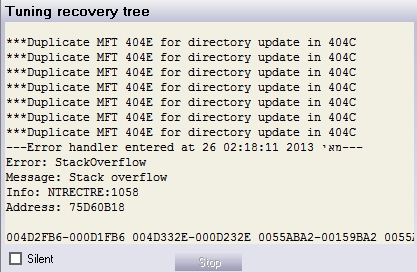
1wJ9Q9z.jpg


and in event viewer im seeing those:
Code:
Faulting application name: gdbnt.exe, version: 4.3.0.0, time stamp: 0x2a425e19
Faulting module name: IMM32.DLL, version: 6.1.7601.17514, time stamp: 0x4ce7ba53
Exception code: 0xc0000005
Fault offset: 0x000116bf
Faulting process id: 0x1930
Faulting application start time: 0x01ce5990dd1a8274
Faulting application path: C:\Program Files (x86)\Runtime Software\GetDataBack for NTFS\gdbnt.exe
Faulting module path: C:\Windows\system32\IMM32.DLL
Report Id: 5dd6ce78-c591-11e2-bbf9-005056c00008

Faulting application name: gdbnt.exe, version: 4.3.0.0, time stamp: 0x2a425e19
Faulting module name: user32.dll, version: 6.1.7601.17514, time stamp: 0x4ce7ba59
Exception code: 0xc0000005
Fault offset: 0x0001613f
Faulting process id: 0x2470
Faulting application start time: 0x01ce597dd52d9a1f
Faulting application path: C:\Program Files (x86)\Runtime Software\GetDataBack for NTFS\gdbnt.exe
Faulting module path: C:\Windows\syswow64\user32.dll
Report Id: 8715c9e2-c57d-11e2-bbf9-005056c00008

also attached an SF Diagnostic Tool report.
 

My Computer My Computer

Computer type
PC/Desktop
OS
Microsoft Windows 7 Ultimate 64-bit 7601 Multiprocessor Free Service Pack 1
CPU
Intel(R) Core(TM) i7-2600K CPU @ 3.40GHz
Motherboard
ASUSTeK Computer INC. P8Z68 DELUXE/GEN3
Memory
8.00 GB
Graphics Card(s)
NVIDIA GeForce GTX 460
Sound Card
(1) Realtek High Definition Audio (2) ManyCam Virtual Micr
Monitor(s) Displays
Dell U2311H
Screen Resolution
1920 x 1080 x 32 bits (4294967296 colors) @ 60 Hz
Hard Drives
(1) ATA OCZ-VERTEX2 SCSI Disk Device (2) ATA WDC WD20EARS-00M SCSI Disk Device (3) ATA WDC WD20EARS-00M SCSI Disk Device (4) WD Ext HDD 1021 USB Device
PSU
1000W
Cooling
Noctua
Internet Speed
100Mbit
Antivirus
ESET 6
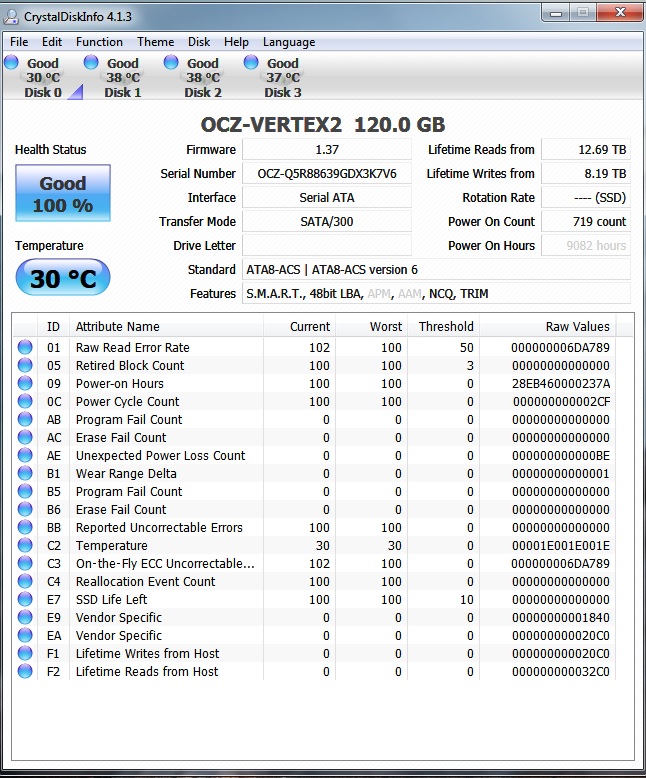
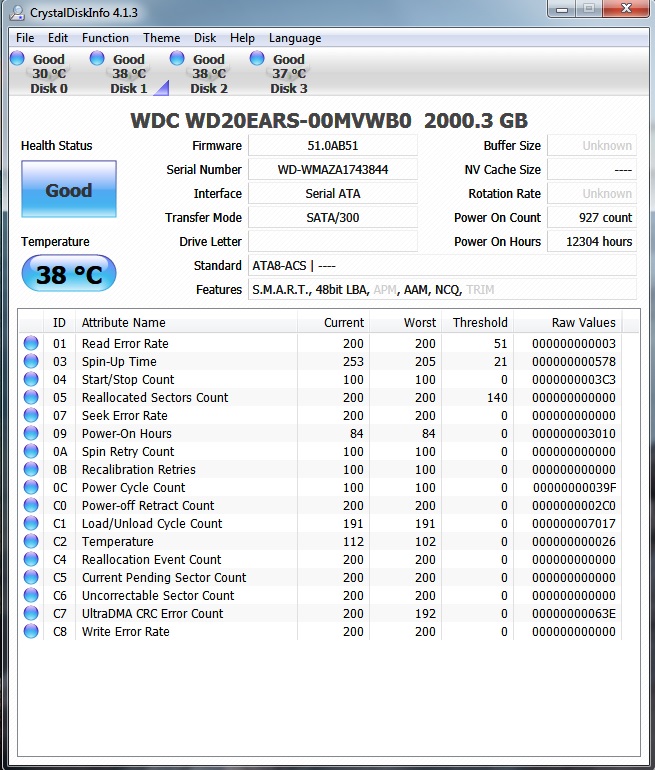
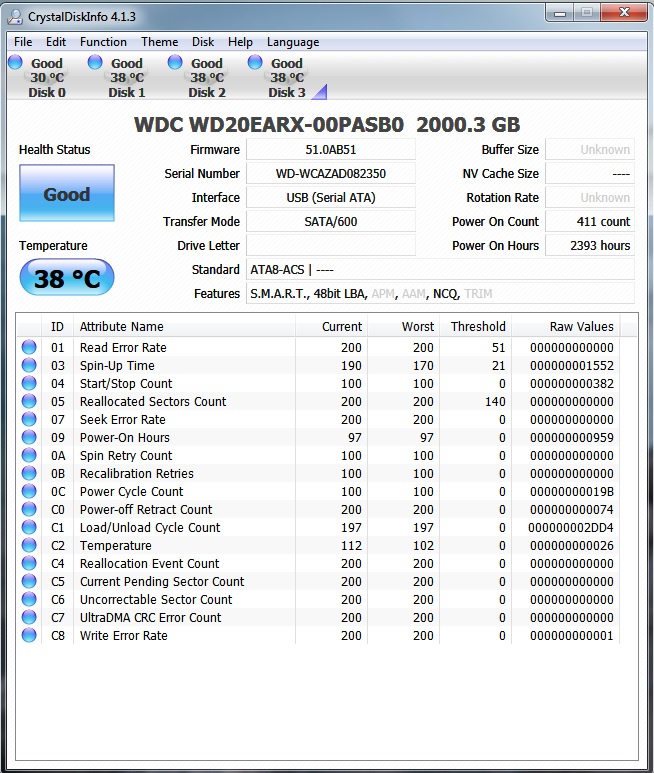
Please run Crystal Disk and post a snapshot of the SMART values here for each HDD/SSD or external HDD
 

My Computer My Computer

Computer Manufacturer/Model Number
Nothing specific....what ever the clients provide for Repair
OS
Windows 7 ultimate x64
hey here is the snapshots: (the 3rd is the drive im recovering from)

xJFJIJ2.jpg


hpeIPS6.jpg


GX4QXLo.jpg


Yal4kHx.jpg
 

My Computer My Computer

Computer type
PC/Desktop
OS
Microsoft Windows 7 Ultimate 64-bit 7601 Multiprocessor Free Service Pack 1
CPU
Intel(R) Core(TM) i7-2600K CPU @ 3.40GHz
Motherboard
ASUSTeK Computer INC. P8Z68 DELUXE/GEN3
Memory
8.00 GB
Graphics Card(s)
NVIDIA GeForce GTX 460
Sound Card
(1) Realtek High Definition Audio (2) ManyCam Virtual Micr
Monitor(s) Displays
Dell U2311H
Screen Resolution
1920 x 1080 x 32 bits (4294967296 colors) @ 60 Hz
Hard Drives
(1) ATA OCZ-VERTEX2 SCSI Disk Device (2) ATA WDC WD20EARS-00M SCSI Disk Device (3) ATA WDC WD20EARS-00M SCSI Disk Device (4) WD Ext HDD 1021 USB Device
PSU
1000W
Cooling
Noctua
Internet Speed
100Mbit
Antivirus
ESET 6
the Drive looks fine..

One wierd thing is your pagefile looks very less.... could you change that to system managed size and try using the software..

Could you try recovering your data using Recuva

Let me know
 

My Computer My Computer

Computer Manufacturer/Model Number
Nothing specific....what ever the clients provide for Repair
OS
Windows 7 ultimate x64
the Drive looks fine..

One wierd thing is your pagefile looks very less.... could you change that to system managed size and try using the software..

Could you try recovering your data using Recuva

Let me know
The pagefile is set to system managed already, but maybe its small because i dont have enough space on the partition, il make some space for pagefile and will try the getdataback.
as for recuva i cant use cause it recovering just individual files and i need complete partition

**awaiting more users to join and help plz
 

My Computer My Computer

Computer type
PC/Desktop
OS
Microsoft Windows 7 Ultimate 64-bit 7601 Multiprocessor Free Service Pack 1
CPU
Intel(R) Core(TM) i7-2600K CPU @ 3.40GHz
Motherboard
ASUSTeK Computer INC. P8Z68 DELUXE/GEN3
Memory
8.00 GB
Graphics Card(s)
NVIDIA GeForce GTX 460
Sound Card
(1) Realtek High Definition Audio (2) ManyCam Virtual Micr
Monitor(s) Displays
Dell U2311H
Screen Resolution
1920 x 1080 x 32 bits (4294967296 colors) @ 60 Hz
Hard Drives
(1) ATA OCZ-VERTEX2 SCSI Disk Device (2) ATA WDC WD20EARS-00M SCSI Disk Device (3) ATA WDC WD20EARS-00M SCSI Disk Device (4) WD Ext HDD 1021 USB Device
PSU
1000W
Cooling
Noctua
Internet Speed
100Mbit
Antivirus
ESET 6
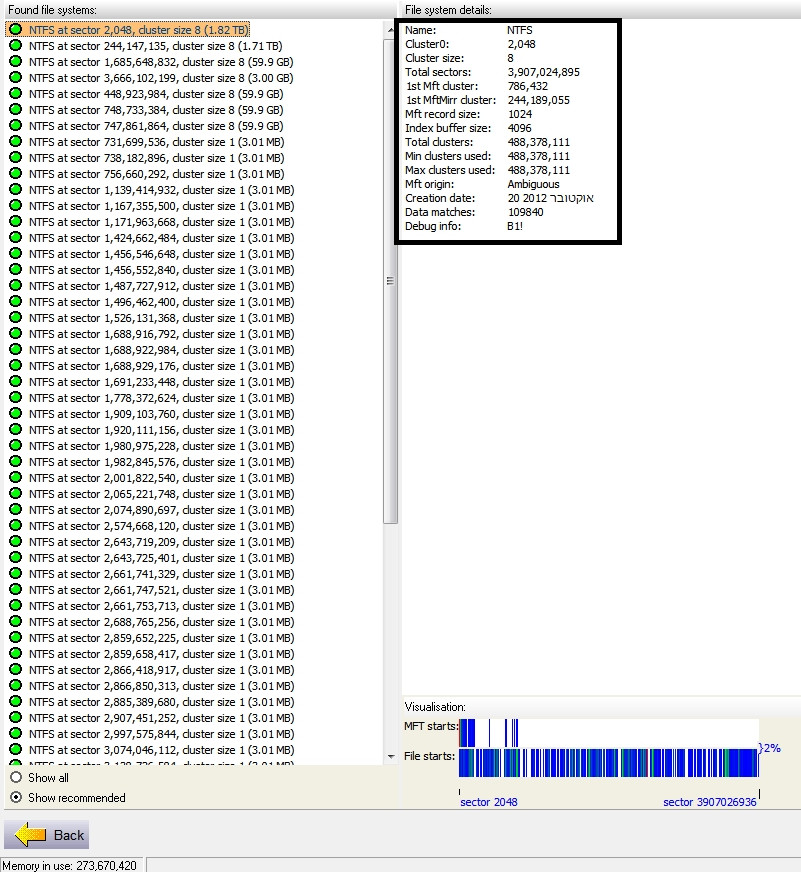
How big is the partition you are trying to recover?

And where are you recovering the partition to ?
 

My Computer My Computer

Computer Manufacturer/Model Number
Nothing specific....what ever the clients provide for Repair
OS
Windows 7 ultimate x64
The partition size is 2tb as in this picture:

ub4BjuT.jpg


im recovering to an empty external usb2 drive.
p.s. - iv tried with the new pagefile settings after making space - and it didnt work, same error
 

My Computer My Computer

Computer type
PC/Desktop
OS
Microsoft Windows 7 Ultimate 64-bit 7601 Multiprocessor Free Service Pack 1
CPU
Intel(R) Core(TM) i7-2600K CPU @ 3.40GHz
Motherboard
ASUSTeK Computer INC. P8Z68 DELUXE/GEN3
Memory
8.00 GB
Graphics Card(s)
NVIDIA GeForce GTX 460
Sound Card
(1) Realtek High Definition Audio (2) ManyCam Virtual Micr
Monitor(s) Displays
Dell U2311H
Screen Resolution
1920 x 1080 x 32 bits (4294967296 colors) @ 60 Hz
Hard Drives
(1) ATA OCZ-VERTEX2 SCSI Disk Device (2) ATA WDC WD20EARS-00M SCSI Disk Device (3) ATA WDC WD20EARS-00M SCSI Disk Device (4) WD Ext HDD 1021 USB Device
PSU
1000W
Cooling
Noctua
Internet Speed
100Mbit
Antivirus
ESET 6
man i was hoping this thread will attract more experts. anything you can
 

My Computer My Computer

Computer type
PC/Desktop
OS
Microsoft Windows 7 Ultimate 64-bit 7601 Multiprocessor Free Service Pack 1
CPU
Intel(R) Core(TM) i7-2600K CPU @ 3.40GHz
Motherboard
ASUSTeK Computer INC. P8Z68 DELUXE/GEN3
Memory
8.00 GB
Graphics Card(s)
NVIDIA GeForce GTX 460
Sound Card
(1) Realtek High Definition Audio (2) ManyCam Virtual Micr
Monitor(s) Displays
Dell U2311H
Screen Resolution
1920 x 1080 x 32 bits (4294967296 colors) @ 60 Hz
Hard Drives
(1) ATA OCZ-VERTEX2 SCSI Disk Device (2) ATA WDC WD20EARS-00M SCSI Disk Device (3) ATA WDC WD20EARS-00M SCSI Disk Device (4) WD Ext HDD 1021 USB Device
PSU
1000W
Cooling
Noctua
Internet Speed
100Mbit
Antivirus
ESET 6
The stack overflow can be caused due to copy protection by the system...

here is what you need to do ..

1. click on Start > Run and type sysdm.cpl
2. You will be given the System Properties box. Click on Advanced -> Then under Performance click Settings
3. Then click on the Data Execution Prevention tab and select "Turn on DEP for all programs and services except those i select"
4. Click the add button and path to whatever version of your software you are using. In this case software will be found in C:\Program Files (x86)\Runtime Software\GetDataBack for NTFS\gdbnt.exe
5. Once gdbnt.exe is in the list, click OK to close the Performance Options and OK again to close System Properties

It should work now....

If this doesn't resolve then the most probable cause is you are trying to save 2TB on a USB drive which maynot have enough space... in order to save the partition you need a bigger driver
 

My Computer My Computer

Computer Manufacturer/Model Number
Nothing specific....what ever the clients provide for Repair
OS
Windows 7 ultimate x64
The stack overflow can be caused due to copy protection by the system...

here is what you need to do ..

1. click on Start > Run and type sysdm.cpl
2. You will be given the System Properties box. Click on Advanced -> Then under Performance click Settings
3. Then click on the Data Execution Prevention tab and select "Turn on DEP for all programs and services except those i select"
4. Click the add button and path to whatever version of your software you are using. In this case software will be found in C:\Program Files (x86)\Runtime Software\GetDataBack for NTFS\gdbnt.exe
5. Once gdbnt.exe is in the list, click OK to close the Performance Options and OK again to close System Properties

It should work now....

If this doesn't resolve then the most probable cause is you are trying to save 2TB on a USB drive which maynot have enough space... in order to save the partition you need a bigger driver

hey, iv tried the nx AlwaysOff in bcdedit witch completely disable DEP and the same errors occurring.
as for the USB drive its a 2TB witch is empty, but the software(s) getting stuck in the analyzing part, way before the recovering action
 

My Computer My Computer

Computer type
PC/Desktop
OS
Microsoft Windows 7 Ultimate 64-bit 7601 Multiprocessor Free Service Pack 1
CPU
Intel(R) Core(TM) i7-2600K CPU @ 3.40GHz
Motherboard
ASUSTeK Computer INC. P8Z68 DELUXE/GEN3
Memory
8.00 GB
Graphics Card(s)
NVIDIA GeForce GTX 460
Sound Card
(1) Realtek High Definition Audio (2) ManyCam Virtual Micr
Monitor(s) Displays
Dell U2311H
Screen Resolution
1920 x 1080 x 32 bits (4294967296 colors) @ 60 Hz
Hard Drives
(1) ATA OCZ-VERTEX2 SCSI Disk Device (2) ATA WDC WD20EARS-00M SCSI Disk Device (3) ATA WDC WD20EARS-00M SCSI Disk Device (4) WD Ext HDD 1021 USB Device
PSU
1000W
Cooling
Noctua
Internet Speed
100Mbit
Antivirus
ESET 6
All right smarty pants ... do the following

  1. Download Process Monitor. Unzip the file and open Procmon.exe with administrative privileges
  2. You will see that it will start capturing events ... Stop this by clicking on the Magnifying glass icon. then clear the window with the Eraser icon.
  3. Now Start the capture again by clicking on the Magnifying glass icon... but this time while you do that also start GetDataBack at the same time...
  4. Let them both run ... till you get the error and getdataback crashes...
  5. Then stop the capture at procmon .. and save the capture using "File > Save"... in the resulting windows.. select "All Events" and save the file as .pml
  6. Upload the .pml file... Since this is going to be a big file.... Zip the files and upload it dropbox or skydrive and post a link here

I will have one final look.
 

My Computer My Computer

Computer Manufacturer/Model Number
Nothing specific....what ever the clients provide for Repair
OS
Windows 7 ultimate x64
ok doing this now. will update and upload
 

My Computer My Computer

Computer type
PC/Desktop
OS
Microsoft Windows 7 Ultimate 64-bit 7601 Multiprocessor Free Service Pack 1
CPU
Intel(R) Core(TM) i7-2600K CPU @ 3.40GHz
Motherboard
ASUSTeK Computer INC. P8Z68 DELUXE/GEN3
Memory
8.00 GB
Graphics Card(s)
NVIDIA GeForce GTX 460
Sound Card
(1) Realtek High Definition Audio (2) ManyCam Virtual Micr
Monitor(s) Displays
Dell U2311H
Screen Resolution
1920 x 1080 x 32 bits (4294967296 colors) @ 60 Hz
Hard Drives
(1) ATA OCZ-VERTEX2 SCSI Disk Device (2) ATA WDC WD20EARS-00M SCSI Disk Device (3) ATA WDC WD20EARS-00M SCSI Disk Device (4) WD Ext HDD 1021 USB Device
PSU
1000W
Cooling
Noctua
Internet Speed
100Mbit
Antivirus
ESET 6
Last edited:

My Computer My Computer

Computer type
PC/Desktop
OS
Microsoft Windows 7 Ultimate 64-bit 7601 Multiprocessor Free Service Pack 1
CPU
Intel(R) Core(TM) i7-2600K CPU @ 3.40GHz
Motherboard
ASUSTeK Computer INC. P8Z68 DELUXE/GEN3
Memory
8.00 GB
Graphics Card(s)
NVIDIA GeForce GTX 460
Sound Card
(1) Realtek High Definition Audio (2) ManyCam Virtual Micr
Monitor(s) Displays
Dell U2311H
Screen Resolution
1920 x 1080 x 32 bits (4294967296 colors) @ 60 Hz
Hard Drives
(1) ATA OCZ-VERTEX2 SCSI Disk Device (2) ATA WDC WD20EARS-00M SCSI Disk Device (3) ATA WDC WD20EARS-00M SCSI Disk Device (4) WD Ext HDD 1021 USB Device
PSU
1000W
Cooling
Noctua
Internet Speed
100Mbit
Antivirus
ESET 6
hello? awaiting for further replies
 

My Computer My Computer

Computer type
PC/Desktop
OS
Microsoft Windows 7 Ultimate 64-bit 7601 Multiprocessor Free Service Pack 1
CPU
Intel(R) Core(TM) i7-2600K CPU @ 3.40GHz
Motherboard
ASUSTeK Computer INC. P8Z68 DELUXE/GEN3
Memory
8.00 GB
Graphics Card(s)
NVIDIA GeForce GTX 460
Sound Card
(1) Realtek High Definition Audio (2) ManyCam Virtual Micr
Monitor(s) Displays
Dell U2311H
Screen Resolution
1920 x 1080 x 32 bits (4294967296 colors) @ 60 Hz
Hard Drives
(1) ATA OCZ-VERTEX2 SCSI Disk Device (2) ATA WDC WD20EARS-00M SCSI Disk Device (3) ATA WDC WD20EARS-00M SCSI Disk Device (4) WD Ext HDD 1021 USB Device
PSU
1000W
Cooling
Noctua
Internet Speed
100Mbit
Antivirus
ESET 6
Hi

Looking at the .pml which almost 7.7 GB in size and almost 19 million entries... sorry i can't be fast enough.. I have got a life !!

Ok i can see that you trying to run lots of program at the same time... I can see you are downloading a file through chrome and at the same time running bittorrent and then getdataback... saving and writing data to d:\

Also you are using two pagefiles one on your SSD and other on D:\. My suggestion is not to use the pagefile on SSD as it would reduce the lifetime of your SSD. Keep the paging file only on D:\ with system managed.

Thirdly to avoid all other programs interfering with Getdataback... i would suggest you use the Live CD version or BratPE version to retrive your files...

Follow the instruction mentioned on those links and you will be able to recover.

Let me know how that goes.
 

My Computer My Computer

Computer Manufacturer/Model Number
Nothing specific....what ever the clients provide for Repair
OS
Windows 7 ultimate x64
tnx iv moved the pagefile to D.

ok so iv tried the suggestions but those didn't worked, the hang/crash also occurs in bartpe/winpe environments. so it seems the problem is more hardware related,but just between the software to this specific hdd (witch seems to be in good condition).
iv did a tests to all the components in the computer and all is looking good, also did memtest with no errors.

what could cause a software to crash with this drive? other drives dont crash
 

My Computer My Computer

Computer type
PC/Desktop
OS
Microsoft Windows 7 Ultimate 64-bit 7601 Multiprocessor Free Service Pack 1
CPU
Intel(R) Core(TM) i7-2600K CPU @ 3.40GHz
Motherboard
ASUSTeK Computer INC. P8Z68 DELUXE/GEN3
Memory
8.00 GB
Graphics Card(s)
NVIDIA GeForce GTX 460
Sound Card
(1) Realtek High Definition Audio (2) ManyCam Virtual Micr
Monitor(s) Displays
Dell U2311H
Screen Resolution
1920 x 1080 x 32 bits (4294967296 colors) @ 60 Hz
Hard Drives
(1) ATA OCZ-VERTEX2 SCSI Disk Device (2) ATA WDC WD20EARS-00M SCSI Disk Device (3) ATA WDC WD20EARS-00M SCSI Disk Device (4) WD Ext HDD 1021 USB Device
PSU
1000W
Cooling
Noctua
Internet Speed
100Mbit
Antivirus
ESET 6
Have you tried it with the Live CD version .... which is linux based ??

If it still crashes in that too and the BSOD's are also memory related (c0005) ... then you could do a memtest for your RAM sticks..

Do the test for Each RAM in Each slot individually for 7 to 8 pass

Do this first before you go with the live CD route...
 

My Computer My Computer

Computer Manufacturer/Model Number
Nothing specific....what ever the clients provide for Repair
OS
Windows 7 ultimate x64
I didnt tried the linux one, also i should note that up until now i havnt got a BSOD, its hangs/crashes. i wonder if its c0005 too but in winpe event viewer is not active so im not sure how to find out.

memtest results were clean from yesterday (tough 2 passes and not 7/8). il try
 

My Computer My Computer

Computer type
PC/Desktop
OS
Microsoft Windows 7 Ultimate 64-bit 7601 Multiprocessor Free Service Pack 1
CPU
Intel(R) Core(TM) i7-2600K CPU @ 3.40GHz
Motherboard
ASUSTeK Computer INC. P8Z68 DELUXE/GEN3
Memory
8.00 GB
Graphics Card(s)
NVIDIA GeForce GTX 460
Sound Card
(1) Realtek High Definition Audio (2) ManyCam Virtual Micr
Monitor(s) Displays
Dell U2311H
Screen Resolution
1920 x 1080 x 32 bits (4294967296 colors) @ 60 Hz
Hard Drives
(1) ATA OCZ-VERTEX2 SCSI Disk Device (2) ATA WDC WD20EARS-00M SCSI Disk Device (3) ATA WDC WD20EARS-00M SCSI Disk Device (4) WD Ext HDD 1021 USB Device
PSU
1000W
Cooling
Noctua
Internet Speed
100Mbit
Antivirus
ESET 6
Well memtest need to be done 7 to 8 passes... to confirm at least the RAM's are fine...

If this passes... then the only thing to do is to try with another software or try the live CD version
 

My Computer My Computer

Computer Manufacturer/Model Number
Nothing specific....what ever the clients provide for Repair
OS
Windows 7 ultimate x64
after days of testing, it seems there is nothing wrong with the system hardware and probably not software either (the errors occurs in both linux live cd and winpe). iv checked the ram as suggested and no errors, so the only clue iv found is in Microsoft forum that the OP have an 0xc0000005 and one of the posters think it can come from Bad sectors or corrupt disk.

but the disk seems to be fine in all aspects, i need to ask, from a recovery stand point, is it safe to try and correct the bad sectors or other disk corruption? (that may or may not exist, im not sure) cause i need to maintain the disk at the current recovery level (1.2 TB from 1.8), and not reduce the amount of files and such.

what do you suggest?
 

My Computer My Computer

Computer type
PC/Desktop
OS
Microsoft Windows 7 Ultimate 64-bit 7601 Multiprocessor Free Service Pack 1
CPU
Intel(R) Core(TM) i7-2600K CPU @ 3.40GHz
Motherboard
ASUSTeK Computer INC. P8Z68 DELUXE/GEN3
Memory
8.00 GB
Graphics Card(s)
NVIDIA GeForce GTX 460
Sound Card
(1) Realtek High Definition Audio (2) ManyCam Virtual Micr
Monitor(s) Displays
Dell U2311H
Screen Resolution
1920 x 1080 x 32 bits (4294967296 colors) @ 60 Hz
Hard Drives
(1) ATA OCZ-VERTEX2 SCSI Disk Device (2) ATA WDC WD20EARS-00M SCSI Disk Device (3) ATA WDC WD20EARS-00M SCSI Disk Device (4) WD Ext HDD 1021 USB Device
PSU
1000W
Cooling
Noctua
Internet Speed
100Mbit
Antivirus
ESET 6
Back
Top