Various performance drops

patrickmorris

New member
Local time
10:53 PM
Messages
40
I have an ATI card which gets the grey screen of death fair enough that crashes my computer when ever i play a game or leave my computer idle or basicly do anything else,so thanks to a ****ing lazy bunch of ****s over at ATI who've known about this problem for 3 months and no fix as of yet.

Performance goes -
-good
-crashing becuase of ati card
-various blue screens (made another thread,with no solution)

now,i've reformatted last week,computer getting worse by the 'crash
now im getting crashes which windows says are performance crashes

-Bootmgr image is corrupt,system cannot boot

-"The file is possibly corrupt,the file header checksum does not match the computer ed checksum"

-Windows failed to load becuase of a critical system driver is missing or corrupt

-Stop c00000221 unknown hard error, \systemRoot\system32\ntdll.dll

-many,many differnt blue screen codes.

So...pretty much on the verge of ****ing this peice of shit out the window,as ive no money becuase i work from home on computer.

computer specs- (if it helps)
AMD Phenom II X2 550 Black Edition Dual Core Processor (3.6GHz,6MB Cache)

ATI Radeon 5700 Graaphics ***DirectX 11***

4GB 800MGZ Dueal Channel DDR3 SDRAM

ASUS M2N68-AM SE2 Mainboard,AM2 + Intergrated graphics MATX

1TB Serial ATA Hard Drive 16MB Buffer

Windows 7 64 Bit
 

My Computer

OS
Windows 7 64 bit
Patrick,
Well lad, with all of the problems you've described, then my recommendatation is: Clean Install.

If immediately after the clean install everything is working, then run Windows 7's Backup and Restore to perform a System Image backup and also after that, go back there and make yourself a System Repair CD.

Now create a System Restore point an create a System Restore point BEFORE each and every piece of software or hardware you add to your system. This a lots of work but at least then you will be able to get back to a stable point.

To create a System Restore point:
WIN + Pause/Break combination of keys
Choose System Protection in the left-hand task pane.
Click on the Create button

WIN is that key with the funny looking wavy flag on it.
 

My Computer

Computer Manufacturer/Model Number
Toshiba Satellite S875D-S7239 laptop
OS
MS Windows 7 Ultimate SP1 64-bit
CPU
AMD A10-4600M
Motherboard
AMD Pumori (Socket FT1)
Memory
6.00 GB Dual-Channel DDR3 @ 798MHz (11-11-12-28)
Graphics Card(s)
AMD Radeon HD 7660G
Sound Card
High Definition Audio Device
Monitor(s) Displays
Generic PnP Monitor (1600x900@60Hz)
Screen Resolution
1600x900@60Hz
Hard Drives
SSD 119GB Corsair CSSD-V128GB2 ATA Device
Keyboard
Standard PS/2 Keyboard
Mouse
HP Wireless Optical Mobile Mouse Model FHA-3410
Internet Speed
What the local pub, local coffee shop offers.
Other Info
Optical Drive:MATSHITA BD-CMB UJ160B ATA Device


Also have an Asus ha1002xp netbook with Win 7 Ultimate installed.
Patrick,
Well lad, with all of the problems you've described, then my recommendatation is: Clean Install.

If immediately after the clean install everything is working, then run Windows 7's Backup and Restore to perform a System Image backup and also after that, go back there and make yourself a System Repair CD.

Now create a System Restore point an create a System Restore point BEFORE each and every piece of software or hardware you add to your system. This a lots of work but at least then you will be able to get back to a stable point.

To create a System Restore point:
WIN + Pause/Break combination of keys
Choose System Protection in the left-hand task pane.
Click on the Create button

WIN is that key with the funny looking wavy flag on it.

Thanks,alot of hassal tho,mabye its w7 :/ what if i installed XP
 

My Computer

OS
Windows 7 64 bit
Patrick,
That's your call. I consider Win7 to be the best OS that MS has ever produced.

And to be honest, If I was a betting man I'd give a 100 to 1 odds that we have a case of operator malfunction.
 

My Computer

Computer Manufacturer/Model Number
Toshiba Satellite S875D-S7239 laptop
OS
MS Windows 7 Ultimate SP1 64-bit
CPU
AMD A10-4600M
Motherboard
AMD Pumori (Socket FT1)
Memory
6.00 GB Dual-Channel DDR3 @ 798MHz (11-11-12-28)
Graphics Card(s)
AMD Radeon HD 7660G
Sound Card
High Definition Audio Device
Monitor(s) Displays
Generic PnP Monitor (1600x900@60Hz)
Screen Resolution
1600x900@60Hz
Hard Drives
SSD 119GB Corsair CSSD-V128GB2 ATA Device
Keyboard
Standard PS/2 Keyboard
Mouse
HP Wireless Optical Mobile Mouse Model FHA-3410
Internet Speed
What the local pub, local coffee shop offers.
Other Info
Optical Drive:MATSHITA BD-CMB UJ160B ATA Device


Also have an Asus ha1002xp netbook with Win 7 Ultimate installed.
Patrick,
That's your call. I consider Win7 to be the best OS that MS has ever produced.

And to be honest, If I was a betting man I'd give a 100 to 1 odds that we have a case of operator malfunction.

I'd take your word on it,as you can imagine me not being able to make any more money im just running out of choices..
 

My Computer

OS
Windows 7 64 bit
Sounds like a hard drive with problems to me ever issue you listed could be from Hard disk getting bad clusters. Run check disk and report the results.
 

My Computer

Computer Manufacturer/Model Number
HomeBuilt
OS
Win 7 64 Ultimate- Win 7 Home premium 64- XP- Adndroid 3.1 and 2.3 Ubantu- Vista Ultimate 64
CPU
Intel I7 920 OC'd 3.8
Motherboard
Asus Rampage Extreme 11
Memory
12 gigs Dominator 1600
Graphics Card(s)
2ea Nvidia 280's SLI superclocked version
Sound Card
XFI
Monitor(s) Displays
Twin HP 2745's
Hard Drives
2ea 1 TB internal Drives - 6 TB External NAS
PSU
Thermaltake toughpower 1200 watt
Case
Lain Li A70b
Cooling
Air Cooled
Internet Speed
15 down 3 up Comcast
Patrick
WIN + F1 key combo
type Check a Disk for Errors
 

My Computer

Computer Manufacturer/Model Number
Toshiba Satellite S875D-S7239 laptop
OS
MS Windows 7 Ultimate SP1 64-bit
CPU
AMD A10-4600M
Motherboard
AMD Pumori (Socket FT1)
Memory
6.00 GB Dual-Channel DDR3 @ 798MHz (11-11-12-28)
Graphics Card(s)
AMD Radeon HD 7660G
Sound Card
High Definition Audio Device
Monitor(s) Displays
Generic PnP Monitor (1600x900@60Hz)
Screen Resolution
1600x900@60Hz
Hard Drives
SSD 119GB Corsair CSSD-V128GB2 ATA Device
Keyboard
Standard PS/2 Keyboard
Mouse
HP Wireless Optical Mobile Mouse Model FHA-3410
Internet Speed
What the local pub, local coffee shop offers.
Other Info
Optical Drive:MATSHITA BD-CMB UJ160B ATA Device


Also have an Asus ha1002xp netbook with Win 7 Ultimate installed.
Patrick,
Let us know how the computer does after a few hours.
 

My Computer

Computer Manufacturer/Model Number
Toshiba Satellite S875D-S7239 laptop
OS
MS Windows 7 Ultimate SP1 64-bit
CPU
AMD A10-4600M
Motherboard
AMD Pumori (Socket FT1)
Memory
6.00 GB Dual-Channel DDR3 @ 798MHz (11-11-12-28)
Graphics Card(s)
AMD Radeon HD 7660G
Sound Card
High Definition Audio Device
Monitor(s) Displays
Generic PnP Monitor (1600x900@60Hz)
Screen Resolution
1600x900@60Hz
Hard Drives
SSD 119GB Corsair CSSD-V128GB2 ATA Device
Keyboard
Standard PS/2 Keyboard
Mouse
HP Wireless Optical Mobile Mouse Model FHA-3410
Internet Speed
What the local pub, local coffee shop offers.
Other Info
Optical Drive:MATSHITA BD-CMB UJ160B ATA Device


Also have an Asus ha1002xp netbook with Win 7 Ultimate installed.
Curious pat... did check disk show any errors?
 

My Computer

Computer Manufacturer/Model Number
HomeBuilt
OS
Win 7 64 Ultimate- Win 7 Home premium 64- XP- Adndroid 3.1 and 2.3 Ubantu- Vista Ultimate 64
CPU
Intel I7 920 OC'd 3.8
Motherboard
Asus Rampage Extreme 11
Memory
12 gigs Dominator 1600
Graphics Card(s)
2ea Nvidia 280's SLI superclocked version
Sound Card
XFI
Monitor(s) Displays
Twin HP 2745's
Hard Drives
2ea 1 TB internal Drives - 6 TB External NAS
PSU
Thermaltake toughpower 1200 watt
Case
Lain Li A70b
Cooling
Air Cooled
Internet Speed
15 down 3 up Comcast
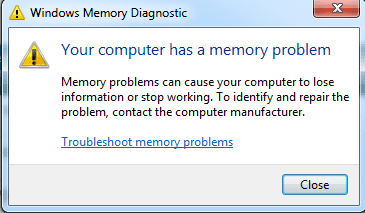
After doing a diagnostic check it said my computer has memory problems


what course of action can i take now?
 

Attachments

  • memory1.png
    memory1.png
    19.7 KB · Views: 1

My Computer

OS
Windows 7 64 bit
open up your case and re-seat memory then try again.

Next remove 1 stick at a time to isolate the bad stick. Buy new.
 

My Computer

Computer Manufacturer/Model Number
HomeBuilt
OS
Win 7 64 Ultimate- Win 7 Home premium 64- XP- Adndroid 3.1 and 2.3 Ubantu- Vista Ultimate 64
CPU
Intel I7 920 OC'd 3.8
Motherboard
Asus Rampage Extreme 11
Memory
12 gigs Dominator 1600
Graphics Card(s)
2ea Nvidia 280's SLI superclocked version
Sound Card
XFI
Monitor(s) Displays
Twin HP 2745's
Hard Drives
2ea 1 TB internal Drives - 6 TB External NAS
PSU
Thermaltake toughpower 1200 watt
Case
Lain Li A70b
Cooling
Air Cooled
Internet Speed
15 down 3 up Comcast
open up your case and re-seat memory then try again.

Next remove 1 stick at a time to isolate the bad stick. Buy new.

How can i tell if a sticks bad tho,just i've 3 at the moment leave 2 in if it crashes still try another arrangement of the sticks i.e take out one put another in
 

My Computer

OS
Windows 7 64 bit
Yeah you need to isolate which stick is the bad one. or worse it could be a bad slot in the system board.

If it has memory errors and its a new PC consider making the Company you bought it from deal with it.
 

My Computer

Computer Manufacturer/Model Number
HomeBuilt
OS
Win 7 64 Ultimate- Win 7 Home premium 64- XP- Adndroid 3.1 and 2.3 Ubantu- Vista Ultimate 64
CPU
Intel I7 920 OC'd 3.8
Motherboard
Asus Rampage Extreme 11
Memory
12 gigs Dominator 1600
Graphics Card(s)
2ea Nvidia 280's SLI superclocked version
Sound Card
XFI
Monitor(s) Displays
Twin HP 2745's
Hard Drives
2ea 1 TB internal Drives - 6 TB External NAS
PSU
Thermaltake toughpower 1200 watt
Case
Lain Li A70b
Cooling
Air Cooled
Internet Speed
15 down 3 up Comcast
Back
Top