VBox - CPU Utilization Creeps Up

Antman

New member
Local time
1:22 AM
Messages
4,573
VBox 3.08 hosting XP32, running EdgeStream Client in WiMP10. Viewing video stream on TFCnow.com

Host CPU usage begins at 10-40%, fluctuating. I can live with that. After some time, CPU starts hitting 85-90+. The delay between 'normal' CPU and spiked CPU can be 5 minutes to 30+ minutes.

Pausing/Stopping WiMP returns the CPU to a lower rate, but resuming immediately spikes.

Is it possibly related to the codec utilized by the stream source?
 
That is one of the problems I also had within VB. Was never able to correct it, so if you find a way please post the correction. Also, was unable to do drag and drop between host and virtual machine.

I went back to the VM Ware 6.5.3 Workstation and Player ($189.00) since it was paid for, and ran without to much of a problem. At present vmx.exe is running at 23,788 K and vmplayer.exe is running at a study 28,888 K and neither is spiking at more than 3,500 K.

Firefox takes up more ram at 86,492 K then all of VM Ware.
 

My Computer

Computer Manufacturer/Model Number
HP Pavilion a4302f
OS
Win 7 Pro x64, VM Win XP, Win7 Pro Sandbox, Kubuntu 11
CPU
AMD Athlon(tm) II X4 640 @ 3.0 Gbz
Memory
12GB 1066MHz DDR3 SDRAM - 2x4GB, 2x2GB
Graphics Card(s)
ATI Radeon HD 4350 HD Graphics/Audio with 512MB
Sound Card
Realtek High Definition Audio
Monitor(s) Displays
1. Dell 23" SP2307, 2. Mitsublishi 40" HDTV, Hannspree 25"
Screen Resolution
1. 2048x1152, 2. 1920-1080, 3. 1920x1200
Hard Drives
Int: 1 120 Gig SSD i
1 - 2.5" 500 USB External HDD
1 -1 Tb USB External HDD
Case
Mid Tower
Cooling
Standard Fans - 5 fans (very quiet)
Keyboard
Microsoft Wireless 2000
Mouse
Microsoft Wireless Mouse 5000
Internet Speed
10 Mbit (realistically 500 Kbit - 1.2 Mbit)
Other Info
Speakers - Bose Desktop (Excellent Sound)
1 external CD|DVD\Blue-ray Recorders/Players (Sony)
I rolled back to VBox 3.04. Which was a challenge in itself. I just upgraded from 3.04 to 3.08 today. A week or so ago, I had moved from 3.04 to 3.06 - and returned to 3.04 for the same problem.

I had to do a System Restore today to get 3.08 off.

3.04 is bouncing the CPU between 16 and 30%, changing every second or two.

I would lay out the $189 for VMWare, but I am really just waiting for a Windows 7 update the EdgeStream client - the only reason I am using the VM.
 
try to disable acceleration (VT-x or AMD-V), and check if that performs better. I noted that sometimes the hardware assisted virtualization may cause issues. Overall, vbox is very good in terms of cpu and memory use. I don't really observe much difference between vmware and vbox.

the memory usage from taskbar on virtual machine engines might be deceiving. It's quite often a process uses more ram, but that does not really mean vm engine actually uses less ram.
 

My Computer

OS
windows 7
Hi all
For a FREE efficient vm solution why not use vmware server. Costs ZILCH and works very well indeed.

Use version 1 if you are unhappy with having to use a browser as a vm console or version 2 if you don't mind the browser console.

You'll find the overhead is MUCH smaller than VBOX and you can run the vm's in the background as well.

Cheers
jimbo
 

My Computer

Computer type
PC/Desktop
Computer Manufacturer/Model Number
Custom built, several laptops HP/ASUS
OS
Linux CENTOS 7 / various Windows OS'es and servers
CPU
Intel i7 Intel i5
Memory
8GB, 16GB
Graphics Card(s)
On Motherboard
Sound Card
Realtek HD audio
Monitor(s) Displays
Apple Cinema display, Samsung LCD
Screen Resolution
1920 X 1080
Hard Drives
4 X 1TB SATA
Mouse
Toshiba wireless laser
Internet Speed
> 20MB up
Hi all
For a FREE efficient vm solution why not use vmware server. Costs ZILCH and works very well indeed.

Use version 1 if you are unhappy with having to use a browser as a vm console or version 2 if you don't mind the browser console.

You'll find the overhead is MUCH smaller than VBOX and you can run the vm's in the background as well.

Cheers
jimbo
I am going to give VMserver a go. Just a few days remain before I install my Win7 license, so I will tyest it on this install.
 
try to disable acceleration (VT-x or AMD-V), and check if that performs better. I noted that sometimes the hardware assisted virtualization may cause issues. Overall, vbox is very good in terms of cpu and memory use. I don't really observe much difference between vmware and vbox.

the memory usage from taskbar on virtual machine engines might be deceiving. It's quite often a process uses more ram, but that does not really mean vm engine actually uses less ram.
I will also give this a go. I understand about the memory usage.
 
try to disable acceleration (VT-x or AMD-V), and check if that performs better. I noted that sometimes the hardware assisted virtualization may cause issues. Overall, vbox is very good in terms of cpu and memory use. I don't really observe much difference between vmware and vbox.

the memory usage from taskbar on virtual machine engines might be deceiving. It's quite often a process uses more ram, but that does not really mean vm engine actually uses less ram.
I will also give this a go. I understand about the memory usage.
FAIL.

Substantial increase in CPU %
 
Not to go too much off topic but having Vbox installed screws up Rainmeter for me. After Vbox is installed, it will slow the refresh rate of Rainmeter on the Host machine and RM also starts crashing. I believe you use both Antman, have you had this happen as well?
 

My Computer

Computer type
PC/Desktop
Computer Manufacturer/Model Number
Airbot 2.0
OS
Windows 7 Ultimate x64 SP1
CPU
Core i7 920 (D0) @ 4Ghz, *26c idle *65c full load on air
Motherboard
Asus P6X58D Premium - Sata 6Gb/s - USB 3.0
Memory
12GB DDR3 Corsair Dominator -CMD12GX3M6A1600C8 at 1600MHz
Graphics Card(s)
Zotac Geforce GTX 770
Sound Card
ASUS Xonar D2X
Monitor(s) Displays
1 LG 24" Flatron W2453V-PF 1 Samsung 24" P2450H both 2ms RT
Screen Resolution
1920x1080@60hz
Hard Drives
1 Samsung 250GB 840 Evo SSD
1 OCZ Vertex2 180GB SSD
1 TB Samsung Spinpoint F1 7200RPM 32MB cache
2 500GB WD Caviar Blacks 7200RPM 32MB cache (WD5001AALS)

Pioneer DVD Burner DVR-S18M
PSU
Corsair HX1000W
Case
Cooler Master HAF 932
Cooling
Case Fans *3 230mm, *1 140mm/CPU - *Tuniq Tower 120 Extreme
Keyboard
Logitech Wireless MK700
Mouse
Logitech Wireless MK700
Internet Speed
DL 15 Mbps UL 0.98 Mbps
Antivirus
None
Browser
Firefox Nightly
Other Info
Processor-7.7 *RAM- 7.9 *Graphics-7.9 *Gaming Graphics- 7.9 *SSD- 7.8 W.E.I final score= 7.7
*Phone- LG Nexus 5
try to disable acceleration (VT-x or AMD-V), and check if that performs better. I noted that sometimes the hardware assisted virtualization may cause issues. Overall, vbox is very good in terms of cpu and memory use. I don't really observe much difference between vmware and vbox.

the memory usage from taskbar on virtual machine engines might be deceiving. It's quite often a process uses more ram, but that does not really mean vm engine actually uses less ram.
I will also give this a go. I understand about the memory usage.
FAIL.

Substantial increase in CPU %

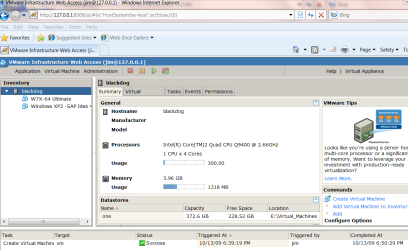
Hi is that on VMWARE server

It shouldn't happen

Can you post a screen shot of the Console when running one VM (the server console not the Virtual machine's console)

Example shown in this shot with one XP vm running and creating a 2nd VM - W7-X-64 ultimate

BTW you should define your Virtual Machines as SINGLE PROCESSOR and split the Virtual disk into 2GB chunks rather than define the whole kybosh in one go.

Exception if your VM is running a database then DO define virtual disk(s) in one go - not in 2GB chunks -- keep single processor and you don't need the same amount of RAM as you would on a real machine - even W7-X64 ultimate will run happily on a 1 or 2GB Virtual machine --running VM's are DIFFERENT to real machines in terms of resources.

Note you'll have to switch VT back on again if you want to run 64 Bit guests under vmware server. You don't need to for 32 bit guests,

Cheers
jimbo
 

Attachments

  • vmcons.png
    vmcons.png
    56.6 KB · Views: 43

My Computer

Computer type
PC/Desktop
Computer Manufacturer/Model Number
Custom built, several laptops HP/ASUS
OS
Linux CENTOS 7 / various Windows OS'es and servers
CPU
Intel i7 Intel i5
Memory
8GB, 16GB
Graphics Card(s)
On Motherboard
Sound Card
Realtek HD audio
Monitor(s) Displays
Apple Cinema display, Samsung LCD
Screen Resolution
1920 X 1080
Hard Drives
4 X 1TB SATA
Mouse
Toshiba wireless laser
Internet Speed
> 20MB up
VBox 3.08 hosting XP32, running EdgeStream Client in WiMP10. Viewing video stream on TFCnow.com

Host CPU usage begins at 10-40%, fluctuating. I can live with that. After some time, CPU starts hitting 85-90+. The delay between 'normal' CPU and spiked CPU can be 5 minutes to 30+ minutes.

Pausing/Stopping WiMP returns the CPU to a lower rate, but resuming immediately spikes.

Is it possibly related to the codec utilized by the stream source?

Another thing, vbox NAT network may be the cause of high cpu. If you are using NAT, then try to change to a bridged network with a real physical ip address
 

My Computer

OS
windows 7
Not to go too much off topic but having Vbox installed screws up Rainmeter for me. After Vbox is installed, it will slow the refresh rate of Rainmeter on the Host machine and RM also starts crashing. I believe you use both Antman, have you had this happen as well?
Not currently running RainMeter on this install. I will load it up though for testing purposes.

I had to drive to the UPS warehouse and pick up my FREE Windows 7 Ultimate license and DVDs. Got lost twice. Thank you to the *sshole who stole my GPS last year while I was at the post office.
 
VBox 3.08 hosting XP32, running EdgeStream Client in WiMP10. Viewing video stream on TFCnow.com

Host CPU usage begins at 10-40%, fluctuating. I can live with that. After some time, CPU starts hitting 85-90+. The delay between 'normal' CPU and spiked CPU can be 5 minutes to 30+ minutes.

Pausing/Stopping WiMP returns the CPU to a lower rate, but resuming immediately spikes.

Is it possibly related to the codec utilized by the stream source?

Another thing, vbox NAT network may be the cause of high cpu. If you are using NAT, then try to change to a bridged network with a real physical ip address
Will also try that before I ditch this build.

But, you have found the only difference between my pre 3.x and post 3.x versions of VBox. In 2.x, I was not using NAT. Also noteworthy, this CPU issue appears to be a new development. I may have not noticed before, regardless of my experience once I updated to 3.06 - but I do not think so. It is a fairly big problem.

@Jimbo - I have not installed the VMserver yet. Been in the car basically all day - with another 80 mile trip before I eat dinner.
 
Back
Top