VDM Files?

coover

New member
Local time
6:49 PM
Messages
10
Today, I noticed 8 Directories located on my C: Drive that I do not think were there before ... The directories have strange names like

8f57efc509138e555a6a1e8672bbdad0

and have two files with names like

64367F18-DE9F-44D0-B53C-B213793C0789mpasdlta.vdm

Since they are new, i assume they are related to something I did yesterday. Two days ago, i tried to use Acronis True Image to backup my computer. After a short time, Acronis objected that it couldn't read something within a sector on the hard drive .. oh, oh, I thought. I opened Explorer, right clicked on the drive and selected Properties, went to the Tools tab and selected Error-checking. Several hours later, the Error-checker had found the problems, all luckily within the Recycle Bin, and repaired them. I then used Acronis to "Clone" the original hard drive to another, and replaced the old drive with the new drive. The computer booted right away with the 8 new directories, each with two VDM files.

Any suggestions?
 

My Computer

Computer Manufacturer/Model Number
Acer 5620-6830
OS
Windows 7 Ultimate 64 bit
CPU
Core2 Duo T5250
Memory
4 GB
Those folders are temporary files that were extracted but never cleaned from by the installers the created them. You can delete them. Was probably from some of the packages Windows Update installed.
 

My Computer

Computer type
PC/Desktop
Computer Manufacturer/Model Number
Alienware Aurora ALX R4
OS
Windows 10 Pro (x64)
CPU
Intel Core i7-3930K (3.2GHz - 4.5GHz)
Motherboard
Alienware Aurora-R4 x79
Memory
4x Samsung 4GB PC3-12800 DDR3 (16GB 1600MHz)
Graphics Card(s)
Nvidia Geforce GTX 690
Sound Card
SteelSeries Siberia Elite
Monitor(s) Displays
Dell UltraSharp U3011
Screen Resolution
2560x1600
Hard Drives
Samsung 850 Pro 256 GB, Seagate 1TB Desktop Hybrid HDD, 2x Western Digital 4TB Green HDD
PSU
875W Some Dell PSU <.<
Case
Alienware Aurora ALX
Cooling
Custom Liquid Cooling (EK CPU & GPU blocks) dual EK 480RAD
Keyboard
Logitech G710+ Mechanical
Mouse
Logitech G700s
Internet Speed
Verizon Fios (50 mbps average)
Other Info
Server: Intel NUC D54250WYK: i5-4250U, 16GB, 256 GB mSATA, Windows Server 2012 R2
My first guess was to delete them, but I don't like deleting files that I really do not know from whence they came.
 

My Computer

Computer Manufacturer/Model Number
Acer 5620-6830
OS
Windows 7 Ultimate 64 bit
CPU
Core2 Duo T5250
Memory
4 GB
Do you have Microsoft Security Essentials? MSE leaves folders like this with VDM files after every update. They seem to show up in odd places like this. Head over to the Microsoft forums and check it out. Apparently a fix is in the works so they get saved in the proper place.
 

My Computer

Computer Manufacturer/Model Number
Asus P8H67-M EVO
OS
Windows 7 Professional 64 bit
CPU
Intel Core i5-2500K
Motherboard
Asus
Memory
8 GB
Graphics Card(s)
Intel HD Graphics 3000
Sound Card
Realtek
Monitor(s) Displays
17" Dell (x2)
Screen Resolution
1280 x 1024
Hard Drives
Intel 510 SSD 120 GB
Western Digital 1 TB
Thanks ... I've now deleted them without any apparent effect (yet).
 

My Computer

Computer Manufacturer/Model Number
Acer 5620-6830
OS
Windows 7 Ultimate 64 bit
CPU
Core2 Duo T5250
Memory
4 GB
Just an FYI since they are already gone but I suspect they may have been Acronis image files. Acronis also uses the VDM extension in their (at least) last two releases of True Image.

By chance did you run a backup mistakenly to the C drive when you last ran Acronis?
 

My Computer

Computer Manufacturer/Model Number
Dell Vostro 420
OS
Windows 7 Pro x64
CPU
3.00 GHz Intel Core2 Quad Q9650
Memory
4 GB
Graphics Card(s)
ATI Radeon HD 3400 Series
Monitor(s) Displays
DELL 2405FPW
Screen Resolution
1920x1200
Hard Drives
System: 80GB WDC WD800JD-22MSA1
Data: 500GB Hitachi HDP725050GLA360
Internet Speed
Verizon FiOS 20/5 mbps
Other Info
Computing is primarily business use with off-time troubleshooting practice: Remote desktop, scanning and producing invoices, some minor graphics work.
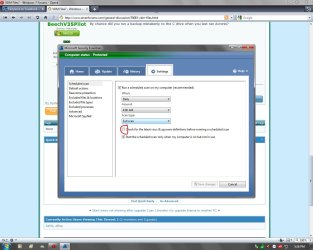
For everyone having problems with VDM files and folders go into MSE>options and uncheck "Check for the latest virus & spyware definitions..."
 

Attachments

  • Untitled.jpg
    Untitled.jpg
    111.7 KB · Views: 393

My Computer

Computer Manufacturer/Model Number
Home Built
OS
Windows 7 Ultimate x64 RTM
CPU
AMD Athlon II X2 240 @ 3.2Ghz
Motherboard
Gigabyte GA-MA785GMT-UD2H
Memory
6GB Mushkin DDR3 PC-1333
Graphics Card(s)
ATI Radeon HD 4200 IGP Hybrid CrossFireX w\ Sapphire HD3450
Sound Card
Onboard Realtek HD audio controller
Monitor(s) Displays
D-SUB: LG W2343T-PF 23" LCD HDMI: LG 32LH20 32" LCD
Screen Resolution
1920*1080
Hard Drives
WD Caviar Green 1TB SATA3
PSU
Cooler Master Elite Power 400W
Case
Cooler Master Elite 360
Cooling
AMD Stock :)
Keyboard
Crappy wirelss logitech
Mouse
crappy wireless logitech
Internet Speed
792k
For everyone having problems with VDM files and folders go into MSE>options and uncheck "Check for the latest virus & spyware definitions..."

Uhhh...no offense but that suggestion is just unwise. This issue with temp directories is not that bad to warrant such a workaround.
 

My Computer

Computer type
PC/Desktop
Computer Manufacturer/Model Number
Alienware Aurora ALX R4
OS
Windows 10 Pro (x64)
CPU
Intel Core i7-3930K (3.2GHz - 4.5GHz)
Motherboard
Alienware Aurora-R4 x79
Memory
4x Samsung 4GB PC3-12800 DDR3 (16GB 1600MHz)
Graphics Card(s)
Nvidia Geforce GTX 690
Sound Card
SteelSeries Siberia Elite
Monitor(s) Displays
Dell UltraSharp U3011
Screen Resolution
2560x1600
Hard Drives
Samsung 850 Pro 256 GB, Seagate 1TB Desktop Hybrid HDD, 2x Western Digital 4TB Green HDD
PSU
875W Some Dell PSU <.<
Case
Alienware Aurora ALX
Cooling
Custom Liquid Cooling (EK CPU & GPU blocks) dual EK 480RAD
Keyboard
Logitech G710+ Mechanical
Mouse
Logitech G700s
Internet Speed
Verizon Fios (50 mbps average)
Other Info
Server: Intel NUC D54250WYK: i5-4250U, 16GB, 256 GB mSATA, Windows Server 2012 R2
To BeechV35Pilot ... No, the first attempt to clone was to an external HD using the latest version of True Image, 2010 Home and was intended to be a backup. After repairing the hard drive so it could be read, I cloned to a new drive I installed within the computer, itself.

I guess I was very lucky this time, that the files on the section that had to be repaired were all within the Recycle Bin.
 

My Computer

Computer Manufacturer/Model Number
Acer 5620-6830
OS
Windows 7 Ultimate 64 bit
CPU
Core2 Duo T5250
Memory
4 GB
Back
Top