Verifying DMI Pool Data Strikes Again

FlyingSheep

New member
Local time
7:33 AM
Messages
5
Hello all, I've got into a bit of a stupid situation, so I'll do my best to describe this nonsense. This problem started this morning when I woke up, yesterday was like any day in the life of gamers, I honestly didn't change a thing and here I am. I browsed the forums of all types and places, even read a few in Spanish (those were a nightmare). Anyway, I tried starting in safe-mode, but I don't have that option. I have a Gigabyte motherboard so I only have an F9 option which is some stupid repair option that I learned is to prevent situations like these by allowing you to create a back-up partition, which I didn't know about so I never did. Thus, this option doesn't work also.

I got my windows 7 copy for free thanks to my college, so I downloaded the ISO and burnt to a CD which I used to install on my computer some 2 or so years ago. It's been working flawlessly, this computer I did build myself. The only thing I can think about is a virus of sorts, which I highly doubt since I'm rather crafty when it comes to viruses. The only thing I downloaded was a (I honestly forget what it's called a section editor program so that I can give myself endless money in a game called X-Com UFO Defense. It's an old game m y friend gave to me to try before the new XCom comes out, and I know he wouldn't try anything against me, so I think I can rule a virus out. Unless the program I downloaded had one.

I'm entirely lost, other than that one download I spent the day doing normal things on my computer. Oh, I also used my disk, tried to boot from it, but changing the boot menu to put from everything with the word CD in it also didn't change anything. So in short: I can't boot from my install CD, I can't boot in safe-mode, and I'm stuck at the DMI pool screen. For the first time in my computer life, I'm rather... perplexed. >.
 
Last edited:

My Computer

OS
Windows 7
You didn't actually describe the problem, unless I missed it. By the way, Safe Mode is an OS feature, and has nothing to do with the motherboard. I can enter Safe Mode just fine on a Gigabyte board, and any other system.
 

My Computer

OS
Windows 7 Ultimate x64 SP1
CPU
Intel Core i7-2600
Motherboard
Gigabyte GA-P67A-UD3P-B3
Memory
12 GB Patriot Extreme DDR3-1333
Graphics Card(s)
Nvidia GTX 470
Monitor(s) Displays
Dell UltraSharp 2209WA
Hard Drives
OCZ Agility3 240 GB, WD5001AALS, WD7501AALS
PSU
OCZ ModStream 700W
Case
CoolerMaster HAF 912 Advanced
Cooling
CoolerMaster Hyper 212 Plus
I understand that, I'm not saying it's not. And the problem is stated in the title, I'm stuck at Verifying DMI Pool Data. I said in my post that I can't enter Safe Mode, pressing F1-12 like a mad-man (other than the normal BIOs/Boot Menu) does nothing. It's crazy, I've survived a few of these in the past, but this little guy got me trapped. Q_Q
 

My Computer

OS
Windows 7
Unplug or remove any "extra" devices...hard drives, PCI cards, etc. and try to boot with minimal hardware.
 

My Computer

Computer Manufacturer/Model Number
Custom
OS
Windows 7 Ultimate RTM (Technet)
CPU
3.00 gigahertz Intel Core2 Duo E8400
Motherboard
ASUSTeK Computer INC. P5K/EPU Rev 1.xx
Memory
4GB
Graphics Card(s)
ATI Radeon X1950 Pro
Sound Card
Built in HD Audio
Monitor(s) Displays
22" Gateway LCD
Screen Resolution
1920 x 1200
Hard Drives
ST3160023A [Hard drive] (160.04 GB) -- drive 0, rev 8.01, ST3500630AS [Hard drive] (500.11 GB) -- drive 2, rev 3.AAK
ST3500630AS [Hard drive] (500.11 GB) -- drive 1, rev 3.AAK
Keyboard
Logitech G11
Mouse
Microsoft Wireless Laser Mouse 5000
Internet Speed
13.44 Mbps
Well, I took the battery out and waited a while, that did nothing. Now I'm trying to flash my BIOS, but have encountered another problem. I've got a Gigabyte GA-M52LT-D3P with a Q-Flash utility. I got a youtube video on how to do it (YouTube - ‪Flash BIOS with Gigabyte Q-Flash‬‏) but F8 doesn't work, so I can't enter Q-Flash. I've got everything installed on my USB. Seems like it's just one problem after the other.
 

My Computer

OS
Windows 7
Try pushing F8 madly during bootup for Safe Mode. Then try repair options there.
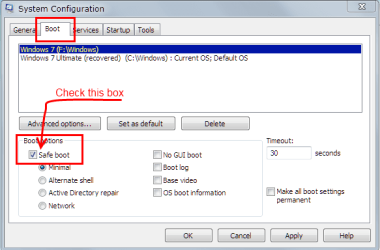
Another, easier way to get Safe Mode. Type msconfig in the Start search. click msconfig, go to the boot tab and check the box as shown below. Thhis will only effect the next boot.
msconfig boot.PNG
 

My Computer

Computer type
PC/Desktop
Computer Manufacturer/Model Number
Home Built Desktop By DataTech
OS
Windows 7 Ultimate X64 SP1
CPU
Intel i5-2550K, Differing ~4.4-4.8GHz No built in GPU
Motherboard
ASUS P8Z68-V PRO/GEN3
Memory
16GB G.Skill Sniper 1866MHz @ 2133MHz 2x8GB
Graphics Card(s)
ASUS GTX650TIB-DC2OC-2GD5, (650TI Boost)
Sound Card
Onboard Realtek 5-1
Monitor(s) Displays
Samsung P2570HD
Screen Resolution
1920x1080
Hard Drives
Samsung 840 Pro 256GB SSD for OS, 500GB Seagate Constellation (Enterprise drive) for Data
PSU
Corsair HX650W
Case
Inwin Dragon Rider
Cooling
Hyper 212 EVO w/two Noctua fans, push-pull, @1300 RPM
Keyboard
E-Z Eyes, bright yellow keys with large characters
Mouse
steelseries SENSEI Laser Pro Gaming
Internet Speed
48-51Mbs Mbs down, 11 Mbs up Xfinity Cable
Antivirus
Norton Internet Security 2013
Browser
IE 10, Opera, Pale Moon if needed
Other Info
4 case fans, LG BluRay-RE, ASUS DVD-RW, Mr. Fusion power supply, 1.21 gigawatts.
I've given up. I found a way to enter Q-Flash from a friend, I updated my BIOS to the latest version and still got the same error. As of right now, I'm looking for a new motherbored. Seems like this one is shot.

Also, as mentioned in the first post, I can't enter Safe-Mode.
 
Last edited:

My Computer

OS
Windows 7
I've given up. I found a way to enter Q-Flash from a friend, I updated my BIOS to the latest version and still got the same error. As of right now, I'm looking for a new motherbored. Seems like this one is shot.

Also, as mentioned in the first post, I can't enter Safe-Mode.

Why can't you enter safe mode? What happens when you try? Do you even get the menu to choose safe mode? Details are helpful.
 

My Computer

Computer Manufacturer/Model Number
Custom
OS
Windows 7 Ultimate RTM (Technet)
CPU
3.00 gigahertz Intel Core2 Duo E8400
Motherboard
ASUSTeK Computer INC. P5K/EPU Rev 1.xx
Memory
4GB
Graphics Card(s)
ATI Radeon X1950 Pro
Sound Card
Built in HD Audio
Monitor(s) Displays
22" Gateway LCD
Screen Resolution
1920 x 1200
Hard Drives
ST3160023A [Hard drive] (160.04 GB) -- drive 0, rev 8.01, ST3500630AS [Hard drive] (500.11 GB) -- drive 2, rev 3.AAK
ST3500630AS [Hard drive] (500.11 GB) -- drive 1, rev 3.AAK
Keyboard
Logitech G11
Mouse
Microsoft Wireless Laser Mouse 5000
Internet Speed
13.44 Mbps
If you have an USB keyboard and your ports aren't set to Legacy in the BIOS, that might explain some of the issues you are having, but in one post you mention trying to hit F12 for Safe Mode. It's F8. Once the POST screens go by, that's when you start hitting F8.

In addition to all of this, you can also clear the CMOS, and then boot up again, going into the BIOS to set your options.
 

My Computer

OS
Windows 7 Ultimate x64 SP1
CPU
Intel Core i7-2600
Motherboard
Gigabyte GA-P67A-UD3P-B3
Memory
12 GB Patriot Extreme DDR3-1333
Graphics Card(s)
Nvidia GTX 470
Monitor(s) Displays
Dell UltraSharp 2209WA
Hard Drives
OCZ Agility3 240 GB, WD5001AALS, WD7501AALS
PSU
OCZ ModStream 700W
Case
CoolerMaster HAF 912 Advanced
Cooling
CoolerMaster Hyper 212 Plus
Can't enter Safe-mode, there is no option, all secret keys and pressing all the F keys in different ways doesn't work. CMOS is a no-go though, already tried it with the battery removal wait time and all that.

Steps I've taken so far:
- CMOS reset
- BIOS update (patched successfully)
- Removal of non-essential objects
- Shaken my first angry while making angry faces
- Sweet talk

Nothing worked so far.
 

My Computer

OS
Windows 7

My Computer

Computer type
PC/Desktop
Computer Manufacturer/Model Number
Home Built Desktop By DataTech
OS
Windows 7 Ultimate X64 SP1
CPU
Intel i5-2550K, Differing ~4.4-4.8GHz No built in GPU
Motherboard
ASUS P8Z68-V PRO/GEN3
Memory
16GB G.Skill Sniper 1866MHz @ 2133MHz 2x8GB
Graphics Card(s)
ASUS GTX650TIB-DC2OC-2GD5, (650TI Boost)
Sound Card
Onboard Realtek 5-1
Monitor(s) Displays
Samsung P2570HD
Screen Resolution
1920x1080
Hard Drives
Samsung 840 Pro 256GB SSD for OS, 500GB Seagate Constellation (Enterprise drive) for Data
PSU
Corsair HX650W
Case
Inwin Dragon Rider
Cooling
Hyper 212 EVO w/two Noctua fans, push-pull, @1300 RPM
Keyboard
E-Z Eyes, bright yellow keys with large characters
Mouse
steelseries SENSEI Laser Pro Gaming
Internet Speed
48-51Mbs Mbs down, 11 Mbs up Xfinity Cable
Antivirus
Norton Internet Security 2013
Browser
IE 10, Opera, Pale Moon if needed
Other Info
4 case fans, LG BluRay-RE, ASUS DVD-RW, Mr. Fusion power supply, 1.21 gigawatts.
Back
Top