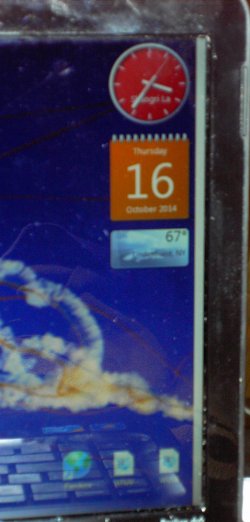
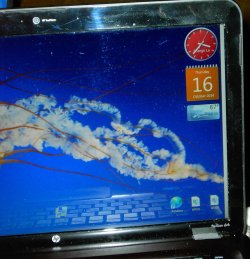
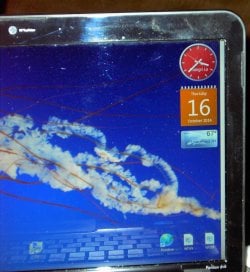
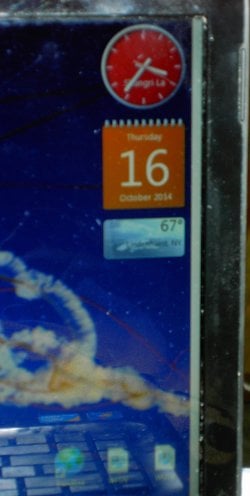
Vertical white line right side of Hp dv6t 3200 laptop display

C390

New member
Local time
2:00 PM
Messages
10
Hey all. I have a 5 yr. old HP Pavilion dv6t 3200 CTO Laptop. I have had a 1/4 " white vertical line on the right side on my display for awhile now. It is there all the time, even in safe mode, even when I run computer error scan.( Black Screen with white line still) The pointer will disappear under the white line when trying to scroll making this difficult. I have used HDMI cable to my TV and the display on it shows no white line. I then assume that it is either the screen or the display cable. I would have to open it up either way, but was wondering if there is a way to figure out which is the culprit ? Or just go for a new screen, just do not want to open it and replace screen to find out cable is bad. Any ideas ? Thanks :huh:
 

My Computer My Computer

At a glance

Windows 7 Home Premium 64-bitIntel i3-370M Dual Core Processor(2.40 Ghz,3M...8 GB. DDR3Intel HD Graphics
Computer type
Laptop
Computer Manufacturer/Model Number
HP Pavillion dv6t 3200 CTO
OS
Windows 7 Home Premium 64-bit
CPU
Intel i3-370M Dual Core Processor(2.40 Ghz,3MBL3 Cache)
Memory
8 GB. DDR3
Graphics Card(s)
Intel HD Graphics
Monitor(s) Displays
15.6"
Screen Resolution
(1366x&68)
Hard Drives
Hitachi 320GB, 7200 RPM,
Case
Black Cherry Plastic HP
Cooling
Internal Laptop
Keyboard
US Standard
Mouse
Synaptics Internal
Internet Speed
15 MBPS
Antivirus
Windows Security Essentials Free
Browser
MSN 11 & Explorer 10
I believe the HP Pavilion dv6t 3200 has integrated graphics, meaning the graphics are soldered to the motherboard.
It is possible that it is the screen, but personally i think it could be the graphics chip. You mentioned that when you connect to an external display the "white line" is no longer visible.

You refer to the cable possibly being the problem are you referring to the HDMI cable or the cable that connects the screen to the motherboard?

If you are talking about the cable that connects the screen to the motherboard, the cable is soldered to the screen therefore if it is the cable a new screen will be needed. Can you take a picture of the line you are seeing please as this will help me diagnose the problem.
 

My Computer My Computer

At a glance

Windows 7 Ultimate 64-bitIntel G3420 3.2GHZ Dual CoreKingson 8GB 1600mhzMSI R7970 TF 3GD5/OC BE
Computer type
PC/Desktop
Computer Manufacturer/Model Number
Custom Build
OS
Windows 7 Ultimate 64-bit
CPU
Intel G3420 3.2GHZ Dual Core
Motherboard
Gigabyte H87-HD3
Memory
Kingson 8GB 1600mhz
Graphics Card(s)
MSI R7970 TF 3GD5/OC BE
Monitor(s) Displays
21" LG & "19 Vertical Samsung
Hard Drives
120GB SSD - Boot
1TB WD
350GB External
2TB External (Wireless)
PSU
Corsair CX 500 modular
Case
Zalman Z11 Plus (modified)
Cooling
Corsair H55, 2x 120mm SP Corsair, 1x 140 Coolermaster
Keyboard
Corsair K50
Mouse
CSL Gaming
Internet Speed
164Mbps
Antivirus
Avast, Malwarebytes
Browser
Google Chrome, IE, Firefox
Yes I am sorry for the wording. When connected to an external moniter the line is no longer visable. I am not sure if the internle screen cable is seperate or not. I did see a cable advertised and believe them to be seperate parts ( The Screen & Cable ). Thanks for the reply.
 
Last edited:

My Computer My Computer

At a glance

Windows 7 Home Premium 64-bitIntel i3-370M Dual Core Processor(2.40 Ghz,3M...8 GB. DDR3Intel HD Graphics
Computer type
Laptop
Computer Manufacturer/Model Number
HP Pavillion dv6t 3200 CTO
OS
Windows 7 Home Premium 64-bit
CPU
Intel i3-370M Dual Core Processor(2.40 Ghz,3MBL3 Cache)
Memory
8 GB. DDR3
Graphics Card(s)
Intel HD Graphics
Monitor(s) Displays
15.6"
Screen Resolution
(1366x&68)
Hard Drives
Hitachi 320GB, 7200 RPM,
Case
Black Cherry Plastic HP
Cooling
Internal Laptop
Keyboard
US Standard
Mouse
Synaptics Internal
Internet Speed
15 MBPS
Antivirus
Windows Security Essentials Free
Browser
MSN 11 & Explorer 10
My bets would be on the ribbon cable that hooks the laptop body to the display. Its usually in one of the hinges. I've had enough of the go bad over the years from the simple day-to-day opening/closing of it.
 

My Computer My Computer

At a glance

Windows 7 Ultimate 64 biti7-3930K16Gb2 nVidia GeForce GTX550Ti in SLi
Computer type
PC/Desktop
Computer Manufacturer/Model Number
Homebuilt
OS
Windows 7 Ultimate 64 bit
CPU
i7-3930K
Motherboard
Gigabyte Socket LGA2011
Memory
16Gb
Graphics Card(s)
2 nVidia GeForce GTX550Ti in SLi
Sound Card
MB Integrated
Monitor(s) Displays
Viewsonic 22" & LG 23" in Extended Desktop
Hard Drives
480Gb SSD OS drive
2Tb secondary drive
Case
Corsair Carbon Series Spec 2
Cooling
Corsair Liquid Cooler
Keyboard
Logitech backlit
Mouse
Microsoft gaming
Internet Speed
20Mbps
Antivirus
ESET Security Suite 7
Browser
IE 11
I was thinking it might just be the internal video cable also instead of the whole screen. But what to do ? I have to open it up, and am wondering if there was a way to figure out before doing so. Thanks
 

My Computer My Computer

At a glance

Windows 7 Home Premium 64-bitIntel i3-370M Dual Core Processor(2.40 Ghz,3M...8 GB. DDR3Intel HD Graphics
Computer type
Laptop
Computer Manufacturer/Model Number
HP Pavillion dv6t 3200 CTO
OS
Windows 7 Home Premium 64-bit
CPU
Intel i3-370M Dual Core Processor(2.40 Ghz,3MBL3 Cache)
Memory
8 GB. DDR3
Graphics Card(s)
Intel HD Graphics
Monitor(s) Displays
15.6"
Screen Resolution
(1366x&68)
Hard Drives
Hitachi 320GB, 7200 RPM,
Case
Black Cherry Plastic HP
Cooling
Internal Laptop
Keyboard
US Standard
Mouse
Synaptics Internal
Internet Speed
15 MBPS
Antivirus
Windows Security Essentials Free
Browser
MSN 11 & Explorer 10
I was thinking it might just be the internal video cable also instead of the whole screen. But what to do ? I have to open it up, and am wondering if there was a way to figure out before doing so. Thanks

Sorry for my slow reply C390 (nice name ;))

It is hard to diagnose a faulty ribbon inside a laptop without looking inside, you could try to push around the bottom of the screen to see if the line gets worse or better.
 

My Computer My Computer

At a glance

Windows 7 Ultimate 64-bitIntel G3420 3.2GHZ Dual CoreKingson 8GB 1600mhzMSI R7970 TF 3GD5/OC BE
Computer type
PC/Desktop
Computer Manufacturer/Model Number
Custom Build
OS
Windows 7 Ultimate 64-bit
CPU
Intel G3420 3.2GHZ Dual Core
Motherboard
Gigabyte H87-HD3
Memory
Kingson 8GB 1600mhz
Graphics Card(s)
MSI R7970 TF 3GD5/OC BE
Monitor(s) Displays
21" LG & "19 Vertical Samsung
Hard Drives
120GB SSD - Boot
1TB WD
350GB External
2TB External (Wireless)
PSU
Corsair CX 500 modular
Case
Zalman Z11 Plus (modified)
Cooling
Corsair H55, 2x 120mm SP Corsair, 1x 140 Coolermaster
Keyboard
Corsair K50
Mouse
CSL Gaming
Internet Speed
164Mbps
Antivirus
Avast, Malwarebytes
Browser
Google Chrome, IE, Firefox
No problem with slow replies. I appreciate any reply at all. Like I said I have been using the laptop like this for a month with no change in it's behavior. I can see the cable in the hinge area and have prodded it with no visable changes..
 

My Computer My Computer

At a glance

Windows 7 Home Premium 64-bitIntel i3-370M Dual Core Processor(2.40 Ghz,3M...8 GB. DDR3Intel HD Graphics
Computer type
Laptop
Computer Manufacturer/Model Number
HP Pavillion dv6t 3200 CTO
OS
Windows 7 Home Premium 64-bit
CPU
Intel i3-370M Dual Core Processor(2.40 Ghz,3MBL3 Cache)
Memory
8 GB. DDR3
Graphics Card(s)
Intel HD Graphics
Monitor(s) Displays
15.6"
Screen Resolution
(1366x&68)
Hard Drives
Hitachi 320GB, 7200 RPM,
Case
Black Cherry Plastic HP
Cooling
Internal Laptop
Keyboard
US Standard
Mouse
Synaptics Internal
Internet Speed
15 MBPS
Antivirus
Windows Security Essentials Free
Browser
MSN 11 & Explorer 10
Here are some pictures of the screen
 

Attachments

  • 10162014 004.JPG
    10162014 004.JPG
    356.6 KB · Views: 3
  • 10162014 006.jpg
    10162014 006.jpg
    383.4 KB · Views: 3
  • 10162014 008.jpg
    10162014 008.jpg
    378.4 KB · Views: 4
  • 10162014 010.jpg
    10162014 010.jpg
    408.1 KB · Views: 3
  • 10162014 005.JPG
    10162014 005.JPG
    261.4 KB · Views: 3
Last edited:

My Computer My Computer

At a glance

Windows 7 Home Premium 64-bitIntel i3-370M Dual Core Processor(2.40 Ghz,3M...8 GB. DDR3Intel HD Graphics
Computer type
Laptop
Computer Manufacturer/Model Number
HP Pavillion dv6t 3200 CTO
OS
Windows 7 Home Premium 64-bit
CPU
Intel i3-370M Dual Core Processor(2.40 Ghz,3MBL3 Cache)
Memory
8 GB. DDR3
Graphics Card(s)
Intel HD Graphics
Monitor(s) Displays
15.6"
Screen Resolution
(1366x&68)
Hard Drives
Hitachi 320GB, 7200 RPM,
Case
Black Cherry Plastic HP
Cooling
Internal Laptop
Keyboard
US Standard
Mouse
Synaptics Internal
Internet Speed
15 MBPS
Antivirus
Windows Security Essentials Free
Browser
MSN 11 & Explorer 10
I believe the HP Pavilion dv6t 3200 has integrated graphics, meaning the graphics are soldered to the motherboard.
It is possible that it is the screen, but personally i think it could be the graphics chip. You mentioned that when you connect to an external display the "white line" is no longer visible.

You refer to the cable possibly being the problem are you referring to the HDMI cable or the cable that connects the screen to the motherboard?

If you are talking about the cable that connects the screen to the motherboard, the cable is soldered to the screen therefore if it is the cable a new screen will be needed. Can you take a picture of the line you are seeing please as this will help me diagnose the problem.
If the fault is not present on an external monitor the graphics "card" in the laptop is fine. To me that looks like either a problem with the LVDS cable or the connector or the itself screen is faulty.
 

My Computer My Computer

At a glance

Windows 7 x64 Ultimate and numerous virtual m...AMD FX-8350 Vishera 32nm Technology @ 4.2 GHz...G Skill 32.0GB Dual-Channel DDR3 @ 1204MHz (1...EVGA GeForce GTX 960 4GB Super SC ACX 2.0+ wi...
Computer type
PC/Desktop
Computer Manufacturer/Model Number
Bluethunder II
OS
Windows 7 x64 Ultimate and numerous virtual machines
CPU
AMD FX-8350 Vishera 32nm Technology @ 4.2 GHz default
Motherboard
ASUSTeK COMPUTER INC. SABERTOOTH 990FX R2.0 (Socket 942)
Memory
G Skill 32.0GB Dual-Channel DDR3 @ 1204MHz (11-13-13-31)
Graphics Card(s)
EVGA GeForce GTX 960 4GB Super SC ACX 2.0+ with Back Plate
Sound Card
Creative X-Fi Titanium HD Audiophile PCIe
Monitor(s) Displays
LG L227WTG x 3
Screen Resolution
1680 x 1050 16:10
Hard Drives
238GB Samsung850 PRO SATA Disk Device (SSD)
1863GB Seagate ST2000DM 001-1CH164 (SATA)
1397GB Seagate ST1500DL 003-9VT16L(SATA)
466GB Western Digital WDC WD50 03AZEX-00K1GA0 (SATA) x 2
932GB Seagate ST310005 28AS SATA Disk Device (SATA)
PSU
Enermax Revolution87+ 1000 Watts Gold Certified Power Supply
Case
Rocketfish Full Tower
Cooling
Cooler Master Hyper 212 EVO Push Pull 120mm Fans
Keyboard
Logitech K740
Mouse
Logitech G100S Laser LED + Logitech Gamepad F310
Internet Speed
500 mbs down and 30mbs up
Antivirus
Malwarebytes Pro & Avast and MSE on certain Virtual Machines
Browser
Firefox (Main) Chrome, Internet Explorer (Back Up)
Other Info
Logitech X 230 2.1 Stereo System and 5.1 Yamaha RX V2090
B&W DM6 Monitor Speakers + Center and Surround Speakers
Using Mouse Without Borders (Google it)
When connected to an external monitor the line is no longer visible.
My bets would be on the ribbon cable [..]

Yeah, seems to be straight-forward since the external monitor works *fine*. :)

P.S.
Here are some pictures of the screen

Lolz, the whole computer looks pretty trashed! xD

No wonder, the problem(s), hehe. ;-$

It is possible that it is the screen, but personally i think it could be the graphics chip.
If the fault is not present on an external monitor the graphics "card" in the laptop is fine..
+1

Edit: However, ofc., there's the remote-possibility that something other than the laptop monitor is borked! Heh. :-f
 

My Computer My Computer

At a glance

Windows 7 Professional x64 Service Pack 1i7-3770 Ivy, MSI OC genie OC'd (default)Vengeance 2x4GB 2133MHz (OC'd)GTX 650 Gainward
Computer type
PC/Desktop
Computer Manufacturer/Model Number
Custom
OS
Windows 7 Professional x64 Service Pack 1
CPU
i7-3770 Ivy, MSI OC genie OC'd (default)
Motherboard
Z68A-G43 (G3), MSI
Memory
Vengeance 2x4GB 2133MHz (OC'd)
Graphics Card(s)
GTX 650 Gainward
Monitor(s) Displays
BenQ E2200HD
Screen Resolution
1920x1080
Hard Drives
WD 1TB 64MB sATA; LC-Power LC-PRO-25WU; IT-350SA
PSU
LC7600v2.3
Case
ALTO winwin.rs/
Cooling
Stock / standard
Keyboard
Logitech Alto
Mouse
Genius DeathTaker
Internet Speed
25 (megabits / second) = 3125 KBps = (25.600/2.048)
Antivirus
Comodo
Browser
Mozilla
Other Info
http://valid.canardpc.com/mcdty0
Nostromov, No the laptop is old, but the pictures came out a little weird. It is not that bad looking. I keep this one because I can't seem to find a new 15.6" with a centered mouse pad. The new ones all have the number pad keyboards and the mouse pad to the left. Not for me. I won;t say this one is in like new condition, but works fine considering how many people have problems with HP laptops new and old. Thanks HarriePateman, I got the name from heads up power supplies I used to make for Harrier Jump Jets back in the '80's. The model # was 390. I helped the English keep the Argentine's in line over the Faukland Iislands. many moons ago. The Harrier worked so well the US Marines, Navy came calling and I worked with them all. Thanks everyone, I guess I will start with a new display cable and work from there. Any other comments and replies welcome .:D
 

My Computer My Computer

At a glance

Windows 7 Home Premium 64-bitIntel i3-370M Dual Core Processor(2.40 Ghz,3M...8 GB. DDR3Intel HD Graphics
Computer type
Laptop
Computer Manufacturer/Model Number
HP Pavillion dv6t 3200 CTO
OS
Windows 7 Home Premium 64-bit
CPU
Intel i3-370M Dual Core Processor(2.40 Ghz,3MBL3 Cache)
Memory
8 GB. DDR3
Graphics Card(s)
Intel HD Graphics
Monitor(s) Displays
15.6"
Screen Resolution
(1366x&68)
Hard Drives
Hitachi 320GB, 7200 RPM,
Case
Black Cherry Plastic HP
Cooling
Internal Laptop
Keyboard
US Standard
Mouse
Synaptics Internal
Internet Speed
15 MBPS
Antivirus
Windows Security Essentials Free
Browser
MSN 11 & Explorer 10
I keep this one because I can't seem to find a new 15.6" with a centered mouse pad. The new ones all have the number pad keyboards and the mouse pad to the left. Not for me.
Ugh, a "new one" - as in: buying a brand-new won, from a store? :-0

^^ Why not search through the classifieds, or something, in order to find a computer similar to what you got - for something CHEAP? :D
 
Last edited:

My Computer My Computer

At a glance

Windows 7 Professional x64 Service Pack 1i7-3770 Ivy, MSI OC genie OC'd (default)Vengeance 2x4GB 2133MHz (OC'd)GTX 650 Gainward
Computer type
PC/Desktop
Computer Manufacturer/Model Number
Custom
OS
Windows 7 Professional x64 Service Pack 1
CPU
i7-3770 Ivy, MSI OC genie OC'd (default)
Motherboard
Z68A-G43 (G3), MSI
Memory
Vengeance 2x4GB 2133MHz (OC'd)
Graphics Card(s)
GTX 650 Gainward
Monitor(s) Displays
BenQ E2200HD
Screen Resolution
1920x1080
Hard Drives
WD 1TB 64MB sATA; LC-Power LC-PRO-25WU; IT-350SA
PSU
LC7600v2.3
Case
ALTO winwin.rs/
Cooling
Stock / standard
Keyboard
Logitech Alto
Mouse
Genius DeathTaker
Internet Speed
25 (megabits / second) = 3125 KBps = (25.600/2.048)
Antivirus
Comodo
Browser
Mozilla
Other Info
http://valid.canardpc.com/mcdty0
My initial thought: live with it (as it's on the far side the impact is not that serious, the pc is still useable). Trying to repair it may cost (and things many become worse\break from the repair attempt), save the money for a new laptop, sooner or later a necessity.

But of course if you know what you're doing (or have help), try a fix if you feel secure. btw, regularly back up all your important files, never know if the HD will be next in line showing symptoms of age and use... Good luck.
 

My Computer My Computer

At a glance

W7, W8.1
Computer type
Laptop
Computer Manufacturer/Model Number
Dell \ Lenovo\ HP \ Toshiba
OS
W7, W8.1
Antivirus
MSE, Malwarebytes
Browser
FF
Well I ordered a new video cable for $13 and am waiting for it. Will give it a shot,. Not much to lose as it is 5 years old. I have no problems with opening it up, just putting it back together ! LOL I agree it does not impact much as far as peformance. Again I don;t see many laptops with the center mouse pad, so I would like to keep this one going for now. I want to thank you all for your replies and will let you know how it turns out. :shock:
 

My Computer My Computer

At a glance

Windows 7 Home Premium 64-bitIntel i3-370M Dual Core Processor(2.40 Ghz,3M...8 GB. DDR3Intel HD Graphics
Computer type
Laptop
Computer Manufacturer/Model Number
HP Pavillion dv6t 3200 CTO
OS
Windows 7 Home Premium 64-bit
CPU
Intel i3-370M Dual Core Processor(2.40 Ghz,3MBL3 Cache)
Memory
8 GB. DDR3
Graphics Card(s)
Intel HD Graphics
Monitor(s) Displays
15.6"
Screen Resolution
(1366x&68)
Hard Drives
Hitachi 320GB, 7200 RPM,
Case
Black Cherry Plastic HP
Cooling
Internal Laptop
Keyboard
US Standard
Mouse
Synaptics Internal
Internet Speed
15 MBPS
Antivirus
Windows Security Essentials Free
Browser
MSN 11 & Explorer 10
Back
Top