
VERY BIZZARE!!!--Win 7 pro 64 -bit 2 adapters

Brevmeister

New member
---------------------------I know its long but please just reead--------------------
I built my computer a few months ago and purchased Win 7 pro 64 bit also not long after, i purchased a linksys WUSB600N wireless adapter and found out there are no drivers for it and i coulnt get anything to work until one day i discovered the Xp Mode. so installed that and connected that with my old D-link adapter to that for my only means of internet until i could get this figured out. I installed the drivers for the Linksys adpter from the list of adapters that came intagrated in win 7 and those did not work but it said it was working properly. then i noticed it would connect every once in a while to our wirless network then to find out it would only work when the d-link adapter was connected through the virtual machine. I am trying to figure out a way to not use the d-link/ virtual machine anymore. Sometimes when i unplug the d-link adapter and close Xp mode/ Virtual machine it will work for a lil bit and then get cut off but for some reason it needs the xp mode connection to work. I am gettin about 130mbps from this which i know more is capable. and it seems to me that it creates a LAN connection with the virtual machine because it will say a LAN is connected in the vitual machine. i just need some explanation or some help on how to get rid of the second adapter. windows will not allow me to install any other drivers than what is already installed i find this very odd i could use some help i amd pretty good with computers so a lil bit of anything will help.

p.s.-sry for this being so long

- Thank You
 

My Computer

Computer Manufacturer/Model Number
Custom
OS
Windows 7 Pro 94-bit
CPU
i7-860
Motherboard
Gigabyte P55M-UD2
Memory
4BG DDR3 Corshair xms3
Graphics Card(s)
Nvidia Geforce 9800 GT
Sound Card
on Board
Monitor(s) Displays
19" Acer X193w
Hard Drives
160GB SATA Western Digital
PSU
600W OCZ Steal X-Stream
Case
Antec Three Hundred mini tower
Cooling
1 intake 3 output fans (all 120mm)
---------------------------I know its long but please just reead--------------------
I built my computer a few months ago and purchased Win 7 pro 64 bit also not long after, i purchased a linksys WUSB600N wireless adapter and found out there are no drivers for it and i coulnt get anything to work until one day i discovered the Xp Mode. so installed that and connected that with my old D-link adapter to that for my only means of internet until i could get this figured out. I installed the drivers for the Linksys adpter from the list of adapters that came intagrated in win 7 and those did not work but it said it was working properly. then i noticed it would connect every once in a while to our wirless network then to find out it would only work when the d-link adapter was connected through the virtual machine. I am trying to figure out a way to not use the d-link/ virtual machine anymore. Sometimes when i unplug the d-link adapter and close Xp mode/ Virtual machine it will work for a lil bit and then get cut off but for some reason it needs the xp mode connection to work. I am gettin about 130mbps from this which i know more is capable. and it seems to me that it creates a LAN connection with the virtual machine because it will say a LAN is connected in the vitual machine. i just need some explanation or some help on how to get rid of the second adapter. windows will not allow me to install any other drivers than what is already installed i find this very odd i could use some help i amd pretty good with computers so a lil bit of anything will help.

p.s.-sry for this being so long

- Thank You

Perhaps could you provide a screenshot of your Device Manager and a screenshot of Network Center?

That might be helpful.
 

My Computer

Computer type
PC/Desktop
Computer Manufacturer/Model Number
Custom Build
OS
Windows 7 Professional SP1 - x64 [Non-UEFI Boot]
CPU
Ivy Bridge Core i5 3570K (Delidded)
Motherboard
Asus P8Z77-V LE PLUS
Memory
G.Skill "Ares" DDR3 PC3-12800 - 1600MHz (16Gb)
Graphics Card(s)
Asus Dual-RX480-O4G
Sound Card
Creative Sound Blaster Z w/5.1 sound system
Monitor(s) Displays
Asus IPS 23"
Screen Resolution
16/9
Hard Drives
Internal:
500Go Sata 6Gb/s (x2)
500Go Sata 3Gb/s (x2)
SSD 60Go Sata 6Gb/s
PSU
In Win C 900W Series 80+ Platinum
Case
Thermaltake Chaser A71
Cooling
Custom Water Cooling Loop
Keyboard
Cooler Master QuickFire XTi
Mouse
Razer Imperator 2012 (4G)
Antivirus
MSE
Browser
IE 11.0.xxx Rtm
Other Info
"Raid0" with Intel Smart Response Technology (HDD/SSD)
of wat exactly in the device manager and network center ?
 

My Computer

Computer Manufacturer/Model Number
Custom
OS
Windows 7 Pro 94-bit
CPU
i7-860
Motherboard
Gigabyte P55M-UD2
Memory
4BG DDR3 Corshair xms3
Graphics Card(s)
Nvidia Geforce 9800 GT
Sound Card
on Board
Monitor(s) Displays
19" Acer X193w
Hard Drives
160GB SATA Western Digital
PSU
600W OCZ Steal X-Stream
Case
Antec Three Hundred mini tower
Cooling
1 intake 3 output fans (all 120mm)
of wat exactly in the device manager and network center ?

You have fill your specifications pretty well on SevenForums...

You should be able to find those in your "Control Panel" from the Start Menu...


EDIT:
Welcome to Forums and hope you'll get all answers you might need in the future, here.
 
Last edited:

My Computer

Computer type
PC/Desktop
Computer Manufacturer/Model Number
Custom Build
OS
Windows 7 Professional SP1 - x64 [Non-UEFI Boot]
CPU
Ivy Bridge Core i5 3570K (Delidded)
Motherboard
Asus P8Z77-V LE PLUS
Memory
G.Skill "Ares" DDR3 PC3-12800 - 1600MHz (16Gb)
Graphics Card(s)
Asus Dual-RX480-O4G
Sound Card
Creative Sound Blaster Z w/5.1 sound system
Monitor(s) Displays
Asus IPS 23"
Screen Resolution
16/9
Hard Drives
Internal:
500Go Sata 6Gb/s (x2)
500Go Sata 3Gb/s (x2)
SSD 60Go Sata 6Gb/s
PSU
In Win C 900W Series 80+ Platinum
Case
Thermaltake Chaser A71
Cooling
Custom Water Cooling Loop
Keyboard
Cooler Master QuickFire XTi
Mouse
Razer Imperator 2012 (4G)
Antivirus
MSE
Browser
IE 11.0.xxx Rtm
Other Info
"Raid0" with Intel Smart Response Technology (HDD/SSD)
oook that doesnt answer my question. i know i filled the specs very well i thought i just want to know wat to take a screen shot of?
 

My Computer

Computer Manufacturer/Model Number
Custom
OS
Windows 7 Pro 94-bit
CPU
i7-860
Motherboard
Gigabyte P55M-UD2
Memory
4BG DDR3 Corshair xms3
Graphics Card(s)
Nvidia Geforce 9800 GT
Sound Card
on Board
Monitor(s) Displays
19" Acer X193w
Hard Drives
160GB SATA Western Digital
PSU
600W OCZ Steal X-Stream
Case
Antec Three Hundred mini tower
Cooling
1 intake 3 output fans (all 120mm)
Type " device manager " in the the start menu and hit enter (or select from the list as you type)

This will open the Device manager:

Scroll down to Network Adapters and click on the arrow to expand

Use the Snipping Tool to take a screenshot of the device manager (type " snipping " in the start menu )

Follow this on how to upload the picture.

ie:

Device.JPG
 

My Computer

Computer type
PC/Desktop
Computer Manufacturer/Model Number
Systems by SmartEyeball
OS
8 Pro x64
CPU
i7 3770K 4.6GHz
Motherboard
ASUS P8Z77 WS
Memory
16GB G.Skill Trident X 2666mhz
Graphics Card(s)
x2 EVGA 780 Ti Superclocked SLI
Sound Card
SB X-FI Surround 5.1 PRO USB / ATH-AD900 Headphones
Monitor(s) Displays
x3 Dell U2410 / 58" Samsung
Screen Resolution
5760*1200/ 1920*1200
Hard Drives
2x Intel 520 240GB (RAID 0) * 2x WD Caviar Blacks 2TB (RAID 0) * 2TB WD Caviar Black * Sony Optirac DVD
PSU
Silverstone Strider Evolution 1200W
Case
Thermaltake Level 10 GT Snow Edition
Cooling
Noctua NH-D14
Keyboard
Topre Realforce // Ducky Shine MX Black // Filco Ninja TKL
Mouse
Thermaltake Theron (Highly Recommended) + Razer Imperator
Antivirus
MSE
Browser
IE, FF, WaterFox
Other Info
GT Extreme V2 Sim Racing Cockpit + 40" LCD and K/B Mouse stand ▼
Fanatec CSR Elite Wheel + Clubsport V1 Pedals + CSR shifter/7G-H ▼Saitek X52 Pro ▼ TrackIR 5 Pro
Buttkicker v2 Seat Rumbler with Dedicated 5.1 and Sub Woofer attached to frame ▼
=
Bloody Big Grin
why do you need thiis
 

My Computer

Computer Manufacturer/Model Number
Custom
OS
Windows 7 Pro 94-bit
CPU
i7-860
Motherboard
Gigabyte P55M-UD2
Memory
4BG DDR3 Corshair xms3
Graphics Card(s)
Nvidia Geforce 9800 GT
Sound Card
on Board
Monitor(s) Displays
19" Acer X193w
Hard Drives
160GB SATA Western Digital
PSU
600W OCZ Steal X-Stream
Case
Antec Three Hundred mini tower
Cooling
1 intake 3 output fans (all 120mm)
why do you need thiis

If you open the screen shot smartyeyeball posted you'd see there are ? marks highlighted.

These mean the devices are recognized by the OS but no drivers were loaded.

It also gives a good deal of information as to what you have in your PC.

Anyone trying to help would benefit knowing what your devices look like since they are not sitting next to you and able to pull up this screen, only trying to help you.
 

My Computer

Computer Manufacturer/Model Number
DELL XPS Studio 435T
OS
Vista 64 Ultimate, Windows 7 64 Ultimate, Ubuntu 9.10
CPU
i7 975 3.3 GHz Extreme (Factory OC'd to 3.6 GHz)
Motherboard
DELL provided
Memory
18 Gb Tri-Channel 1066
Graphics Card(s)
ATI 5970 2048 Mb
Sound Card
X-Fi Extreme Gamer
Monitor(s) Displays
Vizio 37" HD-TV
Screen Resolution
1920 x 1080
Hard Drives
1.5 Tb HDD
1.5 Tb HDD
2.0 Tb Network Drive
512 Gb Crucial SSD
PSU
DELL Provided 475 watts
Case
DELL
Cooling
3 fans
Keyboard
Logitech Performance K350 Wireless
Mouse
Logitech Performance MX Wireless
Internet Speed
3 Mb up 750 Kb down
Other Info
Bamboo Fun Tablet, Belkin N+ Wireless router, Pioneer Dolby System Wireless Headphones, Bose 5.1 Dolby Surround Sound System, LifeCam VX 3000 Webcam, Blu-Ray/Hi Def DVD +RW combo and Blu-ray +RW,l 15 in 1 media card reader, Logitech Rumblepad 2, Hauppauge 2250 DTV Tuner with MS Media Center Remote

Laptop:Alienware M17x, Q9100 CPU, 8Gb RAM, 1920x1200 WUXGA LCD driven by 4870's in CrossFireX, Bl

My Computer

Computer Manufacturer/Model Number
Self Built
OS
Windows 7 ultimate 64 bit / XP Home sp3
CPU
intel Core 2 Duo E8400 3.0ghz
Motherboard
Asus P5ND bios 1401
Memory
8 gigs 1066 OCZ Fata1ty
Graphics Card(s)
EVGA GTX 580 Call of Duty Black Ops Edition
Sound Card
Creative Soundblaster Audigy 2zs
Monitor(s) Displays
Asus 24in LCD's 2MS X2
Screen Resolution
1920x1080p @60Hz
Hard Drives
WD Caviar 500 Black/ WD Caviar 200 Blue
PSU
OCZ 700W GameXtreme
Case
NZXT Apollo
Cooling
Corsair H50 CPU/120mm x3 /60mm x2 /Corsair Dominator Ram
Keyboard
Logitech Bluetooth Wireless MX5000
Mouse
Logitech Bluetooth Wireless MX1000
Internet Speed
Download 19.83 Upload 0.97
Other Info
Logitech Z2300 Speakers/ Bose Noise Cancelling Headphones/Avermedia PCI-e Hybrid TV Bravo/Epson NX415 all in one/ 4 Port Powered USB Hub/ LG 10x Bluray Burner /TSST Corp DVDRW External
Perhaps could you provide a screenshot of your Device Manager and a screenshot of Network Center?

That might be helpful.

of wat exactly in the device manager and network center ?

i know i filled the specs very well i thought i just want to know wat to take a screen shot of?

why do you need thiis

Because we are trying to help you. NoN asked you to post a screenshot - you asked of what, I provided an example exactly of what, and how to do it.


Your original post outlined issues with improper drivers, intermittent connection issues and needing XP mode etc

A simple screenshot of your network adapters could possibly help identify any apparent conflicts / problems with the currently installed network drivers.


(P.S - it's Windows 7 Pro x64 not x94 )
 

My Computer

Computer type
PC/Desktop
Computer Manufacturer/Model Number
Systems by SmartEyeball
OS
8 Pro x64
CPU
i7 3770K 4.6GHz
Motherboard
ASUS P8Z77 WS
Memory
16GB G.Skill Trident X 2666mhz
Graphics Card(s)
x2 EVGA 780 Ti Superclocked SLI
Sound Card
SB X-FI Surround 5.1 PRO USB / ATH-AD900 Headphones
Monitor(s) Displays
x3 Dell U2410 / 58" Samsung
Screen Resolution
5760*1200/ 1920*1200
Hard Drives
2x Intel 520 240GB (RAID 0) * 2x WD Caviar Blacks 2TB (RAID 0) * 2TB WD Caviar Black * Sony Optirac DVD
PSU
Silverstone Strider Evolution 1200W
Case
Thermaltake Level 10 GT Snow Edition
Cooling
Noctua NH-D14
Keyboard
Topre Realforce // Ducky Shine MX Black // Filco Ninja TKL
Mouse
Thermaltake Theron (Highly Recommended) + Razer Imperator
Antivirus
MSE
Browser
IE, FF, WaterFox
Other Info
GT Extreme V2 Sim Racing Cockpit + 40" LCD and K/B Mouse stand ▼
Fanatec CSR Elite Wheel + Clubsport V1 Pedals + CSR shifter/7G-H ▼Saitek X52 Pro ▼ TrackIR 5 Pro
Buttkicker v2 Seat Rumbler with Dedicated 5.1 and Sub Woofer attached to frame ▼
=
Bloody Big Grin
of wat exactly in the device manager and network center ?

Sorry, i was away for an entire week...

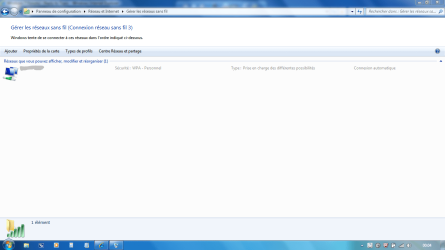
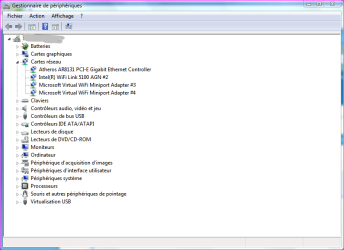
I was asking you to post screenshots because i wanted to see the adpaters used in your device manager and how it was set either in the network center...

I was hoping aswell some of us could help you in native language, as you might have noticed in the screenshots!

Have you resolved your issue?
 

Attachments

  • Capture.PNG
    Capture.PNG
    198.3 KB · Views: 7
  • Capture2.PNG
    Capture2.PNG
    78 KB · Views: 9

My Computer

Computer type
PC/Desktop
Computer Manufacturer/Model Number
Custom Build
OS
Windows 7 Professional SP1 - x64 [Non-UEFI Boot]
CPU
Ivy Bridge Core i5 3570K (Delidded)
Motherboard
Asus P8Z77-V LE PLUS
Memory
G.Skill "Ares" DDR3 PC3-12800 - 1600MHz (16Gb)
Graphics Card(s)
Asus Dual-RX480-O4G
Sound Card
Creative Sound Blaster Z w/5.1 sound system
Monitor(s) Displays
Asus IPS 23"
Screen Resolution
16/9
Hard Drives
Internal:
500Go Sata 6Gb/s (x2)
500Go Sata 3Gb/s (x2)
SSD 60Go Sata 6Gb/s
PSU
In Win C 900W Series 80+ Platinum
Case
Thermaltake Chaser A71
Cooling
Custom Water Cooling Loop
Keyboard
Cooler Master QuickFire XTi
Mouse
Razer Imperator 2012 (4G)
Antivirus
MSE
Browser
IE 11.0.xxx Rtm
Other Info
"Raid0" with Intel Smart Response Technology (HDD/SSD)
OK it doesnt have question marks ik somethin isnt right when there is im not stupid i was just wonderin if anyone had any correct drivers to go with my adapter it will not allow me to delete the device/unistall and or install other drivers over it
 

My Computer

Computer Manufacturer/Model Number
Custom
OS
Windows 7 Pro 94-bit
CPU
i7-860
Motherboard
Gigabyte P55M-UD2
Memory
4BG DDR3 Corshair xms3
Graphics Card(s)
Nvidia Geforce 9800 GT
Sound Card
on Board
Monitor(s) Displays
19" Acer X193w
Hard Drives
160GB SATA Western Digital
PSU
600W OCZ Steal X-Stream
Case
Antec Three Hundred mini tower
Cooling
1 intake 3 output fans (all 120mm)
oh no i have not
 

Attachments

My Computer

Computer Manufacturer/Model Number
Custom
OS
Windows 7 Pro 94-bit
CPU
i7-860
Motherboard
Gigabyte P55M-UD2
Memory
4BG DDR3 Corshair xms3
Graphics Card(s)
Nvidia Geforce 9800 GT
Sound Card
on Board
Monitor(s) Displays
19" Acer X193w
Hard Drives
160GB SATA Western Digital
PSU
600W OCZ Steal X-Stream
Case
Antec Three Hundred mini tower
Cooling
1 intake 3 output fans (all 120mm)
oh no i have not


Ok I was reading Cisco forums...and looks manies have the same probs as you and do not find the proper 7 x64 drivers.

So, you better install the Vista x64 drivers instead.


EDIT:
I found Windows 7 Drivers for x32 & x64 and there is two versions of it, v1 & v2

Try those new one from Cisco Site dated 03/24/2010:

v2 is: 3.0.10.0,1 for the Usb Key 2
v1 is: 3.0.10.0 for the Usb Key 1
 

Attachments

My Computer

Computer type
PC/Desktop
Computer Manufacturer/Model Number
Custom Build
OS
Windows 7 Professional SP1 - x64 [Non-UEFI Boot]
CPU
Ivy Bridge Core i5 3570K (Delidded)
Motherboard
Asus P8Z77-V LE PLUS
Memory
G.Skill "Ares" DDR3 PC3-12800 - 1600MHz (16Gb)
Graphics Card(s)
Asus Dual-RX480-O4G
Sound Card
Creative Sound Blaster Z w/5.1 sound system
Monitor(s) Displays
Asus IPS 23"
Screen Resolution
16/9
Hard Drives
Internal:
500Go Sata 6Gb/s (x2)
500Go Sata 3Gb/s (x2)
SSD 60Go Sata 6Gb/s
PSU
In Win C 900W Series 80+ Platinum
Case
Thermaltake Chaser A71
Cooling
Custom Water Cooling Loop
Keyboard
Cooler Master QuickFire XTi
Mouse
Razer Imperator 2012 (4G)
Antivirus
MSE
Browser
IE 11.0.xxx Rtm
Other Info
"Raid0" with Intel Smart Response Technology (HDD/SSD)
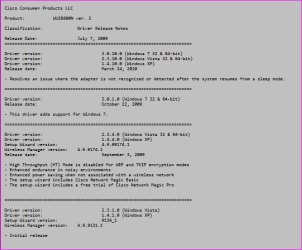
Here the release note for v1:
 

Attachments

  • Capture.PNG
    Capture.PNG
    24.5 KB · Views: 10

My Computer

Computer type
PC/Desktop
Computer Manufacturer/Model Number
Custom Build
OS
Windows 7 Professional SP1 - x64 [Non-UEFI Boot]
CPU
Ivy Bridge Core i5 3570K (Delidded)
Motherboard
Asus P8Z77-V LE PLUS
Memory
G.Skill "Ares" DDR3 PC3-12800 - 1600MHz (16Gb)
Graphics Card(s)
Asus Dual-RX480-O4G
Sound Card
Creative Sound Blaster Z w/5.1 sound system
Monitor(s) Displays
Asus IPS 23"
Screen Resolution
16/9
Hard Drives
Internal:
500Go Sata 6Gb/s (x2)
500Go Sata 3Gb/s (x2)
SSD 60Go Sata 6Gb/s
PSU
In Win C 900W Series 80+ Platinum
Case
Thermaltake Chaser A71
Cooling
Custom Water Cooling Loop
Keyboard
Cooler Master QuickFire XTi
Mouse
Razer Imperator 2012 (4G)
Antivirus
MSE
Browser
IE 11.0.xxx Rtm
Other Info
"Raid0" with Intel Smart Response Technology (HDD/SSD)
Side track... I read this thread because I'm not able to use W7 HPro 64 with my Palm PDA, no driver for the USB sync cable nor for an IR Dingle I purchased.

But, the great instruction herein on how to do a screen shot was very constructive/helpful on using W7...I think I may learn to "love" Windows 7, notwithstanding the lack of drivers.

Can I run XP simulation on W7 HPro?
 

My Computer

OS
Windows 7 Home Premium
Side track... I read this thread because I'm not able to use W7 HPro 64 with my Palm PDA, no driver for the USB sync cable nor for an IR Dingle I purchased.

But, the great instruction herein on how to do a screen shot was very constructive/helpful on using W7...I think I may learn to "love" Windows 7, notwithstanding the lack of drivers.

Can I run XP simulation on W7 HPro?

You mean "XP Mode"....yes!

http://www.sevenforums.com/tutorials/8247-windows-xp-mode-install-setup.html
 

My Computer

Computer type
PC/Desktop
Computer Manufacturer/Model Number
Custom Build
OS
Windows 7 Professional SP1 - x64 [Non-UEFI Boot]
CPU
Ivy Bridge Core i5 3570K (Delidded)
Motherboard
Asus P8Z77-V LE PLUS
Memory
G.Skill "Ares" DDR3 PC3-12800 - 1600MHz (16Gb)
Graphics Card(s)
Asus Dual-RX480-O4G
Sound Card
Creative Sound Blaster Z w/5.1 sound system
Monitor(s) Displays
Asus IPS 23"
Screen Resolution
16/9
Hard Drives
Internal:
500Go Sata 6Gb/s (x2)
500Go Sata 3Gb/s (x2)
SSD 60Go Sata 6Gb/s
PSU
In Win C 900W Series 80+ Platinum
Case
Thermaltake Chaser A71
Cooling
Custom Water Cooling Loop
Keyboard
Cooler Master QuickFire XTi
Mouse
Razer Imperator 2012 (4G)
Antivirus
MSE
Browser
IE 11.0.xxx Rtm
Other Info
"Raid0" with Intel Smart Response Technology (HDD/SSD)
[QUOTEOk I was reading Cisco forums...and looks manies have the same probs as you and do not find the proper 7 x64 drivers.

So, you better install the Vista x64 drivers instead.


EDIT:
I found Windows 7 Drivers for x32 & x64 and there is two versions of it, v1 & v2

Try those new one from Cisco Site dated 03/24/2010:

v2 is: 3.0.10.0,1 for the Usb Key 2
v1 is: 3.0.10.0 for the Usb Key 1
Attached Files
zip.gif
WUSB600Nv2-Win7_3.0.10.0,1.zip (982.9 KB, 0 views)
zip.gif
WUSB600Nv2-Win7_3.0.10.0.zip (982.9 KB, 0 views)
][/QUOTE]


i installed the v2 one just fine after i unistalled the others but i still have to use xp mode for it to see networks
 

My Computer

Computer Manufacturer/Model Number
Custom
OS
Windows 7 Pro 94-bit
CPU
i7-860
Motherboard
Gigabyte P55M-UD2
Memory
4BG DDR3 Corshair xms3
Graphics Card(s)
Nvidia Geforce 9800 GT
Sound Card
on Board
Monitor(s) Displays
19" Acer X193w
Hard Drives
160GB SATA Western Digital
PSU
600W OCZ Steal X-Stream
Case
Antec Three Hundred mini tower
Cooling
1 intake 3 output fans (all 120mm)
oh no i have not


Ok I was reading Cisco forums...and looks manies have the same probs as you and do not find the proper 7 x64 drivers.

So, you better install the Vista x64 drivers instead.


EDIT:
I found Windows 7 Drivers for x32 & x64 and there is two versions of it, v1 & v2

Try those new one from Cisco Site dated 03/24/2010:

v2 is: 3.0.10.0,1 for the Usb Key 2
v1 is: 3.0.10.0 for the Usb Key 1


i installed the v2 one just fine after i unistalled the others but i still have to use xp mode for it to see networks
 

My Computer

Computer Manufacturer/Model Number
Custom
OS
Windows 7 Pro 94-bit
CPU
i7-860
Motherboard
Gigabyte P55M-UD2
Memory
4BG DDR3 Corshair xms3
Graphics Card(s)
Nvidia Geforce 9800 GT
Sound Card
on Board
Monitor(s) Displays
19" Acer X193w
Hard Drives
160GB SATA Western Digital
PSU
600W OCZ Steal X-Stream
Case
Antec Three Hundred mini tower
Cooling
1 intake 3 output fans (all 120mm)
oh no i have not


Ok I was reading Cisco forums...and looks manies have the same probs as you and do not find the proper 7 x64 drivers.

So, you better install the Vista x64 drivers instead.


EDIT:
I found Windows 7 Drivers for x32 & x64 and there is two versions of it, v1 & v2

Try those new one from Cisco Site dated 03/24/2010:

v2 is: 3.0.10.0,1 for the Usb Key 2
v1 is: 3.0.10.0 for the Usb Key 1


i installed the v2 one just fine after i unistalled the others but i still have to use xp mode for it to see networks


Humm, That's very tough! I do not own that Cisco Adapter so i'm feeling not very much helpy, now.

You've got the Windows 7 drivers and it won't work!!!!:(
 
Last edited:

My Computer

Computer type
PC/Desktop
Computer Manufacturer/Model Number
Custom Build
OS
Windows 7 Professional SP1 - x64 [Non-UEFI Boot]
CPU
Ivy Bridge Core i5 3570K (Delidded)
Motherboard
Asus P8Z77-V LE PLUS
Memory
G.Skill "Ares" DDR3 PC3-12800 - 1600MHz (16Gb)
Graphics Card(s)
Asus Dual-RX480-O4G
Sound Card
Creative Sound Blaster Z w/5.1 sound system
Monitor(s) Displays
Asus IPS 23"
Screen Resolution
16/9
Hard Drives
Internal:
500Go Sata 6Gb/s (x2)
500Go Sata 3Gb/s (x2)
SSD 60Go Sata 6Gb/s
PSU
In Win C 900W Series 80+ Platinum
Case
Thermaltake Chaser A71
Cooling
Custom Water Cooling Loop
Keyboard
Cooler Master QuickFire XTi
Mouse
Razer Imperator 2012 (4G)
Antivirus
MSE
Browser
IE 11.0.xxx Rtm
Other Info
"Raid0" with Intel Smart Response Technology (HDD/SSD)
Back
Top