Very high temps on Asus G50VT--fan is clean

robertpri

New member
Local time
5:43 PM
Messages
46
On another thread, I noted a high screeching sound when restarting, and my son mentioned that high temps can cause odd problems.

I installed Speefan 4.44 and sure enough, the temps are high.
GPU: 74C
hard drives okay
Temp1 59C
core1 52C
core2 52C

Shutdown and removed bottom and found the fan to be very clean. Recleaned anyway, includin air inlet.

Booted to the battery [I was on the kitchen table] and temps were very good:

GPU: 48C
everything else <45C

Happy happy!

It ran 15 minutes with no problems. Put the cover back on and retested with same temps.

Shutdown and moved latop to it's place, and connected the usual USB devices, mouse, KB, ESATA drive, speakers, printer, etc.

Booted and all temps went sky high!
GPU began at 55 and climbed to 74C
all other temps crept up.

Can USB devices cause this? I elevated the laptop to give the fan inlet plenty of breathing room--no help.

I've had this laptop three years and the first time I have tested temps, so don't know if this heat problem is new, or it's aways been running hot.
 

My Computer My Computer

At a glance

Win 7 - 64 Pro2.284 gb? laptop
Computer Manufacturer/Model Number
Asus G50 and Toshiba L505
OS
Win 7 - 64 Pro
CPU
2.28
Motherboard
?- asus laptop
Memory
4 gb
Graphics Card(s)
? laptop
Sound Card
? laptop
Monitor(s) Displays
dual display, laptop and 24" Samsung
Hard Drives
two 250gb drives in laptop and one 250 Esata
PSU
laptop
Case
laptop
Cooling
laptop

My Computer My Computer

At a glance

Windows 7 Ultimate 64i7 3770k OC'd 4.6 @ 1.17v, also FX 8120 & i5 ...32 gb G.Skill Sniper DDR3 10-12-12-31 @ 2133XFX Radeon 7870 2GB DDR5
Computer type
PC/Desktop
Computer Manufacturer/Model Number
A blend of brains, brawn and dumb luck.
OS
Windows 7 Ultimate 64
CPU
i7 3770k OC'd 4.6 @ 1.17v, also FX 8120 & i5 miniITX
Motherboard
MSI P67A-GD80 b3
Memory
32 gb G.Skill Sniper DDR3 10-12-12-31 @ 2133
Graphics Card(s)
XFX Radeon 7870 2GB DDR5
Sound Card
Sound Blaster Z Series Card
Monitor(s) Displays
(2) LG LED 23" 1920 x 1080 2ms Monitors via mini d-port
Screen Resolution
1680 X 1050 p
Hard Drives
Samsung 256 gb 830 SSD sata III
(1) 1 tb WD Black
(2) 1 tb Hitachi deskmates/sata II
(2) 1 tb WD green/sata II
(2) 3 tb Seagate Barracuda
(1) 120 gb OCZ Vertex SS
(1) Drobo 5N w/5 Seagate 3tb
PSU
EVGA modular 1000G2 80% gold rating & APC 1200 RS
Case
CoolerMaster Storm Styker
Cooling
7 case fans 140mm & 120mm, NZXT Kraken X60
Keyboard
(2) Logitech Illuminated Keyboards (1) usb (1) wireless
Mouse
Logitech G700 & T-BC21 - nano nx for the laptop
Internet Speed
Basic 120mbps down
Antivirus
Trend Micro Titanium Max Security & Malwarebytes Premium
Browser
Chrome and IE 10
Other Info
5 Noctua case fans + 3 Noctua in p/p on NZXT cooler
Integrated hot swap drive bays for 2.5" Drives
(2) Lite-on dvd/cd/Blu Ray optical 22X
Integrated fan controller and led on/off
HP Officejet Pro 8630 all-n-one
Hot-swappable 3.5" hard drive bay
Netgear Nighthawk router
Asus USB 3 & sata 6 PCIe card
Vantec IDE to sata adptr./Ultra sata adptr
Lenovo L420 i5 lappy with m sata
Drobo 5N advanced NAS
Bad news. The fan is fine, but I began to disconnect everything [usb's, etc] and found the culprit. I disconnected my 20" secondary monitor and the GPU temp dropped 20 C in five minutes. But I LOVE my second monitor!

I might consider that tigerdirect fan you noted. thanks
 

My Computer My Computer

At a glance

Win 7 - 64 Pro2.284 gb? laptop
Computer Manufacturer/Model Number
Asus G50 and Toshiba L505
OS
Win 7 - 64 Pro
CPU
2.28
Motherboard
?- asus laptop
Memory
4 gb
Graphics Card(s)
? laptop
Sound Card
? laptop
Monitor(s) Displays
dual display, laptop and 24" Samsung
Hard Drives
two 250gb drives in laptop and one 250 Esata
PSU
laptop
Case
laptop
Cooling
laptop
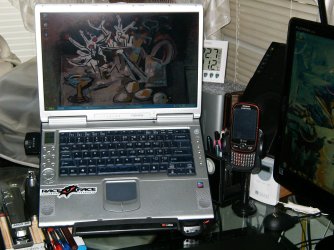
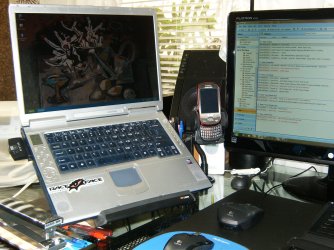
I use a riser with out a fan and run a 23" monitor with wireless mouse and keyboard......it's the bomb set up !
HPIM1304.JPG

HPIM1319.JPG
 

My Computer My Computer

At a glance

Windows 7 Ultimate 64i7 3770k OC'd 4.6 @ 1.17v, also FX 8120 & i5 ...32 gb G.Skill Sniper DDR3 10-12-12-31 @ 2133XFX Radeon 7870 2GB DDR5
Computer type
PC/Desktop
Computer Manufacturer/Model Number
A blend of brains, brawn and dumb luck.
OS
Windows 7 Ultimate 64
CPU
i7 3770k OC'd 4.6 @ 1.17v, also FX 8120 & i5 miniITX
Motherboard
MSI P67A-GD80 b3
Memory
32 gb G.Skill Sniper DDR3 10-12-12-31 @ 2133
Graphics Card(s)
XFX Radeon 7870 2GB DDR5
Sound Card
Sound Blaster Z Series Card
Monitor(s) Displays
(2) LG LED 23" 1920 x 1080 2ms Monitors via mini d-port
Screen Resolution
1680 X 1050 p
Hard Drives
Samsung 256 gb 830 SSD sata III
(1) 1 tb WD Black
(2) 1 tb Hitachi deskmates/sata II
(2) 1 tb WD green/sata II
(2) 3 tb Seagate Barracuda
(1) 120 gb OCZ Vertex SS
(1) Drobo 5N w/5 Seagate 3tb
PSU
EVGA modular 1000G2 80% gold rating & APC 1200 RS
Case
CoolerMaster Storm Styker
Cooling
7 case fans 140mm & 120mm, NZXT Kraken X60
Keyboard
(2) Logitech Illuminated Keyboards (1) usb (1) wireless
Mouse
Logitech G700 & T-BC21 - nano nx for the laptop
Internet Speed
Basic 120mbps down
Antivirus
Trend Micro Titanium Max Security & Malwarebytes Premium
Browser
Chrome and IE 10
Other Info
5 Noctua case fans + 3 Noctua in p/p on NZXT cooler
Integrated hot swap drive bays for 2.5" Drives
(2) Lite-on dvd/cd/Blu Ray optical 22X
Integrated fan controller and led on/off
HP Officejet Pro 8630 all-n-one
Hot-swappable 3.5" hard drive bay
Netgear Nighthawk router
Asus USB 3 & sata 6 PCIe card
Vantec IDE to sata adptr./Ultra sata adptr
Lenovo L420 i5 lappy with m sata
Drobo 5N advanced NAS
75 Celsius is fine, in fact, I have been crunching seti@home on my Asus G50VT's 9800gs video card for years now, nearly 24/7 at about 85-90 celsius no problems! Silicon these days are very tough, well, back in 2009.

You can increase airflow by upgrading from the Delta 13-fin KDB05105HB “7F36” fan to the Forcecon DFS541305MH0T “F8U5” 17 fin fan, it moves more air and is the stock fan on the G50VX and G51J. Easy to take off the heatsink and install.
 

My Computer My Computer

At a glance

windows 7
OS
windows 7
You should check on Asus's website to see if there is a graphics driver update. If there is not one available, go to Windows Update and see if it has a graphics driver (or monitor) driver update. If not, go to the graphics card vendor's website and see if they have a graphics card driver update.
 

My Computer My Computer

At a glance

Windows 7 Professional x64 Service Pack 1AMD Athlon X4 6456GB DDR3 1066Sapphire Radeon HD 5670 512MB GDDR5
Computer type
PC/Desktop
Computer Manufacturer/Model Number
HP Pavilion P7-1010
OS
Windows 7 Professional x64 Service Pack 1
CPU
AMD Athlon X4 645
Motherboard
Foxxcon N-Alvorix RS880
Memory
6GB DDR3 1066
Graphics Card(s)
Sapphire Radeon HD 5670 512MB GDDR5
Sound Card
Realtek Integrated Audio
Monitor(s) Displays
HP 2011x
Screen Resolution
1600x900
Hard Drives
1. Crucial M4 128GB SSD
2. 1TB Seagate Barracuda 7200.12 RPM
3. 1TB Western Digital Caviar Green 5400RPM
PSU
Seasonic S12 II Bronze 380 Watt
Case
HP OEM
Cooling
Coolermaster Heatsink, AVC Case Fan
Keyboard
HP OEM- Made by Chicony
Mouse
HP OEM- Made by Logitech
Internet Speed
20MBit Down/4 Up
Antivirus
Microsoft Security Essentials
Browser
Internet Explorer 10
Back
Top