Very odd partition

ICIT2LOL

Confusion Therapist
Guru
Gold Member
VIP
Local time
1:35 PM
Messages
20,778
Location
Central West NSW
Some of you will know I have had a great deal of trouble recently getting anything from the EBay seller of an Asus ROG G750JM laptop and to cut a very long story short the optional Windows 7 he installed on the machine I bought I was given the activation code yet no sticker. I have asked Microsoft re the sticker and they say it has to have one but still the seller insists he doesn't have to provide one.

So I have left it because it has ben nearly two weeks trying to get some satisfaction and if Microsoft want to query my install I have it on record what has transpired.
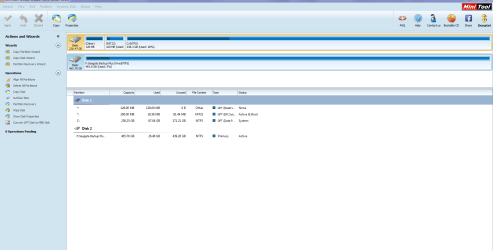
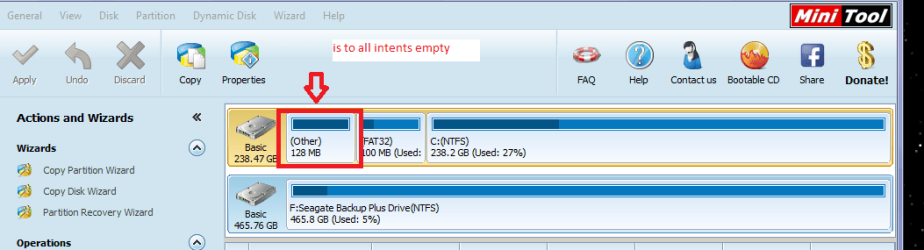
Now tonight I was going to set up a Macrium image of the machine as it is right now but I have discovered a partition on the main hard drive that appears to have nothing in it - se pic.
Does anyone have any idea what this could be and if so why it is there?
 

Attachments
  • MINI TOOL SNIP.PNG
    MINI TOOL SNIP.PNG
    21.4 KB · Views: 4

My Computer

Computer type
PC/Desktop
Computer Manufacturer/Model Number
Own build (new) Desk1 / Asus ROG Win 7 / Desk2 1st build
OS
Desk1 7 Home Prem / Desk2 10 Pro / Main lap Asus ROG 10 Pro 2 laptop Toshiba 7 Pro Asus P2520 7 & 10
CPU
Desk1 i5 3750K / Laptop i7 GTX 860M / Desk2 i5 2500
Motherboard
Desk1 Asus P877-V / Desk2 Gigabyte H67 UD3H / Laptop ?
Memory
Desk1 8GB (1866) / Desk2 16GB (1333) / Laptop 8Gb DDR3
Graphics Card(s)
Desk 1& 2NVidia GTX 650 & Laptops on board Intel
Sound Card
Desk 1 & 2 -XONAR DG Realtek High Def audio Laptop
Monitor(s) Displays
Desk 1 Benq HD 2450 / Desk2 Philips 24" / Laptop 17.5"
Screen Resolution
1920x1080 D1 & D2 & Laptop 1
Hard Drives
Desk1 Samsung 120GB 830 SSD
Asus ROG 256GB 850 Pro SSD
Desk2 Samsung 840 256 SSD
Toshiba 120GB EVO
PSU
Desk 1 Corsair HX 1050/ Laptop ? / Desk 2 Corsair HX 650
Case
Desk 1 Cooler HAF XM ? Toshiba laptop / Desk2 Coolermaster
Cooling
Fans on all Desk1 -2 Desk2 - all Coolermasters 5 Laptop ?
Keyboard
Desk 1 MS Sidewinder X6 Desk 2 MS Sidewinder X 4
Mouse
Desk 1&2 - Gigabyte MS 900 gamer - laptop - Logitec wireless
Internet Speed
ADSL2+
Other Info
One other Desktop (tester) and spare Toshba laptop both with SSD's
Running Kaspersky 2016 ISS on all machines config'd identically
Logitec audio stereo systems on each machine (x3)
Canon MG5250MFC
Router/modem TP-Link running WPA2SK
To me it seems that the drive was formatted as a GPT drive. GPT drives will have the 128MB MSR (Microsoft System Reserved) Partition.

Please check the drive listing below the Partition Wizard Disk MAP. You will know it for certain. :)

09-01-2015 16-06-37.jpg
 

My Computer

OS
Windows 7 Home Premium 32 bit
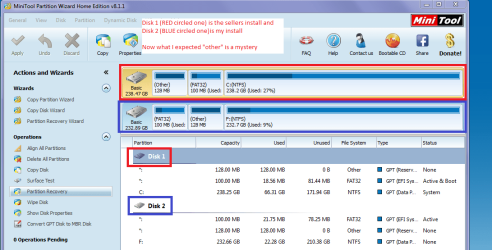
In the case of ICit2 disk 1 is the GPT drive - System drive. His lappy is most probably UEFI since he downgraded from Windows 8 to Windows 7 if I remember correct.

Disk 2 is MBR - his Seagate Backup Plus external drive.
 

My Computer

OS
Windows 7 Home Premium 32 bit
Please post a screenshot of Disk Management - Post a Screen Capture Image
to compare.

Please also include all of the drive listings box from PW and not just the drive map.

Jumanji you'd better take a look at what he posted in http://www.sevenforums.com/2978914-post426.html because there he has two UEFI installs to GPT disks which are somehow marked Active. We need to see a Disk Mgmt screenshot to compare because that would either have to be misreported having an Active flag on GPT partitions or it is seriously defective.
 
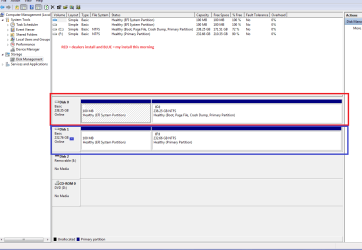
As requested but I do not see the third partition that was in the Partition Wizard shot. Both are Samsungs original is an 850 and the one I installed on this morning an EVO.
 

Attachments

  • INSTALL2.PNG
    INSTALL2.PNG
    24 KB · Views: 4

My Computer

Computer type
PC/Desktop
Computer Manufacturer/Model Number
Own build (new) Desk1 / Asus ROG Win 7 / Desk2 1st build
OS
Desk1 7 Home Prem / Desk2 10 Pro / Main lap Asus ROG 10 Pro 2 laptop Toshiba 7 Pro Asus P2520 7 & 10
CPU
Desk1 i5 3750K / Laptop i7 GTX 860M / Desk2 i5 2500
Motherboard
Desk1 Asus P877-V / Desk2 Gigabyte H67 UD3H / Laptop ?
Memory
Desk1 8GB (1866) / Desk2 16GB (1333) / Laptop 8Gb DDR3
Graphics Card(s)
Desk 1& 2NVidia GTX 650 & Laptops on board Intel
Sound Card
Desk 1 & 2 -XONAR DG Realtek High Def audio Laptop
Monitor(s) Displays
Desk 1 Benq HD 2450 / Desk2 Philips 24" / Laptop 17.5"
Screen Resolution
1920x1080 D1 & D2 & Laptop 1
Hard Drives
Desk1 Samsung 120GB 830 SSD
Asus ROG 256GB 850 Pro SSD
Desk2 Samsung 840 256 SSD
Toshiba 120GB EVO
PSU
Desk 1 Corsair HX 1050/ Laptop ? / Desk 2 Corsair HX 650
Case
Desk 1 Cooler HAF XM ? Toshiba laptop / Desk2 Coolermaster
Cooling
Fans on all Desk1 -2 Desk2 - all Coolermasters 5 Laptop ?
Keyboard
Desk 1 MS Sidewinder X6 Desk 2 MS Sidewinder X 4
Mouse
Desk 1&2 - Gigabyte MS 900 gamer - laptop - Logitec wireless
Internet Speed
ADSL2+
Other Info
One other Desktop (tester) and spare Toshba laptop both with SSD's
Running Kaspersky 2016 ISS on all machines config'd identically
Logitec audio stereo systems on each machine (x3)
Canon MG5250MFC
Router/modem TP-Link running WPA2SK
Yep, the full screen PW screenshot with Disk Map as well as the Disk list should clear the air.

I have only referred to what ICit2 posted in this thread - his first post - and have answered his question.:D

The screenshot he posted above is different showing two GPT drives of 200+GB ( His first screenshot in this thread showed one GPT drive 200+GB and another external drive 400+GB drive)

And ICit2, Windows Disk Management will not show up the 128MB MSR partitions on a GPT drive lest users meddle with it.
 

My Computer

OS
Windows 7 Home Premium 32 bit
Ok here is the shot requested
 

Attachments

  • INSTALL.PNG
    INSTALL.PNG
    44.6 KB · Views: 2

My Computer

Computer type
PC/Desktop
Computer Manufacturer/Model Number
Own build (new) Desk1 / Asus ROG Win 7 / Desk2 1st build
OS
Desk1 7 Home Prem / Desk2 10 Pro / Main lap Asus ROG 10 Pro 2 laptop Toshiba 7 Pro Asus P2520 7 & 10
CPU
Desk1 i5 3750K / Laptop i7 GTX 860M / Desk2 i5 2500
Motherboard
Desk1 Asus P877-V / Desk2 Gigabyte H67 UD3H / Laptop ?
Memory
Desk1 8GB (1866) / Desk2 16GB (1333) / Laptop 8Gb DDR3
Graphics Card(s)
Desk 1& 2NVidia GTX 650 & Laptops on board Intel
Sound Card
Desk 1 & 2 -XONAR DG Realtek High Def audio Laptop
Monitor(s) Displays
Desk 1 Benq HD 2450 / Desk2 Philips 24" / Laptop 17.5"
Screen Resolution
1920x1080 D1 & D2 & Laptop 1
Hard Drives
Desk1 Samsung 120GB 830 SSD
Asus ROG 256GB 850 Pro SSD
Desk2 Samsung 840 256 SSD
Toshiba 120GB EVO
PSU
Desk 1 Corsair HX 1050/ Laptop ? / Desk 2 Corsair HX 650
Case
Desk 1 Cooler HAF XM ? Toshiba laptop / Desk2 Coolermaster
Cooling
Fans on all Desk1 -2 Desk2 - all Coolermasters 5 Laptop ?
Keyboard
Desk 1 MS Sidewinder X6 Desk 2 MS Sidewinder X 4
Mouse
Desk 1&2 - Gigabyte MS 900 gamer - laptop - Logitec wireless
Internet Speed
ADSL2+
Other Info
One other Desktop (tester) and spare Toshba laptop both with SSD's
Running Kaspersky 2016 ISS on all machines config'd identically
Logitec audio stereo systems on each machine (x3)
Canon MG5250MFC
Router/modem TP-Link running WPA2SK
Nope Icit2 :), please post the full screenshot of the Partition Wizard that appears in your first post- the one with 238.47 GB drive and 465.76 GB drive.

Anyway answers to your question:

1. The 128MB partition is the MSR partition in GPT drive.

2. The MSR is used on UEFI/GPT systems, to support software components that formerly used hidden sectors.The MSR partition must:
Have 128 MB of hard drive space.
Be located before the Windows operating-system partitions.
For more information about MSR partitions, see Windows and GPT FAQ

Extract:
The Microsoft Reserved Partition (MSR) reserves space on each disk drive for subsequent use by operating system software. GPT disks do not allow hidden sectors. Software components that formerly used hidden sectors now allocate portions of the MSR for component-specific partitions. For example, converting a basic disk to a dynamic disk causes the MSR on that disk to be reduced in size and a newly created partition holds the dynamic disk database. The MSR has the Partition GUID:
DEFINE_GUID (PARTITION_MSFT_RESERVED_GUID, 0xE3C9E316L, 0x0B5C, 0x4DB8, 0x81, 0x7D, 0xF9, 0x2D, 0xF0, 0x02, 0x15, 0xAE)
What disks require an MSR?

Every GPT disk must contain an MSR. The order of partitions on the disk should be ESP (if any), OEM (if any) and MSR followed by primary data partition(s). It is particularly important that the MSR be created before other primary data partitions.

3. You won't see the MSR partition in Window Disk Management.

( I am not into the other thread where you are discussing the seller's install and your install. That is Greg's domain:D and I have not been looking into it.) )
 
Last edited:

My Computer

OS
Windows 7 Home Premium 32 bit
Ok I have just hooked up the back up drive again this is what is on it.

I have just watched Gregs link to Legacy v EUFI and have a very simplistic idea about it and what I thought was something wrong really isn't.

Now when I got the machine I installed a new OEM 7 Home on a new SSD but when I tried to load drivers for 7 Asus support said I had to update the BIOS to do that hence me sending it back to Sydney for them to do the install because of the risks one hears of rehashing the BIOS, and if that happened then I wanted them to be up for the ante but they didn't touch it and I am still left with that message to update it and am very loathe to do it as I don't want to muck this machine up. I do have a dual BIOS Gigabyte board in my older Sandy Bridge and so have some safe guard to trashing the BIOS but with this machine there is only one chance as far as I can see.
 

Attachments

  • INSTALL3.PNG
    INSTALL3.PNG
    37.3 KB · Views: 5

My Computer

Computer type
PC/Desktop
Computer Manufacturer/Model Number
Own build (new) Desk1 / Asus ROG Win 7 / Desk2 1st build
OS
Desk1 7 Home Prem / Desk2 10 Pro / Main lap Asus ROG 10 Pro 2 laptop Toshiba 7 Pro Asus P2520 7 & 10
CPU
Desk1 i5 3750K / Laptop i7 GTX 860M / Desk2 i5 2500
Motherboard
Desk1 Asus P877-V / Desk2 Gigabyte H67 UD3H / Laptop ?
Memory
Desk1 8GB (1866) / Desk2 16GB (1333) / Laptop 8Gb DDR3
Graphics Card(s)
Desk 1& 2NVidia GTX 650 & Laptops on board Intel
Sound Card
Desk 1 & 2 -XONAR DG Realtek High Def audio Laptop
Monitor(s) Displays
Desk 1 Benq HD 2450 / Desk2 Philips 24" / Laptop 17.5"
Screen Resolution
1920x1080 D1 & D2 & Laptop 1
Hard Drives
Desk1 Samsung 120GB 830 SSD
Asus ROG 256GB 850 Pro SSD
Desk2 Samsung 840 256 SSD
Toshiba 120GB EVO
PSU
Desk 1 Corsair HX 1050/ Laptop ? / Desk 2 Corsair HX 650
Case
Desk 1 Cooler HAF XM ? Toshiba laptop / Desk2 Coolermaster
Cooling
Fans on all Desk1 -2 Desk2 - all Coolermasters 5 Laptop ?
Keyboard
Desk 1 MS Sidewinder X6 Desk 2 MS Sidewinder X 4
Mouse
Desk 1&2 - Gigabyte MS 900 gamer - laptop - Logitec wireless
Internet Speed
ADSL2+
Other Info
One other Desktop (tester) and spare Toshba laptop both with SSD's
Running Kaspersky 2016 ISS on all machines config'd identically
Logitec audio stereo systems on each machine (x3)
Canon MG5250MFC
Router/modem TP-Link running WPA2SK
Added to my previous post:

( I am not into the other thread/topic where you are discussing the seller's install and your install or anything related to it. That is Greg's domain.:D and I have not been looking into it.)
 

My Computer

OS
Windows 7 Home Premium 32 bit
Jumanji, why do you think are there Active flags on his two otherwise-correct UEFI installs to GPT hard drives?

I have never seen any partition marked Active on a GPT disk and thought it is not even possible to have Active flag on GPT disks since there is no MBR
 
Last edited:
Yes but I posted I think what you wanted??
 

My Computer

Computer type
PC/Desktop
Computer Manufacturer/Model Number
Own build (new) Desk1 / Asus ROG Win 7 / Desk2 1st build
OS
Desk1 7 Home Prem / Desk2 10 Pro / Main lap Asus ROG 10 Pro 2 laptop Toshiba 7 Pro Asus P2520 7 & 10
CPU
Desk1 i5 3750K / Laptop i7 GTX 860M / Desk2 i5 2500
Motherboard
Desk1 Asus P877-V / Desk2 Gigabyte H67 UD3H / Laptop ?
Memory
Desk1 8GB (1866) / Desk2 16GB (1333) / Laptop 8Gb DDR3
Graphics Card(s)
Desk 1& 2NVidia GTX 650 & Laptops on board Intel
Sound Card
Desk 1 & 2 -XONAR DG Realtek High Def audio Laptop
Monitor(s) Displays
Desk 1 Benq HD 2450 / Desk2 Philips 24" / Laptop 17.5"
Screen Resolution
1920x1080 D1 & D2 & Laptop 1
Hard Drives
Desk1 Samsung 120GB 830 SSD
Asus ROG 256GB 850 Pro SSD
Desk2 Samsung 840 256 SSD
Toshiba 120GB EVO
PSU
Desk 1 Corsair HX 1050/ Laptop ? / Desk 2 Corsair HX 650
Case
Desk 1 Cooler HAF XM ? Toshiba laptop / Desk2 Coolermaster
Cooling
Fans on all Desk1 -2 Desk2 - all Coolermasters 5 Laptop ?
Keyboard
Desk 1 MS Sidewinder X6 Desk 2 MS Sidewinder X 4
Mouse
Desk 1&2 - Gigabyte MS 900 gamer - laptop - Logitec wireless
Internet Speed
ADSL2+
Other Info
One other Desktop (tester) and spare Toshba laptop both with SSD's
Running Kaspersky 2016 ISS on all machines config'd identically
Logitec audio stereo systems on each machine (x3)
Canon MG5250MFC
Router/modem TP-Link running WPA2SK
Jumanji, why do you think are there Active flags on his two otherwise-correct UEFI installs to GPT hard drives?

I have never seen any partition marked Active on a GPT disk and thought it is not even possible to have Active flag on GPT disks since there is no MBR

Number one: I have no exposure to UEFI ( save for the two Windows 8.1 preinstalled HP Laptops that were dropped on me for the initial setup months ago) I just played with those for a while getting in and out of the secure boot and legacy mode.

Number Two: I haven't seen or handled an SSD and therefore do not know in what factory formatted condition it comes whether GPT or MBR..

With that preamble, I guess guess guess when one installs Windows 7 on an MBR disk or GPT disk the usual 100MB System Reserved Partition will always be marked active. So may be we shouldn't bother about it or look at it suspiciously.:)

But what is bothersome when I look into the Seller's install is that, the 128MB MSR partition appears first, followed by the 100MB System Reserved partition. Microsoft requires that the MSR partition should always precede the first primary partition - whether it is a system partition or data partition.

Every GPT disk must contain an MSR. The order of partitions on the disk should be ESP (if any), OEM (if any) and MSR followed by primary data partition(s). It is particularly important that the MSR be created before other primary data partitions.

In that respect ICit2's install meets the Microsoft requirement.

In my opinion, seller's installation may fail to boot forever under certain circumstances.

My question now is if ICit2 wants to have Windows 7 why not he get into legacy mode and install Windows on an MBR disk? Or is that activation code work only with the UEFI install?

Yes but I posted I think what you wanted??

Well, there was some communication gap or misunderstanding when greg was trying to pull me into the other thread and me stubbornly refusing and sticking to this thread answering your query on what is that odd partition and limiting myself to that.:)
 

My Computer

OS
Windows 7 Home Premium 32 bit
The same license can be activated on either UEFI or Legacy installs.

The presence of the MSR and EFI partitions mean it's a UEFI install to GPT disk which cannot have an Active partition. Yet PW shows one, while Disk Mgmt doesn't. It is rare the PW misreports. It might be behind in its accuracy for all UEFI installs.

I am sorry Jumanji if you felt pressured to comment at all. I am always hoping for more colleagues to share knowledge and help handle the tremendous partitioning caseload we get here. This is the only site on the web that walks users through complicated partitioning operations - thousands of them since beta without a single failure.
 
It`s a 232 GB drive, convert it to MBR and re install windows John. No reason for a drive that small to be GPT.

As long as the bios has a Lecacy boot option, you`re all set.
 

My Computer

Computer type
PC/Desktop
Computer Manufacturer/Model Number
Skylake Special #666
OS
Windows 10 Pro x64
CPU
Intel Core i7 6700K
Motherboard
Asus Sabertooth Z170 Mark 1
Memory
GSkill TridentZ RGB 16GB 3600 16-16-16-36
Graphics Card(s)
EVGA GTX 980 Ti SC x2
Sound Card
Realtek High Definition
Monitor(s) Displays
AOC G2460PG
Screen Resolution
1920 x 1080 144Hz
Hard Drives
Samsung 860 Pro 256GB, Seagate Barracuda 4TB x2
PSU
EVGA 1000 P2, EVGA White Custom Braided Cables
Case
Corsair Vengeance C70 Gunmetal Black
Cooling
Corsair H100i v2, Corsair ML120 x2, Thermal Grizzly Kryonaut
Keyboard
Logitech G910 Orion Spectrum
Mouse
Logitech G700s
Internet Speed
Verizon Fios Quantum Gateway 75/75
Antivirus
Windows Defender, Malwarebytes Free 3.8.3
Browser
Chrome
Other Info
Corsair SP120 x4, LG Blu-ray Drive, Durabrand HT-395 100 Watt Dolby Digital Amp, Corsair H2100 Wireless 7.1 Headset
What version is PW?

I always tend to fall back on Diskpart for the definitive answer.
Command Prompt (Admin)
Diskpart
lis dis
sel dis 0
det dis
sel vol # - the ones you want to investigate, repeat the focus on the vols in question.
det vol
det par
exit

It's beyond the scope of this post to describe all of the attribute value pairs. Most will be obvious, but you might have to research the ones that aren't.

A Description of the Diskpart Command-Line Utility
DiskPart
DiskPart Command-Line Options

Be mindful of the references, there have been some additions to Diskpart that might not be applicable to Windows 7.
Sorry - I don't remember what they are, but the documentation should tell you.

Bill
.
 

My Computer

Computer type
Laptop
Computer Manufacturer/Model Number
HP Pavilion dv6-6c10us
OS
x64 (6.3.9600) Win8.1 Pro & soon dual boot x64 (6.1.7601) Win7_SP1 HomePrem
CPU
AMD A6-3420M APU with Radeon(tm) HD Graphics
Motherboard
Hewlett-Packard 1805
Memory
6.00 GB
Graphics Card(s)
AMD Radeon(TM) HD 6520G
Sound Card
(1) AMD High Definition Audio Device (2) IDT High Definiti
Monitor(s) Displays
HP W2072a 20" LCD (1600 x 900) @ 60 Hz
Screen Resolution
1366 x 768 x 32 bits (4294967296 colors) @ 60 Hz
Hard Drives
ST640LM0 00 HM641JI SATA Disk Device
Keyboard
Logitech k520 wireless KB
Mouse
Logitech m320 wireless mouse (bundled with KB)
Internet Speed
15/5 | 54 MB Wireless 'n'
Antivirus
Realtime: Defender or Avast | On-demand: Malwarebytes, ESET
Browser
IE 11 on Win8, IE 10 on win 7
Other Info
Media: [Gimp, Audacity, VLC] || Comm: [WEmail 2012, Skype] || Productivity: [OpenOffice,| Textpad] || Utils: [Sysinternals, cCleaner, Speccy, Defraggler]

My Computer

Computer type
PC/Desktop
Computer Manufacturer/Model Number
Skylake Special #666
OS
Windows 10 Pro x64
CPU
Intel Core i7 6700K
Motherboard
Asus Sabertooth Z170 Mark 1
Memory
GSkill TridentZ RGB 16GB 3600 16-16-16-36
Graphics Card(s)
EVGA GTX 980 Ti SC x2
Sound Card
Realtek High Definition
Monitor(s) Displays
AOC G2460PG
Screen Resolution
1920 x 1080 144Hz
Hard Drives
Samsung 860 Pro 256GB, Seagate Barracuda 4TB x2
PSU
EVGA 1000 P2, EVGA White Custom Braided Cables
Case
Corsair Vengeance C70 Gunmetal Black
Cooling
Corsair H100i v2, Corsair ML120 x2, Thermal Grizzly Kryonaut
Keyboard
Logitech G910 Orion Spectrum
Mouse
Logitech G700s
Internet Speed
Verizon Fios Quantum Gateway 75/75
Antivirus
Windows Defender, Malwarebytes Free 3.8.3
Browser
Chrome
Other Info
Corsair SP120 x4, LG Blu-ray Drive, Durabrand HT-395 100 Watt Dolby Digital Amp, Corsair H2100 Wireless 7.1 Headset
Yep the initial install was done on a wiped drive and for all I can remember it was unallocated space, and the second drive I just stuck it in as new I didn't do anything with it as I used to run Wolfgang's "clean to active" tutorial in preparing SSD's but remember doing it once and ending up with two 100MB partitions which I didn't find until I had installed, and then didn't know what to do with them.:o

That was early on in building and I really did not have much idea about such stuff - not that I have that much now and should get into understanding partitions as I still am mystified as to why they are needed. I have to admit in my tiny mind it is all just data recorded on a flat spinning surface, and I don't see why things like the MBR is needed to be separate from the rest of the other partition/s.
 

My Computer

Computer type
PC/Desktop
Computer Manufacturer/Model Number
Own build (new) Desk1 / Asus ROG Win 7 / Desk2 1st build
OS
Desk1 7 Home Prem / Desk2 10 Pro / Main lap Asus ROG 10 Pro 2 laptop Toshiba 7 Pro Asus P2520 7 & 10
CPU
Desk1 i5 3750K / Laptop i7 GTX 860M / Desk2 i5 2500
Motherboard
Desk1 Asus P877-V / Desk2 Gigabyte H67 UD3H / Laptop ?
Memory
Desk1 8GB (1866) / Desk2 16GB (1333) / Laptop 8Gb DDR3
Graphics Card(s)
Desk 1& 2NVidia GTX 650 & Laptops on board Intel
Sound Card
Desk 1 & 2 -XONAR DG Realtek High Def audio Laptop
Monitor(s) Displays
Desk 1 Benq HD 2450 / Desk2 Philips 24" / Laptop 17.5"
Screen Resolution
1920x1080 D1 & D2 & Laptop 1
Hard Drives
Desk1 Samsung 120GB 830 SSD
Asus ROG 256GB 850 Pro SSD
Desk2 Samsung 840 256 SSD
Toshiba 120GB EVO
PSU
Desk 1 Corsair HX 1050/ Laptop ? / Desk 2 Corsair HX 650
Case
Desk 1 Cooler HAF XM ? Toshiba laptop / Desk2 Coolermaster
Cooling
Fans on all Desk1 -2 Desk2 - all Coolermasters 5 Laptop ?
Keyboard
Desk 1 MS Sidewinder X6 Desk 2 MS Sidewinder X 4
Mouse
Desk 1&2 - Gigabyte MS 900 gamer - laptop - Logitec wireless
Internet Speed
ADSL2+
Other Info
One other Desktop (tester) and spare Toshba laptop both with SSD's
Running Kaspersky 2016 ISS on all machines config'd identically
Logitec audio stereo systems on each machine (x3)
Canon MG5250MFC
Router/modem TP-Link running WPA2SK
It doesn`t need to be separate, my installs are on 1 partition, I stopped using the SR partition a long long time ago.
 
Last edited:

My Computer

Computer type
PC/Desktop
Computer Manufacturer/Model Number
Skylake Special #666
OS
Windows 10 Pro x64
CPU
Intel Core i7 6700K
Motherboard
Asus Sabertooth Z170 Mark 1
Memory
GSkill TridentZ RGB 16GB 3600 16-16-16-36
Graphics Card(s)
EVGA GTX 980 Ti SC x2
Sound Card
Realtek High Definition
Monitor(s) Displays
AOC G2460PG
Screen Resolution
1920 x 1080 144Hz
Hard Drives
Samsung 860 Pro 256GB, Seagate Barracuda 4TB x2
PSU
EVGA 1000 P2, EVGA White Custom Braided Cables
Case
Corsair Vengeance C70 Gunmetal Black
Cooling
Corsair H100i v2, Corsair ML120 x2, Thermal Grizzly Kryonaut
Keyboard
Logitech G910 Orion Spectrum
Mouse
Logitech G700s
Internet Speed
Verizon Fios Quantum Gateway 75/75
Antivirus
Windows Defender, Malwarebytes Free 3.8.3
Browser
Chrome
Other Info
Corsair SP120 x4, LG Blu-ray Drive, Durabrand HT-395 100 Watt Dolby Digital Amp, Corsair H2100 Wireless 7.1 Headset
It doesn`t need to be separate, my installs are on 1 partition, I stopped using the SR partition a long long time ago.
Yep ell that happened on the main desktop when I clean installed just the other week as it happens - I just used a wiped drive.
 

My Computer

Computer type
PC/Desktop
Computer Manufacturer/Model Number
Own build (new) Desk1 / Asus ROG Win 7 / Desk2 1st build
OS
Desk1 7 Home Prem / Desk2 10 Pro / Main lap Asus ROG 10 Pro 2 laptop Toshiba 7 Pro Asus P2520 7 & 10
CPU
Desk1 i5 3750K / Laptop i7 GTX 860M / Desk2 i5 2500
Motherboard
Desk1 Asus P877-V / Desk2 Gigabyte H67 UD3H / Laptop ?
Memory
Desk1 8GB (1866) / Desk2 16GB (1333) / Laptop 8Gb DDR3
Graphics Card(s)
Desk 1& 2NVidia GTX 650 & Laptops on board Intel
Sound Card
Desk 1 & 2 -XONAR DG Realtek High Def audio Laptop
Monitor(s) Displays
Desk 1 Benq HD 2450 / Desk2 Philips 24" / Laptop 17.5"
Screen Resolution
1920x1080 D1 & D2 & Laptop 1
Hard Drives
Desk1 Samsung 120GB 830 SSD
Asus ROG 256GB 850 Pro SSD
Desk2 Samsung 840 256 SSD
Toshiba 120GB EVO
PSU
Desk 1 Corsair HX 1050/ Laptop ? / Desk 2 Corsair HX 650
Case
Desk 1 Cooler HAF XM ? Toshiba laptop / Desk2 Coolermaster
Cooling
Fans on all Desk1 -2 Desk2 - all Coolermasters 5 Laptop ?
Keyboard
Desk 1 MS Sidewinder X6 Desk 2 MS Sidewinder X 4
Mouse
Desk 1&2 - Gigabyte MS 900 gamer - laptop - Logitec wireless
Internet Speed
ADSL2+
Other Info
One other Desktop (tester) and spare Toshba laptop both with SSD's
Running Kaspersky 2016 ISS on all machines config'd identically
Logitec audio stereo systems on each machine (x3)
Canon MG5250MFC
Router/modem TP-Link running WPA2SK
Back
Top