
Solved Very Odd Wired Keyboard 600 Problem -- Win7 x64 refuses install

genesis

New member
Local time
7:49 AM
Messages
12
This is a very odd one.

I have an old Comfort Keyboard 2000 on my desktop machine which is failing. It works, but the keys are getting sloppy and it isn't long for the world.

That keyboard is no longer made, so I bought an inexpensive Wired Keyboard 600.

But when I plug it into my desktop machine I get the dreaded "bong-bong" and it refuses to come up!
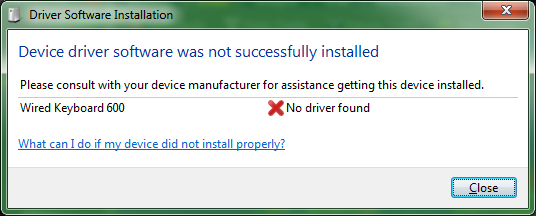
bong.png


If I go into the device manager, it's there under that name, with a nice "!" on it.

Now here's the fun part -- on my laptop (also Windows 7 x64!) it works!

I also looked in the registry for the VID and PID:
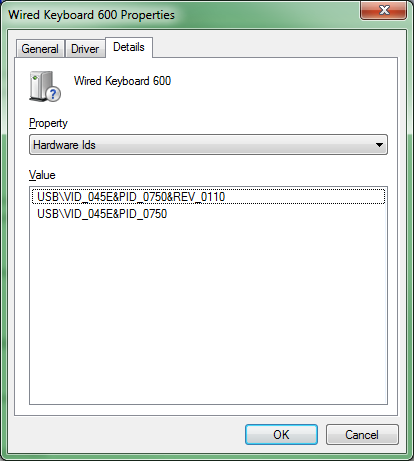
vid.png


And found it under Enum\HID, and the file it references (oem183.inf) is in \Windows\inf.

Anyone have any ideas why this thing won't come up?

It does work in POST, Acronis recovery and on the Windows Rescue disk. But as soon as Win7 starts the number lock LED goes out and that's it -- it is not recognized once the OS starts, whether it's the only keyboard plugged into the machine or there's another one also connected at the same time.
 

My Computer My Computer

At a glance

Win7 x64 SP1, all patches currentCore i7/98012GBNvidia GTX 660
Computer Manufacturer/Model Number
Homebuilt
OS
Win7 x64 SP1, all patches current
CPU
Core i7/980
Motherboard
Intel DX58SO
Memory
12GB
Graphics Card(s)
Nvidia GTX 660
Sound Card
On board
Monitor(s) Displays
4x LCD Panels
Hard Drives
Vertex 4 SSD Boot
2x Seagate rotating, scratch and backup
Keyboard
Comfort Curve 2000
Mouse
Logitech Wireless
Internet Speed
25x5 asymmetric, cable
Hello genesis.

So it is a USB keyboard the works with the laptop but not with the desktop?

Attach the keyboard with the laptop. And then follow the instructions.

  1. Right click on "my computer" icon and click "manage" on the context menu.
  2. It will open the "computer management" window.
  3. Select "Device Manager" in the left pane, It will list all the existing devices up.
  4. Expand "Keyboards" by clicking on the triangle in front of it.
  5. Select one item under it, right click, Properties.
  6. Click on the "Driver" tab, and under it, click the "Driver Details" button.
  7. Upload a screenshot of the resulting window.
It will let us know the drivers that the keyboard is using. And then it is to check why that driver is not working there in the desktop. Also upload your MSINFO32.nfo file.

  1. Click on the start button
  2. Type "msinfo32" (without quotes) in the search bar of the start menu, click the resulting link. It will open the System Information window.
  3. File>Save. In the "File Name" filed, put "MSINFO32" (without Quote), give the save location to desktop, and click the "save" button.
  4. Give the time for processing, it will save a .nfo file on your desktop.
  5. Zip it, and upload it following the instruction.
 

My Computer My Computer

At a glance

Microsoft Windows 10 Pro Insider Preview 64-bitIntel(R) Core(TM) i3-4130 CPU @ 3.40GHzCorsair Vengence 4GB x2 (8.00GB Dual-Channel ...2047MB GeForce GTS 450 (ZOTAC International)
Computer type
PC/Desktop
Computer Manufacturer/Model Number
Self Assembled
OS
Microsoft Windows 10 Pro Insider Preview 64-bit
CPU
Intel(R) Core(TM) i3-4130 CPU @ 3.40GHz
Motherboard
Gigabyte Technology Co., Ltd. B85M-D3H
Memory
Corsair Vengence 4GB x2 (8.00GB Dual-Channel DDR3 @ 798MHz)
Graphics Card(s)
2047MB GeForce GTS 450 (ZOTAC International)
Sound Card
Onboard (Realtek High Definition Audio)
Monitor(s) Displays
LG Flatron E2040T
Screen Resolution
1600x900
Hard Drives
Western Digital 1 TB
Seagate 500 GB
PSU
Corsair VS550
Case
Cooler Master K380
Cooling
Cooler Master Seidon 120V Plus
Keyboard
Logitech MK260r
Mouse
Logitech MK260r
Internet Speed
PMPL Broadband
Antivirus
Windows Defender + MBAM
Browser
Firefox
Other Info
Dell Studio 15" Laptop
Here's what the driver is using on the Laptop. The working keyboard on the desktop machine is using the same files. Another, completely different desktop machine also running Windows 7 also recognizes the keyboard.

It appears that something is playing hell with the USB subsystem.

MSinfo32 file from the desktop attached.
 

Attachments

  • driver.png
    driver.png
    10.6 KB · Views: 8
Last edited:

My Computer My Computer

At a glance

Win7 x64 SP1, all patches currentCore i7/98012GBNvidia GTX 660
Computer Manufacturer/Model Number
Homebuilt
OS
Win7 x64 SP1, all patches current
CPU
Core i7/980
Motherboard
Intel DX58SO
Memory
12GB
Graphics Card(s)
Nvidia GTX 660
Sound Card
On board
Monitor(s) Displays
4x LCD Panels
Hard Drives
Vertex 4 SSD Boot
2x Seagate rotating, scratch and backup
Keyboard
Comfort Curve 2000
Mouse
Logitech Wireless
Internet Speed
25x5 asymmetric, cable
Another piece of information -- if I move an existing device's plug location it may not reattach. I just discovered this; I moved a different USB device (the SignalLink USB audio device) from one hole to another, and it failed to reattach, claiming it had no driver.

It didn't say it couldn't start the driver, it said it was missing, exactly as is the case for the new keyboard...

Hmmm....
 

My Computer My Computer

At a glance

Win7 x64 SP1, all patches currentCore i7/98012GBNvidia GTX 660
Computer Manufacturer/Model Number
Homebuilt
OS
Win7 x64 SP1, all patches current
CPU
Core i7/980
Motherboard
Intel DX58SO
Memory
12GB
Graphics Card(s)
Nvidia GTX 660
Sound Card
On board
Monitor(s) Displays
4x LCD Panels
Hard Drives
Vertex 4 SSD Boot
2x Seagate rotating, scratch and backup
Keyboard
Comfort Curve 2000
Mouse
Logitech Wireless
Internet Speed
25x5 asymmetric, cable
You do three things.

Daemon Tools, Alcohol 120% and Power Archiver Pro uses SCSI Pass Through Direct (SPTD), which is a well known problem causer. Among various problems, it causes the root/port errors. Uninstall Daemon Tools at first. Then download SPTD standalone installer from Disk-Tools.com, and execute the downloaded file as guided below :

  • Double click to open it.
  • Click this button only:
  • 2012-12-13_224441.jpg
  • If it is grayed out, as in the picture, there is no more SPTD in your system, and you just close the window.
Sometimes a malware or rootkit may lead to a root/port failure. so scan the system for possible virus infection.

Do some general USB related troubleshooting. For the port, first, uninstall and reinstall the USB ports drivers.

  1. Right click on Computer icon > manage. It will open the computer management window.
  2. Click on "Device Manager" in the left pane, it will list all installed devices up.
  3. Expand "USB Serial Bus Controllers" by clicking on the triangle in front of it.
  4. Click on one item to select, then right click and uninstall.
  5. Do the same for all.
  6. Restart the computer.
  7. At restart, windows will auto configure the appropriate drivers.
And, Disable USB Selective Suspense too.
USB Selective Suspend - Turn On or Off

For the devices, first, detach all the USB devices other than the keyboard and mouse.
Then, Update the drivers for them all, including the keyboard and mouse, if any third party drivers are installed for them.

Let us know the results.

* Also a search revealed that you are using nForce as the chipset driver, and that includes nvstor.sys as the storage controller driver. You need to try to update nForce, as it contains not only the storage controller, but also network controller and a lot of other vital drivers, including the USB port controllers.

Go to Drivers - Download NVIDIA Drivers, search for nForce, as per your motherboard's chipset specifications.
nForce_zpse7e15947.jpg
 

My Computer My Computer

At a glance

Microsoft Windows 10 Pro Insider Preview 64-bitIntel(R) Core(TM) i3-4130 CPU @ 3.40GHzCorsair Vengence 4GB x2 (8.00GB Dual-Channel ...2047MB GeForce GTS 450 (ZOTAC International)
Computer type
PC/Desktop
Computer Manufacturer/Model Number
Self Assembled
OS
Microsoft Windows 10 Pro Insider Preview 64-bit
CPU
Intel(R) Core(TM) i3-4130 CPU @ 3.40GHz
Motherboard
Gigabyte Technology Co., Ltd. B85M-D3H
Memory
Corsair Vengence 4GB x2 (8.00GB Dual-Channel DDR3 @ 798MHz)
Graphics Card(s)
2047MB GeForce GTS 450 (ZOTAC International)
Sound Card
Onboard (Realtek High Definition Audio)
Monitor(s) Displays
LG Flatron E2040T
Screen Resolution
1600x900
Hard Drives
Western Digital 1 TB
Seagate 500 GB
PSU
Corsair VS550
Case
Cooler Master K380
Cooling
Cooler Master Seidon 120V Plus
Keyboard
Logitech MK260r
Mouse
Logitech MK260r
Internet Speed
PMPL Broadband
Antivirus
Windows Defender + MBAM
Browser
Firefox
Other Info
Dell Studio 15" Laptop
This is interesting -- there is no Daemon Tools listed in the loaded program list, but it is there. Will unload that and the pass-through SCSI stuff as I have no need for either.

The machine has Avast on it along with Windows Defender and Spybot, and has passed a clean test, along with a base file integrity test (Windows' internal validation -- SFC)

Will take a snapshot and give this a shot -- I have already gone through and cleared USB configurations using USBDeview, which allows unloading devices on a singular or batch basis. That's how I found out that I can screw the USB config seriously enough that it won't reload itself (specifically, if I unload the existing keyboard that is working I'm cooked; it forced me to reload last night -- system images are a good thing ;-))

More in a bit once the snapshot syncs.
 

My Computer My Computer

At a glance

Win7 x64 SP1, all patches currentCore i7/98012GBNvidia GTX 660
Computer Manufacturer/Model Number
Homebuilt
OS
Win7 x64 SP1, all patches current
CPU
Core i7/980
Motherboard
Intel DX58SO
Memory
12GB
Graphics Card(s)
Nvidia GTX 660
Sound Card
On board
Monitor(s) Displays
4x LCD Panels
Hard Drives
Vertex 4 SSD Boot
2x Seagate rotating, scratch and backup
Keyboard
Comfort Curve 2000
Mouse
Logitech Wireless
Internet Speed
25x5 asymmetric, cable
About the scans, Avast or the installed Windows Defender cannot do the scan that is needed here. That's why I suggested these two programs only. They may come clean, but the scan is necessary.

And, if you are using VMs, update the program version and the guest tools.
 

My Computer My Computer

At a glance

Microsoft Windows 10 Pro Insider Preview 64-bitIntel(R) Core(TM) i3-4130 CPU @ 3.40GHzCorsair Vengence 4GB x2 (8.00GB Dual-Channel ...2047MB GeForce GTS 450 (ZOTAC International)
Computer type
PC/Desktop
Computer Manufacturer/Model Number
Self Assembled
OS
Microsoft Windows 10 Pro Insider Preview 64-bit
CPU
Intel(R) Core(TM) i3-4130 CPU @ 3.40GHz
Motherboard
Gigabyte Technology Co., Ltd. B85M-D3H
Memory
Corsair Vengence 4GB x2 (8.00GB Dual-Channel DDR3 @ 798MHz)
Graphics Card(s)
2047MB GeForce GTS 450 (ZOTAC International)
Sound Card
Onboard (Realtek High Definition Audio)
Monitor(s) Displays
LG Flatron E2040T
Screen Resolution
1600x900
Hard Drives
Western Digital 1 TB
Seagate 500 GB
PSU
Corsair VS550
Case
Cooler Master K380
Cooling
Cooler Master Seidon 120V Plus
Keyboard
Logitech MK260r
Mouse
Logitech MK260r
Internet Speed
PMPL Broadband
Antivirus
Windows Defender + MBAM
Browser
Firefox
Other Info
Dell Studio 15" Laptop
No VM hypervisor involved; there is a VM on the system but Win7 is not hosted under it (that is, I use it to run XP under Win7, etc, but not with win7 as "one of many")

Removing Daemon Tools Lite and then the SCSI passthrough driver blew up the disk structure with dozens of orphaned files; restoring from snapshot.

"Daemon" may be well-named...
 

My Computer My Computer

At a glance

Win7 x64 SP1, all patches currentCore i7/98012GBNvidia GTX 660
Computer Manufacturer/Model Number
Homebuilt
OS
Win7 x64 SP1, all patches current
CPU
Core i7/980
Motherboard
Intel DX58SO
Memory
12GB
Graphics Card(s)
Nvidia GTX 660
Sound Card
On board
Monitor(s) Displays
4x LCD Panels
Hard Drives
Vertex 4 SSD Boot
2x Seagate rotating, scratch and backup
Keyboard
Comfort Curve 2000
Mouse
Logitech Wireless
Internet Speed
25x5 asymmetric, cable
Ok, got that piece of squeeze (Daemon tools) off the machine and TDS says it's clean.

No change.
 

My Computer My Computer

At a glance

Win7 x64 SP1, all patches currentCore i7/98012GBNvidia GTX 660
Computer Manufacturer/Model Number
Homebuilt
OS
Win7 x64 SP1, all patches current
CPU
Core i7/980
Motherboard
Intel DX58SO
Memory
12GB
Graphics Card(s)
Nvidia GTX 660
Sound Card
On board
Monitor(s) Displays
4x LCD Panels
Hard Drives
Vertex 4 SSD Boot
2x Seagate rotating, scratch and backup
Keyboard
Comfort Curve 2000
Mouse
Logitech Wireless
Internet Speed
25x5 asymmetric, cable
The USB behaves the same?
 

My Computer My Computer

At a glance

Microsoft Windows 10 Pro Insider Preview 64-bitIntel(R) Core(TM) i3-4130 CPU @ 3.40GHzCorsair Vengence 4GB x2 (8.00GB Dual-Channel ...2047MB GeForce GTS 450 (ZOTAC International)
Computer type
PC/Desktop
Computer Manufacturer/Model Number
Self Assembled
OS
Microsoft Windows 10 Pro Insider Preview 64-bit
CPU
Intel(R) Core(TM) i3-4130 CPU @ 3.40GHz
Motherboard
Gigabyte Technology Co., Ltd. B85M-D3H
Memory
Corsair Vengence 4GB x2 (8.00GB Dual-Channel DDR3 @ 798MHz)
Graphics Card(s)
2047MB GeForce GTS 450 (ZOTAC International)
Sound Card
Onboard (Realtek High Definition Audio)
Monitor(s) Displays
LG Flatron E2040T
Screen Resolution
1600x900
Hard Drives
Western Digital 1 TB
Seagate 500 GB
PSU
Corsair VS550
Case
Cooler Master K380
Cooling
Cooler Master Seidon 120V Plus
Keyboard
Logitech MK260r
Mouse
Logitech MK260r
Internet Speed
PMPL Broadband
Antivirus
Windows Defender + MBAM
Browser
Firefox
Other Info
Dell Studio 15" Laptop
Yes. Exactly identical. It still tries to find a driver for the KB on Windows Update, can't, and doesn't find anything that it likes locally on the disk either.

Last night I went rooting around in the Control Set Class listings, and the vid/pid entries ARE THERE and do point to the correct place (the same place the Comfort Keyboard 2000 point to), and there are no filters on the base entry either so it should attach.

Something is hosed, probably in the registry -- but there's no log I can find telling me what it doesn't like nor can I find documentation anywhere on exactly what has to be where in the registry (or on the disk, in what file/directory) for the attachment to succeed.
 

My Computer My Computer

At a glance

Win7 x64 SP1, all patches currentCore i7/98012GBNvidia GTX 660
Computer Manufacturer/Model Number
Homebuilt
OS
Win7 x64 SP1, all patches current
CPU
Core i7/980
Motherboard
Intel DX58SO
Memory
12GB
Graphics Card(s)
Nvidia GTX 660
Sound Card
On board
Monitor(s) Displays
4x LCD Panels
Hard Drives
Vertex 4 SSD Boot
2x Seagate rotating, scratch and backup
Keyboard
Comfort Curve 2000
Mouse
Logitech Wireless
Internet Speed
25x5 asymmetric, cable

My Computer My Computer

At a glance

Microsoft Windows 10 Pro Insider Preview 64-bitIntel(R) Core(TM) i3-4130 CPU @ 3.40GHzCorsair Vengence 4GB x2 (8.00GB Dual-Channel ...2047MB GeForce GTS 450 (ZOTAC International)
Computer type
PC/Desktop
Computer Manufacturer/Model Number
Self Assembled
OS
Microsoft Windows 10 Pro Insider Preview 64-bit
CPU
Intel(R) Core(TM) i3-4130 CPU @ 3.40GHz
Motherboard
Gigabyte Technology Co., Ltd. B85M-D3H
Memory
Corsair Vengence 4GB x2 (8.00GB Dual-Channel DDR3 @ 798MHz)
Graphics Card(s)
2047MB GeForce GTS 450 (ZOTAC International)
Sound Card
Onboard (Realtek High Definition Audio)
Monitor(s) Displays
LG Flatron E2040T
Screen Resolution
1600x900
Hard Drives
Western Digital 1 TB
Seagate 500 GB
PSU
Corsair VS550
Case
Cooler Master K380
Cooling
Cooler Master Seidon 120V Plus
Keyboard
Logitech MK260r
Mouse
Logitech MK260r
Internet Speed
PMPL Broadband
Antivirus
Windows Defender + MBAM
Browser
Firefox
Other Info
Dell Studio 15" Laptop
I suspect I'm going to wind up reloading this thing.... even though that pizzes me off due to the time required to reload all my applications and such. Thank god my data is on a NAS (running Unix, natch, which has undergone more upgrades and such than I can count over nearly two decades without a single hitch) and thus is impervious to this nonsense.
 

My Computer My Computer

At a glance

Win7 x64 SP1, all patches currentCore i7/98012GBNvidia GTX 660
Computer Manufacturer/Model Number
Homebuilt
OS
Win7 x64 SP1, all patches current
CPU
Core i7/980
Motherboard
Intel DX58SO
Memory
12GB
Graphics Card(s)
Nvidia GTX 660
Sound Card
On board
Monitor(s) Displays
4x LCD Panels
Hard Drives
Vertex 4 SSD Boot
2x Seagate rotating, scratch and backup
Keyboard
Comfort Curve 2000
Mouse
Logitech Wireless
Internet Speed
25x5 asymmetric, cable
I gave up and ran a repair install - that appears to be ok, but I am still validating it. If not, well, I'll go back to the backup, reload that, drop all the credentials off the programs in question and reload the box from zero.

Thanks -- marked solved although the "solved" was a reload ;)
 

My Computer My Computer

At a glance

Win7 x64 SP1, all patches currentCore i7/98012GBNvidia GTX 660
Computer Manufacturer/Model Number
Homebuilt
OS
Win7 x64 SP1, all patches current
CPU
Core i7/980
Motherboard
Intel DX58SO
Memory
12GB
Graphics Card(s)
Nvidia GTX 660
Sound Card
On board
Monitor(s) Displays
4x LCD Panels
Hard Drives
Vertex 4 SSD Boot
2x Seagate rotating, scratch and backup
Keyboard
Comfort Curve 2000
Mouse
Logitech Wireless
Internet Speed
25x5 asymmetric, cable
If the isssue come back, let us know. There must be a feasible solution.
 

My Computer My Computer

At a glance

Microsoft Windows 10 Pro Insider Preview 64-bitIntel(R) Core(TM) i3-4130 CPU @ 3.40GHzCorsair Vengence 4GB x2 (8.00GB Dual-Channel ...2047MB GeForce GTS 450 (ZOTAC International)
Computer type
PC/Desktop
Computer Manufacturer/Model Number
Self Assembled
OS
Microsoft Windows 10 Pro Insider Preview 64-bit
CPU
Intel(R) Core(TM) i3-4130 CPU @ 3.40GHz
Motherboard
Gigabyte Technology Co., Ltd. B85M-D3H
Memory
Corsair Vengence 4GB x2 (8.00GB Dual-Channel DDR3 @ 798MHz)
Graphics Card(s)
2047MB GeForce GTS 450 (ZOTAC International)
Sound Card
Onboard (Realtek High Definition Audio)
Monitor(s) Displays
LG Flatron E2040T
Screen Resolution
1600x900
Hard Drives
Western Digital 1 TB
Seagate 500 GB
PSU
Corsair VS550
Case
Cooler Master K380
Cooling
Cooler Master Seidon 120V Plus
Keyboard
Logitech MK260r
Mouse
Logitech MK260r
Internet Speed
PMPL Broadband
Antivirus
Windows Defender + MBAM
Browser
Firefox
Other Info
Dell Studio 15" Laptop
Unless someone has a fairly clean description of exactly how Windows 7 processes a connecting USB device, including how it uses the VID and PID fields (which is the identity information the device uses originally) to determine what driver(s) to associate with it and what can modify that (e.g. why it would go looking to Windows Update for a driver when the pid/vid identification is present in the registry and declares it as associated with the correct driver) I don't know how we'll ever figure that out.

I know how Linux does this and where it looks, and as such tracing problems like this on those systems is pretty trivial. For Windows.... not so much.
 

My Computer My Computer

At a glance

Win7 x64 SP1, all patches currentCore i7/98012GBNvidia GTX 660
Computer Manufacturer/Model Number
Homebuilt
OS
Win7 x64 SP1, all patches current
CPU
Core i7/980
Motherboard
Intel DX58SO
Memory
12GB
Graphics Card(s)
Nvidia GTX 660
Sound Card
On board
Monitor(s) Displays
4x LCD Panels
Hard Drives
Vertex 4 SSD Boot
2x Seagate rotating, scratch and backup
Keyboard
Comfort Curve 2000
Mouse
Logitech Wireless
Internet Speed
25x5 asymmetric, cable
Back
Top
