Solved Very Strange Keyboard Issue

Thaigrr

New member
Local time
10:35 PM
Messages
10
Salutations SevenForums People.

This week I started using a new PC with Win7 Ultimate. There is something wrong with the way my keyboard responds in all first person shooter games.

The move forward key stops working when I hit other keys. For example, when I hold the move-forward key down my guy will continuously move forward until I hit a strafe key or a melee key, etc. At that point my character stops moving forward and I have to release the forward key & then press it again, in order to keep moving forward.

In other words, it's not digitally continuous. The same thing happens if I strafe left, or right, or move backwards. As soon as I hit a combination of keys, the movement halts. It requires a constant re-pressing of the key to continue moving. In summary: My keys are 'interrupted' when I press other keys; they are not constantly activated when depressed. The problem does not occur with mouse inputs.

I've changed the keyboard & mouse, and the USB ports they're connected to, and the problem persists. I've done all updates to BIOS, operating system, chipset, drivers... 'Sticky keys' is not on, neither is 'filter keys'. My regional keyboard setting is English US, and that's all.

I've ran an antivirus scan & combofix & my system is clean (just reformatted). I've disabled everything except the necessities in system configuration. There are no infections or app threads disrupting me, and everything is fine with my PC except for this keyboard issue in gaming.

I'm at a loss as to what is causing this. It's a very tricky subject to search on Google, and I've had no luck there. So here is my forum post, hopefully somebody can suggest a resolution. Thank you for any help.

Thaigrr
 

My Computer

Computer type
PC/Desktop
Computer Manufacturer/Model Number
custom build
OS
Windows 7 ultimate x64
CPU
core i7 2600K
Motherboard
Intel DH67CL
Memory
12GB
Graphics Card(s)
GTX 570
Hard Drives
SSD primary: 128GB
1TB Secondary: Seagate
3TB Tertiary: WD Green
Antivirus
avg
Browser
firefox
Hello and welcome to the forums,

That is a very tricky one, you are right!

Reading through your post, it looks like you have tried everything! What are the 1st person games it is happening in?


Paul.
 

My Computer

OS
Windows 7 Professional 64 bit
Reply to Paul

Thank you for your reply Paul. The problem occurred in Left4Dead so then I tested it with Quake2, and the problem occurs there as well. This leads me to conclude that it will occur with any FPS. I believe the problem is fundamental to the way Windows 7 Ultimate operates my keyboard.

You can replicate what I'm talking about by following this simple exercise. Open notepad and hold down your 'D' key. After a few seconds tap your 'S' key once (while keeping 'D' held down). You will see that all text inputs stop. This is perfectly normal in a windows environment but it should not happen in a gaming environment, in which the keys should be 'active' as long as they are depressed.

The keyboard problem I'm having is that 'windows environment functionality' is occurring in my gaming environments, it would seem. Sadly I confess to being stymied at this point, and certainly I welcome any suggestions, thanks, Thaigrr.
 
Last edited:

My Computer

Computer type
PC/Desktop
Computer Manufacturer/Model Number
custom build
OS
Windows 7 ultimate x64
CPU
core i7 2600K
Motherboard
Intel DH67CL
Memory
12GB
Graphics Card(s)
GTX 570
Hard Drives
SSD primary: 128GB
1TB Secondary: Seagate
3TB Tertiary: WD Green
Antivirus
avg
Browser
firefox
No worries,

I am really struggling to think of anything it could be, especially seeing as you have re-formatted and tried a different keyboard.
Do you have another FPS game you can try it out on just to be 100% sure it's not an issue with those 2 specific games?
 

My Computer

OS
Windows 7 Professional 64 bit
Reply2 to Paul

Thank you again for your extended interest. I will try another FPS game when I finish work to ensure it is not game-specific as you have suggested, although I'm very confident it is not, as evidenced by the problem's occurrence in two games already. Left4Dead (is the greatest game ever, in my opinion, and) is the only game I play.

Perhaps I will need to look into finding a way to prompt windows to continuously digitally acknowledge key inputs, perhaps with a specific driver or registry tweak. Again, the problem I'm having is a very complicated subject to seek out on Google.

In any case, Windows will not update my keyboard driver because it recognizes the current driver as 'the best driver is already installed'. My keyboard is a Microsoft Natural ergonomic model, and I played L4D with it just fine on my old computer, which ran WinXP.

Just out of curiosity, did you try the exercise I described above? If so, you will understand exactly what I am referring to. Thanks again, Thaigrr.
 

My Computer

Computer type
PC/Desktop
Computer Manufacturer/Model Number
custom build
OS
Windows 7 ultimate x64
CPU
core i7 2600K
Motherboard
Intel DH67CL
Memory
12GB
Graphics Card(s)
GTX 570
Hard Drives
SSD primary: 128GB
1TB Secondary: Seagate
3TB Tertiary: WD Green
Antivirus
avg
Browser
firefox
Hiya Thaigrr,

Yes I tried what you said, and I understand fully what is happening. It must be annoying as hell!

You certainly should not need to find a registry tweak for such a thing as it should not be happening in the first place. I just wish I had one of those 2 games to test it out on myself on Windows 7.

Lets see if it does the same in another FPS game for you. Do you have any such as Battlefield 2 or 3 or any Call of Duty games?
 

My Computer

OS
Windows 7 Professional 64 bit
I played the Call of Duty games when they originally came out but I haven't played anything but L4D since it came out. I have a binder full of older FPS shooters though, and I will install one of them and test it, and then post here again with an update. Thx, Thaigrr
 

My Computer

Computer type
PC/Desktop
Computer Manufacturer/Model Number
custom build
OS
Windows 7 ultimate x64
CPU
core i7 2600K
Motherboard
Intel DH67CL
Memory
12GB
Graphics Card(s)
GTX 570
Hard Drives
SSD primary: 128GB
1TB Secondary: Seagate
3TB Tertiary: WD Green
Antivirus
avg
Browser
firefox
Reply3 to Paul

Another game I have installed is Left4Dead 2. It's a really great game too, but it's not as good as the first one, which is for the most part, the perfect co-op action game. Testing L4D2 has resulted in the same problem as the other games.

I can't continue moving forward (or any direction) as soon as I hit another key. What a frustrating issue. If you have any colleagues that you think may offer enlightenment, please refer this thread to them. Thank you again for your efforts. Thaigrr.
 

My Computer

Computer type
PC/Desktop
Computer Manufacturer/Model Number
custom build
OS
Windows 7 ultimate x64
CPU
core i7 2600K
Motherboard
Intel DH67CL
Memory
12GB
Graphics Card(s)
GTX 570
Hard Drives
SSD primary: 128GB
1TB Secondary: Seagate
3TB Tertiary: WD Green
Antivirus
avg
Browser
firefox
Dam, that rules out the games then.

I have requested more help on this as it beyond me. I don't know if anyone will be able to help but hopefully a couple of people will try.

Paul.
 

My Computer

OS
Windows 7 Professional 64 bit
Hi Thaigrr, welcome to 7F! :) Hi Paul,

The problem being experienced here is called "Ghosting"
https://www.microsoft.com/Microsoft Applied Sciences Keyboard Ghosting Explained, and from a link within that blog: https://www.microsoft.com/Microsoft Applied Sciences SideWinder X4 Anti-Ghosting FAQ

Thaigrr you don't fully explain what type of Microsoft Natural ergonomic model you have, but it should handle up to 6 simultaneous key presses. See report from: Lab-Tested: 8 Ambitious High-End Keyboards - Page 2 | Maximum PC, scroll down to the second comparison chart for the 7000 Anti-ghosting.

One problem mention in the sidewinder blog is limitations with the USB connection.

I'm coming up with four conclusions here:

  • Try all the other USB connections you haven't had the keyboard (KB) attached to. If you've been using wi-fi I don't know what to tell you.
  • You may have an outdated driver, check your version to see if it's 8.2 Both the 4000, and 7000 are 8.2. Even though they are the same, if you have the 4000 try the 7000 driver, maybe MS updated ghosting or other features that the 4000 doesn't have, worst case, the KB wouldn't work and you'd have to swap back. A restore point might help here.
  • Maybe remap the KB, but that's out of my league.
  • You may have a bad keyboard, can you RMA it?.
 

My Computer

Computer type
PC/Desktop
Computer Manufacturer/Model Number
Gateway DX4831-01e (Mid-Tower Desktop)
OS
Originally Win 7 Hm Prem x64 Ver 6.1.7600 Build 7601-SP1 | Upgraded to Windows 10 December 14, 2019
CPU
Intel i3 530 2.93GHz, 2933MHz 2 Cores 4 Logical Processors
Motherboard
Gateway H57M01 133 megahertz
Memory
6GB of 1,333MHz DDR3 SDRAM
Graphics Card(s)
32MB Intel Graphics Media Accelerator HD IGChip
Sound Card
Realtek High Definition Audio
Monitor(s) Displays
Gateway HX2000 20inch TFT active matrix TN
Screen Resolution
1600 x 900 x 59 hertz
Hard Drives
WDC WD10EADS-00M2B0 [HDD] (1000.20 GB) -- drive 0,
HL-DT-ST DVDRAM GH41N [CD-ROM dr]
Four card readers, and Four USB 2.0
PSU
300watts.
Case
Mid-Tower Desktop
Cooling
Stock from Gateway
Keyboard
Natural Ergonomic Keyboard 4000, see Other Info
Mouse
Orig. Gateway wore out now using Insignia USB wired optical
Internet Speed
Vz FIOS 10ms png 57.64Mbps down 65.53Mbps up Speedtest.org
Antivirus
Zamana Anti-logger with Anti-malware, MSE, Windows Firewall,
Browser
IE11.0.9600.19399-Upd ver11.0.135, Firefox 68.0.1 x64
Other Info
System Specs by Belarc.

BIOS: American Megatrends Inc. P01-A0 11/17/2009

Replaced the MS 'Natural' Standard PS/2 Enhanced 101-102 Keyboard with a new Natural Ergonomic Keyboard 4000 on August 1st 2014.

Canon Pixma MG3222 Printer.

Updated to IE11 on 12102015 | Fios Quantum Router g1100

Additional AV: SpywareBlaster, manual Mbam, SAS
Thanks for dropping by Anak, some interesting info there.


Paul.
 

My Computer

OS
Windows 7 Professional 64 bit
Your welcome Paul, I remembered it from years ago, but it took a little bit to jog my memory for newer information on it.

Steve
 

My Computer

Computer type
PC/Desktop
Computer Manufacturer/Model Number
Gateway DX4831-01e (Mid-Tower Desktop)
OS
Originally Win 7 Hm Prem x64 Ver 6.1.7600 Build 7601-SP1 | Upgraded to Windows 10 December 14, 2019
CPU
Intel i3 530 2.93GHz, 2933MHz 2 Cores 4 Logical Processors
Motherboard
Gateway H57M01 133 megahertz
Memory
6GB of 1,333MHz DDR3 SDRAM
Graphics Card(s)
32MB Intel Graphics Media Accelerator HD IGChip
Sound Card
Realtek High Definition Audio
Monitor(s) Displays
Gateway HX2000 20inch TFT active matrix TN
Screen Resolution
1600 x 900 x 59 hertz
Hard Drives
WDC WD10EADS-00M2B0 [HDD] (1000.20 GB) -- drive 0,
HL-DT-ST DVDRAM GH41N [CD-ROM dr]
Four card readers, and Four USB 2.0
PSU
300watts.
Case
Mid-Tower Desktop
Cooling
Stock from Gateway
Keyboard
Natural Ergonomic Keyboard 4000, see Other Info
Mouse
Orig. Gateway wore out now using Insignia USB wired optical
Internet Speed
Vz FIOS 10ms png 57.64Mbps down 65.53Mbps up Speedtest.org
Antivirus
Zamana Anti-logger with Anti-malware, MSE, Windows Firewall,
Browser
IE11.0.9600.19399-Upd ver11.0.135, Firefox 68.0.1 x64
Other Info
System Specs by Belarc.

BIOS: American Megatrends Inc. P01-A0 11/17/2009

Replaced the MS 'Natural' Standard PS/2 Enhanced 101-102 Keyboard with a new Natural Ergonomic Keyboard 4000 on August 1st 2014.

Canon Pixma MG3222 Printer.

Updated to IE11 on 12102015 | Fios Quantum Router g1100

Additional AV: SpywareBlaster, manual Mbam, SAS
Some keyboards have limits on input. If the good advice above does't work then get a gaming keyboard.
 

My Computer

Computer type
PC/Desktop
Computer Manufacturer/Model Number
Dude Build
OS
Windows 10 Pro X64
CPU
Intel(R) Core(TM) i5-3570K CPU OC@ 4.5GHZ Turbo
Motherboard
MSI Z77A-G45 Gaming
Memory
8.00 GB DDR3 1600Mhz
Graphics Card(s)
MSI Gaming X GTX 1070
Sound Card
Realtek High Definition
Monitor(s) Displays
Dell S23O9W, HP L1710
Screen Resolution
DELL-1920 x 1080 HP-1280 x1024
Hard Drives
Crucial m4 256 SSD, WD 7200RPM 500GB WD 1TB
PSU
Seasonic X650 GOLD
Case
Zalman Z12
Cooling
Antec Kuhler 920
Keyboard
Logitech
Mouse
MSI DS100 Interceptor
Internet Speed
50 down and 5 up
Antivirus
MSE
Browser
Chrome, IE 11
Other Info
Logitech X-620 Speakers
Reply to Anak & Paul

Hi Anak, thank you for your detailed reply to my problem. Now that I understand the 'ghosting' concept I can explore keyboard solutions a little more specifically.

This is what I discovered: My MS Natural ergonomic keyboard is 'ghosting' under Win7 Ultimate x64. This isn't a problem with the keyboard itself because it worked fine with WinXP. I did try a different keyboard and had the same problem, but it was also an MS ergonomic keyboard (although not an identical model).

Today I tried a third keyboard; a MS 'comfort curve' keyboard that is much newer, and it does not have the ghosting problem. So now I will attempt to find a special Win7 driver for the older keyboard and failing that, I will purchase a newer model and chalk that cost to another Microsoft legacy incompatibility. I will now mark this thread as solved.

Thanks again Paul & Anak, Thaigrr.
 

My Computer

Computer type
PC/Desktop
Computer Manufacturer/Model Number
custom build
OS
Windows 7 ultimate x64
CPU
core i7 2600K
Motherboard
Intel DH67CL
Memory
12GB
Graphics Card(s)
GTX 570
Hard Drives
SSD primary: 128GB
1TB Secondary: Seagate
3TB Tertiary: WD Green
Antivirus
avg
Browser
firefox
Excellent, I am pleased you finally got to the bottom of it Thaigrr.

Well done to Anak:cool:
 

My Computer

OS
Windows 7 Professional 64 bit
Thaigrr, I'm glad to hear you were able to come to a resolution, although it wasn't with the keyboard you seemed most comfortable with.

Thaigrr, If I run across any "special" drivers I'll post back, I hope you can do the same. By the way, what are the model and serial numbers of those two keyboards?

As an afterthought, did you ever consider installing the ergo boards with XP compatibility? http://www.sevenforums.com/tutorials/316-compatibility-mode.html

Paul, thank you for those kind words.

Steve
 

My Computer

Computer type
PC/Desktop
Computer Manufacturer/Model Number
Gateway DX4831-01e (Mid-Tower Desktop)
OS
Originally Win 7 Hm Prem x64 Ver 6.1.7600 Build 7601-SP1 | Upgraded to Windows 10 December 14, 2019
CPU
Intel i3 530 2.93GHz, 2933MHz 2 Cores 4 Logical Processors
Motherboard
Gateway H57M01 133 megahertz
Memory
6GB of 1,333MHz DDR3 SDRAM
Graphics Card(s)
32MB Intel Graphics Media Accelerator HD IGChip
Sound Card
Realtek High Definition Audio
Monitor(s) Displays
Gateway HX2000 20inch TFT active matrix TN
Screen Resolution
1600 x 900 x 59 hertz
Hard Drives
WDC WD10EADS-00M2B0 [HDD] (1000.20 GB) -- drive 0,
HL-DT-ST DVDRAM GH41N [CD-ROM dr]
Four card readers, and Four USB 2.0
PSU
300watts.
Case
Mid-Tower Desktop
Cooling
Stock from Gateway
Keyboard
Natural Ergonomic Keyboard 4000, see Other Info
Mouse
Orig. Gateway wore out now using Insignia USB wired optical
Internet Speed
Vz FIOS 10ms png 57.64Mbps down 65.53Mbps up Speedtest.org
Antivirus
Zamana Anti-logger with Anti-malware, MSE, Windows Firewall,
Browser
IE11.0.9600.19399-Upd ver11.0.135, Firefox 68.0.1 x64
Other Info
System Specs by Belarc.

BIOS: American Megatrends Inc. P01-A0 11/17/2009

Replaced the MS 'Natural' Standard PS/2 Enhanced 101-102 Keyboard with a new Natural Ergonomic Keyboard 4000 on August 1st 2014.

Canon Pixma MG3222 Printer.

Updated to IE11 on 12102015 | Fios Quantum Router g1100

Additional AV: SpywareBlaster, manual Mbam, SAS
Reply2 to Anak

Hi Anak, thank you for the compatibility mode link. It seems to apply only to programs & unfortunately I cannot find any compatibility adjustment options for my keyboard hardware, nor can I find any special Win7 drivers, either official or third-party.

Yes, my MS Natural keyboard is a discontinued item but it's a really great ergonomic keyboard. I suppose I could use it at the office or such, because the only thing it has problems with is ghosting whilst gaming...

In any case, it is a Microsoft Natural Keyboard part number: 59758. The other keyboard I tried, and with which I had the same problem, is the Microsoft Natural Keyboard Elite (there is no part # for this one, and it is also a discontinued model).

I think it was very indolent or short-sighted of Microsoft to build a new OS that excludes perfectly good legacy hardware that worked fine under XP, but I can't say it is atypical.

Thank you again for your assistance. Thaigrr
 

My Computer

Computer type
PC/Desktop
Computer Manufacturer/Model Number
custom build
OS
Windows 7 ultimate x64
CPU
core i7 2600K
Motherboard
Intel DH67CL
Memory
12GB
Graphics Card(s)
GTX 570
Hard Drives
SSD primary: 128GB
1TB Secondary: Seagate
3TB Tertiary: WD Green
Antivirus
avg
Browser
firefox
Hi Anak, thank you for the compatibility mode link. It seems to apply only to programs & unfortunately I cannot find any compatibility adjustment options for my keyboard hardware, nor can I find any special Win7 drivers, either official or third-party.
Your welcome.

It seems to apply only to programs
A driver is a program, and I wouldn't think there would be any adjustments in the hardware application once its been installed.

You don't want to disrupt the board that is working for you now, but have you tried following the Compatibility Mode tutorial going as far as Option One step three to see if it will give you that option?

If the software for the ergo board(s) is/are on a CD or DVD you could check the properties of the setup.exe file on the disk, but you would have better luck if you copied the disk to your Desktop and checking the properties there.

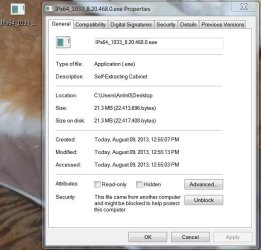
On a lark, I downloaded the driver for the 7000;

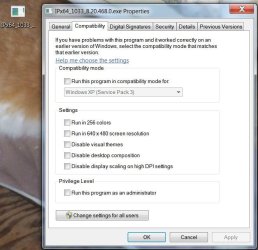
Here is the General Tab, you would have to Unblock the file first then go to the Compatibility Tab and make your selections:
kb1.JPG


And the Compatibility Tab:
kb2.JPG


Compatibility Mode still may or may not work, but the options are there. The choice is yours.
 

My Computer

Computer type
PC/Desktop
Computer Manufacturer/Model Number
Gateway DX4831-01e (Mid-Tower Desktop)
OS
Originally Win 7 Hm Prem x64 Ver 6.1.7600 Build 7601-SP1 | Upgraded to Windows 10 December 14, 2019
CPU
Intel i3 530 2.93GHz, 2933MHz 2 Cores 4 Logical Processors
Motherboard
Gateway H57M01 133 megahertz
Memory
6GB of 1,333MHz DDR3 SDRAM
Graphics Card(s)
32MB Intel Graphics Media Accelerator HD IGChip
Sound Card
Realtek High Definition Audio
Monitor(s) Displays
Gateway HX2000 20inch TFT active matrix TN
Screen Resolution
1600 x 900 x 59 hertz
Hard Drives
WDC WD10EADS-00M2B0 [HDD] (1000.20 GB) -- drive 0,
HL-DT-ST DVDRAM GH41N [CD-ROM dr]
Four card readers, and Four USB 2.0
PSU
300watts.
Case
Mid-Tower Desktop
Cooling
Stock from Gateway
Keyboard
Natural Ergonomic Keyboard 4000, see Other Info
Mouse
Orig. Gateway wore out now using Insignia USB wired optical
Internet Speed
Vz FIOS 10ms png 57.64Mbps down 65.53Mbps up Speedtest.org
Antivirus
Zamana Anti-logger with Anti-malware, MSE, Windows Firewall,
Browser
IE11.0.9600.19399-Upd ver11.0.135, Firefox 68.0.1 x64
Other Info
System Specs by Belarc.

BIOS: American Megatrends Inc. P01-A0 11/17/2009

Replaced the MS 'Natural' Standard PS/2 Enhanced 101-102 Keyboard with a new Natural Ergonomic Keyboard 4000 on August 1st 2014.

Canon Pixma MG3222 Printer.

Updated to IE11 on 12102015 | Fios Quantum Router g1100

Additional AV: SpywareBlaster, manual Mbam, SAS
  • Like
Reactions: Arc
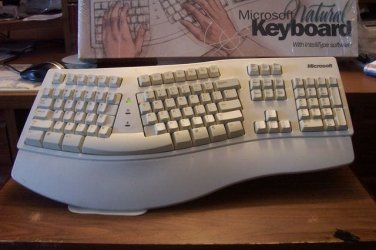
I got to thinking and looked at my keyboard P/N and its the same as yours 59758, and we've been using it since win98. Remember that USB limitation?

Well, I've always had ours hooked up with a PS/2 connector, even now because that's the type it came with. So if yours has a USB connection and you have a PS/2 connection at the back of your machine try an adapter or if you've been using an adapter take it off and plug it into the PS/2 connection..

Here's a pix of ours:
100_2331.JPG


More: Keyboard Ghosting & N-key Rollover: How Many Keys Your Keyboard Can Take?
 

My Computer

Computer type
PC/Desktop
Computer Manufacturer/Model Number
Gateway DX4831-01e (Mid-Tower Desktop)
OS
Originally Win 7 Hm Prem x64 Ver 6.1.7600 Build 7601-SP1 | Upgraded to Windows 10 December 14, 2019
CPU
Intel i3 530 2.93GHz, 2933MHz 2 Cores 4 Logical Processors
Motherboard
Gateway H57M01 133 megahertz
Memory
6GB of 1,333MHz DDR3 SDRAM
Graphics Card(s)
32MB Intel Graphics Media Accelerator HD IGChip
Sound Card
Realtek High Definition Audio
Monitor(s) Displays
Gateway HX2000 20inch TFT active matrix TN
Screen Resolution
1600 x 900 x 59 hertz
Hard Drives
WDC WD10EADS-00M2B0 [HDD] (1000.20 GB) -- drive 0,
HL-DT-ST DVDRAM GH41N [CD-ROM dr]
Four card readers, and Four USB 2.0
PSU
300watts.
Case
Mid-Tower Desktop
Cooling
Stock from Gateway
Keyboard
Natural Ergonomic Keyboard 4000, see Other Info
Mouse
Orig. Gateway wore out now using Insignia USB wired optical
Internet Speed
Vz FIOS 10ms png 57.64Mbps down 65.53Mbps up Speedtest.org
Antivirus
Zamana Anti-logger with Anti-malware, MSE, Windows Firewall,
Browser
IE11.0.9600.19399-Upd ver11.0.135, Firefox 68.0.1 x64
Other Info
System Specs by Belarc.

BIOS: American Megatrends Inc. P01-A0 11/17/2009

Replaced the MS 'Natural' Standard PS/2 Enhanced 101-102 Keyboard with a new Natural Ergonomic Keyboard 4000 on August 1st 2014.

Canon Pixma MG3222 Printer.

Updated to IE11 on 12102015 | Fios Quantum Router g1100

Additional AV: SpywareBlaster, manual Mbam, SAS
Yep, that's my keyboard (or it used to be, I just bought the MS Ergo 4000). Now I'm getting used to a new keyboard :)
 

My Computer

Computer type
PC/Desktop
Computer Manufacturer/Model Number
custom build
OS
Windows 7 ultimate x64
CPU
core i7 2600K
Motherboard
Intel DH67CL
Memory
12GB
Graphics Card(s)
GTX 570
Hard Drives
SSD primary: 128GB
1TB Secondary: Seagate
3TB Tertiary: WD Green
Antivirus
avg
Browser
firefox
Back
Top