Very weird occurance..

frootloop

New member
Local time
2:11 PM
Messages
4
So this has happened a few times.. and ive thought someone just got on my computer and went through my stuff.. However.. I took my wife to work this morning and when I got back tons of file folders and applications were open.. as if someone had gone through my computer. Well I know for SURE that there was NO ONE else in my house while this happened.. So this leads me to being extremely stumped.. Should I be worried that this is a security issue?? Has anyone else experienced this? My system is fully up to date on updates.
 

My Computer

Computer Manufacturer/Model Number
MSI A5xxx
OS
Windows 7 Home Premium x64
Memory
4gb DDR2
Hi Frootloop,

Lets start with your current security setup : what security software do you have installed on your computer? Are they up-to-date? Is the firewall turned on?

Regards,
Golden
 

My Computer

Computer type
PC/Desktop
Computer Manufacturer/Model Number
Golden Mk. I.4
OS
Windows 10 Pro x64 ; Xubuntu x64
CPU
Intel i7 860 @ 2.80 GHz O/C'ed to 4.0GHz
Motherboard
Gigabyte P55A-UD3R Rev.1. Award BIOS F13
Memory
16GB Corsair Vengance DDR3 @ 661 MHz Dual Channel (9-9-9-24)
Graphics Card(s)
EVGA NVidia GTX 560 1024MB
Sound Card
Realtek Integrated
Monitor(s) Displays
Dual Samsung SyncMaster 2494HS
Screen Resolution
1920*1080 and 1920*1080
Hard Drives
1*Samsung 840 EVO 120GB SSD;
1*OCZ Vertex 2 60GB SSD;
2*Samsung F3 SpinPoint 1TB in RAID0;
1*Samsung F1 SpinPoint 1TB;
2*Western Digital 1TB External USB 3.0
1*Western Digital 500GB External USB 3.0
1*Seagate 500GB External USB 2.0
PSU
Thermaltake ToughPower QFan 750W
Case
Thermaltake Element S VK60001W2Z
Cooling
Corsair H60 Water Cooling, 2*230mm and 2*80mm case fans
Keyboard
Logitech G110
Mouse
Logitech MX518
Hi Frootloop,

Lets start with your current security setup : what security software do you have installed on your computer? Are they up-to-date? Is the firewall turned on?

Regards,
Golden

I've got Kaspersky Internet Security 2011 - Fully updated, and the firewall is on.
 

My Computer

Computer Manufacturer/Model Number
MSI A5xxx
OS
Windows 7 Home Premium x64
Memory
4gb DDR2
OK. I don't see an issue there. To close off this avenue, please download and install free Malwarebytes, update the database, and then run a full system scan and post the results here.

Regards,
Golden
 

My Computer

Computer type
PC/Desktop
Computer Manufacturer/Model Number
Golden Mk. I.4
OS
Windows 10 Pro x64 ; Xubuntu x64
CPU
Intel i7 860 @ 2.80 GHz O/C'ed to 4.0GHz
Motherboard
Gigabyte P55A-UD3R Rev.1. Award BIOS F13
Memory
16GB Corsair Vengance DDR3 @ 661 MHz Dual Channel (9-9-9-24)
Graphics Card(s)
EVGA NVidia GTX 560 1024MB
Sound Card
Realtek Integrated
Monitor(s) Displays
Dual Samsung SyncMaster 2494HS
Screen Resolution
1920*1080 and 1920*1080
Hard Drives
1*Samsung 840 EVO 120GB SSD;
1*OCZ Vertex 2 60GB SSD;
2*Samsung F3 SpinPoint 1TB in RAID0;
1*Samsung F1 SpinPoint 1TB;
2*Western Digital 1TB External USB 3.0
1*Western Digital 500GB External USB 3.0
1*Seagate 500GB External USB 2.0
PSU
Thermaltake ToughPower QFan 750W
Case
Thermaltake Element S VK60001W2Z
Cooling
Corsair H60 Water Cooling, 2*230mm and 2*80mm case fans
Keyboard
Logitech G110
Mouse
Logitech MX518
OK. I don't see an issue there. To close off this avenue, please download and install free Malwarebytes, update the database, and then run a full system scan and post the results here.

Regards,
Golden

Will do, Thanks for your insight Golden!
 

My Computer

Computer Manufacturer/Model Number
MSI A5xxx
OS
Windows 7 Home Premium x64
Memory
4gb DDR2
In addition to the Malwarebytes scan that Golden suggested, I like to run a couple of additional scans. Often one scan will pick up something that another scan has missed. You can try both of these scans with confidence:
TrendMicro Home Page - Antivirus, Anti-Spam and Internet Security Software - Trend Micro USA (free - go to Free Tools + scan House Call)
MSE Microsoft Security Essentials

Also, is there any possibility that someone is accessing your system remotely?
 

My Computer

Computer Manufacturer/Model Number
HP Pavillion dv5t (generation 1)
OS
Vista 64 bit and 32 bit (SP2)
CPU
Intel(R) Core(TM)2 Duo Processor T9400 (2.53 GHz
Memory
4GB DDR2 System Memory (2 Dimm)
Graphics Card(s)
512 MB NVIDIA GeForce 9600M GT
Monitor(s) Displays
15.4" diagonal WSXGA+ High-Definition HP BrightView Widescre
Screen Resolution
1680 x 1050
Hard Drives
320GB 5400RPM SATA Hard Drive with HP ProtectSmart Hard Drive Protection
Keyboard
Built-in HP
Mouse
Built in - Synaptics TouchPad V6.5 on PS/2 Port
Internet Speed
Max
Other Info
~ Intel Next-Gen Wireless-N Mini-card w/Bluetooth ~ Blu-Ray ROM DVD+/-R/RW ~ Integ. HDTV Hybrid Tuner ~ 12 Cell Battery ~ MS Office (Home Premium) 2007 ~
Be careful about loading two active scanners at the same time, such as MSE and Kaspersky. You'll bog down the system. An online scan isn't a bad idea, nor is downloading Malwarebytes, as suggested. That's a great manual scanner, that's free and provides a second opinion.

Also, go through your Program list in Control Panel and see if you have any remote viewing apps installed, like GoToMeeting, VNC, etc.
 

My Computer

OS
Windows 7 Ultimate x64 SP1
CPU
Intel Core i7-2600
Motherboard
Gigabyte GA-P67A-UD3P-B3
Memory
12 GB Patriot Extreme DDR3-1333
Graphics Card(s)
Nvidia GTX 470
Monitor(s) Displays
Dell UltraSharp 2209WA
Hard Drives
OCZ Agility3 240 GB, WD5001AALS, WD7501AALS
PSU
OCZ ModStream 700W
Case
CoolerMaster HAF 912 Advanced
Cooling
CoolerMaster Hyper 212 Plus
So this has happened a few times.. and ive thought someone just got on my computer and went through my stuff.. However.. I took my wife to work this morning and when I got back tons of file folders and applications were open.. as if someone had gone through my computer. Well I know for SURE that there was NO ONE else in my house while this happened.. So this leads me to being extremely stumped.. Should I be worried that this is a security issue?? Has anyone else experienced this? My system is fully up to date on updates.

This is very curious. You've gotten some good advice here regarding security software, so I'll just submit a few questions along a different line of thought:

  1. Were the files open of a sensitive nature or seem to have a 'context'?
  2. Does anyone else have access to your house?
  3. Are you in a single house or a multi-dwelling? Is your internet connection shared?
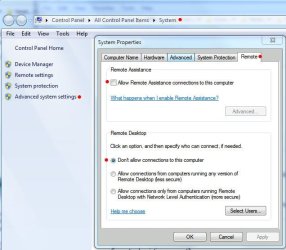
  4. Is Remote Assistance or Remote Desktop Connection enabled (see screenshot #1)?
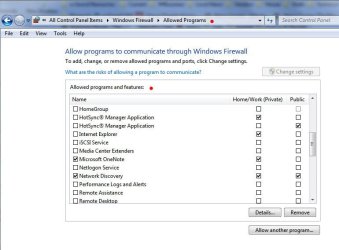
  5. Are any Remote services allowed through Windows Firewall (see screenshot #2)?
  6. Do you have multiple machines? Is file sharing and Network discover enabled (screenshot #3)?
#1

RemoteConnectionSettings.JPG

#2

WindowsFirewallAllowed.JPG

#3

NetwkSharingCenter_Advanced.JPG


James
 

My Computer

OS
Win7U 64 RTM
CPU
Q9550
Motherboard
GA-EP45-UD3R
Memory
8GB Gskill
Graphics Card(s)
ASUS|EAH4850/HTDI/1GD3/A
Sound Card
xfi Plat
Monitor(s) Displays
Dell 2405fpw
Screen Resolution
1920x1200
Hard Drives
Seagate & WD sata Drives
PSU
Antec
Case
Antec
Keyboard
MS Natural Ergonomic 4000
Mouse
Logitech MX610 USB Cordless
James has some very good points, so please check those.

In addition, is your internet connection a wireless one? If so, do you know whether it is protected with a passkey (password)? If so, do you know whether the router is using WEP or WPA2?

Regards,
Golden
 

My Computer

Computer type
PC/Desktop
Computer Manufacturer/Model Number
Golden Mk. I.4
OS
Windows 10 Pro x64 ; Xubuntu x64
CPU
Intel i7 860 @ 2.80 GHz O/C'ed to 4.0GHz
Motherboard
Gigabyte P55A-UD3R Rev.1. Award BIOS F13
Memory
16GB Corsair Vengance DDR3 @ 661 MHz Dual Channel (9-9-9-24)
Graphics Card(s)
EVGA NVidia GTX 560 1024MB
Sound Card
Realtek Integrated
Monitor(s) Displays
Dual Samsung SyncMaster 2494HS
Screen Resolution
1920*1080 and 1920*1080
Hard Drives
1*Samsung 840 EVO 120GB SSD;
1*OCZ Vertex 2 60GB SSD;
2*Samsung F3 SpinPoint 1TB in RAID0;
1*Samsung F1 SpinPoint 1TB;
2*Western Digital 1TB External USB 3.0
1*Western Digital 500GB External USB 3.0
1*Seagate 500GB External USB 2.0
PSU
Thermaltake ToughPower QFan 750W
Case
Thermaltake Element S VK60001W2Z
Cooling
Corsair H60 Water Cooling, 2*230mm and 2*80mm case fans
Keyboard
Logitech G110
Mouse
Logitech MX518
So this has happened a few times.. and ive thought someone just got on my computer and went through my stuff.. However.. I took my wife to work this morning and when I got back tons of file folders and applications were open.. as if someone had gone through my computer. Well I know for SURE that there was NO ONE else in my house while this happened.. So this leads me to being extremely stumped.. Should I be worried that this is a security issue?? Has anyone else experienced this? My system is fully up to date on updates.

This is very curious. You've gotten some good advice here regarding security software, so I'll just submit a few questions along a different line of thought:

  1. Were the files open of a sensitive nature or seem to have a 'context'?
No, Its been different things every time.. Music and photo's mostly

  1. Does anyone else have access to your house?
Negative

  1. Are you in a single house or a multi-dwelling? Is your internet connection shared?
Negative

  1. Is Remote Assistance or Remote Desktop Connection enabled (see screenshot #1)?
Yes, I use crossloop to remote connect to my parents computer when they need help as they are not computer literate. However, When it's not being used, it is uninstalled. I uninstalled it after this happened the first time.

  1. Are any Remote services allowed through Windows Firewall (see screenshot #2)?
Yes, Just my programs I use for work and keeping in touch with family (Skype, AIM)

  1. Do you have multiple machines? Is file sharing and Network discover enabled (screenshot #3)?
Just my wife's laptop, and File Sharing services are disabled. I keep my network as secure as possible.
#1

View attachment 139993

#2

View attachment 139994

#3

View attachment 139997


James

James has some very good points, so please check those.

In addition, is your internet connection a wireless one? If so, do you know whether it is protected with a passkey (password)? If so, do you know whether the router is using WEP or WPA2?

Negative, it is a wired linksys router. Our laptops stay on the desk when they arent in transit.

Regards,
Golden


I posted answer's right under the questions in the quote, It was easier to address them that way. I really appreciate your help guys. If I cannot figure this out soon, I am going to wipe this drive and start all over..

I did a malware scan, and also did a kaspersky full scan, both came up with nothing.
 

My Computer

Computer Manufacturer/Model Number
MSI A5xxx
OS
Windows 7 Home Premium x64
Memory
4gb DDR2
Hi,

Your general security approach seems very good and the malware scans come up clean, so it sounds unlikely, but not impossible, to be from some sort of infection. The behavior of automatic open files and folders is still very odd...........something sounds odd about it.

You mentioned a second (your wife's?) laptop? Is it subject to the same level of security as yours? I presume you scanned both laptops? You mentioned "in-transit" : do you ever use the internet from a public domain? Public Wi-Fi hotspot for example? Does her laptop display similar automatic file/folder openiing behaviour?

There is one last thing that I can think of, and that is to burrow a bit deeper. Can you please download and run RunScanner - it will tell you a bit about the services and files on your system, and you may spot something untoward.

When you run it, choose the Beginner Mode and then run it. It will scan your system and then request you to save the results in a text file. When you open that text file, it will look similar to the example from my PC shown below. Note that "unrated items" are not neccessarily bad : the software may just not know how to classify them.

I also would like to ask Jacee and Corinne (our resiendent security experts) to have a look at this issue if they have the time, so I'll send them a message and ask them to visit here and make any other comments or suggestions if they have any.

Regards,
Golden
 

Attachments

  • 1.PNG
    1.PNG
    35.3 KB · Views: 14

My Computer

Computer type
PC/Desktop
Computer Manufacturer/Model Number
Golden Mk. I.4
OS
Windows 10 Pro x64 ; Xubuntu x64
CPU
Intel i7 860 @ 2.80 GHz O/C'ed to 4.0GHz
Motherboard
Gigabyte P55A-UD3R Rev.1. Award BIOS F13
Memory
16GB Corsair Vengance DDR3 @ 661 MHz Dual Channel (9-9-9-24)
Graphics Card(s)
EVGA NVidia GTX 560 1024MB
Sound Card
Realtek Integrated
Monitor(s) Displays
Dual Samsung SyncMaster 2494HS
Screen Resolution
1920*1080 and 1920*1080
Hard Drives
1*Samsung 840 EVO 120GB SSD;
1*OCZ Vertex 2 60GB SSD;
2*Samsung F3 SpinPoint 1TB in RAID0;
1*Samsung F1 SpinPoint 1TB;
2*Western Digital 1TB External USB 3.0
1*Western Digital 500GB External USB 3.0
1*Seagate 500GB External USB 2.0
PSU
Thermaltake ToughPower QFan 750W
Case
Thermaltake Element S VK60001W2Z
Cooling
Corsair H60 Water Cooling, 2*230mm and 2*80mm case fans
Keyboard
Logitech G110
Mouse
Logitech MX518
Thanks for the link to runscanner software :). I have added the site to my Favorites.
 

My Computer

Computer Manufacturer/Model Number
Deviantsystems
OS
Win7 Ultimate x64
CPU
Intel Core i7 950 (4x 3066 MHz with HT) Quad Core
Motherboard
Asus P6X58D-E
Memory
6GB DDR3 1333Mhz
Graphics Card(s)
Nvidia GTS 450 (1024MB GDDR5 | DX 11)
Sound Card
Intel HD Audio via Realtek ALC889 with 8-channel support
Monitor(s) Displays
Sony Bravia 32"
Screen Resolution
1080i, x1768x992
Hard Drives
2x WD 1TB 7200 RPM Sata
PSU
OCZ ModXStream Pro 600W 80+
Case
Lian Li PC-7FN
Cooling
Processor cooling: Scythe Big Shuriken SCBSK-1000
Keyboard
Microsoft Ergonomic
Mouse
Logitec Trackball
Hi C32C3

Download SilentRunners http://www.silentrunners.org/Silent Runners.zip
1. Unzip/extract the file to its own folder:
C:\Silent Runners.
3. Right-click (choose to run as Administrator) the SilentRunners.vbs inside the folder or on your desktop
to start.
4. A message box will appear asking if you want to skip the supplemental
searches.
5. Press "Yes" to skip [default] or "No" to include them.
6. Another message box will appear saying: "Silent Runners has started. A
message box like this will appear when its done." The tool will scan your
system and create a log by default, in the same directory as the script or
on your desktop. The log is named "Startup Programs (ComputerName)
date/timestamp.txt".
7. When finished, the next message to appear will say: "All Done! the
results are in the file..." (it will provide the full path location of the
log.
8. Copy & paste the log in your next reply.

Note: If you have a script blocking program you may get a warning asking if
you want to allow the script to run. Some will say "malicious script
warning" or something to that effect. There is nothing malicious about this
script, you can click to allow it to execute
.
 

My Computer

Computer type
PC/Desktop
Computer Manufacturer/Model Number
Bruce ... somewhere in his 40's
OS
Windows 7 Ultimate 32bit SP1
CPU
Intel(R) Core(TM)2 Quad CPU @ 2.40GHz, 2400 MHz
Motherboard
INTEL/D975XBX2
Memory
4 GB
Graphics Card(s)
ATI Radeon HD 2600 Pro
Monitor(s) Displays
Samsung SyncMaster 914v
Screen Resolution
1280 x 1024
Hard Drives
2/500GB each ... ST3500630AS ATA Device.
One is not connected
PSU
Rocketfish 700 W
Case
G.Skill Gigabyte Chassis
Keyboard
Standard PS/2 Keyboard
Mouse
Microsoft PS/2 Mouse
Internet Speed
DSL
Antivirus
Avira Internet Security
Browser
IE 11
Other Info
ATI HDMI Audio
Thanks Jacee, but I am not experiencing a security problem. I added runscanner to my Favorites ïn case I need it in the future.
 

My Computer

Computer Manufacturer/Model Number
Deviantsystems
OS
Win7 Ultimate x64
CPU
Intel Core i7 950 (4x 3066 MHz with HT) Quad Core
Motherboard
Asus P6X58D-E
Memory
6GB DDR3 1333Mhz
Graphics Card(s)
Nvidia GTS 450 (1024MB GDDR5 | DX 11)
Sound Card
Intel HD Audio via Realtek ALC889 with 8-channel support
Monitor(s) Displays
Sony Bravia 32"
Screen Resolution
1080i, x1768x992
Hard Drives
2x WD 1TB 7200 RPM Sata
PSU
OCZ ModXStream Pro 600W 80+
Case
Lian Li PC-7FN
Cooling
Processor cooling: Scythe Big Shuriken SCBSK-1000
Keyboard
Microsoft Ergonomic
Mouse
Logitec Trackball
Thanks Jacee. The OP is Fruitloop.
 

My Computer

Computer type
PC/Desktop
Computer Manufacturer/Model Number
Golden Mk. I.4
OS
Windows 10 Pro x64 ; Xubuntu x64
CPU
Intel i7 860 @ 2.80 GHz O/C'ed to 4.0GHz
Motherboard
Gigabyte P55A-UD3R Rev.1. Award BIOS F13
Memory
16GB Corsair Vengance DDR3 @ 661 MHz Dual Channel (9-9-9-24)
Graphics Card(s)
EVGA NVidia GTX 560 1024MB
Sound Card
Realtek Integrated
Monitor(s) Displays
Dual Samsung SyncMaster 2494HS
Screen Resolution
1920*1080 and 1920*1080
Hard Drives
1*Samsung 840 EVO 120GB SSD;
1*OCZ Vertex 2 60GB SSD;
2*Samsung F3 SpinPoint 1TB in RAID0;
1*Samsung F1 SpinPoint 1TB;
2*Western Digital 1TB External USB 3.0
1*Western Digital 500GB External USB 3.0
1*Seagate 500GB External USB 2.0
PSU
Thermaltake ToughPower QFan 750W
Case
Thermaltake Element S VK60001W2Z
Cooling
Corsair H60 Water Cooling, 2*230mm and 2*80mm case fans
Keyboard
Logitech G110
Mouse
Logitech MX518
You're in good hands with Golden and Jacee, but I'm curious as to how often it happens? Also, have you tried disconnecting your internet connection when you're not using the system(s)? It might be interesting to see what happens when there's 'no way out'. It also might be wisdom until you figure out what's going on.

James
 

My Computer

OS
Win7U 64 RTM
CPU
Q9550
Motherboard
GA-EP45-UD3R
Memory
8GB Gskill
Graphics Card(s)
ASUS|EAH4850/HTDI/1GD3/A
Sound Card
xfi Plat
Monitor(s) Displays
Dell 2405fpw
Screen Resolution
1920x1200
Hard Drives
Seagate & WD sata Drives
PSU
Antec
Case
Antec
Keyboard
MS Natural Ergonomic 4000
Mouse
Logitech MX610 USB Cordless
Back
Top