VGA Video Card adapter driver needed...

this link to my screen shot with the tool.

sreenshot.jpg picture by carlos_rocks - Photobucket

It may be an Intel mobo with onboard graphics but somehow Nvidia is showing up in the audit.

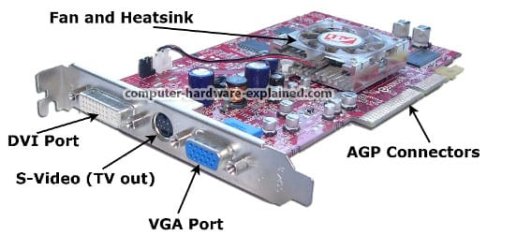
Did you look at the back of your case to see if there is a video card as shown in the screenshot I attached above? If not, then that Nvidia is a ghost listing.

i did everything and the card "updated" i restarted my computer and its still not letting me use aero :(

Was this the Intel Extreme graphic driver link I gave you yesterday? How do you know it updated the driver. Did the date or version change in Device Manager?


i didnt...umm but it said it was updated on the device manager...i installed something...im not sure if it was the right one though...and yes it appears to be the same card in the picture u supplied....
 

My Computer My Computer

At a glance

Windows 7Custom Built2.0 GB RAMstandard VGA Graphics adapter
Computer Manufacturer/Model Number
Unknowned
OS
Windows 7
CPU
Custom Built
Motherboard
Board: Intel Corporation D865GLC AAC28906-408 ...??
Memory
2.0 GB RAM
Graphics Card(s)
standard VGA Graphics adapter
Sound Card
soundMAX
Monitor(s) Displays
hp pavilion f1503
Screen Resolution
1024x768
Hard Drives
Maxtor 6Y080P0 [Hard drive] (81.96 GB)
PSU
??
Case
Ultra
Cooling
Fan?
Keyboard
razer lycosa
Mouse
Logitech
Internet Speed
Road Runner TURBO
i didnt...umm but it said it was updated on the device manager...i installed something...im not sure if it was the right one though...and yes it appears to be the same card in the picture u supplied....

So there is a video card in a PCI slot that in any way resembles the screenshot?

graphics-card9.jpg

Can you please look for a model or serial number on it.

It may be necessary to open the case to examine the card under bright light with a magnifying glass to get the exact serial or model number off the card.

Don't touch anything without first discharging static electricting on the outside of your case.

Then we can find the driver and install it.
 
i didnt...umm but it said it was updated on the device manager...i installed something...im not sure if it was the right one though...and yes it appears to be the same card in the picture u supplied....

So there is a video card in a PCI slot that in any way resembles the screenshot?

View attachment 44082

Can you please look for a model or serial number on it.

It may be necessary to open the case to examine the card under bright light with a magnifying glass to get the exact serial or model number off the card.

Don't touch anything without first discharging static electricting on the outside of your case.

Then we can find the driver and install it.


ok...its CN-09Y779-69702-398-4736
 

My Computer My Computer

At a glance

Windows 7Custom Built2.0 GB RAMstandard VGA Graphics adapter
Computer Manufacturer/Model Number
Unknowned
OS
Windows 7
CPU
Custom Built
Motherboard
Board: Intel Corporation D865GLC AAC28906-408 ...??
Memory
2.0 GB RAM
Graphics Card(s)
standard VGA Graphics adapter
Sound Card
soundMAX
Monitor(s) Displays
hp pavilion f1503
Screen Resolution
1024x768
Hard Drives
Maxtor 6Y080P0 [Hard drive] (81.96 GB)
PSU
??
Case
Ultra
Cooling
Fan?
Keyboard
razer lycosa
Mouse
Logitech
Internet Speed
Road Runner TURBO
Do you have a Dell computer? It thought you said it is custom built.

This is a Dell Nvidia card. I am looking for the driver. Please reconfirm the exact numbers given.

it is... the numbers are correct.....
 

My Computer My Computer

At a glance

Windows 7Custom Built2.0 GB RAMstandard VGA Graphics adapter
Computer Manufacturer/Model Number
Unknowned
OS
Windows 7
CPU
Custom Built
Motherboard
Board: Intel Corporation D865GLC AAC28906-408 ...??
Memory
2.0 GB RAM
Graphics Card(s)
standard VGA Graphics adapter
Sound Card
soundMAX
Monitor(s) Displays
hp pavilion f1503
Screen Resolution
1024x768
Hard Drives
Maxtor 6Y080P0 [Hard drive] (81.96 GB)
PSU
??
Case
Ultra
Cooling
Fan?
Keyboard
razer lycosa
Mouse
Logitech
Internet Speed
Road Runner TURBO

My Computer My Computer

At a glance

Windows 7Custom Built2.0 GB RAMstandard VGA Graphics adapter
Computer Manufacturer/Model Number
Unknowned
OS
Windows 7
CPU
Custom Built
Motherboard
Board: Intel Corporation D865GLC AAC28906-408 ...??
Memory
2.0 GB RAM
Graphics Card(s)
standard VGA Graphics adapter
Sound Card
soundMAX
Monitor(s) Displays
hp pavilion f1503
Screen Resolution
1024x768
Hard Drives
Maxtor 6Y080P0 [Hard drive] (81.96 GB)
PSU
??
Case
Ultra
Cooling
Fan?
Keyboard
razer lycosa
Mouse
Logitech
Internet Speed
Road Runner TURBO
Do you have a Dell computer? It thought you said it is custom built.

This is a Dell Nvidia card. I am looking for the driver. Please reconfirm the exact numbers given.

Is this the same card: Dell 09Y779 GeForce4 MX420 64MB 8x AGP DVI Video Card - eBay (item 270506281602 end time Jan-01-10 10:54:47 PST)
yup the exact same.


Video:nVidia 64MB GeForce4 MX 420 w/... Driver - Free software downloads and software reviews - CNET Download.com
 
Trust me, it will install.

I just accidentally installed it to my computer when I was trying only to unzip the files.

Gotta go pre-emptively SysRestore from boot.
 
Trust me, it will install.

I just accidentally installed it to my computer when I was trying only to unzip the files.

Gotta go pre-emptively SysRestore from boot.
i forced it to install but it still doesnt work :'(
 

My Computer My Computer

At a glance

Windows 7Custom Built2.0 GB RAMstandard VGA Graphics adapter
Computer Manufacturer/Model Number
Unknowned
OS
Windows 7
CPU
Custom Built
Motherboard
Board: Intel Corporation D865GLC AAC28906-408 ...??
Memory
2.0 GB RAM
Graphics Card(s)
standard VGA Graphics adapter
Sound Card
soundMAX
Monitor(s) Displays
hp pavilion f1503
Screen Resolution
1024x768
Hard Drives
Maxtor 6Y080P0 [Hard drive] (81.96 GB)
PSU
??
Case
Ultra
Cooling
Fan?
Keyboard
razer lycosa
Mouse
Logitech
Internet Speed
Road Runner TURBO
Trust me, it will install.

I just accidentally installed it to my computer when I was trying only to unzip the files.

Gotta go pre-emptively SysRestore from boot.
i forced it to install but it still doesnt work :'(


Does it show in Device Manager Display adapter to be Nvidia MX420?

If not, open the file in C/Dell/Drivers and browse within to Setup, right click and select Compatibility tab on Properties, set to XP SP2 compatibility with Run as Administrator, select for all users.

Now run setup again.

If this fails, go back to the VGA display adapter in Device manager, click Driver tab , Update driver, then browse to C/Dell/Drivers folder until it picks up the correct driver.
 
Trust me, it will install.

I just accidentally installed it to my computer when I was trying only to unzip the files.

Gotta go pre-emptively SysRestore from boot.
i forced it to install but it still doesnt work :'(


Does it show in Device Manager Display adapter to be Nvidia MX420?

If not, open the file in C/Dell/Drivers and browse within to Setup, right click and select Compatibility tab on Properties, set to XP SP2 compatibility with Run as Administrator, select for all users.

Now run setup again.

If this fails, go back to the VGA display adapter in Device manager, click Driver tab , Update driver, then browse to C/Dell/Drivers folder until it picks up the correct driver.
yea its shows up as Nvidia....
 

My Computer My Computer

At a glance

Windows 7Custom Built2.0 GB RAMstandard VGA Graphics adapter
Computer Manufacturer/Model Number
Unknowned
OS
Windows 7
CPU
Custom Built
Motherboard
Board: Intel Corporation D865GLC AAC28906-408 ...??
Memory
2.0 GB RAM
Graphics Card(s)
standard VGA Graphics adapter
Sound Card
soundMAX
Monitor(s) Displays
hp pavilion f1503
Screen Resolution
1024x768
Hard Drives
Maxtor 6Y080P0 [Hard drive] (81.96 GB)
PSU
??
Case
Ultra
Cooling
Fan?
Keyboard
razer lycosa
Mouse
Logitech
Internet Speed
Road Runner TURBO
Good, what is the version and date showing?

now click on the Driver tab of the Nvidia display adapter in Device Manager and have it Update driver on the internet.

Meanwhile keep a close eye on Windows Updates for a more recent driver arriving.

It is an old card but may have something newer. I already searched Google but you can search deeper using exact Device name on display adapter Driver tab or the Ven number in Details tab.

Right click desktop and see if you can get a better screen resolution now.
 
Hi,

Just for thoughts, I've checked Drivers - Download NVIDIA Drivers
I don't see any GeForce 4 MX drivers for Windows Desktop OS above Windows XP.

I think it's time for you to upgrade that card, or upgrade your computer as whole...

Or if you're adventurous enough, you could try install the Windows Server 2003 driver and cross your finger...

Regards,

zzz2496
 

My Computer My Computer

At a glance

Windows7 Ultimate 64bitIntel Core 2 Quad Q6600DDR2 Adata 4GBNvidia GeForce GTX 285 1024 and Nvidia GeForc...
Computer Manufacturer/Model Number
Self Built
OS
Windows7 Ultimate 64bit
CPU
Intel Core 2 Quad Q6600
Motherboard
Abit IN9-32X-MMAX
Memory
DDR2 Adata 4GB
Graphics Card(s)
Nvidia GeForce GTX 285 1024 and Nvidia GeForce 8800GT 512
Sound Card
Asus Xonar HDAV 1.3
Monitor(s) Displays
Dell 2407WFP and BenQ 2400v and Philips 150v3
Screen Resolution
3840x1200 and 1024x768
Hard Drives
2 WDC 1TB
1 WDC 1.5TB
1 WDC 640GB
1 WDC 320GB
1 Seagate 200GB
PSU
Corsair TX 850W
Case
Cooler Master HAF932
Cooling
Arctic Cooling Freezer Extreme and plenty of fans...
Keyboard
MicrosoftNaturalKeyboard 4000/Apple Alu keyboard/Dinovo mini
Mouse
Logitech G5/MarbleMouseTrackball/PerformanceMX/SpacePilotPRO
Internet Speed
1.5Mbps down/384Kbps up
Other Info
APC SURT 1000XL
Logitech Z-560
Wiimote
Mikrotik Router
Linksys (now Cisco) SD2008 8 port Gigabit switch
Linksys WRT54G (acting as AP)
Apple wireless Aluminium keyboard
Apple Magic Mouse
Xbox360 wired controller
Good, what is the version and date showing?

now click on the Driver tab of the Nvidia display adapter in Device Manager and have it Update driver on the internet.

Meanwhile keep a close eye on Windows Updates for a more recent driver arriving.

It is an old card but may have something newer. I already searched Google but you can search deeper using exact Device name on display adapter Driver tab or the Ven number in Details tab.

Right click desktop and see if you can get a better screen resolution now.

date: 3/14/03
version: 4.2.3.8
 

My Computer My Computer

At a glance

Windows 7Custom Built2.0 GB RAMstandard VGA Graphics adapter
Computer Manufacturer/Model Number
Unknowned
OS
Windows 7
CPU
Custom Built
Motherboard
Board: Intel Corporation D865GLC AAC28906-408 ...??
Memory
2.0 GB RAM
Graphics Card(s)
standard VGA Graphics adapter
Sound Card
soundMAX
Monitor(s) Displays
hp pavilion f1503
Screen Resolution
1024x768
Hard Drives
Maxtor 6Y080P0 [Hard drive] (81.96 GB)
PSU
??
Case
Ultra
Cooling
Fan?
Keyboard
razer lycosa
Mouse
Logitech
Internet Speed
Road Runner TURBO
Well, that's older than the 2007 Intel Extreme Graphics driver you installed yesterday for the graphics chip on the motherboard.

Normally a card is better if only for the added memory, but I'm wondering if you might be better off rolling back to the other driver. Is there any noticeable difference? Did it give you a higher screen resolution when you right click the desktop?

You have had 3 drivers now since we started: The VGA placeholder from MS, Intel's own chipset driver, and now the Nvidia card driver. Which one do you like the best and want to keep?

They should all be stored for selection at Device Manager>Display adapter>Driver>update>Browse My Computer>Let Me Pick so you can compare them.
 
Last edited:
Well, that's older than the 2007 Intel Extreme Graphics driver you installed yesterday for the graphics chip on the motherboard.

Normally a card is better if only for the added memory, but I'm wondering if you might be better off rolling back to the other driver. Is there any noticeable difference? Did it give you a higher screen resolution when you right click the desktop?

You have had 3 drivers now since we started: The VGA placeholder from MS, Intel's own chipset driver, and now the Nvidia card driver. Which one do you like the best and want to keep?

They should all be stored for selection at Device Manager>Display adapter>Driver>update>Browse My Computer>Let Me Pick.


well i dunno where the 2007 upgrade of yesterday is...i think i didnt install it...maybe i thought it did. im stuck in this step from yesterday.

screenshot2.jpg picture by carlos_rocks - Photobucket
 

My Computer My Computer

At a glance

Windows 7Custom Built2.0 GB RAMstandard VGA Graphics adapter
Computer Manufacturer/Model Number
Unknowned
OS
Windows 7
CPU
Custom Built
Motherboard
Board: Intel Corporation D865GLC AAC28906-408 ...??
Memory
2.0 GB RAM
Graphics Card(s)
standard VGA Graphics adapter
Sound Card
soundMAX
Monitor(s) Displays
hp pavilion f1503
Screen Resolution
1024x768
Hard Drives
Maxtor 6Y080P0 [Hard drive] (81.96 GB)
PSU
??
Case
Ultra
Cooling
Fan?
Keyboard
razer lycosa
Mouse
Logitech
Internet Speed
Road Runner TURBO

My Computer My Computer

At a glance

Windows 7Custom Built2.0 GB RAMstandard VGA Graphics adapter
Computer Manufacturer/Model Number
Unknowned
OS
Windows 7
CPU
Custom Built
Motherboard
Board: Intel Corporation D865GLC AAC28906-408 ...??
Memory
2.0 GB RAM
Graphics Card(s)
standard VGA Graphics adapter
Sound Card
soundMAX
Monitor(s) Displays
hp pavilion f1503
Screen Resolution
1024x768
Hard Drives
Maxtor 6Y080P0 [Hard drive] (81.96 GB)
PSU
??
Case
Ultra
Cooling
Fan?
Keyboard
razer lycosa
Mouse
Logitech
Internet Speed
Road Runner TURBO
Your graphics chip is Intel 865G which I see in that screenshot list so try it and compare versions with this one I linked you to yesterday:

Video: Intel® Extreme Graphics Driver for 865 Chipset-Based Intel Desktop Boards
its the exact same...im stuck here now...im not sure if im even doing it right...

screenshot3.jpg picture by carlos_rocks - Photobucket

YoshiCookies, according to the serial number, your display adapter is a NVIDIA card, you can't install it using Intel display driver... and FYI, NVIDIA has stopped it's support for GeForce 4 MX and below. Check my post for NVIDIA's driver download page.

Regards,

zzz2496
 

My Computer My Computer

At a glance

Windows7 Ultimate 64bitIntel Core 2 Quad Q6600DDR2 Adata 4GBNvidia GeForce GTX 285 1024 and Nvidia GeForc...
Computer Manufacturer/Model Number
Self Built
OS
Windows7 Ultimate 64bit
CPU
Intel Core 2 Quad Q6600
Motherboard
Abit IN9-32X-MMAX
Memory
DDR2 Adata 4GB
Graphics Card(s)
Nvidia GeForce GTX 285 1024 and Nvidia GeForce 8800GT 512
Sound Card
Asus Xonar HDAV 1.3
Monitor(s) Displays
Dell 2407WFP and BenQ 2400v and Philips 150v3
Screen Resolution
3840x1200 and 1024x768
Hard Drives
2 WDC 1TB
1 WDC 1.5TB
1 WDC 640GB
1 WDC 320GB
1 Seagate 200GB
PSU
Corsair TX 850W
Case
Cooler Master HAF932
Cooling
Arctic Cooling Freezer Extreme and plenty of fans...
Keyboard
MicrosoftNaturalKeyboard 4000/Apple Alu keyboard/Dinovo mini
Mouse
Logitech G5/MarbleMouseTrackball/PerformanceMX/SpacePilotPRO
Internet Speed
1.5Mbps down/384Kbps up
Other Info
APC SURT 1000XL
Logitech Z-560
Wiimote
Mikrotik Router
Linksys (now Cisco) SD2008 8 port Gigabit switch
Linksys WRT54G (acting as AP)
Apple wireless Aluminium keyboard
Apple Magic Mouse
Xbox360 wired controller
In an earlier post on this thread, we determined that although he has an onboard intel graphics chipset, he's using an nvidia card.
 

My Computer My Computer

At a glance

windows 7 RTM x64Phenom II 965 Quad Core 3.4GhzMushkin Blackline 8GB (4x2gb)XFX Radeon 5970 Black Edition
Computer Manufacturer/Model Number
Black_Box (homebuilt)
OS
windows 7 RTM x64
CPU
Phenom II 965 Quad Core 3.4Ghz
Motherboard
Asus M4A79T Deluxe
Memory
Mushkin Blackline 8GB (4x2gb)
Graphics Card(s)
XFX Radeon 5970 Black Edition
Sound Card
onboard
Monitor(s) Displays
Dell 2408WPF-main Dell E248WFP-secondary
Screen Resolution
1920x1200-main 1920x1200-secondary
Hard Drives
OCZ Vertex Limited Edition 100GB (OS)
x1 WD Black Edition 500GB drive (Storage)
PSU
XFX 850w Black Edition (Modular)
Case
Mountian Mods H2go
Cooling
CoolITSystems ECO A.L.C.
Keyboard
Logitech MX 5500 wireless keyboard
Mouse
Razor Copperhead
Internet Speed
16Mb down/2Mb up Wowway Cable Internet
Back
Top