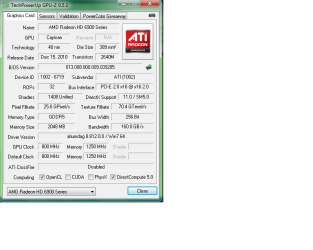
Vid card not running at full x16 speed.

nerotoxen

New member
Local time
9:03 AM
Messages
21
So here's my dilemma:

After this problem with Bsods and such my video card only wants to run at x4 speeds. It was running at x16 speeds when I first installed windows. Now for some reason it only wants to stay at x4 sometimes it will go to x8 after a reboot.

What are you guys' thoughts? I have the latest 11.11 drivers from ati's site. Both power plugs from psu into the card are in place.

I feel like I'm taking a performance hit here. I ran a furmark and the scores have dropped since I installed windows and it was at full x16.
 

Attachments
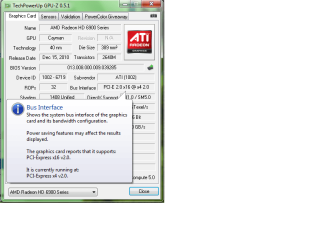
  • Untitled.png
    Untitled.png
    21.4 KB · Views: 275

My Computer My Computer

At a glance

Windows 7 Pro 64-bitAMD Phenom II x4 925Kingston HyperX Blu 4 gig (2x2gb modules) DDR...Sapphire HD 6950 2gb
OS
Windows 7 Pro 64-bit
CPU
AMD Phenom II x4 925
Motherboard
Asus Evo M4A79XTO (latest BIOS)
Memory
Kingston HyperX Blu 4 gig (2x2gb modules) DDR3 1600
Graphics Card(s)
Sapphire HD 6950 2gb
Sound Card
onboard
Monitor(s) Displays
ViewSonic 19''
Hard Drives
1 250 wd
PSU
Antec 620w Neo Eco
Case
None atm.
Cooling
Cooler Master
This is kind of tricky, if the hardware is seeing it that way it's not a windows problem, it's a hardware issue. If windows is somehow dumbing down the hardware. I could only blame chipset or graphics drivers for incorrectly interpreting things.
 

My Computer My Computer

At a glance

Windows 7 x64Intel i7 2600kG.skill Ripjaw 16gigs @ 1866Nvidia gtx580 (evga)
Computer Manufacturer/Model Number
Insane hobo technologies. ;-)
OS
Windows 7 x64
CPU
Intel i7 2600k
Motherboard
Asrock z68 extreme 4 gen 3
Memory
G.skill Ripjaw 16gigs @ 1866
Graphics Card(s)
Nvidia gtx580 (evga)
Sound Card
Integrated HD audio + hdmi
Monitor(s) Displays
24" ASUS widescreen + 42" insignia
Screen Resolution
1080p (1920x1080)
Hard Drives
128 Samsung 830
256 Samsung 840
3 x 1tb storage drive (various)
1 western digital 1tb (eSATA)
1 Seagate 1tb (eSATA)
PSU
1 kilowatt SLI/Crossfire rated Silverstone modular
Case
NZXT Phantom + additional 220 fan
Cooling
Zalmann
Keyboard
Microsoft wireless 3000 (v2)
Mouse
MS - wireless 5000 (bluetrack)
Internet Speed
depends on if you ask me or my provider.
Other Info
The above information is provided as is, and the author assumes no responsibility for issues it may cause with your sanity or fanboyism.
Do you have any other PCI-X cards installed in the other PCI-X 16 expansion slot?
 

My Computer My Computer

At a glance

Windows 10 Pro x64, Windows 8.1 Pro x64, Wind...INTEL i9-7920X LGA 206664 GB (4 X 16 GB) G-Skill V Series DDR4 3200 ...EVGA GTX 1060 SC 3 GB
Computer type
PC/Desktop
Computer Manufacturer/Model Number
Custom Built
OS
Windows 10 Pro x64, Windows 8.1 Pro x64, Windows 7 Ultimate x64 SP1,
CPU
INTEL i9-7920X LGA 2066
Motherboard
Gigabyte X299-WU8 F3
Memory
64 GB (4 X 16 GB) G-Skill V Series DDR4 3200 Quad Channel
Graphics Card(s)
EVGA GTX 1060 SC 3 GB
Sound Card
Realtek Onboard ALC1220
Monitor(s) Displays
2 x Samsung S27E310
Screen Resolution
1920x1080
Hard Drives
Samsung 2 x 970 EVO Plus 500 GB NVMe
1 x 6TB WD 6003FZBX SATA
1 x 6TB WD 60EFRX SATA
12 x 3TB WD 30EFRX SATA
PSU
Seasonic X-1050
Case
Thermaltake Armor+
Cooling
Corsair H80i V2 Liquid AOI Cooler
Keyboard
Logitech G510s
Mouse
Logitech MX Master 2S
Internet Speed
200 Mb/s
Antivirus
ESET NOD32 13.1
Browser
EDGE (Dev, Canary, Beta), Chrome
Other Info
ASUS RT-AC68U router
Malwarebytes 4.0.4
Nope nothing is installed hardware wise except for what's necessary to run the system.

I'm thinking I have some sort of hardware issue, but I'm not sure what. Everything I test out seems to work ok. This card shows x16 on another windows 7 system as well, and it used to show x16 on this system too! I may have fixed my bsod problems, but now this!

I keep looking into this issue on google and can't come up with anything. The mobo is supposed to see it as what the hardware can handle but won't put it there now. Used to but now it won't :(

Thank you for the replies btw!
 

My Computer My Computer

At a glance

Windows 7 Pro 64-bitAMD Phenom II x4 925Kingston HyperX Blu 4 gig (2x2gb modules) DDR...Sapphire HD 6950 2gb
OS
Windows 7 Pro 64-bit
CPU
AMD Phenom II x4 925
Motherboard
Asus Evo M4A79XTO (latest BIOS)
Memory
Kingston HyperX Blu 4 gig (2x2gb modules) DDR3 1600
Graphics Card(s)
Sapphire HD 6950 2gb
Sound Card
onboard
Monitor(s) Displays
ViewSonic 19''
Hard Drives
1 250 wd
PSU
Antec 620w Neo Eco
Case
None atm.
Cooling
Cooler Master
I'm pretty foggy on this, but I have been looking at motherboards similar to yours, and at least some of them state that if a single graphics card is used, it must be installed in the second x16 slot, with some kind of power card inserted in the first, for the graphics to run at x16. I have been looking at so many Asus motherboards lately, that I may well have mixed things up.
 

My Computer My Computer

At a glance

W7x64 Pro, SuSe 12.1/** W7 x64 Pro, XP MCEPhenom II 1090T w/Noctua NH-D14 /**4400+ X2 w...2 x 2GB Patriot PGS34g1600LLKA/**4x1GB Corsai...EVGA GTX460 SC/**EVGA 8800GTS
Computer Manufacturer/Model Number
DIY
OS
W7x64 Pro, SuSe 12.1/** W7 x64 Pro, XP MCE
CPU
Phenom II 1090T w/Noctua NH-D14 /**4400+ X2 w/CM Hyper TX 3
Motherboard
ASRock 890FX Deluxe 4/**A8N-SLI
Memory
2 x 2GB Patriot PGS34g1600LLKA/**4x1GB Corsair VS
Graphics Card(s)
EVGA GTX460 SC/**EVGA 8800GTS
Sound Card
Asus Xonar D2X/**Xonar D1
Monitor(s) Displays
Acer X233H, Dell E152FPc /**LG M237-WD
Screen Resolution
1920x1080 & 1024x768/**1980x1080
Hard Drives
WDC 2TB, 1.5TB, 1TB, 500GB,Seagate 500GB , Maxtor 80GB /**500GB Seagate & WDC 1TB Black
PSU
CM RS600 w/ APC BX1000G/**Antec 500 TP w/ APC BX1000
Case
HAF922/**Antec 1040IIB
Cooling
3x200mm, 1x140 and 1x120mm/**5x80mm fans
Keyboard
Logitech Media USB/**Saitek Eclipse
Mouse
Cordless Trackman Wheel/**Ditto
Internet Speed
3.3Mbps
Other Info
SB 560 5.1 w/ Sennheiser RS140/**Creative T20 speakers, Dvico FusionHDTV7 Gold RT, Cisco E3000, HP 5510V AIO, Linksys E3000, Belkin F5U237 hub and **F5D8055 adapter
(** = 2nd rig)
I'm running on one of the earlier model republic of gamer boards myself right now. Let me tell you ASUS loves to confuse things. The only reward is once you get it all right, they are damn good boards.
 

My Computer My Computer

At a glance

Windows 7 x64Intel i7 2600kG.skill Ripjaw 16gigs @ 1866Nvidia gtx580 (evga)
Computer Manufacturer/Model Number
Insane hobo technologies. ;-)
OS
Windows 7 x64
CPU
Intel i7 2600k
Motherboard
Asrock z68 extreme 4 gen 3
Memory
G.skill Ripjaw 16gigs @ 1866
Graphics Card(s)
Nvidia gtx580 (evga)
Sound Card
Integrated HD audio + hdmi
Monitor(s) Displays
24" ASUS widescreen + 42" insignia
Screen Resolution
1080p (1920x1080)
Hard Drives
128 Samsung 830
256 Samsung 840
3 x 1tb storage drive (various)
1 western digital 1tb (eSATA)
1 Seagate 1tb (eSATA)
PSU
1 kilowatt SLI/Crossfire rated Silverstone modular
Case
NZXT Phantom + additional 220 fan
Cooling
Zalmann
Keyboard
Microsoft wireless 3000 (v2)
Mouse
MS - wireless 5000 (bluetrack)
Internet Speed
depends on if you ask me or my provider.
Other Info
The above information is provided as is, and the author assumes no responsibility for issues it may cause with your sanity or fanboyism.
has anyone mentioned going into the bios and checking the pci-e speed to see if it is enabled for x16

I might be mistaken but i thought i saw on the pci -e settings or the southbridge where you can variate the port worth a try
 

My Computer My Computer

At a glance

Windows 10 Home Premium 64bit sp1Intel I7-6700K @ 4.6 Ghz 1.344 volts everyday OC32GB G-Skill TridentZ 3200mhz 16-18-18-38 DDR4Sli Gigabyte Windforce GTX 980 G1
Computer type
PC/Desktop
Computer Manufacturer/Model Number
CoreI7-6700K MrFingerIII Special Builds
OS
Windows 10 Home Premium 64bit sp1
CPU
Intel I7-6700K @ 4.6 Ghz 1.344 volts everyday OC
Motherboard
Asrock Fatality K6 Z170 Socket 1151
Memory
32GB G-Skill TridentZ 3200mhz 16-18-18-38 DDR4
Graphics Card(s)
Sli Gigabyte Windforce GTX 980 G1
Sound Card
AC97 Creative Rage Tactic 3D Headphones Bluetooth
Monitor(s) Displays
27" Asus ROG Swift PG278Q G-Sync 48" Vizio Smart HD TV
Screen Resolution
2560x1440p 27"- 48" Currently Gaming at 2560x1440p Res 2K
Hard Drives
250GB Samsung Evo840SSD Seagate baracuda 500 GB WD Mybook 500Gb 1TB Seagate Barracuda
PSU
HX1050w Corsair Silver 80plus certified crosfire/sli
Case
Enthod Pro Full Tower
Cooling
Corsair H110i GT 280 mm High Performance WaterBlock
Keyboard
Logitech wireless keyboard
Mouse
Logitech wireless mouse
Internet Speed
Cox Cable 100+ mb
Antivirus
WebRoot Spysweeper with Antivirus
Browser
IE-10, Chrome, Opera
Other Info
My Other Rig is a AMD FX8320E @4.6Ghz 16GB Ballistic Sport Ram
Mobo Asrock Fatality 990FX 120GB OCZ SSD 1TB Seagate Barracuda Corsair H75 Cooling PSU Corsair CX750
GPU GTX Gigabyte 970G1
What motherboard are you using? I could only find M4A79XTD EVO on the Asus site. Given that GPU-Z states that "Power saving features may affect the result displayed" what happens when you run GPU-Z along side with Furmark or something that will use the cards full potential?

What does it say in the Catalyst Control Center under Information - Hardware?
 

My Computer My Computer

At a glance

Windows 7 ProfessionalIntel i7 4790K32 GB G.SKILL TridentX F3-2400C10D-GTXEVGA GeForce GTX 980 Superclocked X2 SLI
Computer type
PC/Desktop
Computer Manufacturer/Model Number
Misfits Machine!
OS
Windows 7 Professional
CPU
Intel i7 4790K
Motherboard
ASUS Maximus VII Hero
Memory
32 GB G.SKILL TridentX F3-2400C10D-GTX
Graphics Card(s)
EVGA GeForce GTX 980 Superclocked X2 SLI
Sound Card
Teac UD-501 External USB DAC/Bryston BHA-1 Headphone Amp
Monitor(s) Displays
BenQ BL3200PT
Screen Resolution
2560x1440
Hard Drives
Samsung 850 Pro Series 256GB SSD
Western Digital Red 3TB
PSU
Corsair RM Series Gold 1000W
Case
Corsair Carbide Series Air 540
Cooling
Corsair Hydro Series H110
Keyboard
Corsair Vengeance K70 - Cherry MX Red/Razer Orbweaver Elite
Mouse
Razer DeathAdder Chroma
Are you using any other PCIE slots by chance? Also seekermeister has a point in that some motherboards like to have the first video card in certain positions. You might have a look at your manual to see what the board recommends.

Let us know.

Incidentally I have a 6950 as well....

GPU-Z 6950.JPG

So it should be a card issue.

BTW Are you overclocked? I briefly looked at you BSOD post and saw you had other issues.
 

My Computer My Computer

At a glance

Windows 10 ProIntel Core i7-4770K (3.5Ghz)32 gig Corsair Dominator Platinum (4x8Gig)Sapphire Tri-X R9 Fury
Computer type
PC/Desktop
Computer Manufacturer/Model Number
Custom built by me.
OS
Windows 10 Pro
CPU
Intel Core i7-4770K (3.5Ghz)
Motherboard
Gigabyte G1 Sniper 5 (F10 Bios)
Memory
32 gig Corsair Dominator Platinum (4x8Gig)
Graphics Card(s)
Sapphire Tri-X R9 Fury
Sound Card
Soundblaster ZXR
Monitor(s) Displays
NEC PA242W 24" LCD Monitor
Screen Resolution
1920 x 1200
Hard Drives
Primary - Samsung 850 Pro (512gig), Samsung 840 Pro (256gig), 2TB WD Caviar Black.
PSU
EVGA Supernova 1000 G2
Case
Cooler Master HAF X
Cooling
Corsair H100i with Corsair Air Series SP120 Quiet Fans
Keyboard
Logitech Wireless Wave
Mouse
Logitech Performance MX
Internet Speed
High Speed Cable
Antivirus
Norton Security
Browser
IE11
Other Info
Memory Timings - 1866MHz @ 9-9-9-27-1T @ 1.5 volts
Solar - I can't find anything in the bios stating that it needed to be switched.

society - I was curious of the same thing! So I had done that before posting here to see if I could weed out the possibility of that. I know Cool 'n Quiet keeps the processor underclocked at idle speeds or so. When checking it no it had not changed. I started gpu-z before *said x4* then closed the gpu-z after running furmark and reopened up gpu-z and same thing *said x4* I also looked at ccc when it was running at x12 and x4 ccc matched what ever gpu-z stated under the hardware section.

Before leaving for the evening I removed the card from the mobo and cleared the cmos the umtinth million time. We were gone probably 3 hours or so so I know everything was cleared. Just got home plugged everything back in and started up and what do ya know....


I'm happy that it's x12 again, but disappointed at the fact that I don't know why it would be switching. I just got this system off of newegg on thursday, and am afraid if everything is "fixed" now what might happen in the near future? Will I have problems again? I think I'm just going to go ahead and keep it the way it is now that the bsods are clear and everything else seems in order. What are your guys' thoughts on that?


Sygnus - I am not overclocked at all. Although I'd love to be I'm just unsure of the stability after the problems I've been having, albeit they seem to have vanished. Also the manual says absolutely nothing about which slot it's to be in.
 

Attachments

  • Untitled.png
    Untitled.png
    15.8 KB · Views: 80

My Computer My Computer

At a glance

Windows 7 Pro 64-bitAMD Phenom II x4 925Kingston HyperX Blu 4 gig (2x2gb modules) DDR...Sapphire HD 6950 2gb
OS
Windows 7 Pro 64-bit
CPU
AMD Phenom II x4 925
Motherboard
Asus Evo M4A79XTO (latest BIOS)
Memory
Kingston HyperX Blu 4 gig (2x2gb modules) DDR3 1600
Graphics Card(s)
Sapphire HD 6950 2gb
Sound Card
onboard
Monitor(s) Displays
ViewSonic 19''
Hard Drives
1 250 wd
PSU
Antec 620w Neo Eco
Case
None atm.
Cooling
Cooler Master

My Computer My Computer

At a glance

Windows 10 ProIntel Core i7-4770K (3.5Ghz)32 gig Corsair Dominator Platinum (4x8Gig)Sapphire Tri-X R9 Fury
Computer type
PC/Desktop
Computer Manufacturer/Model Number
Custom built by me.
OS
Windows 10 Pro
CPU
Intel Core i7-4770K (3.5Ghz)
Motherboard
Gigabyte G1 Sniper 5 (F10 Bios)
Memory
32 gig Corsair Dominator Platinum (4x8Gig)
Graphics Card(s)
Sapphire Tri-X R9 Fury
Sound Card
Soundblaster ZXR
Monitor(s) Displays
NEC PA242W 24" LCD Monitor
Screen Resolution
1920 x 1200
Hard Drives
Primary - Samsung 850 Pro (512gig), Samsung 840 Pro (256gig), 2TB WD Caviar Black.
PSU
EVGA Supernova 1000 G2
Case
Cooler Master HAF X
Cooling
Corsair H100i with Corsair Air Series SP120 Quiet Fans
Keyboard
Logitech Wireless Wave
Mouse
Logitech Performance MX
Internet Speed
High Speed Cable
Antivirus
Norton Security
Browser
IE11
Other Info
Memory Timings - 1866MHz @ 9-9-9-27-1T @ 1.5 volts
Don't know for sure... I don't have a multimeter or another AM3 processor or even DDR3 ram to test if it's the board.
 

My Computer My Computer

At a glance

Windows 7 Pro 64-bitAMD Phenom II x4 925Kingston HyperX Blu 4 gig (2x2gb modules) DDR...Sapphire HD 6950 2gb
OS
Windows 7 Pro 64-bit
CPU
AMD Phenom II x4 925
Motherboard
Asus Evo M4A79XTO (latest BIOS)
Memory
Kingston HyperX Blu 4 gig (2x2gb modules) DDR3 1600
Graphics Card(s)
Sapphire HD 6950 2gb
Sound Card
onboard
Monitor(s) Displays
ViewSonic 19''
Hard Drives
1 250 wd
PSU
Antec 620w Neo Eco
Case
None atm.
Cooling
Cooler Master
What BIOS are you running at? Assuming you have a M4A79XTD EVO board, there are a few BIOS updates that relate to stability improvements.
 

My Computer My Computer

At a glance

Windows 7 ProfessionalIntel i7 4790K32 GB G.SKILL TridentX F3-2400C10D-GTXEVGA GeForce GTX 980 Superclocked X2 SLI
Computer type
PC/Desktop
Computer Manufacturer/Model Number
Misfits Machine!
OS
Windows 7 Professional
CPU
Intel i7 4790K
Motherboard
ASUS Maximus VII Hero
Memory
32 GB G.SKILL TridentX F3-2400C10D-GTX
Graphics Card(s)
EVGA GeForce GTX 980 Superclocked X2 SLI
Sound Card
Teac UD-501 External USB DAC/Bryston BHA-1 Headphone Amp
Monitor(s) Displays
BenQ BL3200PT
Screen Resolution
2560x1440
Hard Drives
Samsung 850 Pro Series 256GB SSD
Western Digital Red 3TB
PSU
Corsair RM Series Gold 1000W
Case
Corsair Carbide Series Air 540
Cooling
Corsair Hydro Series H110
Keyboard
Corsair Vengeance K70 - Cherry MX Red/Razer Orbweaver Elite
Mouse
Razer DeathAdder Chroma
Before leaving for the evening I removed the card from the mobo and cleared the cmos the umtinth million time. We were gone probably 3 hours or so so I know everything was cleared. Just got home plugged everything back in and started up and what do ya know....

So does that mean the issue went away? Cause.....


I'm happy that it's x12 again, but disappointed at the fact that I don't know why it would be switching. I just got this system off of newegg on thursday, and am afraid if everything is "fixed" now what might happen in the near future? Will I have problems again? I think I'm just going to go ahead and keep it the way it is now that the bsods are clear and everything else seems in order. What are your guys' thoughts on that?

X12 or X16?

Also if you just got that stuff from Newegg I would consider replacing it if it's still within the return period. No need in messing about only to have the item(s) fail later and now you have to do an RMA.

Incidentally I just went swapped my 6950 for a new one as it was starting to artifact - http://www.sevenforums.com/graphic-cards/138499-ati-6950-a-4.html#post1230124

Anyway the replacement came in and i'm issue free. Now I'm not saying it's the v-card, don't know, I'm just saying it's better to replace a suspected failing part now then to have to deal with an RMA later.

My two cents.

Oh.... I love my 6950. Great card :D

What BIOS are you running at? Assuming you have a M4A79XTD EVO board, there are a few BIOS updates that relate to stability improvements.

Yeah, a BIOS update might be in order.
 

My Computer My Computer

At a glance

Windows 10 ProIntel Core i7-4770K (3.5Ghz)32 gig Corsair Dominator Platinum (4x8Gig)Sapphire Tri-X R9 Fury
Computer type
PC/Desktop
Computer Manufacturer/Model Number
Custom built by me.
OS
Windows 10 Pro
CPU
Intel Core i7-4770K (3.5Ghz)
Motherboard
Gigabyte G1 Sniper 5 (F10 Bios)
Memory
32 gig Corsair Dominator Platinum (4x8Gig)
Graphics Card(s)
Sapphire Tri-X R9 Fury
Sound Card
Soundblaster ZXR
Monitor(s) Displays
NEC PA242W 24" LCD Monitor
Screen Resolution
1920 x 1200
Hard Drives
Primary - Samsung 850 Pro (512gig), Samsung 840 Pro (256gig), 2TB WD Caviar Black.
PSU
EVGA Supernova 1000 G2
Case
Cooler Master HAF X
Cooling
Corsair H100i with Corsair Air Series SP120 Quiet Fans
Keyboard
Logitech Wireless Wave
Mouse
Logitech Performance MX
Internet Speed
High Speed Cable
Antivirus
Norton Security
Browser
IE11
Other Info
Memory Timings - 1866MHz @ 9-9-9-27-1T @ 1.5 volts
Oops lol yeah I meant x16 :)

Also since I posted that I had a bsod and nothing would post. My keyboard light stayed on when I shut the computer down. I just took everything apart and packaged it up a min ago I'm sending the mobo in. That should at least get the ball rolling on pin pointing whats messed up. Now I'm running on my old set up lol Dfi Lanparty nf4 2 gb ram and a lovely AMD +3700. Which overclocks quite nicely ;)

Thank you all who discussed this issue! I very much appreciate the help and pointers!

edit: Man... the new parts sure did help with the fps in furmark! I've lost almost 100 fames a sec!
 

My Computer My Computer

At a glance

Windows 7 Pro 64-bitAMD Phenom II x4 925Kingston HyperX Blu 4 gig (2x2gb modules) DDR...Sapphire HD 6950 2gb
OS
Windows 7 Pro 64-bit
CPU
AMD Phenom II x4 925
Motherboard
Asus Evo M4A79XTO (latest BIOS)
Memory
Kingston HyperX Blu 4 gig (2x2gb modules) DDR3 1600
Graphics Card(s)
Sapphire HD 6950 2gb
Sound Card
onboard
Monitor(s) Displays
ViewSonic 19''
Hard Drives
1 250 wd
PSU
Antec 620w Neo Eco
Case
None atm.
Cooling
Cooler Master
Oops lol yeah I meant x16 :)

Also since I posted that I had a bsod and nothing would post. My keyboard light stayed on when I shut the computer down. I just took everything apart and packaged it up a min ago I'm sending the mobo in. That should at least get the ball rolling on pin pointing whats messed up. Now I'm running on my old set up lol Dfi Lanparty nf4 2 gb ram and a lovely AMD +3700. Which overclocks quite nicely ;)

Thank you all who discussed this issue! I very much appreciate the help and pointers!

edit: Man... the new parts sure did help with the fps in furmark! I've lost almost 100 fames a sec!

Was your other system that was giving you problems overclocked?
 

My Computer My Computer

At a glance

Windows 7 ProfessionalIntel i7 4790K32 GB G.SKILL TridentX F3-2400C10D-GTXEVGA GeForce GTX 980 Superclocked X2 SLI
Computer type
PC/Desktop
Computer Manufacturer/Model Number
Misfits Machine!
OS
Windows 7 Professional
CPU
Intel i7 4790K
Motherboard
ASUS Maximus VII Hero
Memory
32 GB G.SKILL TridentX F3-2400C10D-GTX
Graphics Card(s)
EVGA GeForce GTX 980 Superclocked X2 SLI
Sound Card
Teac UD-501 External USB DAC/Bryston BHA-1 Headphone Amp
Monitor(s) Displays
BenQ BL3200PT
Screen Resolution
2560x1440
Hard Drives
Samsung 850 Pro Series 256GB SSD
Western Digital Red 3TB
PSU
Corsair RM Series Gold 1000W
Case
Corsair Carbide Series Air 540
Cooling
Corsair Hydro Series H110
Keyboard
Corsair Vengeance K70 - Cherry MX Red/Razer Orbweaver Elite
Mouse
Razer DeathAdder Chroma
You know when I first plugged this 5850 into this board it acted in a very similar way. It simply would not post with the new card. Finally I pulled out all the ram but one stick and plugged in my old 8800gtx, everything started up fine. Pull the 8800 out put everything back the way I wanted it, it's been working perfectly ever since.
I'm torn about buying an ASUS mobo for my new build though, things are a bit jinky with them at times.
 

My Computer My Computer

At a glance

Windows 7 x64Intel i7 2600kG.skill Ripjaw 16gigs @ 1866Nvidia gtx580 (evga)
Computer Manufacturer/Model Number
Insane hobo technologies. ;-)
OS
Windows 7 x64
CPU
Intel i7 2600k
Motherboard
Asrock z68 extreme 4 gen 3
Memory
G.skill Ripjaw 16gigs @ 1866
Graphics Card(s)
Nvidia gtx580 (evga)
Sound Card
Integrated HD audio + hdmi
Monitor(s) Displays
24" ASUS widescreen + 42" insignia
Screen Resolution
1080p (1920x1080)
Hard Drives
128 Samsung 830
256 Samsung 840
3 x 1tb storage drive (various)
1 western digital 1tb (eSATA)
1 Seagate 1tb (eSATA)
PSU
1 kilowatt SLI/Crossfire rated Silverstone modular
Case
NZXT Phantom + additional 220 fan
Cooling
Zalmann
Keyboard
Microsoft wireless 3000 (v2)
Mouse
MS - wireless 5000 (bluetrack)
Internet Speed
depends on if you ask me or my provider.
Other Info
The above information is provided as is, and the author assumes no responsibility for issues it may cause with your sanity or fanboyism.
Society - No sir! I wasn't sure how to overclock the phenoms just yet so I had just left everything bone stock. Pretty much the only thing I had messed with in the bios of the asus board was the cool n quiet option to off, and look for the pcie stuff.

Mag. - I don't believe its the video card since I've placed it into the dfi board and everything works 100% every time.
 

My Computer My Computer

At a glance

Windows 7 Pro 64-bitAMD Phenom II x4 925Kingston HyperX Blu 4 gig (2x2gb modules) DDR...Sapphire HD 6950 2gb
OS
Windows 7 Pro 64-bit
CPU
AMD Phenom II x4 925
Motherboard
Asus Evo M4A79XTO (latest BIOS)
Memory
Kingston HyperX Blu 4 gig (2x2gb modules) DDR3 1600
Graphics Card(s)
Sapphire HD 6950 2gb
Sound Card
onboard
Monitor(s) Displays
ViewSonic 19''
Hard Drives
1 250 wd
PSU
Antec 620w Neo Eco
Case
None atm.
Cooling
Cooler Master
yeah same story here, that's how I figured it, same manufacturer to, my alt machine is a old amd fx60 rig with a dfi lanparty expert board on it.
You have rma as a option though. So you're doing the right thing. In my case this mobo is long past warranty.
 

My Computer My Computer

At a glance

Windows 7 x64Intel i7 2600kG.skill Ripjaw 16gigs @ 1866Nvidia gtx580 (evga)
Computer Manufacturer/Model Number
Insane hobo technologies. ;-)
OS
Windows 7 x64
CPU
Intel i7 2600k
Motherboard
Asrock z68 extreme 4 gen 3
Memory
G.skill Ripjaw 16gigs @ 1866
Graphics Card(s)
Nvidia gtx580 (evga)
Sound Card
Integrated HD audio + hdmi
Monitor(s) Displays
24" ASUS widescreen + 42" insignia
Screen Resolution
1080p (1920x1080)
Hard Drives
128 Samsung 830
256 Samsung 840
3 x 1tb storage drive (various)
1 western digital 1tb (eSATA)
1 Seagate 1tb (eSATA)
PSU
1 kilowatt SLI/Crossfire rated Silverstone modular
Case
NZXT Phantom + additional 220 fan
Cooling
Zalmann
Keyboard
Microsoft wireless 3000 (v2)
Mouse
MS - wireless 5000 (bluetrack)
Internet Speed
depends on if you ask me or my provider.
Other Info
The above information is provided as is, and the author assumes no responsibility for issues it may cause with your sanity or fanboyism.
Ouch lol I just hate the sending it all back and having to pay for the shipping and then waiting more time without my baby lol!
 

My Computer My Computer

At a glance

Windows 7 Pro 64-bitAMD Phenom II x4 925Kingston HyperX Blu 4 gig (2x2gb modules) DDR...Sapphire HD 6950 2gb
OS
Windows 7 Pro 64-bit
CPU
AMD Phenom II x4 925
Motherboard
Asus Evo M4A79XTO (latest BIOS)
Memory
Kingston HyperX Blu 4 gig (2x2gb modules) DDR3 1600
Graphics Card(s)
Sapphire HD 6950 2gb
Sound Card
onboard
Monitor(s) Displays
ViewSonic 19''
Hard Drives
1 250 wd
PSU
Antec 620w Neo Eco
Case
None atm.
Cooling
Cooler Master
Back
Top