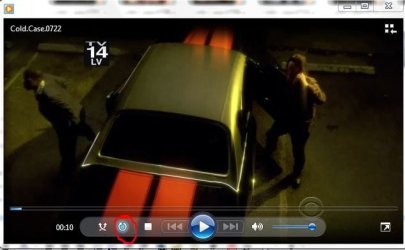
When I play a video it loops and plays again so how can I stop it after it plays once?
How can I put together video clips? I have hundreds of video clips so how can I sink then together so I might want to take a dozen of them and play then at one time instead of clicking on one each time?
What player do you use? There should be a button that disables looping/replays
In Windows Media Player it's this one (if you can't see it, switch to library mode ...click on the 3 squares in the top right)
The easiest to play a certain amount of clips in sequence would be a playlist.
Right click into the movie and go to SHOW LIST
pull into the list the clips you'd like to play, then save the list
and there you go
If you want to physically combine clips they all need to have certain parameters identical (like framerate, screen size etc), so most likely they need to be re-encoded/converted first.
-DG
My Computer
Computer Manufacturer/Model Number
HP m8000n
OS
Windows 7 Ultimate x86
CPU
DualCore AMD Athlon 64 X2, 2600 MHz 5200+
Motherboard
Asus M2N68-LA (Narra)
Memory
Samsung 2GB DDR2
Graphics Card(s)
Onboard NVIDIA GeForce 6150SE nForce 430
Sound Card
Onboard nVIDIA nForce 6100-430 (MCP61P)
Monitor(s) Displays
Westinghouse 19" LED
Screen Resolution
1280x1024
Hard Drives
SATA II Seagate Barracuda 500GB
USB II WD Elements 500GB
USB II WD My Book 1TB
USB II WD My Book 2TB
Windows Live Movie Maker does a pretty decent job pasting movie clips together - and you can mix filetypes (most anyhow). The problem SledgeDG refers to is with lossless editors. But WLMM does the conversion itself.
My Computer
Computer Manufacturer/Model Number
HP, Dell, Gateway, Toshiba - 4 laptops and 2 desktops
Not really...I said "so most likely they need to be re-encoded/converted first"
and that's exactly what WLMM does..take everything, convert it to wmv and stitch it together.
I expect most of those clips to be in FLV format anyways
My Computer
Computer Manufacturer/Model Number
HP m8000n
OS
Windows 7 Ultimate x86
CPU
DualCore AMD Athlon 64 X2, 2600 MHz 5200+
Motherboard
Asus M2N68-LA (Narra)
Memory
Samsung 2GB DDR2
Graphics Card(s)
Onboard NVIDIA GeForce 6150SE nForce 430
Sound Card
Onboard nVIDIA nForce 6100-430 (MCP61P)
Monitor(s) Displays
Westinghouse 19" LED
Screen Resolution
1280x1024
Hard Drives
SATA II Seagate Barracuda 500GB
USB II WD Elements 500GB
USB II WD My Book 1TB
USB II WD My Book 2TB
FLV is no good. That has to be converted. But I often mix AVI with WMV which works OK. WLMM reencodes everything, regardless what it is - even WMV to WMV.
My Computer
Computer Manufacturer/Model Number
HP, Dell, Gateway, Toshiba - 4 laptops and 2 desktops
I know WLMM works with almost everything but most youth nowadays have the movie clips from youTube and if you don't use the correct plugin you get only FLV instead of MP4.
BTW here you get the Windows Movie Maker 6 HD from Vista (not the low end 2.6 version!) which supposedly should be better than the LIFE one...or so they say. I personally use different Software...wmv doesn't fit my needs.