Video / Audio Playback Jumpy When Browsing Net / Other Tasks going on

sevendoc

New member
Hi everyone,

I hope some of you may be able to help with this issue Ive been having with media playback.

Whenever I have audio or video playing on my computer (e.g. on iPlayer, Youtube, Window Media Player, VLC, iTunes), I notice that when I am browsing the web in Chrome, the playback always becomes 'jumpy' and 'choppy'. It only seems to happen when data is being transferred, for example, when I load a new page, or even when typing something in google. When I dont use the internet, it doesnt happen, but this becomes awkward because.

After searching the internet for solutions, I have tried the following without success:
Re-installing video and audio card drivers, disabling hardware acceleration in Flash, altered the power usage profiles in control panel, changing disabling flash in Chrome, tried Firefox, cleaned up internet history/old files etc, virus check, tried looking through task manager.

It seems to me that maybe too much memory is being used on the computer? Though looking through task manager nothing jumped out as being excessive?

Im on Windows 64 Bit Home, using a HP Pavilion dv7 Notebook, 4gb RAM, AMD Phenom 2GHz . I'd be happy to hear any suggestions of possible
Thanks! :)
 

My Computer

OS
Microsoft Windows 7 Home Premium 64-bit 7601 Multiprocessor Free Service Pack 1
CPU
AMD Phenom(tm) II N930 Quad-Core Processor
Motherboard
Hewlett-Packard 1443
Memory
4.00 GB
Graphics Card(s)
(1) ATI Mobility Radeon HD 5470 (2) AMD M880G with ATI Mo
Sound Card
(1) ATI High Definition Audio Device (2) IDT High Definiti
Hard Drives
TOSHIBA MK5061GSYN ATA Device
The first thing that comes to mind is you only have 4GB of RAM, and if you want muti-tasking - many programs open at the same time you may need more memory. Also I notice you have the 64 bit OS version. The big plus for having a 64 bit version is it will address more than 4GB of RAM. Since you only have 4GB, you have lost the biggest use for a 64 bit OS.
 

My Computer

Computer type
PC/Desktop
Computer Manufacturer/Model Number
My Own Build
OS
Windows 10 64 bit
CPU
Intel i7 6700K
Motherboard
ASUS ROG Maximus VIII Hero
Memory
16GB Corsair Dominator
Graphics Card(s)
Intel CPU Graphics
Sound Card
RealTek
Monitor(s) Displays
27" Dell S2719dgf
Screen Resolution
2560X1440
Hard Drives
1 TB Samsung 850 EVO SSD for Win 10 Pro
500GB Samsung 850 EVO SSD for Win 10 Insider
2 TB drive for backup
PSU
EVGA Supernova 750G2
Case
BeQuiet Silent Base 600
Cooling
Deepcool Captain 120EX
Keyboard
Microsoft Wireless 2000
Mouse
Microsoft wireless
Internet Speed
100 MB/sec (Cable)
Antivirus
Microsoft Defender and Malwarebytes
Browser
Edge/Firefox
Other Info
Cakewalk (Sonar) by BandLab and Studio One 4.1 Pro recording studio software. MOTU 896Mk3 Hybrid recording interface, Frontier Tranzport wireless control unit, Behringer X-Touch Control Surface.
Five USB connected optical drives for CD Audio production using Nero BurningROM
Thanks for your reply fireberd,
I have had the computer for just over a year and a half now....but have never had this problem before, only in the past week or two I have noticed this happening, so I am certain the memory I have can cope with my demands....so perhaps there is something not right with my notebook.
 

My Computer

OS
Microsoft Windows 7 Home Premium 64-bit 7601 Multiprocessor Free Service Pack 1
CPU
AMD Phenom(tm) II N930 Quad-Core Processor
Motherboard
Hewlett-Packard 1443
Memory
4.00 GB
Graphics Card(s)
(1) ATI Mobility Radeon HD 5470 (2) AMD M880G with ATI Mo
Sound Card
(1) ATI High Definition Audio Device (2) IDT High Definiti
Hard Drives
TOSHIBA MK5061GSYN ATA Device
Are there any extra programs running? that you didn't have before? Did you install anything new?

Download and run the DPC Latency Checker and see if it shows up anything.

DPC Latency Checker
 

My Computer

Computer type
PC/Desktop
Computer Manufacturer/Model Number
My Own Build
OS
Windows 10 64 bit
CPU
Intel i7 6700K
Motherboard
ASUS ROG Maximus VIII Hero
Memory
16GB Corsair Dominator
Graphics Card(s)
Intel CPU Graphics
Sound Card
RealTek
Monitor(s) Displays
27" Dell S2719dgf
Screen Resolution
2560X1440
Hard Drives
1 TB Samsung 850 EVO SSD for Win 10 Pro
500GB Samsung 850 EVO SSD for Win 10 Insider
2 TB drive for backup
PSU
EVGA Supernova 750G2
Case
BeQuiet Silent Base 600
Cooling
Deepcool Captain 120EX
Keyboard
Microsoft Wireless 2000
Mouse
Microsoft wireless
Internet Speed
100 MB/sec (Cable)
Antivirus
Microsoft Defender and Malwarebytes
Browser
Edge/Firefox
Other Info
Cakewalk (Sonar) by BandLab and Studio One 4.1 Pro recording studio software. MOTU 896Mk3 Hybrid recording interface, Frontier Tranzport wireless control unit, Behringer X-Touch Control Surface.
Five USB connected optical drives for CD Audio production using Nero BurningROM
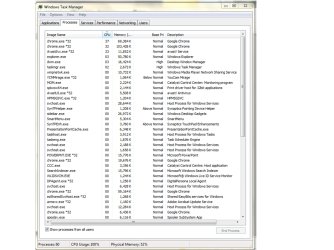
I tried DPC but it didnt highlight anything. I installed an iTunes update recently - will try and roll that back if I can. However, I think I have isolated the problem - it seems that random programs are using up to %100 of my CPU. e.g. when browsing Chrome, it will peak at %100, which slows down everything else, including multimedia. This also happens with Firefox, and whenever I run anything else (e.g. I ran Malwarebytes and that was sitting very high).

I seem to be having a similar problem to this guy:
http://www.sevenforums.com/performance-maintenance/219451-high-cpu-random-programs.html

I have tried the suggestions but no luck so far. I have pasted a screenshot to give you an idea, do you maybe have any other suggestions?

TM.jpg
 

My Computer

OS
Microsoft Windows 7 Home Premium 64-bit 7601 Multiprocessor Free Service Pack 1
CPU
AMD Phenom(tm) II N930 Quad-Core Processor
Motherboard
Hewlett-Packard 1443
Memory
4.00 GB
Graphics Card(s)
(1) ATI Mobility Radeon HD 5470 (2) AMD M880G with ATI Mo
Sound Card
(1) ATI High Definition Audio Device (2) IDT High Definiti
Hard Drives
TOSHIBA MK5061GSYN ATA Device
Although Chrome is popular, I've seen several problems that was caused by it. Generally, Firefox and Malwarebytes does not cause the problems. I have malwarebytes (paid version) on my recording system PC an it does not interfere with anything. I also have Firefox and it does not cause any problems.

However, I installed Chrome and started to have audio problems with dropouts, noise, etc. I uninstalled Chrome but still had the problem which turned out to be the Chrome auto updater still installed and running. I had to manually remove all traces of the Google updater (many places in the registry).
 

My Computer

Computer type
PC/Desktop
Computer Manufacturer/Model Number
My Own Build
OS
Windows 10 64 bit
CPU
Intel i7 6700K
Motherboard
ASUS ROG Maximus VIII Hero
Memory
16GB Corsair Dominator
Graphics Card(s)
Intel CPU Graphics
Sound Card
RealTek
Monitor(s) Displays
27" Dell S2719dgf
Screen Resolution
2560X1440
Hard Drives
1 TB Samsung 850 EVO SSD for Win 10 Pro
500GB Samsung 850 EVO SSD for Win 10 Insider
2 TB drive for backup
PSU
EVGA Supernova 750G2
Case
BeQuiet Silent Base 600
Cooling
Deepcool Captain 120EX
Keyboard
Microsoft Wireless 2000
Mouse
Microsoft wireless
Internet Speed
100 MB/sec (Cable)
Antivirus
Microsoft Defender and Malwarebytes
Browser
Edge/Firefox
Other Info
Cakewalk (Sonar) by BandLab and Studio One 4.1 Pro recording studio software. MOTU 896Mk3 Hybrid recording interface, Frontier Tranzport wireless control unit, Behringer X-Touch Control Surface.
Five USB connected optical drives for CD Audio production using Nero BurningROM
Back
Top