Solved video clip

skostro

New member
Member
VIP
Local time
4:43 PM
Messages
182
Not sure where to ask his question.
I'm preparing a powerpoint presentation (M.O. 2000 Professional), muddling thru it ok.
My question: On one (or actually several) of the slides, I would like to insert a 'video clip'.
(It's a video clip from you tube).
Is this poissible?
If so, how do I go about it?
 

My Computer

Computer type
PC/Desktop
Computer Manufacturer/Model Number
hp
OS
windows 7 Home Premium 32bit.
Antivirus
avast
Browser
ie, chrome
Not sure where to ask his question.
I'm preparing a powerpoint presentation (M.O. 2000 Professional), muddling thru it ok.
My question: On one (or actually several) of the slides, I would like to insert a 'video clip'.
(It's a video clip from you tube).
Is this poissible?
If so, how do I go about it?

Here's a tutorial .doc
 

My Computer

OS
Win7 Ultimate x64 SP1 / WCP x64 / Ubuntu 11 x64
skostro,

Well, first, you will need to be able to download the video off of youtube. Search firefox add-ons, as I'm not sure IE has such an add-on, but I could be wrong. There was one called youtube video converter or something, just look around.

Then once you save the file, you click the "Insert" tab at the top of powerpoint, and on the far right you will see "video". Click it and select "video from File...". Browse to the location of your saved video, and then select it, and click "Insert". There it is. Size it, etc.

Don't use any copywrited material, as that can put you in a world of hurt.

*Edit - sorry Influx, you posted before I was finished typing. Beat me to it ;)
 
Last edited:

My Computer

Computer type
PC/Desktop
Computer Manufacturer/Model Number
Custom Asus Build
OS
Microsoft Windows 8.1 Pro 64-bit
CPU
Intel(R) Core(TM) i3-4130 CPU @ 3.40GHz
Motherboard
B85M-E
Memory
8.00 GB
Graphics Card(s)
None
Sound Card
Realtek High Definition Audio
Monitor(s) Displays
Asus 23.6" Monitor
Screen Resolution
1920 x 1080 x 32 bits (4294967296 colors) @ 60 Hz
Hard Drives
INTEL SSDSC2BW180A4
Samsung SSD 840 PRO Series
PSU
Seasonic S12II-380Bronze
Case
Lian Li
Cooling
Fan, Passive
Keyboard
Logitech K120
Mouse
Microsoft Touch Mouse
Internet Speed
4ms Ping, 19.0 Mbps Download, 19.0 Mbps Upload
Antivirus
Eset Endpoint
Browser
Internet Explorer, Chrome
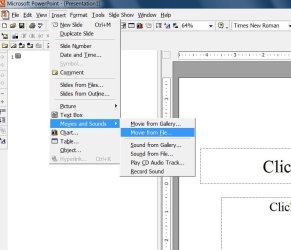
Next, Insert | Movies and Sound | Movie from file

When I go to this option, 'movie from file' is greyed out. ie, not a viable option.
 

My Computer

Computer type
PC/Desktop
Computer Manufacturer/Model Number
hp
OS
windows 7 Home Premium 32bit.
Antivirus
avast
Browser
ie, chrome
Did you buy the full powerpoint and office suite software? you may need to, or use the free openoffice.org powerpoint (will be different)
 

My Computer

Computer type
PC/Desktop
Computer Manufacturer/Model Number
Custom Asus Build
OS
Microsoft Windows 8.1 Pro 64-bit
CPU
Intel(R) Core(TM) i3-4130 CPU @ 3.40GHz
Motherboard
B85M-E
Memory
8.00 GB
Graphics Card(s)
None
Sound Card
Realtek High Definition Audio
Monitor(s) Displays
Asus 23.6" Monitor
Screen Resolution
1920 x 1080 x 32 bits (4294967296 colors) @ 60 Hz
Hard Drives
INTEL SSDSC2BW180A4
Samsung SSD 840 PRO Series
PSU
Seasonic S12II-380Bronze
Case
Lian Li
Cooling
Fan, Passive
Keyboard
Logitech K120
Mouse
Microsoft Touch Mouse
Internet Speed
4ms Ping, 19.0 Mbps Download, 19.0 Mbps Upload
Antivirus
Eset Endpoint
Browser
Internet Explorer, Chrome
Ok, it's now working. ie, not greyed out.
I click on movie from file, I click on the movie I want...........but nothing happens, the screen just returns to the 'blank' slide.
Now what?
 

My Computer

Computer type
PC/Desktop
Computer Manufacturer/Model Number
hp
OS
windows 7 Home Premium 32bit.
Antivirus
avast
Browser
ie, chrome
Do you get this?:
Capture.PNG

You will have to navigate to the location where file is saved to
 

My Computer

Computer type
PC/Desktop
Computer Manufacturer/Model Number
Custom Asus Build
OS
Microsoft Windows 8.1 Pro 64-bit
CPU
Intel(R) Core(TM) i3-4130 CPU @ 3.40GHz
Motherboard
B85M-E
Memory
8.00 GB
Graphics Card(s)
None
Sound Card
Realtek High Definition Audio
Monitor(s) Displays
Asus 23.6" Monitor
Screen Resolution
1920 x 1080 x 32 bits (4294967296 colors) @ 60 Hz
Hard Drives
INTEL SSDSC2BW180A4
Samsung SSD 840 PRO Series
PSU
Seasonic S12II-380Bronze
Case
Lian Li
Cooling
Fan, Passive
Keyboard
Logitech K120
Mouse
Microsoft Touch Mouse
Internet Speed
4ms Ping, 19.0 Mbps Download, 19.0 Mbps Upload
Antivirus
Eset Endpoint
Browser
Internet Explorer, Chrome
no, that screen is not coming up on my powerpoint.
that must be a different version of ppt.
i do have an insert tab, but no video tab.
my insert tab leads to a pop out window with several options, one which is 'movie with sounds', then 'movie from file'.
then i select a movie clip(avi).
that's where i go , but nothing gets 'inserted'.
 

My Computer

Computer type
PC/Desktop
Computer Manufacturer/Model Number
hp
OS
windows 7 Home Premium 32bit.
Antivirus
avast
Browser
ie, chrome
Last edited:

My Computer

Computer type
PC/Desktop
Computer Manufacturer/Model Number
Custom Asus Build
OS
Microsoft Windows 8.1 Pro 64-bit
CPU
Intel(R) Core(TM) i3-4130 CPU @ 3.40GHz
Motherboard
B85M-E
Memory
8.00 GB
Graphics Card(s)
None
Sound Card
Realtek High Definition Audio
Monitor(s) Displays
Asus 23.6" Monitor
Screen Resolution
1920 x 1080 x 32 bits (4294967296 colors) @ 60 Hz
Hard Drives
INTEL SSDSC2BW180A4
Samsung SSD 840 PRO Series
PSU
Seasonic S12II-380Bronze
Case
Lian Li
Cooling
Fan, Passive
Keyboard
Logitech K120
Mouse
Microsoft Touch Mouse
Internet Speed
4ms Ping, 19.0 Mbps Download, 19.0 Mbps Upload
Antivirus
Eset Endpoint
Browser
Internet Explorer, Chrome
movie.jpg

When I click on movie from file, I go to my video file, select a video, & click ok.
But the screen just goes back to the blank slide.
 

My Computer

Computer type
PC/Desktop
Computer Manufacturer/Model Number
hp
OS
windows 7 Home Premium 32bit.
Antivirus
avast
Browser
ie, chrome
Hello skostro,

I meant a picture of the blank file, as you described, but it doesn't entirely matter.

Go here to repair 2007 Publisher (if you own 2003, there is a link at the top of the webpage to an alternate repair): How to install the individual 2007 Office features or to repair the installed 2007 Office programs - scroll down to find it and follow the tutorials.

You may need to convert the movie file into another video format. Publisher may not be able to read that particular video you have. Let me research this a bit
 

My Computer

Computer type
PC/Desktop
Computer Manufacturer/Model Number
Custom Asus Build
OS
Microsoft Windows 8.1 Pro 64-bit
CPU
Intel(R) Core(TM) i3-4130 CPU @ 3.40GHz
Motherboard
B85M-E
Memory
8.00 GB
Graphics Card(s)
None
Sound Card
Realtek High Definition Audio
Monitor(s) Displays
Asus 23.6" Monitor
Screen Resolution
1920 x 1080 x 32 bits (4294967296 colors) @ 60 Hz
Hard Drives
INTEL SSDSC2BW180A4
Samsung SSD 840 PRO Series
PSU
Seasonic S12II-380Bronze
Case
Lian Li
Cooling
Fan, Passive
Keyboard
Logitech K120
Mouse
Microsoft Touch Mouse
Internet Speed
4ms Ping, 19.0 Mbps Download, 19.0 Mbps Upload
Antivirus
Eset Endpoint
Browser
Internet Explorer, Chrome
Good news! I've found a good guide for you. Read through it, at at the bottom there is a blue expandable text that reads "converting videos". Click it, and read through that. It will tell you how. Failing all of this, I wouldn't know how else to go about solving your problem. :(
http://windows.microsoft.com/en-US/...ideos-and-pictures-from-one-format-to-another
Make sure you have all important updates installed, you may need them!
 

My Computer

Computer type
PC/Desktop
Computer Manufacturer/Model Number
Custom Asus Build
OS
Microsoft Windows 8.1 Pro 64-bit
CPU
Intel(R) Core(TM) i3-4130 CPU @ 3.40GHz
Motherboard
B85M-E
Memory
8.00 GB
Graphics Card(s)
None
Sound Card
Realtek High Definition Audio
Monitor(s) Displays
Asus 23.6" Monitor
Screen Resolution
1920 x 1080 x 32 bits (4294967296 colors) @ 60 Hz
Hard Drives
INTEL SSDSC2BW180A4
Samsung SSD 840 PRO Series
PSU
Seasonic S12II-380Bronze
Case
Lian Li
Cooling
Fan, Passive
Keyboard
Logitech K120
Mouse
Microsoft Touch Mouse
Internet Speed
4ms Ping, 19.0 Mbps Download, 19.0 Mbps Upload
Antivirus
Eset Endpoint
Browser
Internet Explorer, Chrome
Whew.......gettin' dizzy.
I actually got it to work.
In a nut shell, the insert feature does not work.
What did work was drag & drop.
Go figure.
Thank you for your help.
 

My Computer

Computer type
PC/Desktop
Computer Manufacturer/Model Number
hp
OS
windows 7 Home Premium 32bit.
Antivirus
avast
Browser
ie, chrome
Lol whatever works! :)
Glad it is now
 

My Computer

Computer type
PC/Desktop
Computer Manufacturer/Model Number
Custom Asus Build
OS
Microsoft Windows 8.1 Pro 64-bit
CPU
Intel(R) Core(TM) i3-4130 CPU @ 3.40GHz
Motherboard
B85M-E
Memory
8.00 GB
Graphics Card(s)
None
Sound Card
Realtek High Definition Audio
Monitor(s) Displays
Asus 23.6" Monitor
Screen Resolution
1920 x 1080 x 32 bits (4294967296 colors) @ 60 Hz
Hard Drives
INTEL SSDSC2BW180A4
Samsung SSD 840 PRO Series
PSU
Seasonic S12II-380Bronze
Case
Lian Li
Cooling
Fan, Passive
Keyboard
Logitech K120
Mouse
Microsoft Touch Mouse
Internet Speed
4ms Ping, 19.0 Mbps Download, 19.0 Mbps Upload
Antivirus
Eset Endpoint
Browser
Internet Explorer, Chrome
Back
Top